HardwareGaming KeyboardsAdvertisement FeatureA premium gaming keyboard for an exceptional experienceWhen you purchase through links on our site, we may earn an affiliate commission.Here’s how it works.
HardwareGaming KeyboardsAdvertisement FeatureA premium gaming keyboard for an exceptional experienceWhen you purchase through links on our site, we may earn an affiliate commission.Here’s how it works.
When you purchase through links on our site, we may earn an affiliate commission.Here’s how it works.
(Image credit: Asus)
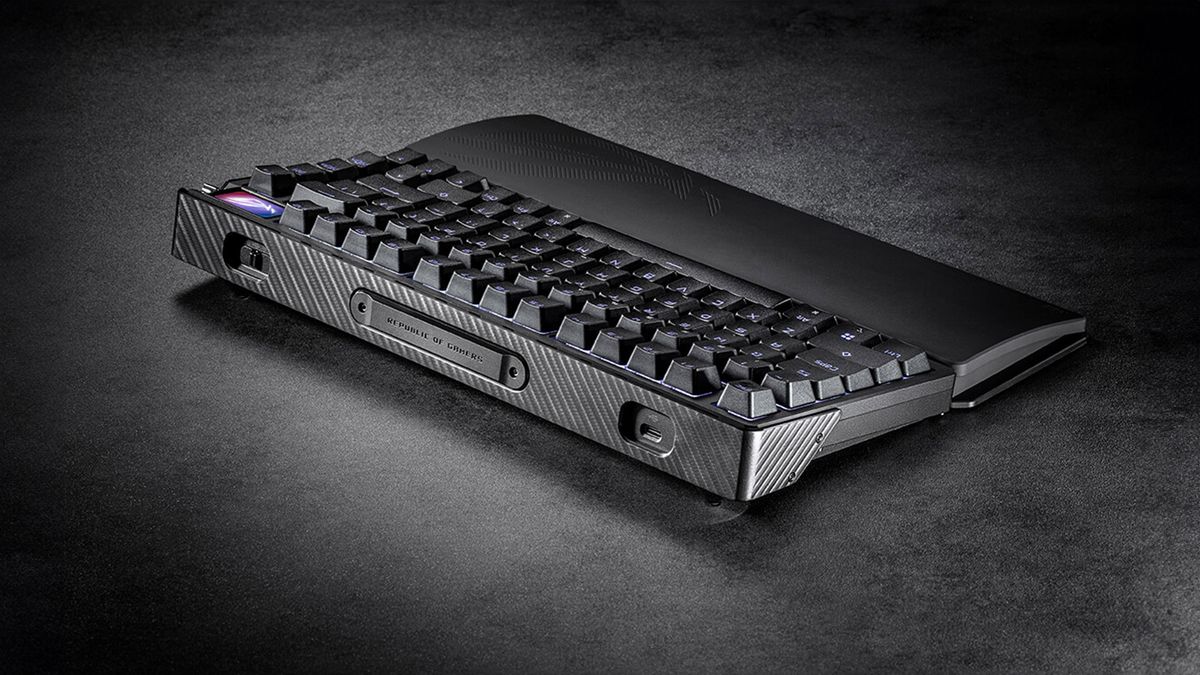
I spend more time than I’d like to admit mentally optimizing my gaming space. Where can I afford to cut corners and where should I splurge on the best gear? One item I can’t overlook is the keyboard. It needs to look good, feel better, and of course, perform the way I need it to when I’m circle-strafing furiously.TheROG Azoth Extremeis the kind of keyboard gamers aspire to have at their disposal. It’s built to withstand the hours of creativity and focus you’ll pour into it and still produce the gaming prowess you need.(Image credit: Asus)Extreme EngineeringOne look will tell you the ROG Azoth Extreme isn’t like other keyboards. There are touches all over the crafted aluminium alloy chassis, with intense care paid to the style of the exterior, resulting in a gorgeously unified aesthetic.It’s not just about looks, though; it’s about how satisfying it feels to use. The typing experience is smooth, featuring pre-lubed, hot-swappable ROG NX mechanical switches. Switches like this arewhypeople like mechanical keyboards, preventing accidental keystrokes and providing exceptional physical feedback. The carbon fiber positioning plate and the ROG switch stabilizers on the longer keys provide a crispy sensation when typing and ensure your keys stay wobble-free. With three layers of sound-dampening foam enhancing the acoustics, that satisfying mechanical “thock” is as rich as it’s ever been.(Image credit: Asus)The satisfaction doesn’t stop with the acoustics. Let’s start with the full-color OLED touchscreen. It’s only a 1.47-inch display, but it can clearly show you information about the inside of your computer (CPU voltage, temperature, and usage), your input settings (keystrokes per second, battery status, and Mac or PC mode), or just a fun gif to make you giggle during work meetings.Out of the box, the knob next to the screen can be used to make five different adjustments, including muting your music or changing your computer’s RGB lighting effects. Get into ROG’s Armory Crate app to set a sixth customizable option.The greatest customization, though, is the freedom to use this keyboard however you like. Tri-mode connections give you every option. Standard wired USB mode is great if you’re not going to move around. If you’re more of a wireless fan, the ROG SpeedNova wireless technology sets you up with near-zero-latency gameplay and a battery life of 245 hours. If you’ve got multiple devices, you can use Bluetooth to connect to up to three machines, switching between them with ease.Asus ROG Azoth Extreme, $500Visit SiteYou can also find the keyboard at:Micro CenterBest BuyBuilt for ComfortThis is a product for enthusiasts. It’s made for people who make their computer the hub of their world. It’s the portal through which they hang out with friends, discover new universes, and even earn a living. ROG knows this and wants to create an experience of unparalleled comfort and performance, making the hours you spend with it a pleasure—whether work or play.The adjustable gasket mount is designed to give you two different typefeels. When you’re in hard mode, the keys will feel firm and responsive—a necessity when you’re gaming and every movement counts. Remove the laser-engraved ROG nameplate on the back and flip the switch to soft mode, and you’ll get a more comfortable, flexible keypress ideal for casual use.(Image credit: Asus)The ROG Azoth Extreme is as much about ease of use as it is about performance. The detachable magnetic legs offer three tilt levels, helping you find your optimal ergonomic angle. There’s also an extended silicone wrist rest with an aluminum alloy base. It’s constructed to perfectly fit and retain its firmness, making sure you’re able to enjoy this keyboard over the long haul.
I spend more time than I’d like to admit mentally optimizing my gaming space. Where can I afford to cut corners and where should I splurge on the best gear? One item I can’t overlook is the keyboard. It needs to look good, feel better, and of course, perform the way I need it to when I’m circle-strafing furiously.
TheROG Azoth Extremeis the kind of keyboard gamers aspire to have at their disposal. It’s built to withstand the hours of creativity and focus you’ll pour into it and still produce the gaming prowess you need.
(Image credit: Asus)
Extreme Engineering
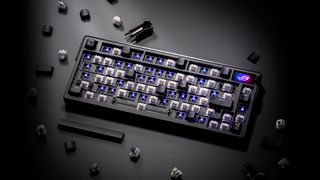
One look will tell you the ROG Azoth Extreme isn’t like other keyboards. There are touches all over the crafted aluminium alloy chassis, with intense care paid to the style of the exterior, resulting in a gorgeously unified aesthetic.
It’s not just about looks, though; it’s about how satisfying it feels to use. The typing experience is smooth, featuring pre-lubed, hot-swappable ROG NX mechanical switches. Switches like this arewhypeople like mechanical keyboards, preventing accidental keystrokes and providing exceptional physical feedback. The carbon fiber positioning plate and the ROG switch stabilizers on the longer keys provide a crispy sensation when typing and ensure your keys stay wobble-free. With three layers of sound-dampening foam enhancing the acoustics, that satisfying mechanical “thock” is as rich as it’s ever been.
(Image credit: Asus)
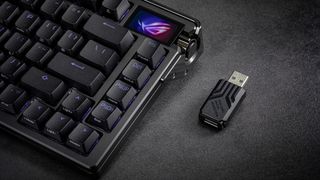
The satisfaction doesn’t stop with the acoustics. Let’s start with the full-color OLED touchscreen. It’s only a 1.47-inch display, but it can clearly show you information about the inside of your computer (CPU voltage, temperature, and usage), your input settings (keystrokes per second, battery status, and Mac or PC mode), or just a fun gif to make you giggle during work meetings.
Out of the box, the knob next to the screen can be used to make five different adjustments, including muting your music or changing your computer’s RGB lighting effects. Get into ROG’s Armory Crate app to set a sixth customizable option.
The greatest customization, though, is the freedom to use this keyboard however you like. Tri-mode connections give you every option. Standard wired USB mode is great if you’re not going to move around. If you’re more of a wireless fan, the ROG SpeedNova wireless technology sets you up with near-zero-latency gameplay and a battery life of 245 hours. If you’ve got multiple devices, you can use Bluetooth to connect to up to three machines, switching between them with ease.
Asus ROG Azoth Extreme, $500Visit SiteYou can also find the keyboard at:Micro CenterBest Buy
Asus ROG Azoth Extreme, $500Visit SiteYou can also find the keyboard at:Micro CenterBest Buy
Asus ROG Azoth Extreme, $500
Asus ROG Azoth Extreme, $500
Visit SiteYou can also find the keyboard at:Micro CenterBest Buy
Visit Site
Visit Site
Visit Site
Visit Site
Visit Site
Visit Site
You can also find the keyboard at:Micro CenterBest Buy
Built for Comfort
This is a product for enthusiasts. It’s made for people who make their computer the hub of their world. It’s the portal through which they hang out with friends, discover new universes, and even earn a living. ROG knows this and wants to create an experience of unparalleled comfort and performance, making the hours you spend with it a pleasure—whether work or play.
The adjustable gasket mount is designed to give you two different typefeels. When you’re in hard mode, the keys will feel firm and responsive—a necessity when you’re gaming and every movement counts. Remove the laser-engraved ROG nameplate on the back and flip the switch to soft mode, and you’ll get a more comfortable, flexible keypress ideal for casual use.
(Image credit: Asus)
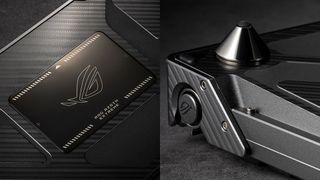
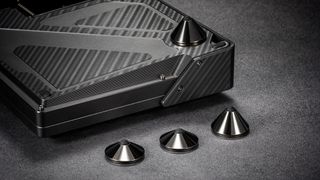
The ROG Azoth Extreme is as much about ease of use as it is about performance. The detachable magnetic legs offer three tilt levels, helping you find your optimal ergonomic angle. There’s also an extended silicone wrist rest with an aluminum alloy base. It’s constructed to perfectly fit and retain its firmness, making sure you’re able to enjoy this keyboard over the long haul.
The biggest gaming news, reviews and hardware deals
HARDWARE BUYING GUIDESLATEST GAME REVIEWS1Best Steam Deck accessories in Australia for 2025: Our favorite docks, powerbanks and gamepads2Best graphics card for laptops: the mobile GPUs I’d want in my next gaming laptop3Best mini PCs in 2025: The compact computers I love the most4Best 14-inch gaming laptop: The top compact gaming laptops I’ve held in these hands5Best Mini-ITX motherboards in 2025: My pick from all the mini mobo marvels I’ve tested1Thank Goodness You’re Here! review2Shiren the Wanderer: The Mystery Dungeon of Serpentcoil Island review3WD Black SN850X 8 TB NVMe SSD review4Ikea Utespelare desk review5Asus ROG Harpe Ace Mini wireless mouse review
HARDWARE BUYING GUIDESLATEST GAME REVIEWS1Best Steam Deck accessories in Australia for 2025: Our favorite docks, powerbanks and gamepads2Best graphics card for laptops: the mobile GPUs I’d want in my next gaming laptop3Best mini PCs in 2025: The compact computers I love the most4Best 14-inch gaming laptop: The top compact gaming laptops I’ve held in these hands5Best Mini-ITX motherboards in 2025: My pick from all the mini mobo marvels I’ve tested1Thank Goodness You’re Here! review2Shiren the Wanderer: The Mystery Dungeon of Serpentcoil Island review3WD Black SN850X 8 TB NVMe SSD review4Ikea Utespelare desk review5Asus ROG Harpe Ace Mini wireless mouse review
HARDWARE BUYING GUIDESLATEST GAME REVIEWS1Best Steam Deck accessories in Australia for 2025: Our favorite docks, powerbanks and gamepads2Best graphics card for laptops: the mobile GPUs I’d want in my next gaming laptop3Best mini PCs in 2025: The compact computers I love the most4Best 14-inch gaming laptop: The top compact gaming laptops I’ve held in these hands5Best Mini-ITX motherboards in 2025: My pick from all the mini mobo marvels I’ve tested1Thank Goodness You’re Here! review2Shiren the Wanderer: The Mystery Dungeon of Serpentcoil Island review3WD Black SN850X 8 TB NVMe SSD review4Ikea Utespelare desk review5Asus ROG Harpe Ace Mini wireless mouse review
HARDWARE BUYING GUIDESLATEST GAME REVIEWS1Best Steam Deck accessories in Australia for 2025: Our favorite docks, powerbanks and gamepads2Best graphics card for laptops: the mobile GPUs I’d want in my next gaming laptop3Best mini PCs in 2025: The compact computers I love the most4Best 14-inch gaming laptop: The top compact gaming laptops I’ve held in these hands5Best Mini-ITX motherboards in 2025: My pick from all the mini mobo marvels I’ve tested1Thank Goodness You’re Here! review2Shiren the Wanderer: The Mystery Dungeon of Serpentcoil Island review3WD Black SN850X 8 TB NVMe SSD review4Ikea Utespelare desk review5Asus ROG Harpe Ace Mini wireless mouse review
HARDWARE BUYING GUIDESLATEST GAME REVIEWS
1Best Steam Deck accessories in Australia for 2025: Our favorite docks, powerbanks and gamepads

1Best Steam Deck accessories in Australia for 2025: Our favorite docks, powerbanks and gamepads
1
Best Steam Deck accessories in Australia for 2025: Our favorite docks, powerbanks and gamepads
2Best graphics card for laptops: the mobile GPUs I’d want in my next gaming laptop
2Best graphics card for laptops: the mobile GPUs I’d want in my next gaming laptop
2
Best graphics card for laptops: the mobile GPUs I’d want in my next gaming laptop
3Best mini PCs in 2025: The compact computers I love the most
3Best mini PCs in 2025: The compact computers I love the most
3
Best mini PCs in 2025: The compact computers I love the most
4Best 14-inch gaming laptop: The top compact gaming laptops I’ve held in these hands
4Best 14-inch gaming laptop: The top compact gaming laptops I’ve held in these hands
4
Best 14-inch gaming laptop: The top compact gaming laptops I’ve held in these hands
5Best Mini-ITX motherboards in 2025: My pick from all the mini mobo marvels I’ve tested
5Best Mini-ITX motherboards in 2025: My pick from all the mini mobo marvels I’ve tested
5
Best Mini-ITX motherboards in 2025: My pick from all the mini mobo marvels I’ve tested
1Thank Goodness You’re Here! review
1Thank Goodness You’re Here! review
1
Thank Goodness You’re Here! review
2Shiren the Wanderer: The Mystery Dungeon of Serpentcoil Island review
2Shiren the Wanderer: The Mystery Dungeon of Serpentcoil Island review
2
Shiren the Wanderer: The Mystery Dungeon of Serpentcoil Island review
3WD Black SN850X 8 TB NVMe SSD review
3WD Black SN850X 8 TB NVMe SSD review
3
WD Black SN850X 8 TB NVMe SSD review
4Ikea Utespelare desk review
4Ikea Utespelare desk review
4
Ikea Utespelare desk review
5Asus ROG Harpe Ace Mini wireless mouse review
5Asus ROG Harpe Ace Mini wireless mouse review
5
Asus ROG Harpe Ace Mini wireless mouse review
