Our Verdict
Our Verdict
ForOne of the best typing experiences going for a ready-made gaming keyboardUseful media controlsEqualiser function is neatBeautiful chassis
PC Gamer’s got your backOur experienced team dedicates many hours to every review, to really get to the heart of what matters most to you.Find out more about how we evaluate games and hardware.
PC Gamer’s got your backOur experienced team dedicates many hours to every review, to really get to the heart of what matters most to you.Find out more about how we evaluate games and hardware.
The ROG Azoth Extreme is a$500gaming keyboard. You’re probably now staring at the screen mouth agape wondering what it is about the Azoth Extreme that makes it worth $500. In many ways, that’s how I’ve approached this review. Because I didn’t get it at first, and to be honest, I still don’t.
First impressions of the Azoth Extreme were very good. I lifted the lid of the box it arrived in and it unwrapped itself like a cake in a Wes Anderson movie. A great start in trying to convince me it’s worth a large sum. Inside the second branded box—truly no expense spared here—sits the Azoth Extreme. I reach in and lift it out, which takes a little more effort than I was expecting as it weighs 1.508 kg.
The first thing to notice about the Azoth Extreme is it’s a 75% size—the same as its predecessor, the ROG Azoth. That means no numpad and only a handful of the traditional shortcut keys: Delete, Insert, Page Up, Page Down. It does at least retain the full function row, which means it’s not overly reliant on the included Function key, next to which sits the Windows Copilot switch.
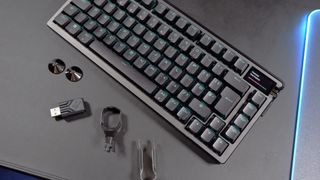
Asus thought to include a spare keycap for the Copilot key, cleverly anticipating my need to promptly remove it, which I do thusly using the included keycap puller-cum-knuckle duster.
ROG Azoth Extreme specs(Image credit: Future)Size:75%Base:Hot-swappableSwitches:ROG NX Snow/StormBacklighting:Per keyDisplay:Full-colour touchscreen OLEDAnti-ghosting:N-key rolloverPolling rate:1,000/8,000 Hz (with Polling Rate Booster)Dimensions:332 x 139 x 40 mmWeight:1.508 kg (w/out cable/wrist rest)Connections:2.4 GHz | USB Type-C | BluetoothBattery life:130-hours (w/out lighting)Price:$500| UK TBC | Aus TBC
ROG Azoth Extreme specs
(Image credit: Future)Size:75%Base:Hot-swappableSwitches:ROG NX Snow/StormBacklighting:Per keyDisplay:Full-colour touchscreen OLEDAnti-ghosting:N-key rolloverPolling rate:1,000/8,000 Hz (with Polling Rate Booster)Dimensions:332 x 139 x 40 mmWeight:1.508 kg (w/out cable/wrist rest)Connections:2.4 GHz | USB Type-C | BluetoothBattery life:130-hours (w/out lighting)Price:$500| UK TBC | Aus TBC
(Image credit: Future)
Size:75%Base:Hot-swappableSwitches:ROG NX Snow/StormBacklighting:Per keyDisplay:Full-colour touchscreen OLEDAnti-ghosting:N-key rolloverPolling rate:1,000/8,000 Hz (with Polling Rate Booster)Dimensions:332 x 139 x 40 mmWeight:1.508 kg (w/out cable/wrist rest)Connections:2.4 GHz | USB Type-C | BluetoothBattery life:130-hours (w/out lighting)Price:$500| UK TBC | Aus TBC
Beneath the board sits a conspicuous cutout, inside which sits a Type-A USB dongle and a switch marked ‘soft’ on one side and ‘hard’ on the other. No need to overthink its purpose: if I slide the switch to hard mode, the switch feel is firmer, more responsive, bouncier; if it’s in soft mode it’s flatter, less snappy. The difference between the two is quite minor—as I type this on the Azoth Extreme, I don’t remember which mode I’ve set it in.
Image1of4(Image credit: Future)(Image credit: Future)(Image credit: Future)(Image credit: Future)
Image1of4(Image credit: Future)(Image credit: Future)(Image credit: Future)(Image credit: Future)
Image1of4
(Image credit: Future)(Image credit: Future)(Image credit: Future)(Image credit: Future)
(Image credit: Future)(Image credit: Future)(Image credit: Future)(Image credit: Future)
(Image credit: Future)
(Image credit: Future)
(Image credit: Future)
(Image credit: Future)
(Image credit: Future)

(Image credit: Future)
(Image credit: Future)
(Image credit: Future)
(Image credit: Future)
(Image credit: Future)
(Image credit: Future)
(Image credit: Future)
(Image credit: Future)
(Image credit: Future)
(Image credit: Future)
(Image credit: Future)
(Image credit: Future)
(Image credit: Future)
(Image credit: Future)
(Image credit: Future)
Nevertheless, I’m impressed. Everything about this keyboard oozes quality and I’ve yet to type a single sentence. With that, I connect it to my PC.
The ROG Azoth Extreme package includes a product that Asus hopes to sell separately someday: the Polling Rate Booster. This is an extender for the included Type-A USB dongle that greatly increases the polling rate of the device up to 8,000 Hz. That means it communicates with your computer 8,000 times a second, or eight times more than most.
I’ve tested a high polling rate gaming keyboard before: theCorsair K70 Max. It’s not a feature I care much about—I’m not an esports pro and I don’t notice the difference between 1,000 Hz and 8,000 Hz.
Though this does highlight one concern with the Azoth Extreme: who its target audience is. The high polling rate may appeal to some competitive gamers but those same gamers may well prefer a keyboard with more competitive features including analogue switches and rapid trigger, like theWooting 60HE.
Image1of3(Image credit: Future)(Image credit: Future)(Image credit: Future)
Image1of3(Image credit: Future)(Image credit: Future)(Image credit: Future)
Image1of3
(Image credit: Future)(Image credit: Future)(Image credit: Future)
(Image credit: Future)(Image credit: Future)(Image credit: Future)
(Image credit: Future)
(Image credit: Future)
(Image credit: Future)
(Image credit: Future)
(Image credit: Future)
(Image credit: Future)
(Image credit: Future)
(Image credit: Future)
(Image credit: Future)
(Image credit: Future)
(Image credit: Future)
(Image credit: Future)
(Image credit: Future)
(Image credit: Future)
(Image credit: Future)
The Azoth Extreme’s switches are fantastic for gaming—the linear NX Snow switches inside my review sample are pre-lubed and bliss to game with. Each offers a fast response as I test the board in hard mode: each key press swiftly bouncing back into place as I desperately mash at them in a game of The Finals.
What the Azoth Extreme is best for, however, is typing. I spend my days tapping away at my keyboard and for the past few weeks it’s been me and the Azoth Extreme. I come away from that experience feeling the Azoth Extreme is a wonderful way to go about my work. It doesn’t matter whether in hard or soft mode, the light clack and springy response of each key is great for rapid, satisfying typing experience.
Though is it any better than our pick for the best tenkeyless gaming keyboard today, the Keychron Q3 Max?
What’s unfortunate for the Azoth Extreme is I’ve only recently come into contact with the Keychron Q3 Max and and it’s fresh on my mind. I have been happily typing away at it all day in the office, often peering over to our hardware overlord Dave James to make sure he knew just how smug I was about it. He recently ‘borrowed’ it for a day while I was out of the office and later told me it was terrible, as it made all other keyboards look bad. For two people that frequently use many gaming keyboards, there’s really no higher praise than that.
I’ve switched between the two keyboards these past few days. Any comparison between the Azoth and Q3 Max is extremely tough. My cop-out answer is they’re both sublime. I’d happily bash out a 10,000 word essay on why lubed switches matter on either of these bad boys. If I were pushed to make a decision, however, I prefer the acoustics on the Q3 Max.
Side note
(Image credit: Future)

There’s a certain joyous thud to the Q3 Max that wins me over. It’s much deeper sounding than the lighter clack of the Azoth Extreme. However, I must say the stability of the Azoth Extreme is commendable—there’s a little more wobble to each of the keys on the Keychron Q3 Max.
I may prefer the tone of the Q3 Max but I have to stress this isn’t a condemnation of the Azoth. It’s also fantastic. If I put both keyboards in front of 100 random strangers and asked for opinions I would expect a 50/50 split—personal preference wins out here.
The Q3 Max is half the price, however. I imagine I’d be looking at an entirely different split for public opinion with that factored in.
There are a few other keyboards besides the Q3 Max that are worth considering for pure typing feel. Such as theDucky ProjectD Outlaw65, a DIY kit capable of being fit with many types of key switches and sounding oh so great. Similarly, theAsus ROG Strix Scope II 96 Wirelessuses the same lubed switches as the ROG Azoth Extreme for a lot less money. It’s not quite in the same ballpark for overall quality as the Azoth but there’s a reason it’s our no.1 pick for thebest gaming keyboard.
The one feature you really have to love to justify the purchase of the Azoth Extreme, even a little, is the OLED touchscreen.
I like the OLED screen on the Azoth Extreme more than I thought I would. That’s saying something, as sticking an unnecessary screen on a peripheral and charging over the odds for it is something of a pet peeve of mine. I like the equaliser function, the way it captures the waveform of the music I’m listening to on Tidal, and how I can flick the screen to switch up the animation. It’s neat. Often pointless, but neat.
Image1of2(Image credit: Future)(Image credit: Future)
Image1of2(Image credit: Future)(Image credit: Future)
Image1of2
(Image credit: Future)(Image credit: Future)
(Image credit: Future)(Image credit: Future)
(Image credit: Future)
(Image credit: Future)
(Image credit: Future)
(Image credit: Future)
(Image credit: Future)
(Image credit: Future)
(Image credit: Future)
(Image credit: Future)
(Image credit: Future)
(Image credit: Future)
Buy if…✅ You have money to burn:If you are time poor but cash rich, the ROG Azoth Extreme is a great way to burn through a lot of cash quickly and have something lovely to show for it.✅ You love screens:If you’re absolutely convinced that every component you own should have a screen plonked on it somewhere, you’re in luck. A full-color OLED with touchscreen functionality no less.
Buy if…
✅ You have money to burn:If you are time poor but cash rich, the ROG Azoth Extreme is a great way to burn through a lot of cash quickly and have something lovely to show for it.✅ You love screens:If you’re absolutely convinced that every component you own should have a screen plonked on it somewhere, you’re in luck. A full-color OLED with touchscreen functionality no less.
✅ You have money to burn:If you are time poor but cash rich, the ROG Azoth Extreme is a great way to burn through a lot of cash quickly and have something lovely to show for it.✅ You love screens:If you’re absolutely convinced that every component you own should have a screen plonked on it somewhere, you’re in luck. A full-color OLED with touchscreen functionality no less.
Don’t buy if…❌ You’re an extremely competitive gamer looking for an edge:The 8,000 Hz polling is great though you’ll get more benefit out of a gaming keyboard with Hall effect switches offering rapid trigger.❌ You could be convinced to build your own:The ROG Azoth Extreme is gorgeous to type on but you could build a similarly superb keyboard for similar or less cash and take your pick of any number of fantastic key switches to go in it.
Don’t buy if…
❌ You’re an extremely competitive gamer looking for an edge:The 8,000 Hz polling is great though you’ll get more benefit out of a gaming keyboard with Hall effect switches offering rapid trigger.❌ You could be convinced to build your own:The ROG Azoth Extreme is gorgeous to type on but you could build a similarly superb keyboard for similar or less cash and take your pick of any number of fantastic key switches to go in it.
❌ You’re an extremely competitive gamer looking for an edge:The 8,000 Hz polling is great though you’ll get more benefit out of a gaming keyboard with Hall effect switches offering rapid trigger.❌ You could be convinced to build your own:The ROG Azoth Extreme is gorgeous to type on but you could build a similarly superb keyboard for similar or less cash and take your pick of any number of fantastic key switches to go in it.
Ultimately, the screen alone is not worth the $500 price of admission—nowhere close. TheHyte Q60I recently reviewed practically comes with a mobile phone attached and costs less.
Build your own keyboard. Buy aLoupedeck. Hey, presto, you’ve just about secured a similar experience to the ROG Azoth Extreme with maybe money to spare.
The Verdict
The Verdict
70Read our review policy
70
Asus ROG Azoth Extreme review
TOPICSASUS
TOPICS
More about gaming keyboardsThe Freewrite Wordrunner with a built-in word counter might be the keyboard to look out for if you want to improve your writing processThis keyboard combines two of my favorite things: mechanical switches and breadLatestPalestinian developer raises more than $200,000 to make Dreams on a Pillow, a game about the horrors of the 1948 NakbaSee more latest►
More about gaming keyboardsThe Freewrite Wordrunner with a built-in word counter might be the keyboard to look out for if you want to improve your writing processThis keyboard combines two of my favorite things: mechanical switches and breadLatestPalestinian developer raises more than $200,000 to make Dreams on a Pillow, a game about the horrors of the 1948 NakbaSee more latest►
More about gaming keyboardsThe Freewrite Wordrunner with a built-in word counter might be the keyboard to look out for if you want to improve your writing processThis keyboard combines two of my favorite things: mechanical switches and bread
More about gaming keyboards
The Freewrite Wordrunner with a built-in word counter might be the keyboard to look out for if you want to improve your writing processThis keyboard combines two of my favorite things: mechanical switches and bread
The Freewrite Wordrunner with a built-in word counter might be the keyboard to look out for if you want to improve your writing process
The Freewrite Wordrunner with a built-in word counter might be the keyboard to look out for if you want to improve your writing process
This keyboard combines two of my favorite things: mechanical switches and bread
This keyboard combines two of my favorite things: mechanical switches and bread
LatestPalestinian developer raises more than $200,000 to make Dreams on a Pillow, a game about the horrors of the 1948 NakbaSee more latest►
Latest
Palestinian developer raises more than $200,000 to make Dreams on a Pillow, a game about the horrors of the 1948 Nakba
Palestinian developer raises more than $200,000 to make Dreams on a Pillow, a game about the horrors of the 1948 Nakba
Palestinian developer raises more than $200,000 to make Dreams on a Pillow, a game about the horrors of the 1948 Nakba
See more latest►
Most PopularTurtle Beach Stealth Pivot reviewIkea Matchspel gaming chair reviewASRock DeskMini X600 reviewZotac Zbox Magnus EN374070C reviewMinisforum AtomMan G7 Ti reviewSamsung Galaxy Book4 Ultra reviewNoctua NH-D15 G2 reviewGulikit KK3 Max reviewBallionaire reviewMarvel Rivals reviewBe Quiet! Dark Rock 5 review
Most PopularTurtle Beach Stealth Pivot reviewIkea Matchspel gaming chair reviewASRock DeskMini X600 reviewZotac Zbox Magnus EN374070C reviewMinisforum AtomMan G7 Ti reviewSamsung Galaxy Book4 Ultra reviewNoctua NH-D15 G2 reviewGulikit KK3 Max reviewBallionaire reviewMarvel Rivals reviewBe Quiet! Dark Rock 5 review
Most PopularTurtle Beach Stealth Pivot reviewIkea Matchspel gaming chair reviewASRock DeskMini X600 reviewZotac Zbox Magnus EN374070C reviewMinisforum AtomMan G7 Ti reviewSamsung Galaxy Book4 Ultra reviewNoctua NH-D15 G2 reviewGulikit KK3 Max reviewBallionaire reviewMarvel Rivals reviewBe Quiet! Dark Rock 5 review
Most Popular
Turtle Beach Stealth Pivot review
Ikea Matchspel gaming chair review
ASRock DeskMini X600 review
Zotac Zbox Magnus EN374070C review
Minisforum AtomMan G7 Ti review
Samsung Galaxy Book4 Ultra review
Noctua NH-D15 G2 review
Gulikit KK3 Max review
Ballionaire review
Marvel Rivals review
Be Quiet! Dark Rock 5 review
HARDWARE BUYING GUIDESLATEST GAME REVIEWS1Best Steam Deck accessories in Australia for 2025: Our favorite docks, powerbanks and gamepads2Best graphics card for laptops: the mobile GPUs I’d want in my next gaming laptop3Best mini PCs in 2025: The compact computers I love the most4Best 14-inch gaming laptop: The top compact gaming laptops I’ve held in these hands5Best Mini-ITX motherboards in 2025: My pick from all the mini mobo marvels I’ve tested1Thank Goodness You’re Here! review: An anarchic treasure trove of jokes and skits2Shiren the Wanderer: The Mystery Dungeon of Serpentcoil Island review—like juggling chainsaws on horseback3WD Black SN850X 8 TB NVMe SSD review4Ikea Utespelare desk review5Asus ROG Harpe Ace Mini wireless mouse review
HARDWARE BUYING GUIDESLATEST GAME REVIEWS1Best Steam Deck accessories in Australia for 2025: Our favorite docks, powerbanks and gamepads2Best graphics card for laptops: the mobile GPUs I’d want in my next gaming laptop3Best mini PCs in 2025: The compact computers I love the most4Best 14-inch gaming laptop: The top compact gaming laptops I’ve held in these hands5Best Mini-ITX motherboards in 2025: My pick from all the mini mobo marvels I’ve tested1Thank Goodness You’re Here! review: An anarchic treasure trove of jokes and skits2Shiren the Wanderer: The Mystery Dungeon of Serpentcoil Island review—like juggling chainsaws on horseback3WD Black SN850X 8 TB NVMe SSD review4Ikea Utespelare desk review5Asus ROG Harpe Ace Mini wireless mouse review
HARDWARE BUYING GUIDESLATEST GAME REVIEWS1Best Steam Deck accessories in Australia for 2025: Our favorite docks, powerbanks and gamepads2Best graphics card for laptops: the mobile GPUs I’d want in my next gaming laptop3Best mini PCs in 2025: The compact computers I love the most4Best 14-inch gaming laptop: The top compact gaming laptops I’ve held in these hands5Best Mini-ITX motherboards in 2025: My pick from all the mini mobo marvels I’ve tested1Thank Goodness You’re Here! review: An anarchic treasure trove of jokes and skits2Shiren the Wanderer: The Mystery Dungeon of Serpentcoil Island review—like juggling chainsaws on horseback3WD Black SN850X 8 TB NVMe SSD review4Ikea Utespelare desk review5Asus ROG Harpe Ace Mini wireless mouse review
HARDWARE BUYING GUIDESLATEST GAME REVIEWS1Best Steam Deck accessories in Australia for 2025: Our favorite docks, powerbanks and gamepads2Best graphics card for laptops: the mobile GPUs I’d want in my next gaming laptop3Best mini PCs in 2025: The compact computers I love the most4Best 14-inch gaming laptop: The top compact gaming laptops I’ve held in these hands5Best Mini-ITX motherboards in 2025: My pick from all the mini mobo marvels I’ve tested1Thank Goodness You’re Here! review: An anarchic treasure trove of jokes and skits2Shiren the Wanderer: The Mystery Dungeon of Serpentcoil Island review—like juggling chainsaws on horseback3WD Black SN850X 8 TB NVMe SSD review4Ikea Utespelare desk review5Asus ROG Harpe Ace Mini wireless mouse review
HARDWARE BUYING GUIDESLATEST GAME REVIEWS
1Best Steam Deck accessories in Australia for 2025: Our favorite docks, powerbanks and gamepads
1Best Steam Deck accessories in Australia for 2025: Our favorite docks, powerbanks and gamepads
1
Best Steam Deck accessories in Australia for 2025: Our favorite docks, powerbanks and gamepads
2Best graphics card for laptops: the mobile GPUs I’d want in my next gaming laptop
2Best graphics card for laptops: the mobile GPUs I’d want in my next gaming laptop
2
Best graphics card for laptops: the mobile GPUs I’d want in my next gaming laptop
3Best mini PCs in 2025: The compact computers I love the most
3Best mini PCs in 2025: The compact computers I love the most
3
Best mini PCs in 2025: The compact computers I love the most
4Best 14-inch gaming laptop: The top compact gaming laptops I’ve held in these hands
4Best 14-inch gaming laptop: The top compact gaming laptops I’ve held in these hands
4
Best 14-inch gaming laptop: The top compact gaming laptops I’ve held in these hands
5Best Mini-ITX motherboards in 2025: My pick from all the mini mobo marvels I’ve tested
5Best Mini-ITX motherboards in 2025: My pick from all the mini mobo marvels I’ve tested
5
Best Mini-ITX motherboards in 2025: My pick from all the mini mobo marvels I’ve tested
1Thank Goodness You’re Here! review: An anarchic treasure trove of jokes and skits
1Thank Goodness You’re Here! review: An anarchic treasure trove of jokes and skits
1
Thank Goodness You’re Here! review: An anarchic treasure trove of jokes and skits
2Shiren the Wanderer: The Mystery Dungeon of Serpentcoil Island review—like juggling chainsaws on horseback
2Shiren the Wanderer: The Mystery Dungeon of Serpentcoil Island review—like juggling chainsaws on horseback
2
Shiren the Wanderer: The Mystery Dungeon of Serpentcoil Island review—like juggling chainsaws on horseback
3WD Black SN850X 8 TB NVMe SSD review
3WD Black SN850X 8 TB NVMe SSD review
3
WD Black SN850X 8 TB NVMe SSD review
4Ikea Utespelare desk review
4Ikea Utespelare desk review
4
Ikea Utespelare desk review
5Asus ROG Harpe Ace Mini wireless mouse review
5Asus ROG Harpe Ace Mini wireless mouse review
5
Asus ROG Harpe Ace Mini wireless mouse review
