Our VerdictA snappy and responsive compact keyboard, the ROG Falchion RX Low Profile comes with lovely lubed switches to make gaming and typing a joy.
Our VerdictA snappy and responsive compact keyboard, the ROG Falchion RX Low Profile comes with lovely lubed switches to make gaming and typing a joy.
Our Verdict
Our Verdict
A snappy and responsive compact keyboard, the ROG Falchion RX Low Profile comes with lovely lubed switches to make gaming and typing a joy.
ForFantastic switchesSpeedy actuationSolid buildClever media controlsPlenty of connectivity optionsAgainstIncluded plastic cover doesn’t fit greatNon-standard keycap stemsHigh cost per switch
ForFantastic switchesSpeedy actuationSolid buildClever media controlsPlenty of connectivity options
AgainstIncluded plastic cover doesn’t fit greatNon-standard keycap stemsHigh cost per switch
PC Gamer’s got your backOur experienced team dedicates many hours to every review, to really get to the heart of what matters most to you.Find out more about how we evaluate games and hardware.
PC Gamer’s got your backOur experienced team dedicates many hours to every review, to really get to the heart of what matters most to you.Find out more about how we evaluate games and hardware.
The ROG Falchion RX Low Profile is an absolute joy to type on and one of the best compact keyboards I’ve used in a long time. I say that as someone who’s not usually a big fan of little keyboards—the Falchion RX might make me a convert.
The ROG Falchion RX is much smaller than your traditional full-size keyboard. That makes for a few benefits to the Falchion for any interested party: there’s more room to throw your mouse around, less clutter for your desktop, and the keyboard is egregiously cute. Though this size wouldn’t be my first choice. I regularly stab at alt-codes and that’s made me compact keyboard averse for anything except gaming.
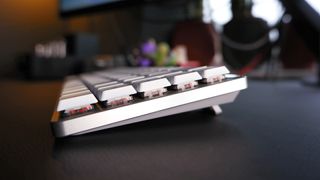
The Falchion RX makes me think twice about my convictions. The combination of its compact size and low-profile switches make it dreamy to type on, with the lower profile keys allowing me to rest my hands into a more relaxed position while typing. Everything you need is within that compact collection of keys, too. F1–F12 and Print Screen are just a press of the Function key away and marked out neatly on side of each slim keycap. This slight design still holds onto some handy keys such as Page Down, Page Up, Delete, Insert and the arrow keys. That’s a key win for me.
Nothing shines more on this keyboard than the individual switches—metaphorically and literally: this board features vibrant per-key RGB lighting and shine-through ABS keycaps. Although the reason I’m so fond of the typing experience on this keyboard comes down to the ROG RX Low-Profile Optical switches within it.
Falchion RX specs(Image credit: Future)Size:60%Switches:ROG RX Low-Profile SwitchBacklighting:Per key RGBAnti-ghosting:N-key rolloverPolling rate:1,000HzDimensions:306 x 110 x 26.5 mm (12 x 4.3 x 1.04-inches)Weight:595g (1.3 lbs)Connections:2.4GHz | USB Type-C | Bluetooth 5.1Cable:USB type A to C braided cableBattery life:up to 430 hr (RGB off, 2.4GHz)Price:$170|£170
Falchion RX specs
(Image credit: Future)Size:60%Switches:ROG RX Low-Profile SwitchBacklighting:Per key RGBAnti-ghosting:N-key rolloverPolling rate:1,000HzDimensions:306 x 110 x 26.5 mm (12 x 4.3 x 1.04-inches)Weight:595g (1.3 lbs)Connections:2.4GHz | USB Type-C | Bluetooth 5.1Cable:USB type A to C braided cableBattery life:up to 430 hr (RGB off, 2.4GHz)Price:$170|£170
(Image credit: Future)
Size:60%Switches:ROG RX Low-Profile SwitchBacklighting:Per key RGBAnti-ghosting:N-key rolloverPolling rate:1,000HzDimensions:306 x 110 x 26.5 mm (12 x 4.3 x 1.04-inches)Weight:595g (1.3 lbs)Connections:2.4GHz | USB Type-C | Bluetooth 5.1Cable:USB type A to C braided cableBattery life:up to 430 hr (RGB off, 2.4GHz)Price:$170|£170
The ROG RX Low-Profile switches are great to jab at throughout the day. They’re smooth but plenty responsive with a 1mm actuation point. They don’t feel much like low-profile switches in action, bar the shorter key travel, which is impressive considering they have such little height to them. The key toAsus' success here, much like in other great gaming keyboards, such as theROG AzothandROG Strix Scope II 96 Wireless, is lube. Lots of it.
The stabilisers, stems and springs have all received a dollop of lube. That’s why each key press sounds so good and that includes longer keys such as the space bar, which can be prone to rattling in some mechanical keyboards. There’s very little of that with the space bar on the Falchion RX and that’s the marker of a well-made keyboard. Combined with a rigid build with next to no flex and multiple layers of sound dampening foam, the Falchion RX is a fantastic keyboard for typing and gaming.
The linear switch within the sound dampened body of Falchion RX makes for a very quiet mechanical keyboard. One of the quieter I’ve used in recent years. That’s potentially a big benefit if you’re looking for a keyboard for a streaming setup. With noise cancellation it’s possible to almost entirely eradicate the sound of the Falchion RX altogether, and it’s honestly not that bad without. Though I can’t attest to the volume of the alternative RX Blue clicky switch.
Image1of4(Image credit: Future)(Image credit: Future)(Image credit: Future)(Image credit: Future)
Image1of4(Image credit: Future)(Image credit: Future)(Image credit: Future)(Image credit: Future)
Image1of4
(Image credit: Future)(Image credit: Future)(Image credit: Future)(Image credit: Future)
(Image credit: Future)(Image credit: Future)(Image credit: Future)(Image credit: Future)
(Image credit: Future)
(Image credit: Future)
(Image credit: Future)
(Image credit: Future)
(Image credit: Future)

(Image credit: Future)
(Image credit: Future)
(Image credit: Future)
(Image credit: Future)
(Image credit: Future)
(Image credit: Future)
(Image credit: Future)
(Image credit: Future)
(Image credit: Future)
(Image credit: Future)
(Image credit: Future)
(Image credit: Future)
(Image credit: Future)
(Image credit: Future)
(Image credit: Future)
Though one thing to note with these ROG RX switches are they use a unique stem design. Low-profile switches tend to use weird and wonderful stems to attach the keycap to the switch itself, but I’ve not seen any like the RX: four small stems on each of the corners secure it into the switch. It’s not an issue to have a design such as this—it’s incredibly sturdy—but it will mean if one of the ABS keycaps breaks, you might not be able to find an easy replacement outside of Asus support.
The Falchion RX is comfortable to type on over long periods thanks to the low key height. That’s true even without a wrist rest, which is very good news because the Falchion RX doesn’t come with one. I’m limited to the two-height adjustable feet to find the right place to get it comfortable for me. It would’ve been better to see a slim wrist rest replacing the plastic keyboard cover included with this keyboard: an oddity in that it doesn’t fit all that well onto the board itself and would almost certainly fall off in transit.
Image1of4(Image credit: Future)(Image credit: Future)(Image credit: Future)(Image credit: Future)
Image1of4(Image credit: Future)(Image credit: Future)(Image credit: Future)(Image credit: Future)
Image1of4
(Image credit: Future)(Image credit: Future)(Image credit: Future)(Image credit: Future)
(Image credit: Future)(Image credit: Future)(Image credit: Future)(Image credit: Future)
(Image credit: Future)
(Image credit: Future)
(Image credit: Future)
(Image credit: Future)
(Image credit: Future)
(Image credit: Future)
(Image credit: Future)
(Image credit: Future)
(Image credit: Future)
(Image credit: Future)
(Image credit: Future)
(Image credit: Future)
(Image credit: Future)
(Image credit: Future)
(Image credit: Future)
(Image credit: Future)
(Image credit: Future)
(Image credit: Future)
(Image credit: Future)
(Image credit: Future)
Buy if…✅ You want a smaller keyboard:I’m yet to find another compact gaming keyboard that offers a switch quite as lovely as the ROG Falchion RX.✅You need flexible connectivity:With 2.4GHz, Bluetooth and a Type-C connection, you won’t be short of options with any manner of device.
Buy if…
✅ You want a smaller keyboard:I’m yet to find another compact gaming keyboard that offers a switch quite as lovely as the ROG Falchion RX.✅You need flexible connectivity:With 2.4GHz, Bluetooth and a Type-C connection, you won’t be short of options with any manner of device.
✅ You want a smaller keyboard:I’m yet to find another compact gaming keyboard that offers a switch quite as lovely as the ROG Falchion RX.
✅You need flexible connectivity:With 2.4GHz, Bluetooth and a Type-C connection, you won’t be short of options with any manner of device.
Don’t buy if…❌ You dislike shortcuts and macros:To get the most out of a compact 60% board such as this, you need to be au fait with hitting the function key to access some keys.
Don’t buy if…
❌ You dislike shortcuts and macros:To get the most out of a compact 60% board such as this, you need to be au fait with hitting the function key to access some keys.
❌ You dislike shortcuts and macros:To get the most out of a compact 60% board such as this, you need to be au fait with hitting the function key to access some keys.
With connectivity options ranging from a compact wireless dongle, Bluetooth 5.1 and the humble USB Type-C cable, you have plenty of options. The dongle also magnetically attaches into the keyboard, which is a feature I’m all for. Overall it’s a great keyboard if you do intend to move it between devices or take it out of the house—not that I literally ever do this myself. It could make a good pairing alongside a Steam Deck or handheld gaming PC—it’s not far off the height or weight of a handheld at 595 grams and 306 x 110 x 26.5 mm. I wouldn’t worry about knocking this board about in a bag, it feels sturdy as heck.
Asus has built-in touch-responsive media controls to the rear left-hand side of the Falchion RX, to avoid adding any unnecessary size to the board itself. I didn’t like this approach at first—the touch controls felt clunky and unresponsive at times—but I’ve come around to it. It’s a decent interface for volume controls on the fly without adding any extra bulk to the keyboard itself. It’s also multi-function, though most of the lighting and macros are easier to sort in the Armoury Crate application. I say that through gritted teeth, Armoury Crate is not easily navigable software.
My only major gripe with the Falchion RX comes is its price. A 60% keyboard with a$170/£170price tag is enough to make your eyes water. That’s a high price per switch. You can score wireless 60% keyboards for a whole lot less, including heaps fromKeychron.
Usually I’d be quick to swap to a full-size gaming keyboard after finishing up a review on a compact keyboard, yet I’m still stabbing gleefully at the ROG Falchion RX Low Profile right now with no plans to change it out just yet. Maintaining a superb typing experience with a cleverly compact design, the Falchion RX makes me want to at least give this whole 60% keyboard thing another whirl.
Asus ROG Falchion RX Low Profile: Price Comparison
15 Amazon customer reviews☆☆☆☆☆
15 Amazon customer reviews☆☆☆☆☆
☆☆☆☆☆
$169.99$134.99ViewDeal endsMon, Jan 20, 2025$169.99$134.99View$169.99$139.99View$169.99View$202.15ViewLow Stock
$169.99$134.99ViewDeal endsMon, Jan 20, 2025
$169.99$134.99View

$169.99$134.99View
$169.99$134.99
$134.99
Deal endsMon, Jan 20, 2025
Deal endsMon, Jan 20, 2025
Deal endsMon, Jan 20, 2025
$169.99$134.99View
$169.99$134.99View

$169.99$134.99View
$169.99$134.99
$134.99
$169.99$139.99View
$169.99$139.99View


$169.99$139.99View
$169.99$139.99
$139.99
$169.99View
$169.99View

$169.99View
$169.99
$169.99
$202.15ViewLow Stock
$202.15View

$202.15View
$202.15
$202.15
Low Stock
Low Stock
Low Stock
Low Stock
Low Stock
Show More Deals
Show More Deals
We check over 250 million products every day for the best prices

The Verdict88Read our review policyAsus ROG Falchion RX Low ProfileA snappy and responsive compact keyboard, the ROG Falchion RX Low Profile comes with lovely lubed switches to make gaming and typing a joy.
The Verdict
The Verdict
88Read our review policyAsus ROG Falchion RX Low ProfileA snappy and responsive compact keyboard, the ROG Falchion RX Low Profile comes with lovely lubed switches to make gaming and typing a joy.
88Read our review policy
88
Asus ROG Falchion RX Low ProfileA snappy and responsive compact keyboard, the ROG Falchion RX Low Profile comes with lovely lubed switches to make gaming and typing a joy.
Asus ROG Falchion RX Low Profile
A snappy and responsive compact keyboard, the ROG Falchion RX Low Profile comes with lovely lubed switches to make gaming and typing a joy.
TOPICSHardwareASUS
TOPICS
LatestIt’s time for me to admit that AI-accelerated frame generation might actually be the way of the future and that’s a good thingElden Ring: Nightreign is getting a closed network test, and I’m totally not fuming because PC players aren’t invited to the party, or anythingHow to feed pegasus in Disney Dreamlight ValleySee more latest►
LatestIt’s time for me to admit that AI-accelerated frame generation might actually be the way of the future and that’s a good thingElden Ring: Nightreign is getting a closed network test, and I’m totally not fuming because PC players aren’t invited to the party, or anythingHow to feed pegasus in Disney Dreamlight ValleySee more latest►
LatestIt’s time for me to admit that AI-accelerated frame generation might actually be the way of the future and that’s a good thingElden Ring: Nightreign is getting a closed network test, and I’m totally not fuming because PC players aren’t invited to the party, or anythingHow to feed pegasus in Disney Dreamlight ValleySee more latest►
Latest
It’s time for me to admit that AI-accelerated frame generation might actually be the way of the future and that’s a good thingElden Ring: Nightreign is getting a closed network test, and I’m totally not fuming because PC players aren’t invited to the party, or anythingHow to feed pegasus in Disney Dreamlight Valley
It’s time for me to admit that AI-accelerated frame generation might actually be the way of the future and that’s a good thing
It’s time for me to admit that AI-accelerated frame generation might actually be the way of the future and that’s a good thing
Elden Ring: Nightreign is getting a closed network test, and I’m totally not fuming because PC players aren’t invited to the party, or anything
Elden Ring: Nightreign is getting a closed network test, and I’m totally not fuming because PC players aren’t invited to the party, or anything
How to feed pegasus in Disney Dreamlight Valley
How to feed pegasus in Disney Dreamlight Valley
See more latest►
Most PopularTurtle Beach Stealth Pivot reviewIkea Matchspel gaming chair reviewASRock DeskMini X600 reviewZotac Zbox Magnus EN374070C reviewMinisforum AtomMan G7 Ti reviewSamsung Galaxy Book4 Ultra reviewNoctua NH-D15 G2 reviewGulikit KK3 Max reviewBallionaire reviewMarvel Rivals reviewBe Quiet! Dark Rock 5 review
Most PopularTurtle Beach Stealth Pivot reviewIkea Matchspel gaming chair reviewASRock DeskMini X600 reviewZotac Zbox Magnus EN374070C reviewMinisforum AtomMan G7 Ti reviewSamsung Galaxy Book4 Ultra reviewNoctua NH-D15 G2 reviewGulikit KK3 Max reviewBallionaire reviewMarvel Rivals reviewBe Quiet! Dark Rock 5 review
Most PopularTurtle Beach Stealth Pivot reviewIkea Matchspel gaming chair reviewASRock DeskMini X600 reviewZotac Zbox Magnus EN374070C reviewMinisforum AtomMan G7 Ti reviewSamsung Galaxy Book4 Ultra reviewNoctua NH-D15 G2 reviewGulikit KK3 Max reviewBallionaire reviewMarvel Rivals reviewBe Quiet! Dark Rock 5 review
Most Popular
Turtle Beach Stealth Pivot review
Ikea Matchspel gaming chair review
ASRock DeskMini X600 review
Zotac Zbox Magnus EN374070C review
Minisforum AtomMan G7 Ti review
Samsung Galaxy Book4 Ultra review
Noctua NH-D15 G2 review
Gulikit KK3 Max review
Ballionaire review
Marvel Rivals review
Be Quiet! Dark Rock 5 review
HARDWARE BUYING GUIDESLATEST GAME REVIEWS1Best Steam Deck accessories in Australia for 2025: Our favorite docks, powerbanks and gamepads2Best graphics card for laptops: the mobile GPUs I’d want in my next gaming laptop3Best mini PCs in 2025: The compact computers I love the most4Best 14-inch gaming laptop: The top compact gaming laptops I’ve held in these hands5Best Mini-ITX motherboards in 2025: My pick from all the mini mobo marvels I’ve tested1Thank Goodness You’re Here! review2Shiren the Wanderer: The Mystery Dungeon of Serpentcoil Island review3WD Black SN850X 8 TB NVMe SSD review4Ikea Utespelare desk review5Asus ROG Harpe Ace Mini wireless mouse review
HARDWARE BUYING GUIDESLATEST GAME REVIEWS1Best Steam Deck accessories in Australia for 2025: Our favorite docks, powerbanks and gamepads2Best graphics card for laptops: the mobile GPUs I’d want in my next gaming laptop3Best mini PCs in 2025: The compact computers I love the most4Best 14-inch gaming laptop: The top compact gaming laptops I’ve held in these hands5Best Mini-ITX motherboards in 2025: My pick from all the mini mobo marvels I’ve tested1Thank Goodness You’re Here! review2Shiren the Wanderer: The Mystery Dungeon of Serpentcoil Island review3WD Black SN850X 8 TB NVMe SSD review4Ikea Utespelare desk review5Asus ROG Harpe Ace Mini wireless mouse review
HARDWARE BUYING GUIDESLATEST GAME REVIEWS1Best Steam Deck accessories in Australia for 2025: Our favorite docks, powerbanks and gamepads2Best graphics card for laptops: the mobile GPUs I’d want in my next gaming laptop3Best mini PCs in 2025: The compact computers I love the most4Best 14-inch gaming laptop: The top compact gaming laptops I’ve held in these hands5Best Mini-ITX motherboards in 2025: My pick from all the mini mobo marvels I’ve tested1Thank Goodness You’re Here! review2Shiren the Wanderer: The Mystery Dungeon of Serpentcoil Island review3WD Black SN850X 8 TB NVMe SSD review4Ikea Utespelare desk review5Asus ROG Harpe Ace Mini wireless mouse review
HARDWARE BUYING GUIDESLATEST GAME REVIEWS1Best Steam Deck accessories in Australia for 2025: Our favorite docks, powerbanks and gamepads2Best graphics card for laptops: the mobile GPUs I’d want in my next gaming laptop3Best mini PCs in 2025: The compact computers I love the most4Best 14-inch gaming laptop: The top compact gaming laptops I’ve held in these hands5Best Mini-ITX motherboards in 2025: My pick from all the mini mobo marvels I’ve tested1Thank Goodness You’re Here! review2Shiren the Wanderer: The Mystery Dungeon of Serpentcoil Island review3WD Black SN850X 8 TB NVMe SSD review4Ikea Utespelare desk review5Asus ROG Harpe Ace Mini wireless mouse review
HARDWARE BUYING GUIDESLATEST GAME REVIEWS
1Best Steam Deck accessories in Australia for 2025: Our favorite docks, powerbanks and gamepads
1Best Steam Deck accessories in Australia for 2025: Our favorite docks, powerbanks and gamepads
1
Best Steam Deck accessories in Australia for 2025: Our favorite docks, powerbanks and gamepads
2Best graphics card for laptops: the mobile GPUs I’d want in my next gaming laptop
2Best graphics card for laptops: the mobile GPUs I’d want in my next gaming laptop
2
Best graphics card for laptops: the mobile GPUs I’d want in my next gaming laptop
3Best mini PCs in 2025: The compact computers I love the most
3Best mini PCs in 2025: The compact computers I love the most
3
Best mini PCs in 2025: The compact computers I love the most
4Best 14-inch gaming laptop: The top compact gaming laptops I’ve held in these hands
4Best 14-inch gaming laptop: The top compact gaming laptops I’ve held in these hands
4
Best 14-inch gaming laptop: The top compact gaming laptops I’ve held in these hands
5Best Mini-ITX motherboards in 2025: My pick from all the mini mobo marvels I’ve tested
5Best Mini-ITX motherboards in 2025: My pick from all the mini mobo marvels I’ve tested
5
Best Mini-ITX motherboards in 2025: My pick from all the mini mobo marvels I’ve tested
1Thank Goodness You’re Here! review
1Thank Goodness You’re Here! review
1
Thank Goodness You’re Here! review
2Shiren the Wanderer: The Mystery Dungeon of Serpentcoil Island review
2Shiren the Wanderer: The Mystery Dungeon of Serpentcoil Island review
2
Shiren the Wanderer: The Mystery Dungeon of Serpentcoil Island review
3WD Black SN850X 8 TB NVMe SSD review
3WD Black SN850X 8 TB NVMe SSD review
3
WD Black SN850X 8 TB NVMe SSD review
4Ikea Utespelare desk review
4Ikea Utespelare desk review
4
Ikea Utespelare desk review
5Asus ROG Harpe Ace Mini wireless mouse review
5Asus ROG Harpe Ace Mini wireless mouse review
5
Asus ROG Harpe Ace Mini wireless mouse review
