Our Verdict
Our Verdict
ForNot that expensive, relativelyDecent throughputComprehensive wired optionsAgainstNo 6GHz networkFaster wireless is available
ForNot that expensive, relativelyDecent throughputComprehensive wired options
AgainstNo 6GHz networkFaster wireless is available
PC Gamer’s got your backOur experienced team dedicates many hours to every review, to really get to the heart of what matters most to you.Find out more about how we evaluate games and hardware.
PC Gamer’s got your backOur experienced team dedicates many hours to every review, to really get to the heart of what matters most to you.Find out more about how we evaluate games and hardware.
$796ViewWe check over 250 million products every day for the best prices
$796ViewWe check over 250 million products every day for the best prices
$796View
$796View
$796View

$796View
$796
$796
We check over 250 million products every day for the best prices
We check over 250 million products every day for the best prices
Is there anything Asus doesn’t make? The Taiwanese company has knocked out everything from 80486 motherboards to PhysX cards, to some excellent gaming laptops, and you’d expect its Wi-Fi routers to be top quality too. For the most part, this new Wi-Fi 7 model is exactly that, but it comes with a specific omission.
Since Wi-Fi 6E, routers have been able to broadcast on three frequencies. There are the common 2.4GHz and 5GHz bands, and a 6GHz band that offers greater speeds at a shorter range. It’s ideal for a gaming PC in the same room as the router, and frees up the others for phones, tablets, and the IoT devices that are increasingly cluttering up our homes. This router doesn’t have that band, but does that mean you’re missing out?
Not really. The 6GHz band is fast, but it’s also shorter-ranged, and doesn’t penetrate solid objects as well. Wi-Fi 7 routers have some clever tricks, however, that mean you can get excellent speeds—certainly faster than you’d need on an average internet connection—on the other bands.
There are the 320MHz-wide channels, which double the potential bandwidth from Wi-Fi 6 and leave Wi-Fi 5 in the dust. You get 4K-QAM that alters the phase and amplitude of the Wi-Fi signal to squeeze more data into the same space, and MLO (Multi-Link Operation) that allows a client to connect via 2.4GHz and 5GHz at the same time. Even without 6GHz (which isn’t approved for use in all countries) Wi-Fi 7 is faster, more reliable, and has less latency as long as you have the equipment to take advantage of it.
RT-BE88U specs(Image credit: Future)Wireless standard:Wi-Fi 7Max wireless speed (claimed):1376 Mbps (2.4GHz), 5764 Mbps (5GHz)Ethernet ports:8WAN:10GbitProcessor:2.6GHz quad-coreRAM:2GBStorage:256MBUSB:1x 3.0 Type-ADimensions:300x188x60.5mmWeight:1kgPrice:$350|£340
RT-BE88U specs
(Image credit: Future)Wireless standard:Wi-Fi 7Max wireless speed (claimed):1376 Mbps (2.4GHz), 5764 Mbps (5GHz)Ethernet ports:8WAN:10GbitProcessor:2.6GHz quad-coreRAM:2GBStorage:256MBUSB:1x 3.0 Type-ADimensions:300x188x60.5mmWeight:1kgPrice:$350|£340
(Image credit: Future)
Wireless standard:Wi-Fi 7Max wireless speed (claimed):1376 Mbps (2.4GHz), 5764 Mbps (5GHz)Ethernet ports:8WAN:10GbitProcessor:2.6GHz quad-coreRAM:2GBStorage:256MBUSB:1x 3.0 Type-ADimensions:300x188x60.5mmWeight:1kgPrice:$350|£340
Yes, you’re going to need a new PC, phone, tablet, smart fridge, whatever to take full advantage of Wi-Fi 7 (though it is of course backward compatible), whether you connect to the 6GHz band or not, but sharing your current internet connection in a new way might not be enough to tip you over the edge into upgrade heaven. Better to get a mighty multi-gigabit fibre connection first, then sort out the Wi-Fi later.
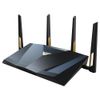
To the Asus RT-BE88U then, and it’s a fairly standard-looking Wi-Fi router of the kind Wednesday Addams might keep as a pet. It’s black, a wide sort of wedge shape, there are twinkly lights, it has a vent grille on top and angular legs/antennas sprout from three of its sides. The antennas have a sharp-looking design with a hole cut through them, so they look like the kind of sword Hawkeye might use after he got his tattoos, and need to be tightened up quite a lot when you assemble the router to prevent them flopping forward like you forgot to water them for a month. Standing tall and proud, their black and bronze colour scheme is attractive, but it’s still something you’re going to place on a shelf then forget about.
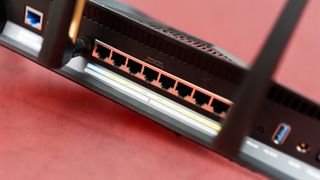
Around the back, there’s an unusual addition for a consumer router in the form of a SFP+ port. This stands for Small Form-factor Pluggable, and is a hot-swappable network interface that’s used for specific connections, such as copper wire or fibre optics, through a modular connector. There’s a 10Gb Ethernet WAN port right next to it, which is going to be the plug of choice for most people and almost certainly good enough for many more years of internet upgrades. There are a lot of other network ports on the back too, making this router an excellent choice as a hub if you’re building or upgrading a wired network. You get four 2.5Gbit Ethernet connections, and four more gigabit ones.
Image1of3(Image credit: Future)(Image credit: Future)(Image credit: Future)
Image1of3(Image credit: Future)(Image credit: Future)(Image credit: Future)
Image1of3
(Image credit: Future)(Image credit: Future)(Image credit: Future)
(Image credit: Future)(Image credit: Future)(Image credit: Future)
(Image credit: Future)
(Image credit: Future)
(Image credit: Future)
(Image credit: Future)
(Image credit: Future)

(Image credit: Future)
(Image credit: Future)
(Image credit: Future)
(Image credit: Future)
(Image credit: Future)
(Image credit: Future)
(Image credit: Future)
(Image credit: Future)
(Image credit: Future)
(Image credit: Future)
LAN4 is a gaming port, which you’ll want to plug your PC into to enjoy higher priority for your gaming traffic if you’re running a congested network. The proximity of the rear two Wi-Fi antennas to the Ethernet array means getting your finger underneath to remove cables from a packed rack of cables can be a little tricky, though with eight ports available this isn’t something you’re likely to be doing too often. A single USB 3 port sits off to the side, next to the power connector and its attendant on/off switch. The vertical nature of the USB port is a good decision, as it removes any limits that might have been placed on the size of flash drive you connect to it for sharing if it had been horizontal.
That’s not bad, and it’s certainly fast enough for streaming and gaming, though it isn’t as good as the top Wi-Fi 7 routers such as theEero Max 7orNetgear RS700Swhich can top 700Mbps up close.
Setting up the router is a case of installing the Asus Router app on your phone, then scanning a QR code on the base of the device to join its Wi-Fi network. From there, you can auto-detect your internet settings if you’ve got it plugged in directly, or choose DHCP mode from the advanced settings to set it up as an access point.
For advanced settings you can log into the router’s web interface, which looks the same as it has with every Asus router going back years. From here you can split out the 5GHz and 2.4GHz networks if you need to, tweak security, and add parental controls and other filtering.
Image1of3(Image credit: Future)(Image credit: Future)(Image credit: Future)
Image1of3(Image credit: Future)(Image credit: Future)(Image credit: Future)
Image1of3
(Image credit: Future)(Image credit: Future)(Image credit: Future)
(Image credit: Future)(Image credit: Future)(Image credit: Future)
(Image credit: Future)
(Image credit: Future)
(Image credit: Future)
(Image credit: Future)
(Image credit: Future)
(Image credit: Future)
(Image credit: Future)
(Image credit: Future)
(Image credit: Future)
(Image credit: Future)
(Image credit: Future)
(Image credit: Future)
(Image credit: Future)
(Image credit: Future)
(Image credit: Future)
Buy if…✅You need to share:If you want to split a very fast internet connection between a lot of wired devices, and don’t care too much about having the best Wi-Fi speed, the BE88U is for you.
Buy if…
✅You need to share:If you want to split a very fast internet connection between a lot of wired devices, and don’t care too much about having the best Wi-Fi speed, the BE88U is for you.
✅You need to share:If you want to split a very fast internet connection between a lot of wired devices, and don’t care too much about having the best Wi-Fi speed, the BE88U is for you.
Don’t buy if…❌You have to have the best:If the idea of having anything less than the best disgusts you, and you think having a home Ethernet network is a last-century idea, maybe spend the double it takes for a proper Wi-Fi 7 device.
Don’t buy if…
❌You have to have the best:If the idea of having anything less than the best disgusts you, and you think having a home Ethernet network is a last-century idea, maybe spend the double it takes for a proper Wi-Fi 7 device.
❌You have to have the best:If the idea of having anything less than the best disgusts you, and you think having a home Ethernet network is a last-century idea, maybe spend the double it takes for a proper Wi-Fi 7 device.
The router is compatible with Asus' AI Mesh system that will allow you to chain routers together to cover a larger area, so being able to set it up in this way is welcome. There’s also a dedicated SSID for IoT devices, which means your lightbulbs won’t clutter up the network you’re trying to game over with their constant chatter, and a guest network too for when your cousins come to stay and you don’t trust them with the password.
The Asus RT-BE88U is, it must be pointed out, almost half the price of some other Wi-Fi 7 routers, so it’s possible to overlook the slightly lower transfer speed and lack of a 6GHz network in favour of saving a few notes. The RT-BE88U also comes with the benefit that setup is easy, and the presence of Wi-Fi 7 means you pick up an element of future-proofing. With all those Ethernet ports, this router could sit at the heart of your home network for a very long time.
Asus RT-BE88U: Price Comparison
$796View
$796View
$796View
$796View
$796
$796
We check over 250 million products every day for the best prices

The Verdict
The Verdict
75Read our review policy
75
Asus RT-BE88U
TOPICSASUS
TOPICS
LatestSorry everyone, Minecraft 2 is cancelled, and it might be our faultTeam Fortress 2 just had the single biggest trade in its history, with ‘the absolute best hat you can get’ going for around $40KThe best part of Marvel Rivals Season 1 is Mister Fantastic’s obnoxiously fun chest-bump attack and his ridiculously OP kitSee more latest►
LatestSorry everyone, Minecraft 2 is cancelled, and it might be our faultTeam Fortress 2 just had the single biggest trade in its history, with ‘the absolute best hat you can get’ going for around $40KThe best part of Marvel Rivals Season 1 is Mister Fantastic’s obnoxiously fun chest-bump attack and his ridiculously OP kitSee more latest►
LatestSorry everyone, Minecraft 2 is cancelled, and it might be our faultTeam Fortress 2 just had the single biggest trade in its history, with ‘the absolute best hat you can get’ going for around $40KThe best part of Marvel Rivals Season 1 is Mister Fantastic’s obnoxiously fun chest-bump attack and his ridiculously OP kitSee more latest►
Latest
Sorry everyone, Minecraft 2 is cancelled, and it might be our faultTeam Fortress 2 just had the single biggest trade in its history, with ‘the absolute best hat you can get’ going for around $40KThe best part of Marvel Rivals Season 1 is Mister Fantastic’s obnoxiously fun chest-bump attack and his ridiculously OP kit
Sorry everyone, Minecraft 2 is cancelled, and it might be our fault
Sorry everyone, Minecraft 2 is cancelled, and it might be our fault
Team Fortress 2 just had the single biggest trade in its history, with ‘the absolute best hat you can get’ going for around $40K
Team Fortress 2 just had the single biggest trade in its history, with ‘the absolute best hat you can get’ going for around $40K
The best part of Marvel Rivals Season 1 is Mister Fantastic’s obnoxiously fun chest-bump attack and his ridiculously OP kit
The best part of Marvel Rivals Season 1 is Mister Fantastic’s obnoxiously fun chest-bump attack and his ridiculously OP kit
See more latest►
Most PopularTurtle Beach Stealth Pivot reviewIkea Matchspel gaming chair reviewASRock DeskMini X600 reviewZotac Zbox Magnus EN374070C reviewMinisforum AtomMan G7 Ti reviewSamsung Galaxy Book4 Ultra reviewNoctua NH-D15 G2 reviewGulikit KK3 Max reviewBallionaire reviewMarvel Rivals reviewBe Quiet! Dark Rock 5 review
Most PopularTurtle Beach Stealth Pivot reviewIkea Matchspel gaming chair reviewASRock DeskMini X600 reviewZotac Zbox Magnus EN374070C reviewMinisforum AtomMan G7 Ti reviewSamsung Galaxy Book4 Ultra reviewNoctua NH-D15 G2 reviewGulikit KK3 Max reviewBallionaire reviewMarvel Rivals reviewBe Quiet! Dark Rock 5 review
Most PopularTurtle Beach Stealth Pivot reviewIkea Matchspel gaming chair reviewASRock DeskMini X600 reviewZotac Zbox Magnus EN374070C reviewMinisforum AtomMan G7 Ti reviewSamsung Galaxy Book4 Ultra reviewNoctua NH-D15 G2 reviewGulikit KK3 Max reviewBallionaire reviewMarvel Rivals reviewBe Quiet! Dark Rock 5 review
Most Popular
Turtle Beach Stealth Pivot review
Ikea Matchspel gaming chair review
ASRock DeskMini X600 review
Zotac Zbox Magnus EN374070C review
Minisforum AtomMan G7 Ti review
Samsung Galaxy Book4 Ultra review
Noctua NH-D15 G2 review
Gulikit KK3 Max review
Ballionaire review
Marvel Rivals review
Be Quiet! Dark Rock 5 review
HARDWARE BUYING GUIDESLATEST GAME REVIEWS1Best Steam Deck accessories in Australia for 2025: Our favorite docks, powerbanks and gamepads2Best graphics card for laptops: the mobile GPUs I’d want in my next gaming laptop3Best mini PCs in 2025: The compact computers I love the most4Best 14-inch gaming laptop: The top compact gaming laptops I’ve held in these hands5Best Mini-ITX motherboards in 2025: My pick from all the mini mobo marvels I’ve tested1Thank Goodness You’re Here! review2Shiren the Wanderer: The Mystery Dungeon of Serpentcoil Island review3WD Black SN850X 8 TB NVMe SSD review4Ikea Utespelare desk review5Asus ROG Harpe Ace Mini wireless mouse review
HARDWARE BUYING GUIDESLATEST GAME REVIEWS1Best Steam Deck accessories in Australia for 2025: Our favorite docks, powerbanks and gamepads2Best graphics card for laptops: the mobile GPUs I’d want in my next gaming laptop3Best mini PCs in 2025: The compact computers I love the most4Best 14-inch gaming laptop: The top compact gaming laptops I’ve held in these hands5Best Mini-ITX motherboards in 2025: My pick from all the mini mobo marvels I’ve tested1Thank Goodness You’re Here! review2Shiren the Wanderer: The Mystery Dungeon of Serpentcoil Island review3WD Black SN850X 8 TB NVMe SSD review4Ikea Utespelare desk review5Asus ROG Harpe Ace Mini wireless mouse review
HARDWARE BUYING GUIDESLATEST GAME REVIEWS1Best Steam Deck accessories in Australia for 2025: Our favorite docks, powerbanks and gamepads2Best graphics card for laptops: the mobile GPUs I’d want in my next gaming laptop3Best mini PCs in 2025: The compact computers I love the most4Best 14-inch gaming laptop: The top compact gaming laptops I’ve held in these hands5Best Mini-ITX motherboards in 2025: My pick from all the mini mobo marvels I’ve tested1Thank Goodness You’re Here! review2Shiren the Wanderer: The Mystery Dungeon of Serpentcoil Island review3WD Black SN850X 8 TB NVMe SSD review4Ikea Utespelare desk review5Asus ROG Harpe Ace Mini wireless mouse review
HARDWARE BUYING GUIDESLATEST GAME REVIEWS1Best Steam Deck accessories in Australia for 2025: Our favorite docks, powerbanks and gamepads2Best graphics card for laptops: the mobile GPUs I’d want in my next gaming laptop3Best mini PCs in 2025: The compact computers I love the most4Best 14-inch gaming laptop: The top compact gaming laptops I’ve held in these hands5Best Mini-ITX motherboards in 2025: My pick from all the mini mobo marvels I’ve tested1Thank Goodness You’re Here! review2Shiren the Wanderer: The Mystery Dungeon of Serpentcoil Island review3WD Black SN850X 8 TB NVMe SSD review4Ikea Utespelare desk review5Asus ROG Harpe Ace Mini wireless mouse review
HARDWARE BUYING GUIDESLATEST GAME REVIEWS
1Best Steam Deck accessories in Australia for 2025: Our favorite docks, powerbanks and gamepads
1Best Steam Deck accessories in Australia for 2025: Our favorite docks, powerbanks and gamepads
1
Best Steam Deck accessories in Australia for 2025: Our favorite docks, powerbanks and gamepads
2Best graphics card for laptops: the mobile GPUs I’d want in my next gaming laptop
2Best graphics card for laptops: the mobile GPUs I’d want in my next gaming laptop
2
Best graphics card for laptops: the mobile GPUs I’d want in my next gaming laptop
3Best mini PCs in 2025: The compact computers I love the most
3Best mini PCs in 2025: The compact computers I love the most
3
Best mini PCs in 2025: The compact computers I love the most
4Best 14-inch gaming laptop: The top compact gaming laptops I’ve held in these hands
4Best 14-inch gaming laptop: The top compact gaming laptops I’ve held in these hands
4
Best 14-inch gaming laptop: The top compact gaming laptops I’ve held in these hands
5Best Mini-ITX motherboards in 2025: My pick from all the mini mobo marvels I’ve tested
5Best Mini-ITX motherboards in 2025: My pick from all the mini mobo marvels I’ve tested
5
Best Mini-ITX motherboards in 2025: My pick from all the mini mobo marvels I’ve tested
1Thank Goodness You’re Here! review
1Thank Goodness You’re Here! review
1
Thank Goodness You’re Here! review
2Shiren the Wanderer: The Mystery Dungeon of Serpentcoil Island review
2Shiren the Wanderer: The Mystery Dungeon of Serpentcoil Island review
2
Shiren the Wanderer: The Mystery Dungeon of Serpentcoil Island review
3WD Black SN850X 8 TB NVMe SSD review
3WD Black SN850X 8 TB NVMe SSD review
3
WD Black SN850X 8 TB NVMe SSD review
4Ikea Utespelare desk review
4Ikea Utespelare desk review
4
Ikea Utespelare desk review
5Asus ROG Harpe Ace Mini wireless mouse review
5Asus ROG Harpe Ace Mini wireless mouse review
5
Asus ROG Harpe Ace Mini wireless mouse review
