Our VerdictIn the din of manufacturers rushing to bring look-a-like handheld gaming PCs to market, Ayaneo has struck a chord with the Flip DS, a truly excellent and original creation.
Our VerdictIn the din of manufacturers rushing to bring look-a-like handheld gaming PCs to market, Ayaneo has struck a chord with the Flip DS, a truly excellent and original creation.
Our Verdict
Our Verdict
In the din of manufacturers rushing to bring look-a-like handheld gaming PCs to market, Ayaneo has struck a chord with the Flip DS, a truly excellent and original creation.
ForTruly compactTwo screensBest navigation on any handheld gaming PCFingerprint sign-inLots of potential for shortcutsAgainstSame chip, same perf as the restBattery could be biggerROG Ally X isn’t much more and better on paper
ForTruly compactTwo screensBest navigation on any handheld gaming PCFingerprint sign-inLots of potential for shortcuts
AgainstSame chip, same perf as the restBattery could be biggerROG Ally X isn’t much more and better on paper
PC Gamer’s got your backOur experienced team dedicates many hours to every review, to really get to the heart of what matters most to you.Find out more about how we evaluate games and hardware.
PC Gamer’s got your backOur experienced team dedicates many hours to every review, to really get to the heart of what matters most to you.Find out more about how we evaluate games and hardware.
The Ayaneo Flip DS is the handheld gaming PC I enjoy using the most, and I don’t say that lightly. I’m aSteam Deckowner, I reviewed the Lenovo Legion Go and Ayaneo Air 1S, and I’ve used the MSI Claw 7, MSI Claw 8, ROG Ally, and ROG Ally X, and yet the Flip DS stands out from among the crowd. This clever clamshell is compact and without sacrificing screen size, controls, or performance. It really is a most excellent all-rounder.
The idea of a gaming handheld is greater freedom to play PC games anywhere and everywhere. Your Steam library at your fingertips and accessible from—well, my bed, mostly. Turns out what I wanted most in a gaming PC was the ability to play games on it while lying flat. Handheld PCs are wonderful for that—and travel, of course—though they’re not without limitations. Battery life is the big one, as is having the graphical grunt to chug through the latest games. Though in my day-to-day use, the real frustration is navigating the desktop with a pair of analogue sticks.
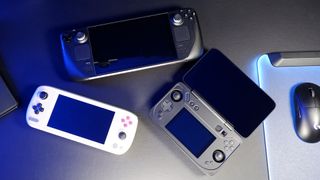
A few handhelds deal with the desktop and navigating tiny menus better than others. The Steam Deck is arguably one of the best for Big Picture Mode and trackpads for navigating the Linux desktop, but generally, it’s a bit of a hassle on the Windows-powered handhelds that followed it. Some, like the Lenovo Legion Go, offer pre-baked touchscreen functionality to help ease the pain a little, but it’s only part-way towards making the OS more amenable to tiny screens. Windows 11 wasn’t really built for this.
So, why might that be an important point to make in a review of the Ayaneo Flip DS?
Flip DS specs(Image credit: Future)Processor:AMD Ryzen 7 8840UGPU:Integrated AMD Radeon 780MRAM:16 GB reviewed, up to 64 GB availableStorage:512 GB reviewed, up to 2 TB availableUpper screen:7-inch 120 Hz IPS touchscreenLower screen:3.5-inch touchscreenControls:Hall effect analogue sticks, gyroscope, optical mouse ‘nubbin’Connectivity:USB4 x1, USB 3.2 Gen 2 Type-C x1, OCuLink, 3.5 mm jack, Micro SD slot, Wi-Fi 6E, Bluetooth 5.2Battery:45 WHrDimensions:18 x 10.2 x 3.6 cmWeight:650 gramsPrice:$749(512 GB/16 GB)
Flip DS specs
(Image credit: Future)Processor:AMD Ryzen 7 8840UGPU:Integrated AMD Radeon 780MRAM:16 GB reviewed, up to 64 GB availableStorage:512 GB reviewed, up to 2 TB availableUpper screen:7-inch 120 Hz IPS touchscreenLower screen:3.5-inch touchscreenControls:Hall effect analogue sticks, gyroscope, optical mouse ‘nubbin’Connectivity:USB4 x1, USB 3.2 Gen 2 Type-C x1, OCuLink, 3.5 mm jack, Micro SD slot, Wi-Fi 6E, Bluetooth 5.2Battery:45 WHrDimensions:18 x 10.2 x 3.6 cmWeight:650 gramsPrice:$749(512 GB/16 GB)
(Image credit: Future)
Processor:AMD Ryzen 7 8840UGPU:Integrated AMD Radeon 780MRAM:16 GB reviewed, up to 64 GB availableStorage:512 GB reviewed, up to 2 TB availableUpper screen:7-inch 120 Hz IPS touchscreenLower screen:3.5-inch touchscreenControls:Hall effect analogue sticks, gyroscope, optical mouse ‘nubbin’Connectivity:USB4 x1, USB 3.2 Gen 2 Type-C x1, OCuLink, 3.5 mm jack, Micro SD slot, Wi-Fi 6E, Bluetooth 5.2Battery:45 WHrDimensions:18 x 10.2 x 3.6 cmWeight:650 gramsPrice:$749(512 GB/16 GB)
Simply put, it’s a dream to dash around the desktop with. The Flip DS comes with not one, not two, not three, butfourways to wield a mouse cursor. There’s the upper screen, the lower screen, the analogue sticks, and the touch-responsive nubbin.
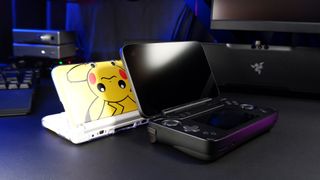
Let’s start with the upper screen. It is a 7-inch IPS display that sits on a hinge above the bulk of the handheld chassis. It’s rated to 120 Hz, too, which is a bit lost on the Radeon 780M GPU inside this handheld but does make for smooth and consistent scrolling. The hinge is the more important bit, however, as this has allowed Ayaneo to stuff a larger screen on this handheld than other devices of a comparable size.
Take the Ayaneo Air 1S, for example. This lovely little device comes with a 5.5-inch screen within a 22.5 x 9 x 3 cm chassis. The Ayaneo Flip DS offers a 7-inch touchscreenanda 3.5-inch touchscreen within an 18 x 10.2 x 3.6 cm chassis. A little thicker and taller than the Ayaneo Air 1S, but much shorter.
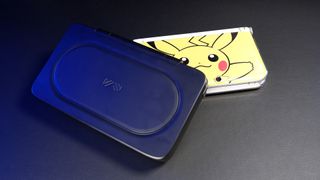
This hinged design has another benefit, too. It neatly folds to protect the two screens and integrated controls on the Flip DS, which means you can stuff it in your bag and not have to worry too much about getting the important bits scratched or scuffed up.
(Image credit: Future)
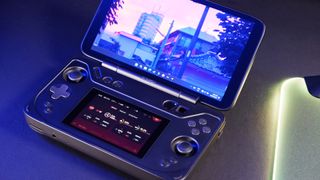
For navigating, the 7-inch upper screen is suitable for quickly signing away the rights to your life in a terms and conditions window or agreeing to one of the many administrator permissions windows you’ll likely run into during setup. Though for everything else, you’ll want to look to smarter solutions also included on the Flip DS.
One such solution being the lower screen. Taking a leaf out of Nintendo’s book, there’s a 3.5-inch touchscreen nestled between the controls on the Flip DS. This lower screen acts as you’d expect any secondary monitor to through Windows—you can drag applications over to it or use it as your primary monitor, if you so wish. Though it is at its most useful when the Ayaneo Space system application is open.
The Ayaneo Space software is sort of your one-stop-shop for configuring the handheld and accessing your library of games across various storefronts. It’s a little like Steam’s Big Picture Mode, though with less shine and a couple of quirks (such as telling me I have audio drivers to install and then not letting me install them). I’ve generally relied on it less, too. When you can navigate around the desktop easily as you would a desktop PC, there’s less need for a bespoke controller-friendly design. Though it’s there when you need it: just hit the button with the Ayaneo logo across it on the bottom right of the Flip DS and it pops up.
(Image credit: Future)
Though even when the Ayaneo Space application is minimised on the upper screen it remains on the lower screen. There it acts as a quick way to access system settings, performance analytics, and application shortcuts with just a tap of your finger. Most handy of all are the built-in keyboard and trackpad, and this is when the Flip DS starts to really come into its own.
With the trackpad enabled the Ayaneo Flip DS effectively turns into a tiny gaming laptop. I was whizzing around with ease, installing applications and navigating the desktop like I would a much larger device. It’s tough to overstate how handy a tiny trackpad is when trying to do literally anything involving lots of mouse movements on a gaming handheld.
Though, arguably, the tiny keyboard is even better.
(Image credit: Future)
I do have a few minor complaints with both the trackpad and keyboard. The layout of the keyboard is fine but as soon as you switch between symbols or numbers, it’s a bit of a mess. It’d be better off mimicking the simplicity of Gboard on Android, where the keys largely remain in the same place whether they’re displaying letters or numbers. Also, the scroll function on the trackpad weirdly uses a pinching motion, which I’d stored in my brain as the zoom in/out shortcut. That’s tough to get used to and I find myself reaching for the analogue sticks instead.
(Image credit: Future)
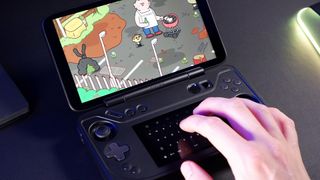
The analogue sticks on the Flip DS are sunken into the chassis to make way for the folding screen. It’s not actually as awful as it sounds, however, as they move pretty freely under thumb within their little wells. Both use Hall effect sensors to accurately measure your movements and should remain reliable constant and without drift thanks to this technology—I wouldn’t buy a controller without Hall effect sticksthese days.
Usually a bit of a faff to navigate the desktop with, Ayaneo has cleverly devised a system of speeding up the mouse cursor movement depending on whether you’re holding either of the triggers on the device—left for fast, right for slow. The slow option is just slow enough to actually hover over tiny buttons on the 7-inch screen and makes a world of difference to the experience of using this handheld gaming PC as an actual PC.
(Image credit: Future)
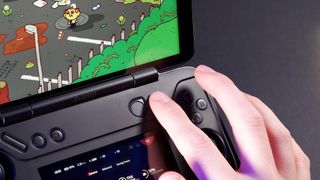
Lastly, there’s the nubbin. That’s not the official name but it best describes it. When I first pulled the Flip DS out of the box for review, I didn’t realise what this was, thinking it to be an extra programmable shortcut button. It sits right next to the fingerprint scanner/power button, too. But it’s actually a touch-responsive touch pad, or what I believe Ayaneo describes as an “optical finger mouse”. I’m not sure that actually makes it clear what it is, though.
It’s just a nubbin. You rub it and the mouse moves accordingly. Press it for the primary mouse button. Nubbin is good. Nubbin is life.
For the limitations with any one of these methods of navigating around the Ayaneo Flip DS, when combined they are extremely powerful. I found it became second nature to tap on one screen, scroll on one analogue stick, and rub the nubbin to get around the desktop. The analogue sticks are the best solution when it comes to actually playing games, but for everything else, there’s the nubbin.
In terms of performance, the Ayaneo Flip DS is a known quantity. That’s true even though we’ve never actually tested the Ryzen 7 8840U inside it. The reason is we’ve seen what theAMD Ryzen7 7840U processor can do inside theAyaneo Air 1Sand OneXPlayer OneXFly, and what the Ryzen Z1 Extreme can do inside the ROG Ally X orLenovo Legion Go. The Ryzen 7 8840U is basically the same; a 7840U rebrand.
(Image credit: Future)
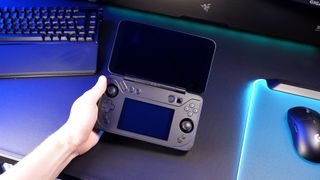
That’s paired with 16 GB of LPDDR5X inside the machine I have here for testing. That’s less overall memory than the Ayaneo Air 1S I reviewed in the past, which had 32 GB. That makes for only around 8 GB to split between CPU and GPU, but this hasn’t been a major detriment paired with the quality settings I’ve used throughout testing of medium or medium-equivalent. I’d even suggest maybe bumping down to low if you’re chasing performance, as you don’t notice the dip in quality quite as much on a smaller screen. Importantly, though, medium and low settings generally make lower demands of VRAM.
As such, there are no surprises when it comes to the gaming performance in my testing. The 8840U performs as expected in Cyberpunk 2077, F1 24, Horizon Zero Dawn, Metro Exodus Enhanced Edition, and Black Myth Wukong’s benchmark tool. It’s best with upscaling enabled for that little extra kick, and I opted for FSR Quality where upscaling is specified.
Buy if…✅ You want a truly portable machine:The Steam Deck and Legion Go are portable in the way that an eighteen-wheeler is, technically, portable. The ROG Ally X is more portable. The Ayaneo Flip DS is better to stuff in a backpack than all of them.✅ You want the easiest handheld experience:Navigation is a pain for all handheld gaming PCs—especially those using Windows—but the Ayaneo’s clever trackpad and mouse solutions are simply the best there is. Especially since there are so many to choose from for different scenarios/applications.
Buy if…
✅ You want a truly portable machine:The Steam Deck and Legion Go are portable in the way that an eighteen-wheeler is, technically, portable. The ROG Ally X is more portable. The Ayaneo Flip DS is better to stuff in a backpack than all of them.✅ You want the easiest handheld experience:Navigation is a pain for all handheld gaming PCs—especially those using Windows—but the Ayaneo’s clever trackpad and mouse solutions are simply the best there is. Especially since there are so many to choose from for different scenarios/applications.
✅ You want a truly portable machine:The Steam Deck and Legion Go are portable in the way that an eighteen-wheeler is, technically, portable. The ROG Ally X is more portable. The Ayaneo Flip DS is better to stuff in a backpack than all of them.
✅ You want the easiest handheld experience:Navigation is a pain for all handheld gaming PCs—especially those using Windows—but the Ayaneo’s clever trackpad and mouse solutions are simply the best there is. Especially since there are so many to choose from for different scenarios/applications.
Don’t buy if…❌ You want the best battery:I’d still recommend the ROG Ally X for someone chasing longevity away from the outlet, even though the Flip DS does perform well in battery tests.❌ You want the best specification for your money:You can buy an ROG Ally X for $50 more than this, maybe the same price with a decent sale, and you’d score a bigger battery, more memory, and a larger 1 TB SSD with the Asus option. That is tough to ignore.
Don’t buy if…
❌ You want the best battery:I’d still recommend the ROG Ally X for someone chasing longevity away from the outlet, even though the Flip DS does perform well in battery tests.❌ You want the best specification for your money:You can buy an ROG Ally X for $50 more than this, maybe the same price with a decent sale, and you’d score a bigger battery, more memory, and a larger 1 TB SSD with the Asus option. That is tough to ignore.
❌ You want the best battery:I’d still recommend the ROG Ally X for someone chasing longevity away from the outlet, even though the Flip DS does perform well in battery tests.
❌ You want the best specification for your money:You can buy an ROG Ally X for $50 more than this, maybe the same price with a decent sale, and you’d score a bigger battery, more memory, and a larger 1 TB SSD with the Asus option. That is tough to ignore.
What’s most impressive about the Ayaneo is the battery life. A steady 116 minutes of gaming up time in PCMark’s gaming battery test. That’s with the Wi-Fi disabled and both screens set to 50% brightness. That’s still shy of thebest handheld gaming PCright now, theROG Ally X, but it’s nevertheless a really impressive showing for a 45 Whr battery.
That said, if Ayaneo could stuff a bigger battery in here somehow, I’d certainly take it.
At$749for the model I’m reviewing here (512 GB SSD/16 GB RAM), you’re not expected to pay a hefty sum for the novelty of the clamshell design and second screen. That’s $50 less than an ROG Ally X. That said, if you’re comparing these spec-for-spec, you’ll find a good few reasons to spend more on theAsusmodel: more memory, more storage, and a bigger battery. It’s difficult to ignore the ROG Ally X, and I think formostpeople it’s still the better choice.
I have to commend Ayaneo, though. It’s put together a handheld with user experience at its core. The Flip DS is different, and not just for the sake of it. From the many mouse options and on-screen keyboard to the clever clamshell design, the Flip DS is better to use for being just a little odd.
The Verdict88Read our review policyAyaneo Flip DS reviewIn the din of manufacturers rushing to bring look-a-like handheld gaming PCs to market, Ayaneo has struck a chord with the Flip DS, a truly excellent and original creation.
The Verdict
The Verdict
88Read our review policyAyaneo Flip DS reviewIn the din of manufacturers rushing to bring look-a-like handheld gaming PCs to market, Ayaneo has struck a chord with the Flip DS, a truly excellent and original creation.
88Read our review policy
88
Ayaneo Flip DS reviewIn the din of manufacturers rushing to bring look-a-like handheld gaming PCs to market, Ayaneo has struck a chord with the Flip DS, a truly excellent and original creation.
Ayaneo Flip DS review
In the din of manufacturers rushing to bring look-a-like handheld gaming PCs to market, Ayaneo has struck a chord with the Flip DS, a truly excellent and original creation.
TOPICSHardware
TOPICS
More about handheld gaming pcsSteamOS beta could be available to download to your handheld gaming PC of choice as soon as AprilI got hands on with the Lenovo Legion Go S handheld PC with Valve’s SteamOS—and it seems like a bit of a winner to meLatestToday’s Wordle answer for Friday, January 10See more latest►
More about handheld gaming pcsSteamOS beta could be available to download to your handheld gaming PC of choice as soon as AprilI got hands on with the Lenovo Legion Go S handheld PC with Valve’s SteamOS—and it seems like a bit of a winner to meLatestToday’s Wordle answer for Friday, January 10See more latest►
More about handheld gaming pcsSteamOS beta could be available to download to your handheld gaming PC of choice as soon as AprilI got hands on with the Lenovo Legion Go S handheld PC with Valve’s SteamOS—and it seems like a bit of a winner to me
More about handheld gaming pcs
SteamOS beta could be available to download to your handheld gaming PC of choice as soon as AprilI got hands on with the Lenovo Legion Go S handheld PC with Valve’s SteamOS—and it seems like a bit of a winner to me

SteamOS beta could be available to download to your handheld gaming PC of choice as soon as April
SteamOS beta could be available to download to your handheld gaming PC of choice as soon as April
I got hands on with the Lenovo Legion Go S handheld PC with Valve’s SteamOS—and it seems like a bit of a winner to me
I got hands on with the Lenovo Legion Go S handheld PC with Valve’s SteamOS—and it seems like a bit of a winner to me
LatestToday’s Wordle answer for Friday, January 10See more latest►
Latest
Today’s Wordle answer for Friday, January 10
Today’s Wordle answer for Friday, January 10
Today’s Wordle answer for Friday, January 10
See more latest►
Most PopularTurtle Beach Stealth Pivot reviewIkea Matchspel gaming chair reviewASRock DeskMini X600 reviewZotac Zbox Magnus EN374070C reviewMinisforum AtomMan G7 Ti reviewSamsung Galaxy Book4 Ultra reviewNoctua NH-D15 G2 reviewGulikit KK3 Max reviewBallionaire reviewMarvel Rivals reviewBe Quiet! Dark Rock 5 review
Most PopularTurtle Beach Stealth Pivot reviewIkea Matchspel gaming chair reviewASRock DeskMini X600 reviewZotac Zbox Magnus EN374070C reviewMinisforum AtomMan G7 Ti reviewSamsung Galaxy Book4 Ultra reviewNoctua NH-D15 G2 reviewGulikit KK3 Max reviewBallionaire reviewMarvel Rivals reviewBe Quiet! Dark Rock 5 review
Most PopularTurtle Beach Stealth Pivot reviewIkea Matchspel gaming chair reviewASRock DeskMini X600 reviewZotac Zbox Magnus EN374070C reviewMinisforum AtomMan G7 Ti reviewSamsung Galaxy Book4 Ultra reviewNoctua NH-D15 G2 reviewGulikit KK3 Max reviewBallionaire reviewMarvel Rivals reviewBe Quiet! Dark Rock 5 review
Most Popular
Turtle Beach Stealth Pivot review
Ikea Matchspel gaming chair review
ASRock DeskMini X600 review
Zotac Zbox Magnus EN374070C review
Minisforum AtomMan G7 Ti review
Samsung Galaxy Book4 Ultra review
Noctua NH-D15 G2 review
Gulikit KK3 Max review
Ballionaire review
Marvel Rivals review
Be Quiet! Dark Rock 5 review
HARDWARE BUYING GUIDESLATEST GAME REVIEWS1Best Steam Deck accessories in Australia for 2025: Our favorite docks, powerbanks and gamepads2Best graphics card for laptops: the mobile GPUs I’d want in my next gaming laptop3Best mini PCs in 2025: The compact computers I love the most4Best 14-inch gaming laptop: The top compact gaming laptops I’ve held in these hands5Best Mini-ITX motherboards in 2025: My pick from all the mini mobo marvels I’ve tested1Thank Goodness You’re Here! review2Shiren the Wanderer: The Mystery Dungeon of Serpentcoil Island review3WD Black SN850X 8 TB NVMe SSD review4Ikea Utespelare desk review5Asus ROG Harpe Ace Mini wireless mouse review
HARDWARE BUYING GUIDESLATEST GAME REVIEWS1Best Steam Deck accessories in Australia for 2025: Our favorite docks, powerbanks and gamepads2Best graphics card for laptops: the mobile GPUs I’d want in my next gaming laptop3Best mini PCs in 2025: The compact computers I love the most4Best 14-inch gaming laptop: The top compact gaming laptops I’ve held in these hands5Best Mini-ITX motherboards in 2025: My pick from all the mini mobo marvels I’ve tested1Thank Goodness You’re Here! review2Shiren the Wanderer: The Mystery Dungeon of Serpentcoil Island review3WD Black SN850X 8 TB NVMe SSD review4Ikea Utespelare desk review5Asus ROG Harpe Ace Mini wireless mouse review
HARDWARE BUYING GUIDESLATEST GAME REVIEWS1Best Steam Deck accessories in Australia for 2025: Our favorite docks, powerbanks and gamepads2Best graphics card for laptops: the mobile GPUs I’d want in my next gaming laptop3Best mini PCs in 2025: The compact computers I love the most4Best 14-inch gaming laptop: The top compact gaming laptops I’ve held in these hands5Best Mini-ITX motherboards in 2025: My pick from all the mini mobo marvels I’ve tested1Thank Goodness You’re Here! review2Shiren the Wanderer: The Mystery Dungeon of Serpentcoil Island review3WD Black SN850X 8 TB NVMe SSD review4Ikea Utespelare desk review5Asus ROG Harpe Ace Mini wireless mouse review
HARDWARE BUYING GUIDESLATEST GAME REVIEWS1Best Steam Deck accessories in Australia for 2025: Our favorite docks, powerbanks and gamepads2Best graphics card for laptops: the mobile GPUs I’d want in my next gaming laptop3Best mini PCs in 2025: The compact computers I love the most4Best 14-inch gaming laptop: The top compact gaming laptops I’ve held in these hands5Best Mini-ITX motherboards in 2025: My pick from all the mini mobo marvels I’ve tested1Thank Goodness You’re Here! review2Shiren the Wanderer: The Mystery Dungeon of Serpentcoil Island review3WD Black SN850X 8 TB NVMe SSD review4Ikea Utespelare desk review5Asus ROG Harpe Ace Mini wireless mouse review
HARDWARE BUYING GUIDESLATEST GAME REVIEWS
1Best Steam Deck accessories in Australia for 2025: Our favorite docks, powerbanks and gamepads
1Best Steam Deck accessories in Australia for 2025: Our favorite docks, powerbanks and gamepads
1
Best Steam Deck accessories in Australia for 2025: Our favorite docks, powerbanks and gamepads
2Best graphics card for laptops: the mobile GPUs I’d want in my next gaming laptop
2Best graphics card for laptops: the mobile GPUs I’d want in my next gaming laptop
2
Best graphics card for laptops: the mobile GPUs I’d want in my next gaming laptop
3Best mini PCs in 2025: The compact computers I love the most
3Best mini PCs in 2025: The compact computers I love the most
3
Best mini PCs in 2025: The compact computers I love the most
4Best 14-inch gaming laptop: The top compact gaming laptops I’ve held in these hands
4Best 14-inch gaming laptop: The top compact gaming laptops I’ve held in these hands
4
Best 14-inch gaming laptop: The top compact gaming laptops I’ve held in these hands
5Best Mini-ITX motherboards in 2025: My pick from all the mini mobo marvels I’ve tested
5Best Mini-ITX motherboards in 2025: My pick from all the mini mobo marvels I’ve tested
5
Best Mini-ITX motherboards in 2025: My pick from all the mini mobo marvels I’ve tested
1Thank Goodness You’re Here! review
1Thank Goodness You’re Here! review
1
Thank Goodness You’re Here! review
2Shiren the Wanderer: The Mystery Dungeon of Serpentcoil Island review
2Shiren the Wanderer: The Mystery Dungeon of Serpentcoil Island review
2
Shiren the Wanderer: The Mystery Dungeon of Serpentcoil Island review
3WD Black SN850X 8 TB NVMe SSD review
3WD Black SN850X 8 TB NVMe SSD review
3
WD Black SN850X 8 TB NVMe SSD review
4Ikea Utespelare desk review
4Ikea Utespelare desk review
4
Ikea Utespelare desk review
5Asus ROG Harpe Ace Mini wireless mouse review
5Asus ROG Harpe Ace Mini wireless mouse review
5
Asus ROG Harpe Ace Mini wireless mouse review
