Our VerdictThe Blacklyte Atlas is a solidly built, huge gaming desk. Its powered legs are smooth and quiet, and there’s tons of room to hide cables and other goodies. It’s just way too expensive for what it is.
Our VerdictThe Blacklyte Atlas is a solidly built, huge gaming desk. Its powered legs are smooth and quiet, and there’s tons of room to hide cables and other goodies. It’s just way too expensive for what it is.
Our Verdict
Our Verdict
The Blacklyte Atlas is a solidly built, huge gaming desk. Its powered legs are smooth and quiet, and there’s tons of room to hide cables and other goodies. It’s just way too expensive for what it is.
ForVery sturdyLots of desk spaceCavernous cable trayRGB lights a-go-goAgainstExpensiveSoftware isn’t easy to use at firstSecretlab Magnus Pro is cheaper
ForVery sturdyLots of desk spaceCavernous cable trayRGB lights a-go-go
AgainstExpensiveSoftware isn’t easy to use at firstSecretlab Magnus Pro is cheaper
PC Gamer’s got your backOur experienced team dedicates many hours to every review, to really get to the heart of what matters most to you.Find out more about how we evaluate games and hardware.
PC Gamer’s got your backOur experienced team dedicates many hours to every review, to really get to the heart of what matters most to you.Find out more about how we evaluate games and hardware.
Recent updatesUpdate 11 December 2024:This review has been updated to note that Blacklyte is a Canadian company and not a Chinese one; clarify price differences between the Blacklyte Atlas and a Secretlab Magnus Pro desk; clarify the use of Blacklyte’s software to control the Atlas desk’s lighting. The overall conclusion and score of the Blacklyte Atlas gaming desk have been adjusted in accordance with these changes.
Recent updatesUpdate 11 December 2024:This review has been updated to note that Blacklyte is a Canadian company and not a Chinese one; clarify price differences between the Blacklyte Atlas and a Secretlab Magnus Pro desk; clarify the use of Blacklyte’s software to control the Atlas desk’s lighting. The overall conclusion and score of the Blacklyte Atlas gaming desk have been adjusted in accordance with these changes.
Recent updates
Update 11 December 2024:This review has been updated to note that Blacklyte is a Canadian company and not a Chinese one; clarify price differences between the Blacklyte Atlas and a Secretlab Magnus Pro desk; clarify the use of Blacklyte’s software to control the Atlas desk’s lighting. The overall conclusion and score of the Blacklyte Atlas gaming desk have been adjusted in accordance with these changes.
The Atlas isn’t a direct 1:1 copy but it’s pretty close, and for some people that actually might be a good thing. After all, getting a Secretlab desk for a not-Secretlab price would be awesome. Except that’s not the case here, as Blacklyte is asking $999/£899 for its gaming desk, more than the base version of the Magnus Pro. Even if you add optional extras to the latter, such as more cable management and an ARGB lighting kit (to match the Atlas), then it’s still$72 cheaper.
Now, if the Atlas was noticeably better than the Magnus Pro, that would be understandable. But it’s not. Don’t get me wrong: the Blacklyte Atlas is a pretty goodgaming desk but the Canada-based company has missed the mark with how it’s set the price.
So what exactly are you getting for your thousand dollars bar a buck? It’s a motorised, height-adjustable fully steel desk, replete with RGB lights, a big cable management tray, and a full-desk mouse pad.
Blacklyte Atlas specs(Image credit: Future)Dimensions:150 x 70 x 72~138 cm (59 x 27.6 x 28~54 inches)Load capacity:120 kg (264.6 lbs)Total weight:28.5 kg (62.7 lbs)Materials:Steel, ABS Plastic, MDFController:Height display, 2x memory slotsLighting:Front+side+corner RGB, switchable modesCollision detection:YesPrice:$999|£899|€999
Blacklyte Atlas specs
(Image credit: Future)Dimensions:150 x 70 x 72~138 cm (59 x 27.6 x 28~54 inches)Load capacity:120 kg (264.6 lbs)Total weight:28.5 kg (62.7 lbs)Materials:Steel, ABS Plastic, MDFController:Height display, 2x memory slotsLighting:Front+side+corner RGB, switchable modesCollision detection:YesPrice:$999|£899|€999
(Image credit: Future)
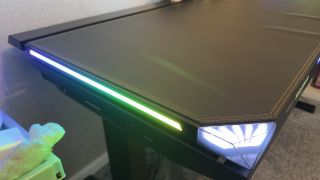
Dimensions:150 x 70 x 72~138 cm (59 x 27.6 x 28~54 inches)Load capacity:120 kg (264.6 lbs)Total weight:28.5 kg (62.7 lbs)Materials:Steel, ABS Plastic, MDFController:Height display, 2x memory slotsLighting:Front+side+corner RGB, switchable modesCollision detection:YesPrice:$999|£899|€999
I have to say that my first impression was of great concern because the two boxes (one containing the desk surface and tray, the other for the legs) looked as if they’d made their way through four war zones, a hurricane, and an industrial car wash for good measure to reach my office. Fortunately, the contents were in good fettle, so I set about putting it all together.
I have to say that it was very easy to put together, nor did I require lots of room to do it, but the final step of flipping the finished build onto its legs was beyond my feeble frame. The Blacklyte Atlas is pretty heavy, a little under 30 kg (66 lbs) in weight and combined with its overall size, rotating about the x-axis is a two-person job.
(Image credit: Future)
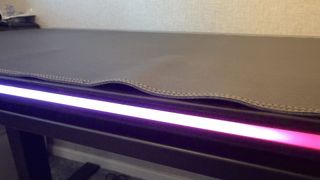
Once upright, I was greeted with a bit of a disappointment. The top surface of the desk is entirely covered with a leatherette mouse pad that magnetically attaches to the steel top. The edge nearest where one would use the desk had large ripples in it and despite using lots of heavy objects to smooth it out, I wasn’t able to completely remove them.
That particular issue just could be with this review sample but if I had paid $999 of my own money on this desk, I’d be considerably less than happy.
What I was pleased with were the motorised legs. They’re incredibly solid and even at full height, the desk barely moves, although it’s best suited for use on a hard floor. My office has a carpet with a thick pile and it did cause some very minor wobbles with the legs fully extended. The action is adjusted via buttons on the right-hand side of the desk’s front panel, with an LCD display indicating the height.
(Image credit: Future)
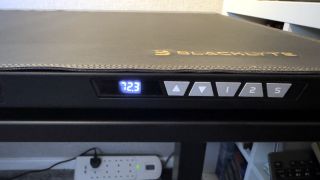
There are only two memory presets available, fewer than the Secretlab Magnus Pro, but I suspect that would be more than enough for most users. There’s a handy button at the far right that locks the buttons from being accidentally pressed, but the desk is more than wide enough to ensure that this is unlikely to ever occur.
On the other side of the front panel, there are five buttons for enabling and controlling the RGB lighting: one each for the front strip, the side strips, and the corner lights. Blacklyte claims that the corner lights are magnetic with a “collision-resistant structure” and that they have “built-in RGB fantasy LED lights, support[ing] 1600W true color display.”
(Image credit: Future)
I can’t vouch for the actual power output of all the lighting but it’s certainlyverybright. In fact, the front strip is so bright, that it’s very distracting when you’re sat at the desk, working or gaming. One can alter the lights through three modes (yellow, green, red, blue, or pulsing between them all) but you can’t change the brightness at all, via the desk’s controls. Fortunately, switching the front strip off makes the desk far more pleasurable to use.
Blacklyte also claims that the lights can “sync with PC programs and match gaming algorithms to enhance gaming experience” via a lengthy USB Type-A cable, but the PC I connected it to didn’t recognise them in any way. Confusingly, the manual actually says that the “host computer cable” is for “desktop height-adjustment control.”
Image1of2(Image credit: Blacklyte)(Image credit: Blacklyte)
Image1of2(Image credit: Blacklyte)(Image credit: Blacklyte)
Image1of2
(Image credit: Blacklyte)(Image credit: Blacklyte)
(Image credit: Blacklyte)(Image credit: Blacklyte)
(Image credit: Blacklyte)
(Image credit: Blacklyte)
(Image credit: Blacklyte)
(Image credit: Blacklyte)
(Image credit: Blacklyte)

(Image credit: Blacklyte)
(Image credit: Blacklyte)
(Image credit: Blacklyte)
(Image credit: Blacklyte)
(Image credit: Blacklyte)
While the mistake in missing this is mine, I do feel that the software deserves a far more prominent position on Blacklyte’s site, given its importance in controlling the desk’s features.
Speaking of cables, the Atlas has a large section at the rear of the desk that can flip open, revealing a cavernous tray for hiding cables. It’s a bit too large and if you don’t like having monitors right in front of your face, then they need to rest on top of the tray’s lid. I can imagine that having to move screens about every time you want to get into the tray would become irksome rather quickly.
(Image credit: Future)
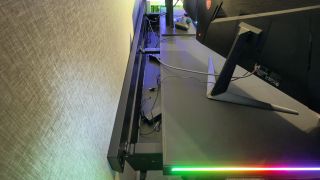
There’s a reasonably sized gap between the tray lid and the desk surface itself which should, in theory, permit the use of monitor arms. However, the mounting clamps of such devices would end up digging into the mouse pad and permanently marking or even cutting it.
You could try fitting arms to the cable tray’s lid but then you wouldn’t be able to open it.
One good thing about the Atlas is that the mains power cable that supplies electricity for the lights and lifting motors plugs into a socket at the bottom of the left leg. At the top of the same leg, there’s a general power outlet that you plug the desk’s power controller into. However, one can plug an extension strip into that socket instead and then power up the desk via the strip.
Buy if…✅ You enjoy having an RGB festival in your room:The Atlas' light strips are as bright and vivid as you could ever possibly want
Buy if…
✅ You enjoy having an RGB festival in your room:The Atlas' light strips are as bright and vivid as you could ever possibly want
✅ You enjoy having an RGB festival in your room:The Atlas' light strips are as bright and vivid as you could ever possibly want
Don’t buy if…❌ You want value for money:At $999, the Atlas is a lot of money for a desk, especially when the competition offers the same features for less money
Don’t buy if…
❌ You want value for money:At $999, the Atlas is a lot of money for a desk, especially when the competition offers the same features for less money
❌ You want value for money:At $999, the Atlas is a lot of money for a desk, especially when the competition offers the same features for less money
This allows you to place the strip in the cable tray, providing sockets to power monitors, accessories, and potentially even your gaming PC. Blacklyte states that the outlet and associated wiring have a current limit of 10 amps, so you can’t massively load it up, but it does mean that you can avoid having wires dangling down the back of the desk.
That also avoids the potential issue of having the desk hoisting any wires or electrical strips off the floor when it’s at its maximum height.
Taken as a whole, there’s a lot to like with the Blacklyte Atlas gaming desk. It’s incredibly solid and spacious, easy to build (hefty weight aside), and the mouse pad surface is genuinely comfortable. Unfortunately, there are just as many aspects tonotlike about the Atlas, such as the build quality in places and the fiddly software.
But what doesn’t help is the price—it’s a little too expensive for what it is, and if one treats it as a Secretlab Magnus Pro clone, then you have to ask why pay more for the Atlas if it’s not better. If you can find one on sale, with a healthy discount, then it’s worth considering but I’d prefer the Blacklyte to just give it a more sensible price permanently, undercutting the competition to make it far more tempting.
The Verdict72Read our review policyBlacklyte AtlasThe Blacklyte Atlas is a solidly built, huge gaming desk. Its powered legs are smooth and quiet, and there’s tons of room to hide cables and other goodies. It’s just way too expensive for what it is.
The Verdict
The Verdict
72Read our review policyBlacklyte AtlasThe Blacklyte Atlas is a solidly built, huge gaming desk. Its powered legs are smooth and quiet, and there’s tons of room to hide cables and other goodies. It’s just way too expensive for what it is.
72Read our review policy
72
Blacklyte AtlasThe Blacklyte Atlas is a solidly built, huge gaming desk. Its powered legs are smooth and quiet, and there’s tons of room to hide cables and other goodies. It’s just way too expensive for what it is.
Blacklyte Atlas
The Blacklyte Atlas is a solidly built, huge gaming desk. Its powered legs are smooth and quiet, and there’s tons of room to hide cables and other goodies. It’s just way too expensive for what it is.
TOPICSHardware
TOPICS
Latest
Assassin’s Creed Shadows takes a run at improving parkour, as Ubisoft strives to make the system less ‘like a gas pedal’
Assassin’s Creed Shadows takes a run at improving parkour, as Ubisoft strives to make the system less ‘like a gas pedal’
Today’s Wordle answer for Saturday, January 11
Today’s Wordle answer for Saturday, January 11
See more latest►
Most PopularTurtle Beach Stealth Pivot reviewIkea Matchspel gaming chair reviewASRock DeskMini X600 reviewZotac Zbox Magnus EN374070C reviewMinisforum AtomMan G7 Ti reviewSamsung Galaxy Book4 Ultra reviewNoctua NH-D15 G2 reviewGulikit KK3 Max reviewBallionaire reviewMarvel Rivals reviewBe Quiet! Dark Rock 5 review
Most PopularTurtle Beach Stealth Pivot reviewIkea Matchspel gaming chair reviewASRock DeskMini X600 reviewZotac Zbox Magnus EN374070C reviewMinisforum AtomMan G7 Ti reviewSamsung Galaxy Book4 Ultra reviewNoctua NH-D15 G2 reviewGulikit KK3 Max reviewBallionaire reviewMarvel Rivals reviewBe Quiet! Dark Rock 5 review
Most PopularTurtle Beach Stealth Pivot reviewIkea Matchspel gaming chair reviewASRock DeskMini X600 reviewZotac Zbox Magnus EN374070C reviewMinisforum AtomMan G7 Ti reviewSamsung Galaxy Book4 Ultra reviewNoctua NH-D15 G2 reviewGulikit KK3 Max reviewBallionaire reviewMarvel Rivals reviewBe Quiet! Dark Rock 5 review
Most Popular
Turtle Beach Stealth Pivot review
Ikea Matchspel gaming chair review
ASRock DeskMini X600 review
Zotac Zbox Magnus EN374070C review
Minisforum AtomMan G7 Ti review
Samsung Galaxy Book4 Ultra review
Noctua NH-D15 G2 review
Gulikit KK3 Max review
Ballionaire review
Marvel Rivals review
Be Quiet! Dark Rock 5 review
HARDWARE BUYING GUIDESLATEST GAME REVIEWS1Best Steam Deck accessories in Australia for 2025: Our favorite docks, powerbanks and gamepads2Best graphics card for laptops: the mobile GPUs I’d want in my next gaming laptop3Best mini PCs in 2025: The compact computers I love the most4Best 14-inch gaming laptop: The top compact gaming laptops I’ve held in these hands5Best Mini-ITX motherboards in 2025: My pick from all the mini mobo marvels I’ve tested1Thank Goodness You’re Here! review2Shiren the Wanderer: The Mystery Dungeon of Serpentcoil Island review3WD Black SN850X 8 TB NVMe SSD review4Ikea Utespelare desk review5Asus ROG Harpe Ace Mini wireless mouse review
HARDWARE BUYING GUIDESLATEST GAME REVIEWS1Best Steam Deck accessories in Australia for 2025: Our favorite docks, powerbanks and gamepads2Best graphics card for laptops: the mobile GPUs I’d want in my next gaming laptop3Best mini PCs in 2025: The compact computers I love the most4Best 14-inch gaming laptop: The top compact gaming laptops I’ve held in these hands5Best Mini-ITX motherboards in 2025: My pick from all the mini mobo marvels I’ve tested1Thank Goodness You’re Here! review2Shiren the Wanderer: The Mystery Dungeon of Serpentcoil Island review3WD Black SN850X 8 TB NVMe SSD review4Ikea Utespelare desk review5Asus ROG Harpe Ace Mini wireless mouse review
HARDWARE BUYING GUIDESLATEST GAME REVIEWS1Best Steam Deck accessories in Australia for 2025: Our favorite docks, powerbanks and gamepads2Best graphics card for laptops: the mobile GPUs I’d want in my next gaming laptop3Best mini PCs in 2025: The compact computers I love the most4Best 14-inch gaming laptop: The top compact gaming laptops I’ve held in these hands5Best Mini-ITX motherboards in 2025: My pick from all the mini mobo marvels I’ve tested1Thank Goodness You’re Here! review2Shiren the Wanderer: The Mystery Dungeon of Serpentcoil Island review3WD Black SN850X 8 TB NVMe SSD review4Ikea Utespelare desk review5Asus ROG Harpe Ace Mini wireless mouse review
HARDWARE BUYING GUIDESLATEST GAME REVIEWS1Best Steam Deck accessories in Australia for 2025: Our favorite docks, powerbanks and gamepads2Best graphics card for laptops: the mobile GPUs I’d want in my next gaming laptop3Best mini PCs in 2025: The compact computers I love the most4Best 14-inch gaming laptop: The top compact gaming laptops I’ve held in these hands5Best Mini-ITX motherboards in 2025: My pick from all the mini mobo marvels I’ve tested1Thank Goodness You’re Here! review2Shiren the Wanderer: The Mystery Dungeon of Serpentcoil Island review3WD Black SN850X 8 TB NVMe SSD review4Ikea Utespelare desk review5Asus ROG Harpe Ace Mini wireless mouse review
HARDWARE BUYING GUIDESLATEST GAME REVIEWS
1Best Steam Deck accessories in Australia for 2025: Our favorite docks, powerbanks and gamepads
1Best Steam Deck accessories in Australia for 2025: Our favorite docks, powerbanks and gamepads
1
Best Steam Deck accessories in Australia for 2025: Our favorite docks, powerbanks and gamepads
2Best graphics card for laptops: the mobile GPUs I’d want in my next gaming laptop
2Best graphics card for laptops: the mobile GPUs I’d want in my next gaming laptop
2
Best graphics card for laptops: the mobile GPUs I’d want in my next gaming laptop
3Best mini PCs in 2025: The compact computers I love the most
3Best mini PCs in 2025: The compact computers I love the most
3
Best mini PCs in 2025: The compact computers I love the most
4Best 14-inch gaming laptop: The top compact gaming laptops I’ve held in these hands
4Best 14-inch gaming laptop: The top compact gaming laptops I’ve held in these hands
4
Best 14-inch gaming laptop: The top compact gaming laptops I’ve held in these hands
5Best Mini-ITX motherboards in 2025: My pick from all the mini mobo marvels I’ve tested
5Best Mini-ITX motherboards in 2025: My pick from all the mini mobo marvels I’ve tested
5
Best Mini-ITX motherboards in 2025: My pick from all the mini mobo marvels I’ve tested
1Thank Goodness You’re Here! review
1Thank Goodness You’re Here! review
1
Thank Goodness You’re Here! review
2Shiren the Wanderer: The Mystery Dungeon of Serpentcoil Island review
2Shiren the Wanderer: The Mystery Dungeon of Serpentcoil Island review
2
Shiren the Wanderer: The Mystery Dungeon of Serpentcoil Island review
3WD Black SN850X 8 TB NVMe SSD review
3WD Black SN850X 8 TB NVMe SSD review
3
WD Black SN850X 8 TB NVMe SSD review
4Ikea Utespelare desk review
4Ikea Utespelare desk review
4
Ikea Utespelare desk review
5Asus ROG Harpe Ace Mini wireless mouse review
5Asus ROG Harpe Ace Mini wireless mouse review
5
Asus ROG Harpe Ace Mini wireless mouse review
