Our VerdictCherry’s new switch is a marked improvement over its extremely popular and widespread predecessor, and the Xtrfy K5V2 keyboard is a lavishly lit and sturdy home for them. Though there are nicer feeling, and cheaper, compact keyboards on the market. Nothing about the Xtrfy makes it sing for me.
Our VerdictCherry’s new switch is a marked improvement over its extremely popular and widespread predecessor, and the Xtrfy K5V2 keyboard is a lavishly lit and sturdy home for them. Though there are nicer feeling, and cheaper, compact keyboards on the market. Nothing about the Xtrfy makes it sing for me.
Our Verdict
Our Verdict
Cherry’s new switch is a marked improvement over its extremely popular and widespread predecessor, and the Xtrfy K5V2 keyboard is a lavishly lit and sturdy home for them. Though there are nicer feeling, and cheaper, compact keyboards on the market. Nothing about the Xtrfy makes it sing for me.
ForSteady switchGood typing experienceGreat for gamingSoftware freeHot-swappableAgainstRGB lighting controls are finickyCheaper wired compact boards available
ForSteady switchGood typing experienceGreat for gamingSoftware freeHot-swappable
AgainstRGB lighting controls are finickyCheaper wired compact boards available
PC Gamer’s got your backOur experienced team dedicates many hours to every review, to really get to the heart of what matters most to you.Find out more about how we evaluate games and hardware.
PC Gamer’s got your backOur experienced team dedicates many hours to every review, to really get to the heart of what matters most to you.Find out more about how we evaluate games and hardware.
The MX2A Reds are an improvement in a number of ways. First and foremost, they’re factory lubed. If you’re a regular reader of our keyboard coverage here at PC Gamer, you’ll know that lube makes for smoother switches with a satisfying clack. That’s certainly true of the MX2A Reds, too. Each key glides effortlessly with each strike from my fingers.
The MX2A switches come with “pin point ring lubrication” applied to the new ‘socket dome’ in the bottom housing. If that sounds like jargon, it sorta is, but in effect means each switch leaves the factory floor with a big dollop of grease in it, and which should stick around for the lifetime of the switch. For comparison to some original MX Reds, I’ve grabbed my Corsair K65 off the shelf. The MX2A switches in the Xtrfy lack the scratchiness and rattle that’s noticeable on the admittedly ageing Corsair.
Other upgrades with the MX2A switches factor into the more consistent key press, including: a new barrel spring, housing socket dome, guidance ribs, and stem geometry. That last one is important, as the MX2A are significantly less wobbly than older MX Reds.
Xtrfy K5V2 specs(Image credit: Future)Size:65%Connectivity:USB Type-C to Type-AKeycaps:ABSSwitches:Cherry MX2A RedHot-swappable:YesMedia controls:Shortcuts via Function keyLighting:RGB lighting modes + onboard controlSoftware:NonePrice:$140/£139/€139
Xtrfy K5V2 specs
(Image credit: Future)Size:65%Connectivity:USB Type-C to Type-AKeycaps:ABSSwitches:Cherry MX2A RedHot-swappable:YesMedia controls:Shortcuts via Function keyLighting:RGB lighting modes + onboard controlSoftware:NonePrice:$140/£139/€139
(Image credit: Future)
Size:65%Connectivity:USB Type-C to Type-AKeycaps:ABSSwitches:Cherry MX2A RedHot-swappable:YesMedia controls:Shortcuts via Function keyLighting:RGB lighting modes + onboard controlSoftware:NonePrice:$140/£139/€139
All of those changes make for a much smoother key press than with previous Cherry MX Red switches. I’d also say they’re generally less clangey, though it’s hard to put a value to how much of that is the new switch itself or the keycaps and stabilisers used on this exact Xtrfy model. Overall it’s a much better switch than the original MX Reds. That’s good news for gamers, as we’re likely to see a lot of them end up in gaming keyboards from multiple brands.
But how does the typing experience on the Cherry Xtrfy K5V2 compare to our favourite keyboard of the moment, theROG Strix Scope II 96 Wireless? To put it simply, I much prefer the Scope II 96 for typing. The lack of wobble in the PBT keycaps through the ROG NX Snow switches is as impressive now as the day I first tried it. Considering the feel of the last-generation Cherry MX Reds and a few other keyboards I have close to hand, however, the snappy and lightweight keypress of the Cherry remains pretty darn good overall.
Image1of3(Image credit: Future)(Image credit: Future)(Image credit: Future)
Image1of3(Image credit: Future)(Image credit: Future)(Image credit: Future)
Image1of3
(Image credit: Future)(Image credit: Future)(Image credit: Future)
(Image credit: Future)(Image credit: Future)(Image credit: Future)
(Image credit: Future)
(Image credit: Future)
(Image credit: Future)
(Image credit: Future)
(Image credit: Future)

(Image credit: Future)
(Image credit: Future)
(Image credit: Future)
(Image credit: Future)
(Image credit: Future)
(Image credit: Future)
(Image credit: Future)
(Image credit: Future)
(Image credit: Future)
(Image credit: Future)
Onwards to the keyboard itself. This is a compact slab with a 65% layout. That means it’s only 325 x 112 mm and doesn’t come with a numpad or the usual cluster above the arrow keys. It does retain arrow keys, however, along with Page Down, Page Up, and Delete keys. The rest of the missing keys can be accessed via the many, many shortcuts on this keyboard.
End, Home, and the F1 – F12 keys are accessed with a press of the Function key. To make up for the lack of physical media keys there are some shortcuts thrown in along the top alphabet row. All pretty sensible shortcuts for any compact keyboard. There are also shortcuts for moving and using the mouse, which are less common but could come in handy.
Image1of2(Image credit: Future)(Image credit: Future)
Image1of2(Image credit: Future)(Image credit: Future)
Image1of2
(Image credit: Future)(Image credit: Future)
(Image credit: Future)(Image credit: Future)
(Image credit: Future)
(Image credit: Future)
(Image credit: Future)
(Image credit: Future)
(Image credit: Future)
(Image credit: Future)
(Image credit: Future)
(Image credit: Future)
(Image credit: Future)
(Image credit: Future)
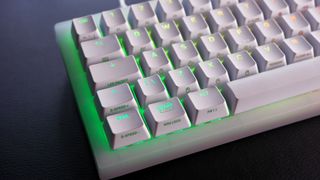
What I find a little overwhelming are the many more shortcut keys for functions with unclear intentions. There’s one key of mysterious machination with a fingerprint blazoned on it, another says K-LED. BG Color, K-Slow, K-Fast, K-Mask, E-speed+ … the list goes on. All those I’ve just mentioned control the RGB lighting on the board, and the reason why there are so many pre-programmed keys to do so is due to the lack of dedicated Cherry software to control this keyboard. That may appeal to some, though if you’re looking for simplicity then I’d look elsewhere.
Programming the RGB lighting is a process of trial and error. You hold down one key, hit another, and maybe the key you’re holding changes in colour. That means you’re changing the overall lighting mode, probably, it might also mean you’re changing the colour the keys light up as you type. I’m yet to entirely suss it out. The instruction manual loosely explains which key does what, but doesn’t explain how exactly they all work together. After trying to change a static colour on a handful of keys, I ended up settling on one of the preset lighting modes instead.
Image1of3(Image credit: Future)(Image credit: Future)(Image credit: Future)
Image1of3(Image credit: Future)(Image credit: Future)(Image credit: Future)
Image1of3
(Image credit: Future)(Image credit: Future)(Image credit: Future)
(Image credit: Future)(Image credit: Future)(Image credit: Future)
(Image credit: Future)
(Image credit: Future)
(Image credit: Future)
(Image credit: Future)
(Image credit: Future)
(Image credit: Future)
(Image credit: Future)
(Image credit: Future)
(Image credit: Future)
(Image credit: Future)
(Image credit: Future)
(Image credit: Future)
(Image credit: Future)
(Image credit: Future)
(Image credit: Future)
Buy if…✅ You don’t want another piece of lighting software on your PC:Forget the proprietary apps to control RGB lighting across your peripherals, the Cherry Xtrfy K5V2 takes care of all that with some keyboard shortcuts. Though the learning curve is a lil' steep.✅ You love a Cherry MX Red switch and you want more of the same:Like the Red switch you know only materially better. That’s the MXA2 Red switch included in the Xtrfy K5V2.
Buy if…
✅ You don’t want another piece of lighting software on your PC:Forget the proprietary apps to control RGB lighting across your peripherals, the Cherry Xtrfy K5V2 takes care of all that with some keyboard shortcuts. Though the learning curve is a lil' steep.✅ You love a Cherry MX Red switch and you want more of the same:Like the Red switch you know only materially better. That’s the MXA2 Red switch included in the Xtrfy K5V2.
✅ You don’t want another piece of lighting software on your PC:Forget the proprietary apps to control RGB lighting across your peripherals, the Cherry Xtrfy K5V2 takes care of all that with some keyboard shortcuts. Though the learning curve is a lil' steep.
✅ You love a Cherry MX Red switch and you want more of the same:Like the Red switch you know only materially better. That’s the MXA2 Red switch included in the Xtrfy K5V2.
Don’t buy if…❌ You don’t mind some software:The onboard controls are fine, but they’re a bit clumsy compared to the full control available via an app.❌ You need a cheap compact mechanical keyboard:There are plenty of wired compact keyboards of a similar size for a lot less money than this, but you won’t get the newer Cherry switches inside just yet.
Don’t buy if…
❌ You don’t mind some software:The onboard controls are fine, but they’re a bit clumsy compared to the full control available via an app.❌ You need a cheap compact mechanical keyboard:There are plenty of wired compact keyboards of a similar size for a lot less money than this, but you won’t get the newer Cherry switches inside just yet.
❌ You don’t mind some software:The onboard controls are fine, but they’re a bit clumsy compared to the full control available via an app.
❌ You need a cheap compact mechanical keyboard:There are plenty of wired compact keyboards of a similar size for a lot less money than this, but you won’t get the newer Cherry switches inside just yet.
The keycaps are made from ABS plastic, which feels like a bit of a miss for the money, but they’re easily replaceable thanks to MX cross stems. The switches themselves are also hot-swappable and the USB Type-C to Type-A cable removable. All of which should see this keyboard last a long time—at least until those switches wear out around the 100 millionth click mark.
You’ll have to part with$140/£139/€139to get yourself in on the Xtrfy action. That’s cheaper than theROG Falchion RX Low-ProfileI recently reviewed, which is a similarly compact board, though the Xtrfy has left less of an impression on me. It’s a neatly packaged gaming keyboard with plenty of functionality for its lack of software, which for some may be all they need to hear, but it nevertheless feels a lot of money for fewer keys than most.
The Verdict71Read our review policyCherry Xtrfy K5V2 reviewCherry’s new switch is a marked improvement over its extremely popular and widespread predecessor, and the Xtrfy K5V2 keyboard is a lavishly lit and sturdy home for them. Though there are nicer feeling, and cheaper, compact keyboards on the market. Nothing about the Xtrfy makes it sing for me.
The Verdict
The Verdict
71Read our review policyCherry Xtrfy K5V2 reviewCherry’s new switch is a marked improvement over its extremely popular and widespread predecessor, and the Xtrfy K5V2 keyboard is a lavishly lit and sturdy home for them. Though there are nicer feeling, and cheaper, compact keyboards on the market. Nothing about the Xtrfy makes it sing for me.
71Read our review policy
71
Cherry Xtrfy K5V2 reviewCherry’s new switch is a marked improvement over its extremely popular and widespread predecessor, and the Xtrfy K5V2 keyboard is a lavishly lit and sturdy home for them. Though there are nicer feeling, and cheaper, compact keyboards on the market. Nothing about the Xtrfy makes it sing for me.
Cherry Xtrfy K5V2 review
Cherry’s new switch is a marked improvement over its extremely popular and widespread predecessor, and the Xtrfy K5V2 keyboard is a lavishly lit and sturdy home for them. Though there are nicer feeling, and cheaper, compact keyboards on the market. Nothing about the Xtrfy makes it sing for me.
TOPICSHardware
TOPICS
More about gaming desktopsAsus ROG Falchion RX Low Profile reviewCorsair K65 Plus reviewLatestI tried a sim racing rig that generates ‘wind’ at CES 2025 and it’s claimed to help keep VR nausea at baySee more latest►
More about gaming desktopsAsus ROG Falchion RX Low Profile reviewCorsair K65 Plus reviewLatestI tried a sim racing rig that generates ‘wind’ at CES 2025 and it’s claimed to help keep VR nausea at baySee more latest►
More about gaming desktopsAsus ROG Falchion RX Low Profile reviewCorsair K65 Plus review
More about gaming desktops
Asus ROG Falchion RX Low Profile reviewCorsair K65 Plus review
Asus ROG Falchion RX Low Profile review
Asus ROG Falchion RX Low Profile review
Corsair K65 Plus review
Corsair K65 Plus review
LatestI tried a sim racing rig that generates ‘wind’ at CES 2025 and it’s claimed to help keep VR nausea at baySee more latest►
Latest
I tried a sim racing rig that generates ‘wind’ at CES 2025 and it’s claimed to help keep VR nausea at bay
I tried a sim racing rig that generates ‘wind’ at CES 2025 and it’s claimed to help keep VR nausea at bay
I tried a sim racing rig that generates ‘wind’ at CES 2025 and it’s claimed to help keep VR nausea at bay
See more latest►
Most PopularTurtle Beach Stealth Pivot reviewIkea Matchspel gaming chair reviewASRock DeskMini X600 reviewZotac Zbox Magnus EN374070C reviewMinisforum AtomMan G7 Ti reviewSamsung Galaxy Book4 Ultra reviewNoctua NH-D15 G2 reviewGulikit KK3 Max reviewBallionaire reviewMarvel Rivals reviewBe Quiet! Dark Rock 5 review
Most PopularTurtle Beach Stealth Pivot reviewIkea Matchspel gaming chair reviewASRock DeskMini X600 reviewZotac Zbox Magnus EN374070C reviewMinisforum AtomMan G7 Ti reviewSamsung Galaxy Book4 Ultra reviewNoctua NH-D15 G2 reviewGulikit KK3 Max reviewBallionaire reviewMarvel Rivals reviewBe Quiet! Dark Rock 5 review
Most PopularTurtle Beach Stealth Pivot reviewIkea Matchspel gaming chair reviewASRock DeskMini X600 reviewZotac Zbox Magnus EN374070C reviewMinisforum AtomMan G7 Ti reviewSamsung Galaxy Book4 Ultra reviewNoctua NH-D15 G2 reviewGulikit KK3 Max reviewBallionaire reviewMarvel Rivals reviewBe Quiet! Dark Rock 5 review
Most Popular
Turtle Beach Stealth Pivot review
Ikea Matchspel gaming chair review
ASRock DeskMini X600 review
Zotac Zbox Magnus EN374070C review
Minisforum AtomMan G7 Ti review
Samsung Galaxy Book4 Ultra review
Noctua NH-D15 G2 review
Gulikit KK3 Max review
Ballionaire review
Marvel Rivals review
Be Quiet! Dark Rock 5 review
HARDWARE BUYING GUIDESLATEST GAME REVIEWS1Best Steam Deck accessories in Australia for 2025: Our favorite docks, powerbanks and gamepads2Best graphics card for laptops: the mobile GPUs I’d want in my next gaming laptop3Best mini PCs in 2025: The compact computers I love the most4Best 14-inch gaming laptop: The top compact gaming laptops I’ve held in these hands5Best Mini-ITX motherboards in 2025: My pick from all the mini mobo marvels I’ve tested1Thank Goodness You’re Here! review: An anarchic treasure trove of jokes and skits2Shiren the Wanderer: The Mystery Dungeon of Serpentcoil Island review—like juggling chainsaws on horseback3WD Black SN850X 8 TB NVMe SSD review4Ikea Utespelare desk review5Asus ROG Harpe Ace Mini wireless mouse review
HARDWARE BUYING GUIDESLATEST GAME REVIEWS1Best Steam Deck accessories in Australia for 2025: Our favorite docks, powerbanks and gamepads2Best graphics card for laptops: the mobile GPUs I’d want in my next gaming laptop3Best mini PCs in 2025: The compact computers I love the most4Best 14-inch gaming laptop: The top compact gaming laptops I’ve held in these hands5Best Mini-ITX motherboards in 2025: My pick from all the mini mobo marvels I’ve tested1Thank Goodness You’re Here! review: An anarchic treasure trove of jokes and skits2Shiren the Wanderer: The Mystery Dungeon of Serpentcoil Island review—like juggling chainsaws on horseback3WD Black SN850X 8 TB NVMe SSD review4Ikea Utespelare desk review5Asus ROG Harpe Ace Mini wireless mouse review
HARDWARE BUYING GUIDESLATEST GAME REVIEWS1Best Steam Deck accessories in Australia for 2025: Our favorite docks, powerbanks and gamepads2Best graphics card for laptops: the mobile GPUs I’d want in my next gaming laptop3Best mini PCs in 2025: The compact computers I love the most4Best 14-inch gaming laptop: The top compact gaming laptops I’ve held in these hands5Best Mini-ITX motherboards in 2025: My pick from all the mini mobo marvels I’ve tested1Thank Goodness You’re Here! review: An anarchic treasure trove of jokes and skits2Shiren the Wanderer: The Mystery Dungeon of Serpentcoil Island review—like juggling chainsaws on horseback3WD Black SN850X 8 TB NVMe SSD review4Ikea Utespelare desk review5Asus ROG Harpe Ace Mini wireless mouse review
HARDWARE BUYING GUIDESLATEST GAME REVIEWS1Best Steam Deck accessories in Australia for 2025: Our favorite docks, powerbanks and gamepads2Best graphics card for laptops: the mobile GPUs I’d want in my next gaming laptop3Best mini PCs in 2025: The compact computers I love the most4Best 14-inch gaming laptop: The top compact gaming laptops I’ve held in these hands5Best Mini-ITX motherboards in 2025: My pick from all the mini mobo marvels I’ve tested1Thank Goodness You’re Here! review: An anarchic treasure trove of jokes and skits2Shiren the Wanderer: The Mystery Dungeon of Serpentcoil Island review—like juggling chainsaws on horseback3WD Black SN850X 8 TB NVMe SSD review4Ikea Utespelare desk review5Asus ROG Harpe Ace Mini wireless mouse review
HARDWARE BUYING GUIDESLATEST GAME REVIEWS
1Best Steam Deck accessories in Australia for 2025: Our favorite docks, powerbanks and gamepads
1Best Steam Deck accessories in Australia for 2025: Our favorite docks, powerbanks and gamepads
1
Best Steam Deck accessories in Australia for 2025: Our favorite docks, powerbanks and gamepads
2Best graphics card for laptops: the mobile GPUs I’d want in my next gaming laptop
2Best graphics card for laptops: the mobile GPUs I’d want in my next gaming laptop
2
Best graphics card for laptops: the mobile GPUs I’d want in my next gaming laptop
3Best mini PCs in 2025: The compact computers I love the most
3Best mini PCs in 2025: The compact computers I love the most
3
Best mini PCs in 2025: The compact computers I love the most
4Best 14-inch gaming laptop: The top compact gaming laptops I’ve held in these hands
4Best 14-inch gaming laptop: The top compact gaming laptops I’ve held in these hands
4
Best 14-inch gaming laptop: The top compact gaming laptops I’ve held in these hands
5Best Mini-ITX motherboards in 2025: My pick from all the mini mobo marvels I’ve tested
5Best Mini-ITX motherboards in 2025: My pick from all the mini mobo marvels I’ve tested
5
Best Mini-ITX motherboards in 2025: My pick from all the mini mobo marvels I’ve tested
1Thank Goodness You’re Here! review: An anarchic treasure trove of jokes and skits
1Thank Goodness You’re Here! review: An anarchic treasure trove of jokes and skits
1
Thank Goodness You’re Here! review: An anarchic treasure trove of jokes and skits
2Shiren the Wanderer: The Mystery Dungeon of Serpentcoil Island review—like juggling chainsaws on horseback
2Shiren the Wanderer: The Mystery Dungeon of Serpentcoil Island review—like juggling chainsaws on horseback
2
Shiren the Wanderer: The Mystery Dungeon of Serpentcoil Island review—like juggling chainsaws on horseback
3WD Black SN850X 8 TB NVMe SSD review
3WD Black SN850X 8 TB NVMe SSD review
3
WD Black SN850X 8 TB NVMe SSD review
4Ikea Utespelare desk review
4Ikea Utespelare desk review
4
Ikea Utespelare desk review
5Asus ROG Harpe Ace Mini wireless mouse review
5Asus ROG Harpe Ace Mini wireless mouse review
5
Asus ROG Harpe Ace Mini wireless mouse review
