Our VerdictCorsair hasn’t skimped out with the K65 Plus, covering all the basics you’d want from a compact keyboard of that price, and topping it with a great battery life. The company assumes non-linear switch likers already have key switches ready to swap out, though, offering zero alternatives to its own linear reds with the base model.ForSubtle, non-gamery lookProgrammable media control dialMac/Windows switchHot swappable key switchesPractical size w/o squishing in keysQuick to wakeAgainstKeycaps have no shine throughLimited base key switch optionsNomenclature is sillyPC Gamer’s got your backOur experienced team dedicates many hours to every review, to really get to the heart of what matters most to you.Find out more about how we evaluate games and hardware.Enter the Corsair K65 Plus, the newest and once again confusingly named keyboard from Corsair. Although the name might suggest that the K65 Plus is a 65% board ‘plus’ some extras, it’s actually just a 75% keyboard. Don’t hold the backwards nomenclature against it, though. There’s otherwise a heck of a lot to like about this compact keyboard. In a world where almost all thebest wireless gaming keyboardshave hundreds of hours of battery life, hot-swappable key switches and dedicated media controls, it’ll have to pull something pretty special to get on the list, though.Out of the box the K65 Plus looks like a lot of the other compact boards we’ve put on our best of list. It’s not plagued with so much of the gamery aesthetic that some boards are, as it comes with a two-tone grey keycap set, and a backplate and spacebar decorated with Corsair’s subtle polygonal pattern. There’s a touch of metallic silver with the escape key—adorned with the Corsair ship logo—and a swanky metal dial in the top right that gives it some extra flair. You can tell it’s going to be a high-end board just from the aesthetic, but there’s more hiding under the hood.What you can’t tell from just looking at the K65 Plus is that it comes with hot-swappable key switches. If you aren’t one for linear switches, there are sadly no other options for different key switches with the base model. So yeah, hot-swap switches are a great feature, but if you’re still saving up for new switches and can’t stand linears, the K65 Plus isn’t going to be the best option for you. If you’ve already got some lying around, the likelihood is they’ll fit the north-facing 5 pin slots, as these will fit most standard key switches. And if you just want to swap the caps, you’re looking at the common-as-muck cross key stem and a Cherry profile. All pretty standard, so there’s very little stress when it comes to swapping out.The MLX Red linear key switches Corsair offers with base K65 Plus are super satisfying. They’re soft with a good level of bounceback, and the 45g actuation force required down to just 1.9mm means I really don’t have to press hard to get them going. Couple that with the soft silicone and foam lining and this is a damn quiet keyboard, too.K65 Plus specs(Image credit: Future)Size:75%Base:Hot-swappableSwitches:Corsair MLX Red LinearBacklighting:Per keyAnti-ghosting:N-key rolloverPolling rate:1,000HzDimensions:32 x 13.5 x 3.5mmWeight:942g | 33oz (w/out cable)Connections:2.4GHz | USB Type-C | BluetoothCable:180mm (braided)Battery life:266-hours (w/out lighting)Warranty:2 yearsPrice:£150|$160Typing on this keyboard is a joy, and shifting around in-game feels nice and smooth. Not to mention the stabilisers are sturdy, and tapping on the corner of the spacebar works just as well as the middle.The most non-standard thing about the keyboard’s layout is its separate Delete key sitting above the Backspace, while the Home, Page Up, and Page Down keys are neatly tucked in a column to the right. It takes a little getting used to, and I’m sure I’ve smashed Home more times than I have Delete when typing in a rush, but it’s fine once you’ve gotten used to it. These are the kinds of things you have to suffer for the benefits a compact keyboard brings. Thankfully the fact it’s a 75% board means you get the separate arrow keys, while keeping the size to a minimum. It means less faffing with the function key like you would with a 60% board.The addition of dedicated media controls in the form of a dial is much appreciated, and is programmable even without downloading the iCue software. Whether in or outside of the software, however, you’re stuck with only four function options: volume, page scrolling (horizontal/vertical), brightness and zoom. And while it’s a little disappointing that you can’t change what clicking the dial does, it’s nice to see a keyboard that lets you go a little deeper into the lighting and other functions without the need for dedicated software. Personally, I’ve never had an issue with the iCue software itself. It sometimes eats up around 2% of my CPU usage, but it’s got an easy-to-understand interface and the added benefit of PC monitoring graphs. In fact, for those with afull Corsair iCue Link cooling setupit does so much more than just reprogram buttons.Image1of3(Image credit: Future)(Image credit: Future)(Image credit: Future)The Corsair K65 Plus is super portable being so compact, and while there is some heft to it it’s still possible to tuck it into a backpack and take it away with you. Double so with its Mac and Windows connectivity switch and a marketed unlit battery life of around 266 hours. I’ve still got the 180mm braided cable tucked into the box since it came four days ago, and I’ve not had to plug it in once, even with the lighting going haywire. It’s safe to say it wouldn’t last 266 hours with the lights on, however. Once it hits the battery warning, the lights automatically switch off and won’t come back on until you plug it in. It’s a bit heavy handed but it keeps it going a little longer.Changing the programmed settings and lighting on the fly is easy. There are four onboard profiles that you can switch through with the function keys and there’s a button on the side to switch the lighting off altogether. Not that you’d want to. The per-key LED’s handle colours I’ve seen plenty of peripherals stumble with, and it looks super vibrant with the slight shine on the backplate helping intensify it. It’s a bit sad that the keycaps don’t allow for shine through on the lettering, but they’re at least PBT so they won’t get shiny as quick as ABS and should last longer, and there’s always the option to switch them out.(Image credit: Future)Buy if…✅ You love having separate directional keys:This is a great size keyboard with the directional keys still intact. They’re not all squished together and messing with the layout, either.✅ You change devices a lot: The K65 Plus makes it super easy to switch between devices and even allows for up to three Bluetooth devices to be connected at once.Don’t buy if…❌ You’re a non-linear switch liker trying to save money:You will have to spend out on a whole new set of key switches, since there’s no option to nab anything but linear switches with the base model.❌ You need macro keys:This is a little more barebones than some, bar the media dial, so don’t expect too many extra gamer-centric features bar standard 1000Hz polling, NKRO and anti-ghosting.All in all the K65 Plus is a smashing and sturdy board with a subtle aesthetic and loads of the worthwhile features expected from high-end boards. It doesn’t push too far into the strange compact layout territory and with a price that matches the features. The main disappointments for me are its lack of key switch options with the base board, and the limited functionality on the media dial, but none of that changes the fact it offers everything you’d want from a $160/£150 keyboard.Basically, the K65 Plus is a great mid-tier board with very little to complain about.The Corsair K65 Plus has a little more space to breathe, layout-wise, compared to the much more affordableKeychron K2which comes in at $69. It also has a few more features such as that little media control knob and hot-swappable switches, but even the Keychron base model comes with various switch options. On the other hand, compare the K65 Plus to something like theAsus ROG Azoth—another hot-swappable keyboard at the higher end of the market—and you might not be getting as many dedicated media controls or a fancy little display, but for half the price you get just as much keyboard and almost double the battery life.The Verdict88Read our review policyCorsair K65 PlusCorsair hasn’t skimped out with the K65 Plus, covering all the basics you’d want from a compact keyboard of that price, and topping it with a great battery life. The company assumes non-linear switch likers already have key switches ready to swap out, though, offering zero alternatives to its own linear reds with the base model.TOPICSHardwareLatestAsus reveals three new Slash Travel Bags for carting around your ROG Ally—however, none of them are particularly fashion forwardToday’s Wordle answer for Friday, January 10We may not have a roadmap or balance patch just yet, but at least Path of Exile 2’s bugfix patch notes are funnySee more latest►Most PopularTurtle Beach Stealth Pivot reviewIkea Matchspel gaming chair reviewASRock DeskMini X600 reviewZotac Zbox Magnus EN374070C reviewMinisforum AtomMan G7 Ti reviewSamsung Galaxy Book4 Ultra reviewNoctua NH-D15 G2 reviewGulikit KK3 Max reviewBallionaire reviewMarvel Rivals reviewBe Quiet! Dark Rock 5 reviewHARDWARE BUYING GUIDESLATEST GAME REVIEWS1Best Steam Deck accessories in Australia for 2025: Our favorite docks, powerbanks and gamepads2Best graphics card for laptops: the mobile GPUs I’d want in my next gaming laptop3Best mini PCs in 2025: The compact computers I love the most4Best 14-inch gaming laptop: The top compact gaming laptops I’ve held in these hands5Best Mini-ITX motherboards in 2025: My pick from all the mini mobo marvels I’ve tested1Thank Goodness You’re Here! review: An anarchic treasure trove of jokes and skits2Shiren the Wanderer: The Mystery Dungeon of Serpentcoil Island review—like juggling chainsaws on horseback3WD Black SN850X 8 TB NVMe SSD review4Ikea Utespelare desk review5Asus ROG Harpe Ace Mini wireless mouse review
Our VerdictCorsair hasn’t skimped out with the K65 Plus, covering all the basics you’d want from a compact keyboard of that price, and topping it with a great battery life. The company assumes non-linear switch likers already have key switches ready to swap out, though, offering zero alternatives to its own linear reds with the base model.ForSubtle, non-gamery lookProgrammable media control dialMac/Windows switchHot swappable key switchesPractical size w/o squishing in keysQuick to wakeAgainstKeycaps have no shine throughLimited base key switch optionsNomenclature is sillyPC Gamer’s got your backOur experienced team dedicates many hours to every review, to really get to the heart of what matters most to you.Find out more about how we evaluate games and hardware.Enter the Corsair K65 Plus, the newest and once again confusingly named keyboard from Corsair. Although the name might suggest that the K65 Plus is a 65% board ‘plus’ some extras, it’s actually just a 75% keyboard. Don’t hold the backwards nomenclature against it, though. There’s otherwise a heck of a lot to like about this compact keyboard. In a world where almost all thebest wireless gaming keyboardshave hundreds of hours of battery life, hot-swappable key switches and dedicated media controls, it’ll have to pull something pretty special to get on the list, though.Out of the box the K65 Plus looks like a lot of the other compact boards we’ve put on our best of list. It’s not plagued with so much of the gamery aesthetic that some boards are, as it comes with a two-tone grey keycap set, and a backplate and spacebar decorated with Corsair’s subtle polygonal pattern. There’s a touch of metallic silver with the escape key—adorned with the Corsair ship logo—and a swanky metal dial in the top right that gives it some extra flair. You can tell it’s going to be a high-end board just from the aesthetic, but there’s more hiding under the hood.What you can’t tell from just looking at the K65 Plus is that it comes with hot-swappable key switches. If you aren’t one for linear switches, there are sadly no other options for different key switches with the base model. So yeah, hot-swap switches are a great feature, but if you’re still saving up for new switches and can’t stand linears, the K65 Plus isn’t going to be the best option for you. If you’ve already got some lying around, the likelihood is they’ll fit the north-facing 5 pin slots, as these will fit most standard key switches. And if you just want to swap the caps, you’re looking at the common-as-muck cross key stem and a Cherry profile. All pretty standard, so there’s very little stress when it comes to swapping out.The MLX Red linear key switches Corsair offers with base K65 Plus are super satisfying. They’re soft with a good level of bounceback, and the 45g actuation force required down to just 1.9mm means I really don’t have to press hard to get them going. Couple that with the soft silicone and foam lining and this is a damn quiet keyboard, too.K65 Plus specs(Image credit: Future)Size:75%Base:Hot-swappableSwitches:Corsair MLX Red LinearBacklighting:Per keyAnti-ghosting:N-key rolloverPolling rate:1,000HzDimensions:32 x 13.5 x 3.5mmWeight:942g | 33oz (w/out cable)Connections:2.4GHz | USB Type-C | BluetoothCable:180mm (braided)Battery life:266-hours (w/out lighting)Warranty:2 yearsPrice:£150|$160Typing on this keyboard is a joy, and shifting around in-game feels nice and smooth. Not to mention the stabilisers are sturdy, and tapping on the corner of the spacebar works just as well as the middle.The most non-standard thing about the keyboard’s layout is its separate Delete key sitting above the Backspace, while the Home, Page Up, and Page Down keys are neatly tucked in a column to the right. It takes a little getting used to, and I’m sure I’ve smashed Home more times than I have Delete when typing in a rush, but it’s fine once you’ve gotten used to it. These are the kinds of things you have to suffer for the benefits a compact keyboard brings. Thankfully the fact it’s a 75% board means you get the separate arrow keys, while keeping the size to a minimum. It means less faffing with the function key like you would with a 60% board.The addition of dedicated media controls in the form of a dial is much appreciated, and is programmable even without downloading the iCue software. Whether in or outside of the software, however, you’re stuck with only four function options: volume, page scrolling (horizontal/vertical), brightness and zoom. And while it’s a little disappointing that you can’t change what clicking the dial does, it’s nice to see a keyboard that lets you go a little deeper into the lighting and other functions without the need for dedicated software. Personally, I’ve never had an issue with the iCue software itself. It sometimes eats up around 2% of my CPU usage, but it’s got an easy-to-understand interface and the added benefit of PC monitoring graphs. In fact, for those with afull Corsair iCue Link cooling setupit does so much more than just reprogram buttons.Image1of3(Image credit: Future)(Image credit: Future)(Image credit: Future)The Corsair K65 Plus is super portable being so compact, and while there is some heft to it it’s still possible to tuck it into a backpack and take it away with you. Double so with its Mac and Windows connectivity switch and a marketed unlit battery life of around 266 hours. I’ve still got the 180mm braided cable tucked into the box since it came four days ago, and I’ve not had to plug it in once, even with the lighting going haywire. It’s safe to say it wouldn’t last 266 hours with the lights on, however. Once it hits the battery warning, the lights automatically switch off and won’t come back on until you plug it in. It’s a bit heavy handed but it keeps it going a little longer.Changing the programmed settings and lighting on the fly is easy. There are four onboard profiles that you can switch through with the function keys and there’s a button on the side to switch the lighting off altogether. Not that you’d want to. The per-key LED’s handle colours I’ve seen plenty of peripherals stumble with, and it looks super vibrant with the slight shine on the backplate helping intensify it. It’s a bit sad that the keycaps don’t allow for shine through on the lettering, but they’re at least PBT so they won’t get shiny as quick as ABS and should last longer, and there’s always the option to switch them out.(Image credit: Future)Buy if…✅ You love having separate directional keys:This is a great size keyboard with the directional keys still intact. They’re not all squished together and messing with the layout, either.✅ You change devices a lot: The K65 Plus makes it super easy to switch between devices and even allows for up to three Bluetooth devices to be connected at once.Don’t buy if…❌ You’re a non-linear switch liker trying to save money:You will have to spend out on a whole new set of key switches, since there’s no option to nab anything but linear switches with the base model.❌ You need macro keys:This is a little more barebones than some, bar the media dial, so don’t expect too many extra gamer-centric features bar standard 1000Hz polling, NKRO and anti-ghosting.All in all the K65 Plus is a smashing and sturdy board with a subtle aesthetic and loads of the worthwhile features expected from high-end boards. It doesn’t push too far into the strange compact layout territory and with a price that matches the features. The main disappointments for me are its lack of key switch options with the base board, and the limited functionality on the media dial, but none of that changes the fact it offers everything you’d want from a $160/£150 keyboard.Basically, the K65 Plus is a great mid-tier board with very little to complain about.The Corsair K65 Plus has a little more space to breathe, layout-wise, compared to the much more affordableKeychron K2which comes in at $69. It also has a few more features such as that little media control knob and hot-swappable switches, but even the Keychron base model comes with various switch options. On the other hand, compare the K65 Plus to something like theAsus ROG Azoth—another hot-swappable keyboard at the higher end of the market—and you might not be getting as many dedicated media controls or a fancy little display, but for half the price you get just as much keyboard and almost double the battery life.The Verdict88Read our review policyCorsair K65 PlusCorsair hasn’t skimped out with the K65 Plus, covering all the basics you’d want from a compact keyboard of that price, and topping it with a great battery life. The company assumes non-linear switch likers already have key switches ready to swap out, though, offering zero alternatives to its own linear reds with the base model.TOPICSHardwareLatestAsus reveals three new Slash Travel Bags for carting around your ROG Ally—however, none of them are particularly fashion forwardToday’s Wordle answer for Friday, January 10We may not have a roadmap or balance patch just yet, but at least Path of Exile 2’s bugfix patch notes are funnySee more latest►Most PopularTurtle Beach Stealth Pivot reviewIkea Matchspel gaming chair reviewASRock DeskMini X600 reviewZotac Zbox Magnus EN374070C reviewMinisforum AtomMan G7 Ti reviewSamsung Galaxy Book4 Ultra reviewNoctua NH-D15 G2 reviewGulikit KK3 Max reviewBallionaire reviewMarvel Rivals reviewBe Quiet! Dark Rock 5 review
Our VerdictCorsair hasn’t skimped out with the K65 Plus, covering all the basics you’d want from a compact keyboard of that price, and topping it with a great battery life. The company assumes non-linear switch likers already have key switches ready to swap out, though, offering zero alternatives to its own linear reds with the base model.ForSubtle, non-gamery lookProgrammable media control dialMac/Windows switchHot swappable key switchesPractical size w/o squishing in keysQuick to wakeAgainstKeycaps have no shine throughLimited base key switch optionsNomenclature is sillyPC Gamer’s got your backOur experienced team dedicates many hours to every review, to really get to the heart of what matters most to you.Find out more about how we evaluate games and hardware.Enter the Corsair K65 Plus, the newest and once again confusingly named keyboard from Corsair. Although the name might suggest that the K65 Plus is a 65% board ‘plus’ some extras, it’s actually just a 75% keyboard. Don’t hold the backwards nomenclature against it, though. There’s otherwise a heck of a lot to like about this compact keyboard. In a world where almost all thebest wireless gaming keyboardshave hundreds of hours of battery life, hot-swappable key switches and dedicated media controls, it’ll have to pull something pretty special to get on the list, though.Out of the box the K65 Plus looks like a lot of the other compact boards we’ve put on our best of list. It’s not plagued with so much of the gamery aesthetic that some boards are, as it comes with a two-tone grey keycap set, and a backplate and spacebar decorated with Corsair’s subtle polygonal pattern. There’s a touch of metallic silver with the escape key—adorned with the Corsair ship logo—and a swanky metal dial in the top right that gives it some extra flair. You can tell it’s going to be a high-end board just from the aesthetic, but there’s more hiding under the hood.What you can’t tell from just looking at the K65 Plus is that it comes with hot-swappable key switches. If you aren’t one for linear switches, there are sadly no other options for different key switches with the base model. So yeah, hot-swap switches are a great feature, but if you’re still saving up for new switches and can’t stand linears, the K65 Plus isn’t going to be the best option for you. If you’ve already got some lying around, the likelihood is they’ll fit the north-facing 5 pin slots, as these will fit most standard key switches. And if you just want to swap the caps, you’re looking at the common-as-muck cross key stem and a Cherry profile. All pretty standard, so there’s very little stress when it comes to swapping out.The MLX Red linear key switches Corsair offers with base K65 Plus are super satisfying. They’re soft with a good level of bounceback, and the 45g actuation force required down to just 1.9mm means I really don’t have to press hard to get them going. Couple that with the soft silicone and foam lining and this is a damn quiet keyboard, too.K65 Plus specs(Image credit: Future)Size:75%Base:Hot-swappableSwitches:Corsair MLX Red LinearBacklighting:Per keyAnti-ghosting:N-key rolloverPolling rate:1,000HzDimensions:32 x 13.5 x 3.5mmWeight:942g | 33oz (w/out cable)Connections:2.4GHz | USB Type-C | BluetoothCable:180mm (braided)Battery life:266-hours (w/out lighting)Warranty:2 yearsPrice:£150|$160Typing on this keyboard is a joy, and shifting around in-game feels nice and smooth. Not to mention the stabilisers are sturdy, and tapping on the corner of the spacebar works just as well as the middle.The most non-standard thing about the keyboard’s layout is its separate Delete key sitting above the Backspace, while the Home, Page Up, and Page Down keys are neatly tucked in a column to the right. It takes a little getting used to, and I’m sure I’ve smashed Home more times than I have Delete when typing in a rush, but it’s fine once you’ve gotten used to it. These are the kinds of things you have to suffer for the benefits a compact keyboard brings. Thankfully the fact it’s a 75% board means you get the separate arrow keys, while keeping the size to a minimum. It means less faffing with the function key like you would with a 60% board.The addition of dedicated media controls in the form of a dial is much appreciated, and is programmable even without downloading the iCue software. Whether in or outside of the software, however, you’re stuck with only four function options: volume, page scrolling (horizontal/vertical), brightness and zoom. And while it’s a little disappointing that you can’t change what clicking the dial does, it’s nice to see a keyboard that lets you go a little deeper into the lighting and other functions without the need for dedicated software. Personally, I’ve never had an issue with the iCue software itself. It sometimes eats up around 2% of my CPU usage, but it’s got an easy-to-understand interface and the added benefit of PC monitoring graphs. In fact, for those with afull Corsair iCue Link cooling setupit does so much more than just reprogram buttons.Image1of3(Image credit: Future)(Image credit: Future)(Image credit: Future)The Corsair K65 Plus is super portable being so compact, and while there is some heft to it it’s still possible to tuck it into a backpack and take it away with you. Double so with its Mac and Windows connectivity switch and a marketed unlit battery life of around 266 hours. I’ve still got the 180mm braided cable tucked into the box since it came four days ago, and I’ve not had to plug it in once, even with the lighting going haywire. It’s safe to say it wouldn’t last 266 hours with the lights on, however. Once it hits the battery warning, the lights automatically switch off and won’t come back on until you plug it in. It’s a bit heavy handed but it keeps it going a little longer.Changing the programmed settings and lighting on the fly is easy. There are four onboard profiles that you can switch through with the function keys and there’s a button on the side to switch the lighting off altogether. Not that you’d want to. The per-key LED’s handle colours I’ve seen plenty of peripherals stumble with, and it looks super vibrant with the slight shine on the backplate helping intensify it. It’s a bit sad that the keycaps don’t allow for shine through on the lettering, but they’re at least PBT so they won’t get shiny as quick as ABS and should last longer, and there’s always the option to switch them out.(Image credit: Future)Buy if…✅ You love having separate directional keys:This is a great size keyboard with the directional keys still intact. They’re not all squished together and messing with the layout, either.✅ You change devices a lot: The K65 Plus makes it super easy to switch between devices and even allows for up to three Bluetooth devices to be connected at once.Don’t buy if…❌ You’re a non-linear switch liker trying to save money:You will have to spend out on a whole new set of key switches, since there’s no option to nab anything but linear switches with the base model.❌ You need macro keys:This is a little more barebones than some, bar the media dial, so don’t expect too many extra gamer-centric features bar standard 1000Hz polling, NKRO and anti-ghosting.All in all the K65 Plus is a smashing and sturdy board with a subtle aesthetic and loads of the worthwhile features expected from high-end boards. It doesn’t push too far into the strange compact layout territory and with a price that matches the features. The main disappointments for me are its lack of key switch options with the base board, and the limited functionality on the media dial, but none of that changes the fact it offers everything you’d want from a $160/£150 keyboard.Basically, the K65 Plus is a great mid-tier board with very little to complain about.The Corsair K65 Plus has a little more space to breathe, layout-wise, compared to the much more affordableKeychron K2which comes in at $69. It also has a few more features such as that little media control knob and hot-swappable switches, but even the Keychron base model comes with various switch options. On the other hand, compare the K65 Plus to something like theAsus ROG Azoth—another hot-swappable keyboard at the higher end of the market—and you might not be getting as many dedicated media controls or a fancy little display, but for half the price you get just as much keyboard and almost double the battery life.The Verdict88Read our review policyCorsair K65 PlusCorsair hasn’t skimped out with the K65 Plus, covering all the basics you’d want from a compact keyboard of that price, and topping it with a great battery life. The company assumes non-linear switch likers already have key switches ready to swap out, though, offering zero alternatives to its own linear reds with the base model.TOPICSHardwareLatestAsus reveals three new Slash Travel Bags for carting around your ROG Ally—however, none of them are particularly fashion forwardToday’s Wordle answer for Friday, January 10We may not have a roadmap or balance patch just yet, but at least Path of Exile 2’s bugfix patch notes are funnySee more latest►Most PopularTurtle Beach Stealth Pivot reviewIkea Matchspel gaming chair reviewASRock DeskMini X600 reviewZotac Zbox Magnus EN374070C reviewMinisforum AtomMan G7 Ti reviewSamsung Galaxy Book4 Ultra reviewNoctua NH-D15 G2 reviewGulikit KK3 Max reviewBallionaire reviewMarvel Rivals reviewBe Quiet! Dark Rock 5 review
Our VerdictCorsair hasn’t skimped out with the K65 Plus, covering all the basics you’d want from a compact keyboard of that price, and topping it with a great battery life. The company assumes non-linear switch likers already have key switches ready to swap out, though, offering zero alternatives to its own linear reds with the base model.ForSubtle, non-gamery lookProgrammable media control dialMac/Windows switchHot swappable key switchesPractical size w/o squishing in keysQuick to wakeAgainstKeycaps have no shine throughLimited base key switch optionsNomenclature is sillyPC Gamer’s got your backOur experienced team dedicates many hours to every review, to really get to the heart of what matters most to you.Find out more about how we evaluate games and hardware.Enter the Corsair K65 Plus, the newest and once again confusingly named keyboard from Corsair. Although the name might suggest that the K65 Plus is a 65% board ‘plus’ some extras, it’s actually just a 75% keyboard. Don’t hold the backwards nomenclature against it, though. There’s otherwise a heck of a lot to like about this compact keyboard. In a world where almost all thebest wireless gaming keyboardshave hundreds of hours of battery life, hot-swappable key switches and dedicated media controls, it’ll have to pull something pretty special to get on the list, though.Out of the box the K65 Plus looks like a lot of the other compact boards we’ve put on our best of list. It’s not plagued with so much of the gamery aesthetic that some boards are, as it comes with a two-tone grey keycap set, and a backplate and spacebar decorated with Corsair’s subtle polygonal pattern. There’s a touch of metallic silver with the escape key—adorned with the Corsair ship logo—and a swanky metal dial in the top right that gives it some extra flair. You can tell it’s going to be a high-end board just from the aesthetic, but there’s more hiding under the hood.What you can’t tell from just looking at the K65 Plus is that it comes with hot-swappable key switches. If you aren’t one for linear switches, there are sadly no other options for different key switches with the base model. So yeah, hot-swap switches are a great feature, but if you’re still saving up for new switches and can’t stand linears, the K65 Plus isn’t going to be the best option for you. If you’ve already got some lying around, the likelihood is they’ll fit the north-facing 5 pin slots, as these will fit most standard key switches. And if you just want to swap the caps, you’re looking at the common-as-muck cross key stem and a Cherry profile. All pretty standard, so there’s very little stress when it comes to swapping out.The MLX Red linear key switches Corsair offers with base K65 Plus are super satisfying. They’re soft with a good level of bounceback, and the 45g actuation force required down to just 1.9mm means I really don’t have to press hard to get them going. Couple that with the soft silicone and foam lining and this is a damn quiet keyboard, too.K65 Plus specs(Image credit: Future)Size:75%Base:Hot-swappableSwitches:Corsair MLX Red LinearBacklighting:Per keyAnti-ghosting:N-key rolloverPolling rate:1,000HzDimensions:32 x 13.5 x 3.5mmWeight:942g | 33oz (w/out cable)Connections:2.4GHz | USB Type-C | BluetoothCable:180mm (braided)Battery life:266-hours (w/out lighting)Warranty:2 yearsPrice:£150|$160Typing on this keyboard is a joy, and shifting around in-game feels nice and smooth. Not to mention the stabilisers are sturdy, and tapping on the corner of the spacebar works just as well as the middle.The most non-standard thing about the keyboard’s layout is its separate Delete key sitting above the Backspace, while the Home, Page Up, and Page Down keys are neatly tucked in a column to the right. It takes a little getting used to, and I’m sure I’ve smashed Home more times than I have Delete when typing in a rush, but it’s fine once you’ve gotten used to it. These are the kinds of things you have to suffer for the benefits a compact keyboard brings. Thankfully the fact it’s a 75% board means you get the separate arrow keys, while keeping the size to a minimum. It means less faffing with the function key like you would with a 60% board.The addition of dedicated media controls in the form of a dial is much appreciated, and is programmable even without downloading the iCue software. Whether in or outside of the software, however, you’re stuck with only four function options: volume, page scrolling (horizontal/vertical), brightness and zoom. And while it’s a little disappointing that you can’t change what clicking the dial does, it’s nice to see a keyboard that lets you go a little deeper into the lighting and other functions without the need for dedicated software. Personally, I’ve never had an issue with the iCue software itself. It sometimes eats up around 2% of my CPU usage, but it’s got an easy-to-understand interface and the added benefit of PC monitoring graphs. In fact, for those with afull Corsair iCue Link cooling setupit does so much more than just reprogram buttons.Image1of3(Image credit: Future)(Image credit: Future)(Image credit: Future)The Corsair K65 Plus is super portable being so compact, and while there is some heft to it it’s still possible to tuck it into a backpack and take it away with you. Double so with its Mac and Windows connectivity switch and a marketed unlit battery life of around 266 hours. I’ve still got the 180mm braided cable tucked into the box since it came four days ago, and I’ve not had to plug it in once, even with the lighting going haywire. It’s safe to say it wouldn’t last 266 hours with the lights on, however. Once it hits the battery warning, the lights automatically switch off and won’t come back on until you plug it in. It’s a bit heavy handed but it keeps it going a little longer.Changing the programmed settings and lighting on the fly is easy. There are four onboard profiles that you can switch through with the function keys and there’s a button on the side to switch the lighting off altogether. Not that you’d want to. The per-key LED’s handle colours I’ve seen plenty of peripherals stumble with, and it looks super vibrant with the slight shine on the backplate helping intensify it. It’s a bit sad that the keycaps don’t allow for shine through on the lettering, but they’re at least PBT so they won’t get shiny as quick as ABS and should last longer, and there’s always the option to switch them out.(Image credit: Future)Buy if…✅ You love having separate directional keys:This is a great size keyboard with the directional keys still intact. They’re not all squished together and messing with the layout, either.✅ You change devices a lot: The K65 Plus makes it super easy to switch between devices and even allows for up to three Bluetooth devices to be connected at once.Don’t buy if…❌ You’re a non-linear switch liker trying to save money:You will have to spend out on a whole new set of key switches, since there’s no option to nab anything but linear switches with the base model.❌ You need macro keys:This is a little more barebones than some, bar the media dial, so don’t expect too many extra gamer-centric features bar standard 1000Hz polling, NKRO and anti-ghosting.All in all the K65 Plus is a smashing and sturdy board with a subtle aesthetic and loads of the worthwhile features expected from high-end boards. It doesn’t push too far into the strange compact layout territory and with a price that matches the features. The main disappointments for me are its lack of key switch options with the base board, and the limited functionality on the media dial, but none of that changes the fact it offers everything you’d want from a $160/£150 keyboard.Basically, the K65 Plus is a great mid-tier board with very little to complain about.The Corsair K65 Plus has a little more space to breathe, layout-wise, compared to the much more affordableKeychron K2which comes in at $69. It also has a few more features such as that little media control knob and hot-swappable switches, but even the Keychron base model comes with various switch options. On the other hand, compare the K65 Plus to something like theAsus ROG Azoth—another hot-swappable keyboard at the higher end of the market—and you might not be getting as many dedicated media controls or a fancy little display, but for half the price you get just as much keyboard and almost double the battery life.The Verdict88Read our review policyCorsair K65 PlusCorsair hasn’t skimped out with the K65 Plus, covering all the basics you’d want from a compact keyboard of that price, and topping it with a great battery life. The company assumes non-linear switch likers already have key switches ready to swap out, though, offering zero alternatives to its own linear reds with the base model.TOPICSHardwareLatestAsus reveals three new Slash Travel Bags for carting around your ROG Ally—however, none of them are particularly fashion forwardToday’s Wordle answer for Friday, January 10We may not have a roadmap or balance patch just yet, but at least Path of Exile 2’s bugfix patch notes are funnySee more latest►Most PopularTurtle Beach Stealth Pivot reviewIkea Matchspel gaming chair reviewASRock DeskMini X600 reviewZotac Zbox Magnus EN374070C reviewMinisforum AtomMan G7 Ti reviewSamsung Galaxy Book4 Ultra reviewNoctua NH-D15 G2 reviewGulikit KK3 Max reviewBallionaire reviewMarvel Rivals reviewBe Quiet! Dark Rock 5 review
Our VerdictCorsair hasn’t skimped out with the K65 Plus, covering all the basics you’d want from a compact keyboard of that price, and topping it with a great battery life. The company assumes non-linear switch likers already have key switches ready to swap out, though, offering zero alternatives to its own linear reds with the base model.
Our VerdictCorsair hasn’t skimped out with the K65 Plus, covering all the basics you’d want from a compact keyboard of that price, and topping it with a great battery life. The company assumes non-linear switch likers already have key switches ready to swap out, though, offering zero alternatives to its own linear reds with the base model.
Our Verdict
Our Verdict
Corsair hasn’t skimped out with the K65 Plus, covering all the basics you’d want from a compact keyboard of that price, and topping it with a great battery life. The company assumes non-linear switch likers already have key switches ready to swap out, though, offering zero alternatives to its own linear reds with the base model.
ForSubtle, non-gamery lookProgrammable media control dialMac/Windows switchHot swappable key switchesPractical size w/o squishing in keysQuick to wakeAgainstKeycaps have no shine throughLimited base key switch optionsNomenclature is silly
ForSubtle, non-gamery lookProgrammable media control dialMac/Windows switchHot swappable key switchesPractical size w/o squishing in keysQuick to wake
AgainstKeycaps have no shine throughLimited base key switch optionsNomenclature is silly
PC Gamer’s got your backOur experienced team dedicates many hours to every review, to really get to the heart of what matters most to you.Find out more about how we evaluate games and hardware.
PC Gamer’s got your backOur experienced team dedicates many hours to every review, to really get to the heart of what matters most to you.Find out more about how we evaluate games and hardware.
Enter the Corsair K65 Plus, the newest and once again confusingly named keyboard from Corsair. Although the name might suggest that the K65 Plus is a 65% board ‘plus’ some extras, it’s actually just a 75% keyboard. Don’t hold the backwards nomenclature against it, though. There’s otherwise a heck of a lot to like about this compact keyboard. In a world where almost all thebest wireless gaming keyboardshave hundreds of hours of battery life, hot-swappable key switches and dedicated media controls, it’ll have to pull something pretty special to get on the list, though.Out of the box the K65 Plus looks like a lot of the other compact boards we’ve put on our best of list. It’s not plagued with so much of the gamery aesthetic that some boards are, as it comes with a two-tone grey keycap set, and a backplate and spacebar decorated with Corsair’s subtle polygonal pattern. There’s a touch of metallic silver with the escape key—adorned with the Corsair ship logo—and a swanky metal dial in the top right that gives it some extra flair. You can tell it’s going to be a high-end board just from the aesthetic, but there’s more hiding under the hood.What you can’t tell from just looking at the K65 Plus is that it comes with hot-swappable key switches. If you aren’t one for linear switches, there are sadly no other options for different key switches with the base model. So yeah, hot-swap switches are a great feature, but if you’re still saving up for new switches and can’t stand linears, the K65 Plus isn’t going to be the best option for you. If you’ve already got some lying around, the likelihood is they’ll fit the north-facing 5 pin slots, as these will fit most standard key switches. And if you just want to swap the caps, you’re looking at the common-as-muck cross key stem and a Cherry profile. All pretty standard, so there’s very little stress when it comes to swapping out.The MLX Red linear key switches Corsair offers with base K65 Plus are super satisfying. They’re soft with a good level of bounceback, and the 45g actuation force required down to just 1.9mm means I really don’t have to press hard to get them going. Couple that with the soft silicone and foam lining and this is a damn quiet keyboard, too.K65 Plus specs(Image credit: Future)Size:75%Base:Hot-swappableSwitches:Corsair MLX Red LinearBacklighting:Per keyAnti-ghosting:N-key rolloverPolling rate:1,000HzDimensions:32 x 13.5 x 3.5mmWeight:942g | 33oz (w/out cable)Connections:2.4GHz | USB Type-C | BluetoothCable:180mm (braided)Battery life:266-hours (w/out lighting)Warranty:2 yearsPrice:£150|$160Typing on this keyboard is a joy, and shifting around in-game feels nice and smooth. Not to mention the stabilisers are sturdy, and tapping on the corner of the spacebar works just as well as the middle.The most non-standard thing about the keyboard’s layout is its separate Delete key sitting above the Backspace, while the Home, Page Up, and Page Down keys are neatly tucked in a column to the right. It takes a little getting used to, and I’m sure I’ve smashed Home more times than I have Delete when typing in a rush, but it’s fine once you’ve gotten used to it. These are the kinds of things you have to suffer for the benefits a compact keyboard brings. Thankfully the fact it’s a 75% board means you get the separate arrow keys, while keeping the size to a minimum. It means less faffing with the function key like you would with a 60% board.The addition of dedicated media controls in the form of a dial is much appreciated, and is programmable even without downloading the iCue software. Whether in or outside of the software, however, you’re stuck with only four function options: volume, page scrolling (horizontal/vertical), brightness and zoom. And while it’s a little disappointing that you can’t change what clicking the dial does, it’s nice to see a keyboard that lets you go a little deeper into the lighting and other functions without the need for dedicated software. Personally, I’ve never had an issue with the iCue software itself. It sometimes eats up around 2% of my CPU usage, but it’s got an easy-to-understand interface and the added benefit of PC monitoring graphs. In fact, for those with afull Corsair iCue Link cooling setupit does so much more than just reprogram buttons.Image1of3(Image credit: Future)(Image credit: Future)(Image credit: Future)The Corsair K65 Plus is super portable being so compact, and while there is some heft to it it’s still possible to tuck it into a backpack and take it away with you. Double so with its Mac and Windows connectivity switch and a marketed unlit battery life of around 266 hours. I’ve still got the 180mm braided cable tucked into the box since it came four days ago, and I’ve not had to plug it in once, even with the lighting going haywire. It’s safe to say it wouldn’t last 266 hours with the lights on, however. Once it hits the battery warning, the lights automatically switch off and won’t come back on until you plug it in. It’s a bit heavy handed but it keeps it going a little longer.Changing the programmed settings and lighting on the fly is easy. There are four onboard profiles that you can switch through with the function keys and there’s a button on the side to switch the lighting off altogether. Not that you’d want to. The per-key LED’s handle colours I’ve seen plenty of peripherals stumble with, and it looks super vibrant with the slight shine on the backplate helping intensify it. It’s a bit sad that the keycaps don’t allow for shine through on the lettering, but they’re at least PBT so they won’t get shiny as quick as ABS and should last longer, and there’s always the option to switch them out.(Image credit: Future)Buy if…✅ You love having separate directional keys:This is a great size keyboard with the directional keys still intact. They’re not all squished together and messing with the layout, either.✅ You change devices a lot: The K65 Plus makes it super easy to switch between devices and even allows for up to three Bluetooth devices to be connected at once.Don’t buy if…❌ You’re a non-linear switch liker trying to save money:You will have to spend out on a whole new set of key switches, since there’s no option to nab anything but linear switches with the base model.❌ You need macro keys:This is a little more barebones than some, bar the media dial, so don’t expect too many extra gamer-centric features bar standard 1000Hz polling, NKRO and anti-ghosting.All in all the K65 Plus is a smashing and sturdy board with a subtle aesthetic and loads of the worthwhile features expected from high-end boards. It doesn’t push too far into the strange compact layout territory and with a price that matches the features. The main disappointments for me are its lack of key switch options with the base board, and the limited functionality on the media dial, but none of that changes the fact it offers everything you’d want from a $160/£150 keyboard.Basically, the K65 Plus is a great mid-tier board with very little to complain about.The Corsair K65 Plus has a little more space to breathe, layout-wise, compared to the much more affordableKeychron K2which comes in at $69. It also has a few more features such as that little media control knob and hot-swappable switches, but even the Keychron base model comes with various switch options. On the other hand, compare the K65 Plus to something like theAsus ROG Azoth—another hot-swappable keyboard at the higher end of the market—and you might not be getting as many dedicated media controls or a fancy little display, but for half the price you get just as much keyboard and almost double the battery life.
Enter the Corsair K65 Plus, the newest and once again confusingly named keyboard from Corsair. Although the name might suggest that the K65 Plus is a 65% board ‘plus’ some extras, it’s actually just a 75% keyboard. Don’t hold the backwards nomenclature against it, though. There’s otherwise a heck of a lot to like about this compact keyboard. In a world where almost all thebest wireless gaming keyboardshave hundreds of hours of battery life, hot-swappable key switches and dedicated media controls, it’ll have to pull something pretty special to get on the list, though.
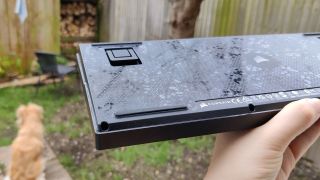
Out of the box the K65 Plus looks like a lot of the other compact boards we’ve put on our best of list. It’s not plagued with so much of the gamery aesthetic that some boards are, as it comes with a two-tone grey keycap set, and a backplate and spacebar decorated with Corsair’s subtle polygonal pattern. There’s a touch of metallic silver with the escape key—adorned with the Corsair ship logo—and a swanky metal dial in the top right that gives it some extra flair. You can tell it’s going to be a high-end board just from the aesthetic, but there’s more hiding under the hood.
What you can’t tell from just looking at the K65 Plus is that it comes with hot-swappable key switches. If you aren’t one for linear switches, there are sadly no other options for different key switches with the base model. So yeah, hot-swap switches are a great feature, but if you’re still saving up for new switches and can’t stand linears, the K65 Plus isn’t going to be the best option for you. If you’ve already got some lying around, the likelihood is they’ll fit the north-facing 5 pin slots, as these will fit most standard key switches. And if you just want to swap the caps, you’re looking at the common-as-muck cross key stem and a Cherry profile. All pretty standard, so there’s very little stress when it comes to swapping out.
The MLX Red linear key switches Corsair offers with base K65 Plus are super satisfying. They’re soft with a good level of bounceback, and the 45g actuation force required down to just 1.9mm means I really don’t have to press hard to get them going. Couple that with the soft silicone and foam lining and this is a damn quiet keyboard, too.
K65 Plus specs(Image credit: Future)Size:75%Base:Hot-swappableSwitches:Corsair MLX Red LinearBacklighting:Per keyAnti-ghosting:N-key rolloverPolling rate:1,000HzDimensions:32 x 13.5 x 3.5mmWeight:942g | 33oz (w/out cable)Connections:2.4GHz | USB Type-C | BluetoothCable:180mm (braided)Battery life:266-hours (w/out lighting)Warranty:2 yearsPrice:£150|$160
K65 Plus specs
(Image credit: Future)Size:75%Base:Hot-swappableSwitches:Corsair MLX Red LinearBacklighting:Per keyAnti-ghosting:N-key rolloverPolling rate:1,000HzDimensions:32 x 13.5 x 3.5mmWeight:942g | 33oz (w/out cable)Connections:2.4GHz | USB Type-C | BluetoothCable:180mm (braided)Battery life:266-hours (w/out lighting)Warranty:2 yearsPrice:£150|$160
(Image credit: Future)
Size:75%Base:Hot-swappableSwitches:Corsair MLX Red LinearBacklighting:Per keyAnti-ghosting:N-key rolloverPolling rate:1,000HzDimensions:32 x 13.5 x 3.5mmWeight:942g | 33oz (w/out cable)Connections:2.4GHz | USB Type-C | BluetoothCable:180mm (braided)Battery life:266-hours (w/out lighting)Warranty:2 yearsPrice:£150|$160
Typing on this keyboard is a joy, and shifting around in-game feels nice and smooth. Not to mention the stabilisers are sturdy, and tapping on the corner of the spacebar works just as well as the middle.
The most non-standard thing about the keyboard’s layout is its separate Delete key sitting above the Backspace, while the Home, Page Up, and Page Down keys are neatly tucked in a column to the right. It takes a little getting used to, and I’m sure I’ve smashed Home more times than I have Delete when typing in a rush, but it’s fine once you’ve gotten used to it. These are the kinds of things you have to suffer for the benefits a compact keyboard brings. Thankfully the fact it’s a 75% board means you get the separate arrow keys, while keeping the size to a minimum. It means less faffing with the function key like you would with a 60% board.
The addition of dedicated media controls in the form of a dial is much appreciated, and is programmable even without downloading the iCue software. Whether in or outside of the software, however, you’re stuck with only four function options: volume, page scrolling (horizontal/vertical), brightness and zoom. And while it’s a little disappointing that you can’t change what clicking the dial does, it’s nice to see a keyboard that lets you go a little deeper into the lighting and other functions without the need for dedicated software. Personally, I’ve never had an issue with the iCue software itself. It sometimes eats up around 2% of my CPU usage, but it’s got an easy-to-understand interface and the added benefit of PC monitoring graphs. In fact, for those with afull Corsair iCue Link cooling setupit does so much more than just reprogram buttons.
Image1of3(Image credit: Future)(Image credit: Future)(Image credit: Future)
Image1of3(Image credit: Future)(Image credit: Future)(Image credit: Future)
Image1of3
(Image credit: Future)(Image credit: Future)(Image credit: Future)
(Image credit: Future)(Image credit: Future)(Image credit: Future)
(Image credit: Future)
(Image credit: Future)
(Image credit: Future)
(Image credit: Future)
(Image credit: Future)

(Image credit: Future)
(Image credit: Future)
(Image credit: Future)
(Image credit: Future)
(Image credit: Future)
(Image credit: Future)
(Image credit: Future)
(Image credit: Future)
(Image credit: Future)
(Image credit: Future)
The Corsair K65 Plus is super portable being so compact, and while there is some heft to it it’s still possible to tuck it into a backpack and take it away with you. Double so with its Mac and Windows connectivity switch and a marketed unlit battery life of around 266 hours. I’ve still got the 180mm braided cable tucked into the box since it came four days ago, and I’ve not had to plug it in once, even with the lighting going haywire. It’s safe to say it wouldn’t last 266 hours with the lights on, however. Once it hits the battery warning, the lights automatically switch off and won’t come back on until you plug it in. It’s a bit heavy handed but it keeps it going a little longer.
Changing the programmed settings and lighting on the fly is easy. There are four onboard profiles that you can switch through with the function keys and there’s a button on the side to switch the lighting off altogether. Not that you’d want to. The per-key LED’s handle colours I’ve seen plenty of peripherals stumble with, and it looks super vibrant with the slight shine on the backplate helping intensify it. It’s a bit sad that the keycaps don’t allow for shine through on the lettering, but they’re at least PBT so they won’t get shiny as quick as ABS and should last longer, and there’s always the option to switch them out.
(Image credit: Future)

Buy if…✅ You love having separate directional keys:This is a great size keyboard with the directional keys still intact. They’re not all squished together and messing with the layout, either.✅ You change devices a lot: The K65 Plus makes it super easy to switch between devices and even allows for up to three Bluetooth devices to be connected at once.
Buy if…
✅ You love having separate directional keys:This is a great size keyboard with the directional keys still intact. They’re not all squished together and messing with the layout, either.✅ You change devices a lot: The K65 Plus makes it super easy to switch between devices and even allows for up to three Bluetooth devices to be connected at once.
✅ You love having separate directional keys:This is a great size keyboard with the directional keys still intact. They’re not all squished together and messing with the layout, either.
✅ You change devices a lot: The K65 Plus makes it super easy to switch between devices and even allows for up to three Bluetooth devices to be connected at once.
Don’t buy if…❌ You’re a non-linear switch liker trying to save money:You will have to spend out on a whole new set of key switches, since there’s no option to nab anything but linear switches with the base model.❌ You need macro keys:This is a little more barebones than some, bar the media dial, so don’t expect too many extra gamer-centric features bar standard 1000Hz polling, NKRO and anti-ghosting.
Don’t buy if…
❌ You’re a non-linear switch liker trying to save money:You will have to spend out on a whole new set of key switches, since there’s no option to nab anything but linear switches with the base model.❌ You need macro keys:This is a little more barebones than some, bar the media dial, so don’t expect too many extra gamer-centric features bar standard 1000Hz polling, NKRO and anti-ghosting.
❌ You’re a non-linear switch liker trying to save money:You will have to spend out on a whole new set of key switches, since there’s no option to nab anything but linear switches with the base model.
❌ You need macro keys:This is a little more barebones than some, bar the media dial, so don’t expect too many extra gamer-centric features bar standard 1000Hz polling, NKRO and anti-ghosting.
All in all the K65 Plus is a smashing and sturdy board with a subtle aesthetic and loads of the worthwhile features expected from high-end boards. It doesn’t push too far into the strange compact layout territory and with a price that matches the features. The main disappointments for me are its lack of key switch options with the base board, and the limited functionality on the media dial, but none of that changes the fact it offers everything you’d want from a $160/£150 keyboard.
Basically, the K65 Plus is a great mid-tier board with very little to complain about.
The Corsair K65 Plus has a little more space to breathe, layout-wise, compared to the much more affordableKeychron K2which comes in at $69. It also has a few more features such as that little media control knob and hot-swappable switches, but even the Keychron base model comes with various switch options. On the other hand, compare the K65 Plus to something like theAsus ROG Azoth—another hot-swappable keyboard at the higher end of the market—and you might not be getting as many dedicated media controls or a fancy little display, but for half the price you get just as much keyboard and almost double the battery life.
The Verdict88Read our review policyCorsair K65 PlusCorsair hasn’t skimped out with the K65 Plus, covering all the basics you’d want from a compact keyboard of that price, and topping it with a great battery life. The company assumes non-linear switch likers already have key switches ready to swap out, though, offering zero alternatives to its own linear reds with the base model.
The Verdict
The Verdict
88Read our review policyCorsair K65 PlusCorsair hasn’t skimped out with the K65 Plus, covering all the basics you’d want from a compact keyboard of that price, and topping it with a great battery life. The company assumes non-linear switch likers already have key switches ready to swap out, though, offering zero alternatives to its own linear reds with the base model.
88Read our review policy
88
Corsair K65 PlusCorsair hasn’t skimped out with the K65 Plus, covering all the basics you’d want from a compact keyboard of that price, and topping it with a great battery life. The company assumes non-linear switch likers already have key switches ready to swap out, though, offering zero alternatives to its own linear reds with the base model.
Corsair K65 Plus
Corsair hasn’t skimped out with the K65 Plus, covering all the basics you’d want from a compact keyboard of that price, and topping it with a great battery life. The company assumes non-linear switch likers already have key switches ready to swap out, though, offering zero alternatives to its own linear reds with the base model.
TOPICSHardware
TOPICS
LatestAsus reveals three new Slash Travel Bags for carting around your ROG Ally—however, none of them are particularly fashion forwardToday’s Wordle answer for Friday, January 10We may not have a roadmap or balance patch just yet, but at least Path of Exile 2’s bugfix patch notes are funnySee more latest►
LatestAsus reveals three new Slash Travel Bags for carting around your ROG Ally—however, none of them are particularly fashion forwardToday’s Wordle answer for Friday, January 10We may not have a roadmap or balance patch just yet, but at least Path of Exile 2’s bugfix patch notes are funnySee more latest►
LatestAsus reveals three new Slash Travel Bags for carting around your ROG Ally—however, none of them are particularly fashion forwardToday’s Wordle answer for Friday, January 10We may not have a roadmap or balance patch just yet, but at least Path of Exile 2’s bugfix patch notes are funnySee more latest►
Latest
Asus reveals three new Slash Travel Bags for carting around your ROG Ally—however, none of them are particularly fashion forwardToday’s Wordle answer for Friday, January 10We may not have a roadmap or balance patch just yet, but at least Path of Exile 2’s bugfix patch notes are funny
Asus reveals three new Slash Travel Bags for carting around your ROG Ally—however, none of them are particularly fashion forward
Asus reveals three new Slash Travel Bags for carting around your ROG Ally—however, none of them are particularly fashion forward
Today’s Wordle answer for Friday, January 10
Today’s Wordle answer for Friday, January 10
We may not have a roadmap or balance patch just yet, but at least Path of Exile 2’s bugfix patch notes are funny
We may not have a roadmap or balance patch just yet, but at least Path of Exile 2’s bugfix patch notes are funny
See more latest►
Most PopularTurtle Beach Stealth Pivot reviewIkea Matchspel gaming chair reviewASRock DeskMini X600 reviewZotac Zbox Magnus EN374070C reviewMinisforum AtomMan G7 Ti reviewSamsung Galaxy Book4 Ultra reviewNoctua NH-D15 G2 reviewGulikit KK3 Max reviewBallionaire reviewMarvel Rivals reviewBe Quiet! Dark Rock 5 review
Most PopularTurtle Beach Stealth Pivot reviewIkea Matchspel gaming chair reviewASRock DeskMini X600 reviewZotac Zbox Magnus EN374070C reviewMinisforum AtomMan G7 Ti reviewSamsung Galaxy Book4 Ultra reviewNoctua NH-D15 G2 reviewGulikit KK3 Max reviewBallionaire reviewMarvel Rivals reviewBe Quiet! Dark Rock 5 review
Most PopularTurtle Beach Stealth Pivot reviewIkea Matchspel gaming chair reviewASRock DeskMini X600 reviewZotac Zbox Magnus EN374070C reviewMinisforum AtomMan G7 Ti reviewSamsung Galaxy Book4 Ultra reviewNoctua NH-D15 G2 reviewGulikit KK3 Max reviewBallionaire reviewMarvel Rivals reviewBe Quiet! Dark Rock 5 review
Most Popular
Turtle Beach Stealth Pivot review
Ikea Matchspel gaming chair review
ASRock DeskMini X600 review
Zotac Zbox Magnus EN374070C review
Minisforum AtomMan G7 Ti review
Samsung Galaxy Book4 Ultra review
Noctua NH-D15 G2 review
Gulikit KK3 Max review
Ballionaire review
Marvel Rivals review
Be Quiet! Dark Rock 5 review
HARDWARE BUYING GUIDESLATEST GAME REVIEWS1Best Steam Deck accessories in Australia for 2025: Our favorite docks, powerbanks and gamepads2Best graphics card for laptops: the mobile GPUs I’d want in my next gaming laptop3Best mini PCs in 2025: The compact computers I love the most4Best 14-inch gaming laptop: The top compact gaming laptops I’ve held in these hands5Best Mini-ITX motherboards in 2025: My pick from all the mini mobo marvels I’ve tested1Thank Goodness You’re Here! review: An anarchic treasure trove of jokes and skits2Shiren the Wanderer: The Mystery Dungeon of Serpentcoil Island review—like juggling chainsaws on horseback3WD Black SN850X 8 TB NVMe SSD review4Ikea Utespelare desk review5Asus ROG Harpe Ace Mini wireless mouse review
HARDWARE BUYING GUIDESLATEST GAME REVIEWS1Best Steam Deck accessories in Australia for 2025: Our favorite docks, powerbanks and gamepads2Best graphics card for laptops: the mobile GPUs I’d want in my next gaming laptop3Best mini PCs in 2025: The compact computers I love the most4Best 14-inch gaming laptop: The top compact gaming laptops I’ve held in these hands5Best Mini-ITX motherboards in 2025: My pick from all the mini mobo marvels I’ve tested1Thank Goodness You’re Here! review: An anarchic treasure trove of jokes and skits2Shiren the Wanderer: The Mystery Dungeon of Serpentcoil Island review—like juggling chainsaws on horseback3WD Black SN850X 8 TB NVMe SSD review4Ikea Utespelare desk review5Asus ROG Harpe Ace Mini wireless mouse review
HARDWARE BUYING GUIDESLATEST GAME REVIEWS1Best Steam Deck accessories in Australia for 2025: Our favorite docks, powerbanks and gamepads2Best graphics card for laptops: the mobile GPUs I’d want in my next gaming laptop3Best mini PCs in 2025: The compact computers I love the most4Best 14-inch gaming laptop: The top compact gaming laptops I’ve held in these hands5Best Mini-ITX motherboards in 2025: My pick from all the mini mobo marvels I’ve tested1Thank Goodness You’re Here! review: An anarchic treasure trove of jokes and skits2Shiren the Wanderer: The Mystery Dungeon of Serpentcoil Island review—like juggling chainsaws on horseback3WD Black SN850X 8 TB NVMe SSD review4Ikea Utespelare desk review5Asus ROG Harpe Ace Mini wireless mouse review
HARDWARE BUYING GUIDESLATEST GAME REVIEWS1Best Steam Deck accessories in Australia for 2025: Our favorite docks, powerbanks and gamepads2Best graphics card for laptops: the mobile GPUs I’d want in my next gaming laptop3Best mini PCs in 2025: The compact computers I love the most4Best 14-inch gaming laptop: The top compact gaming laptops I’ve held in these hands5Best Mini-ITX motherboards in 2025: My pick from all the mini mobo marvels I’ve tested1Thank Goodness You’re Here! review: An anarchic treasure trove of jokes and skits2Shiren the Wanderer: The Mystery Dungeon of Serpentcoil Island review—like juggling chainsaws on horseback3WD Black SN850X 8 TB NVMe SSD review4Ikea Utespelare desk review5Asus ROG Harpe Ace Mini wireless mouse review
HARDWARE BUYING GUIDESLATEST GAME REVIEWS
1Best Steam Deck accessories in Australia for 2025: Our favorite docks, powerbanks and gamepads
1Best Steam Deck accessories in Australia for 2025: Our favorite docks, powerbanks and gamepads
1
Best Steam Deck accessories in Australia for 2025: Our favorite docks, powerbanks and gamepads
2Best graphics card for laptops: the mobile GPUs I’d want in my next gaming laptop
2Best graphics card for laptops: the mobile GPUs I’d want in my next gaming laptop
2
Best graphics card for laptops: the mobile GPUs I’d want in my next gaming laptop
3Best mini PCs in 2025: The compact computers I love the most
3Best mini PCs in 2025: The compact computers I love the most
3
Best mini PCs in 2025: The compact computers I love the most
4Best 14-inch gaming laptop: The top compact gaming laptops I’ve held in these hands
4Best 14-inch gaming laptop: The top compact gaming laptops I’ve held in these hands
4
Best 14-inch gaming laptop: The top compact gaming laptops I’ve held in these hands
5Best Mini-ITX motherboards in 2025: My pick from all the mini mobo marvels I’ve tested
5Best Mini-ITX motherboards in 2025: My pick from all the mini mobo marvels I’ve tested
5
Best Mini-ITX motherboards in 2025: My pick from all the mini mobo marvels I’ve tested
1Thank Goodness You’re Here! review: An anarchic treasure trove of jokes and skits
1Thank Goodness You’re Here! review: An anarchic treasure trove of jokes and skits
1
Thank Goodness You’re Here! review: An anarchic treasure trove of jokes and skits
2Shiren the Wanderer: The Mystery Dungeon of Serpentcoil Island review—like juggling chainsaws on horseback
2Shiren the Wanderer: The Mystery Dungeon of Serpentcoil Island review—like juggling chainsaws on horseback
2
Shiren the Wanderer: The Mystery Dungeon of Serpentcoil Island review—like juggling chainsaws on horseback
3WD Black SN850X 8 TB NVMe SSD review
3WD Black SN850X 8 TB NVMe SSD review
3
WD Black SN850X 8 TB NVMe SSD review
4Ikea Utespelare desk review
4Ikea Utespelare desk review
4
Ikea Utespelare desk review
5Asus ROG Harpe Ace Mini wireless mouse review
5Asus ROG Harpe Ace Mini wireless mouse review
5
Asus ROG Harpe Ace Mini wireless mouse review
