Our VerdictSleek, smooth and sounding lovely, the Corsair K70 Core delivers all you need in a mid-price mechanical gaming keyboard.
Our VerdictSleek, smooth and sounding lovely, the Corsair K70 Core delivers all you need in a mid-price mechanical gaming keyboard.
Our Verdict
Our Verdict
Sleek, smooth and sounding lovely, the Corsair K70 Core delivers all you need in a mid-price mechanical gaming keyboard.
ForSmoother than late-night jazzSound dampedTangle-free cableAgainstDial is rough, not smoothOnly minor adjustabilityiCUE is complex
ForSmoother than late-night jazzSound dampedTangle-free cable
AgainstDial is rough, not smoothOnly minor adjustabilityiCUE is complex
PC Gamer’s got your backOur experienced team dedicates many hours to every review, to really get to the heart of what matters most to you.Find out more about how we evaluate games and hardware.
PC Gamer’s got your backOur experienced team dedicates many hours to every review, to really get to the heart of what matters most to you.Find out more about how we evaluate games and hardware.
$98.20$74.99ViewWe check over 250 million products every day for the best prices
$98.20$74.99ViewWe check over 250 million products every day for the best prices
$98.20$74.99View
$98.20$74.99View
$98.20$74.99View

$98.20$74.99View
$98.20$74.99
$74.99
We check over 250 million products every day for the best prices
We check over 250 million products every day for the best prices
Switches make a mechanical keyboard. Your chosen plank can have all the extra features and RGB in the world, 15 USB ports at the back and an FM radio built in, but if pushing those keys down feels like stroking the back of a porcupine, it’s not going to become a favoured gaming companion.
Lucky, then, that Corsair has been thinking a lot about keyboard switches recently. Exhibit A in this investigation are the Hall effect magnetic switches in theK70 Max, which went down quite well in the PC Gamer review. In the K70 Core you’ll find something slightly different, pre-lubed Corsair MLX Red linear mechanical switches, which are making their debut here, but still with a whole lot of sound-damping foam, just like the K70 Max.
Core keyboards are a step down from the top-of-the-line Pro boards in Corsair’s range. This doesn’t exactly make them budget models, as the price is still higher than that of truly cheap examples, but like a politician desperate for re-election they focus on the core values that make a keyboard great.
These are: having keys? Check. Flippy feet at the back? Rubber pads at the front? Check and check. USB connection? Check (though a wireless version is also available for the profane and corrupt). Absolute dust and fingerprint magnet? Check. Little dial in the top corner that looks neat but you’ll probably never use? Check… though we’re diverging from core values and into oppugnant morality here.
K70 Core specs(Image credit: Future)Size:Full with numpadConnectivity:USB 3 wired, 6ft cableKeycaps:Double-shot ABSSwitches:Corsair MLX Red (linear)Hot-swappable:NoMedia controls:NoLighting:Full RGB per-keySoftware:iCUEPrice:$100/£90
K70 Core specs
(Image credit: Future)Size:Full with numpadConnectivity:USB 3 wired, 6ft cableKeycaps:Double-shot ABSSwitches:Corsair MLX Red (linear)Hot-swappable:NoMedia controls:NoLighting:Full RGB per-keySoftware:iCUEPrice:$100/£90
(Image credit: Future)

Size:Full with numpadConnectivity:USB 3 wired, 6ft cableKeycaps:Double-shot ABSSwitches:Corsair MLX Red (linear)Hot-swappable:NoMedia controls:NoLighting:Full RGB per-keySoftware:iCUEPrice:$100/£90
Otherwise, it’s the usual mix of aluminium and plastic, RGB LEDs and a smidge of flash memory (enough for five profiles). It also uses a USB wired connection that sees a rubber-coated cable emerge from the rear-left of the chassis and make its way round to the back of your PC. A USB hub would have been nice here, but we don’t get one. The cable has a plug on the end that looks for all the world like a USB-C plugged into a USB-A adapter, with a grippy bit to allow easy pulling off. However, after a heavy session of vigorous tugging it remained stubbornly attached. It seemed a bit extreme to get the pliers out, so we’re just going to have to accept that Corsair made it look like that on purpose.
But there’s also foam, and it goes a long way to soundproofing the board. You’ll still get a clicky sound if you bottom-out the keys, but there’s no case ping (probably thanks to the foam) and lubed switches mean actuations are silent too - though it does still make a sound as the key returns to its resting position following a press. While it’s never going to be as silent as a membrane keyboard, if you really try you can switch between a glorious mechanical noise and a reasonably quiet typing action.
(Image credit: Future)

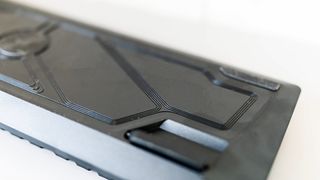
There are no clever optical or adjustable actuation systems here, and you can’t hot-swap anything, but there is a magnetic wrist rest in the box with a strange rough texture that makes you glad you’re not touching it with your fingers.
(Image credit: Future)

That dial is an exception to the ‘everything is customisable’ rule, but you can use it for brightness, scrolling and zooming as well as volume. It’s also an exception to the slippery lubed feel of the board, as not only does it have a textured surface and yellow highlight paint that’s not found anywhere else, but it jerks around with a tinny click that’s so different from the rest of the keys it’s almost as if it came from another keyboard entirely.
The iCUE button next to it is also the only key on the board not balanced on a high switch, so you have to dive over the surrounding keys to find it, and don’t get satisfying feedback from pressing it.
(Image credit: Future)
Buy if…✅You’re replacing a membrane keyboard:The K70 Core doesn’t come with much customisability, but it will feel like a step up from just about anything you’ve used before.✅You want something easy to type on:The K70 Core is breezy to bash out an essay on, and won’t make too much noise.
Buy if…
✅You’re replacing a membrane keyboard:The K70 Core doesn’t come with much customisability, but it will feel like a step up from just about anything you’ve used before.✅You want something easy to type on:The K70 Core is breezy to bash out an essay on, and won’t make too much noise.
✅You’re replacing a membrane keyboard:The K70 Core doesn’t come with much customisability, but it will feel like a step up from just about anything you’ve used before.
✅You want something easy to type on:The K70 Core is breezy to bash out an essay on, and won’t make too much noise.
Don’t buy if…❌You’re looking for something more like the K70 Max:This isn’t a flashy feature board, but one designed to be a pleasure to use.
Don’t buy if…
❌You’re looking for something more like the K70 Max:This isn’t a flashy feature board, but one designed to be a pleasure to use.
❌You’re looking for something more like the K70 Max:This isn’t a flashy feature board, but one designed to be a pleasure to use.
With storage for five profiles onboard the board, FN+ F2 can be used to switch between them, but if you’ve got a load of iCUE devices flashing away on your desktop it won’t communicate with them, forcing you to use software profiles.
Fire up the app and you get access to Corsair’s Mosaics, which are pre-set lighting patterns that are simple to activate. Community-created Mosaics can be found on a digital store, which thankfully has a degree of curation as even the Romans knew the levels of detail and lewdness that could be contained in a simple arrangement of square blocks.
The lighting patterns and customisability are nice to have, but the reason you’ll buy the K70 Core sits between the keycaps and the baseplate. These silky-smooth switches are a big draw for the board, and despite having a limited feature-set in a competitive market segment (and with it being possible to pick up a mechanical gaming keyboard for much less) its quietness and efficiency of operation mean the K70 Core is still able to stand out.
Corsair K70 Core: Price Comparison
$98.20$74.99View
$98.20$74.99View
$98.20$74.99View
$98.20$74.99View
$98.20$74.99
$74.99
We check over 250 million products every day for the best prices

The Verdict83Read our review policyCorsair K70 CoreSleek, smooth and sounding lovely, the Corsair K70 Core delivers all you need in a mid-price mechanical gaming keyboard.
The Verdict
The Verdict
83Read our review policyCorsair K70 CoreSleek, smooth and sounding lovely, the Corsair K70 Core delivers all you need in a mid-price mechanical gaming keyboard.
83Read our review policy
83
Corsair K70 CoreSleek, smooth and sounding lovely, the Corsair K70 Core delivers all you need in a mid-price mechanical gaming keyboard.
Corsair K70 Core
Sleek, smooth and sounding lovely, the Corsair K70 Core delivers all you need in a mid-price mechanical gaming keyboard.
TOPICSHardware
TOPICS
Latest

Wormhole is an impeccable arcade revival of Snake that plays like it fell off the back of Derek Yu’s van
Wormhole is an impeccable arcade revival of Snake that plays like it fell off the back of Derek Yu’s van
My Summer Car, the absurdly detailed Finnish life sim about vehicle maintenance and drinking in your underpants, smashes into 1.0 after nearly a decade in Steam early access
My Summer Car, the absurdly detailed Finnish life sim about vehicle maintenance and drinking in your underpants, smashes into 1.0 after nearly a decade in Steam early access
See more latest►
Most PopularTurtle Beach Stealth Pivot reviewIkea Matchspel gaming chair reviewASRock DeskMini X600 reviewZotac Zbox Magnus EN374070C reviewMinisforum AtomMan G7 Ti reviewSamsung Galaxy Book4 Ultra reviewNoctua NH-D15 G2 reviewGulikit KK3 Max reviewBallionaire reviewMarvel Rivals reviewBe Quiet! Dark Rock 5 review
Most PopularTurtle Beach Stealth Pivot reviewIkea Matchspel gaming chair reviewASRock DeskMini X600 reviewZotac Zbox Magnus EN374070C reviewMinisforum AtomMan G7 Ti reviewSamsung Galaxy Book4 Ultra reviewNoctua NH-D15 G2 reviewGulikit KK3 Max reviewBallionaire reviewMarvel Rivals reviewBe Quiet! Dark Rock 5 review
Most PopularTurtle Beach Stealth Pivot reviewIkea Matchspel gaming chair reviewASRock DeskMini X600 reviewZotac Zbox Magnus EN374070C reviewMinisforum AtomMan G7 Ti reviewSamsung Galaxy Book4 Ultra reviewNoctua NH-D15 G2 reviewGulikit KK3 Max reviewBallionaire reviewMarvel Rivals reviewBe Quiet! Dark Rock 5 review
Most Popular
Turtle Beach Stealth Pivot review
Ikea Matchspel gaming chair review
ASRock DeskMini X600 review
Zotac Zbox Magnus EN374070C review
Minisforum AtomMan G7 Ti review
Samsung Galaxy Book4 Ultra review
Noctua NH-D15 G2 review
Gulikit KK3 Max review
Ballionaire review
Marvel Rivals review
Be Quiet! Dark Rock 5 review
HARDWARE BUYING GUIDESLATEST GAME REVIEWS1Best Steam Deck accessories in Australia for 2025: Our favorite docks, powerbanks and gamepads2Best graphics card for laptops: the mobile GPUs I’d want in my next gaming laptop3Best mini PCs in 2025: The compact computers I love the most4Best 14-inch gaming laptop: The top compact gaming laptops I’ve held in these hands5Best Mini-ITX motherboards in 2025: My pick from all the mini mobo marvels I’ve tested1Thank Goodness You’re Here! review2Shiren the Wanderer: The Mystery Dungeon of Serpentcoil Island review3WD Black SN850X 8 TB NVMe SSD review4Ikea Utespelare desk review5Asus ROG Harpe Ace Mini wireless mouse review
HARDWARE BUYING GUIDESLATEST GAME REVIEWS1Best Steam Deck accessories in Australia for 2025: Our favorite docks, powerbanks and gamepads2Best graphics card for laptops: the mobile GPUs I’d want in my next gaming laptop3Best mini PCs in 2025: The compact computers I love the most4Best 14-inch gaming laptop: The top compact gaming laptops I’ve held in these hands5Best Mini-ITX motherboards in 2025: My pick from all the mini mobo marvels I’ve tested1Thank Goodness You’re Here! review2Shiren the Wanderer: The Mystery Dungeon of Serpentcoil Island review3WD Black SN850X 8 TB NVMe SSD review4Ikea Utespelare desk review5Asus ROG Harpe Ace Mini wireless mouse review
HARDWARE BUYING GUIDESLATEST GAME REVIEWS1Best Steam Deck accessories in Australia for 2025: Our favorite docks, powerbanks and gamepads2Best graphics card for laptops: the mobile GPUs I’d want in my next gaming laptop3Best mini PCs in 2025: The compact computers I love the most4Best 14-inch gaming laptop: The top compact gaming laptops I’ve held in these hands5Best Mini-ITX motherboards in 2025: My pick from all the mini mobo marvels I’ve tested1Thank Goodness You’re Here! review2Shiren the Wanderer: The Mystery Dungeon of Serpentcoil Island review3WD Black SN850X 8 TB NVMe SSD review4Ikea Utespelare desk review5Asus ROG Harpe Ace Mini wireless mouse review
HARDWARE BUYING GUIDESLATEST GAME REVIEWS1Best Steam Deck accessories in Australia for 2025: Our favorite docks, powerbanks and gamepads2Best graphics card for laptops: the mobile GPUs I’d want in my next gaming laptop3Best mini PCs in 2025: The compact computers I love the most4Best 14-inch gaming laptop: The top compact gaming laptops I’ve held in these hands5Best Mini-ITX motherboards in 2025: My pick from all the mini mobo marvels I’ve tested1Thank Goodness You’re Here! review2Shiren the Wanderer: The Mystery Dungeon of Serpentcoil Island review3WD Black SN850X 8 TB NVMe SSD review4Ikea Utespelare desk review5Asus ROG Harpe Ace Mini wireless mouse review
HARDWARE BUYING GUIDESLATEST GAME REVIEWS
1Best Steam Deck accessories in Australia for 2025: Our favorite docks, powerbanks and gamepads
1Best Steam Deck accessories in Australia for 2025: Our favorite docks, powerbanks and gamepads
1
Best Steam Deck accessories in Australia for 2025: Our favorite docks, powerbanks and gamepads
2Best graphics card for laptops: the mobile GPUs I’d want in my next gaming laptop
2Best graphics card for laptops: the mobile GPUs I’d want in my next gaming laptop
2
Best graphics card for laptops: the mobile GPUs I’d want in my next gaming laptop
3Best mini PCs in 2025: The compact computers I love the most
3Best mini PCs in 2025: The compact computers I love the most
3
Best mini PCs in 2025: The compact computers I love the most
4Best 14-inch gaming laptop: The top compact gaming laptops I’ve held in these hands
4Best 14-inch gaming laptop: The top compact gaming laptops I’ve held in these hands
4
Best 14-inch gaming laptop: The top compact gaming laptops I’ve held in these hands
5Best Mini-ITX motherboards in 2025: My pick from all the mini mobo marvels I’ve tested
5Best Mini-ITX motherboards in 2025: My pick from all the mini mobo marvels I’ve tested
5
Best Mini-ITX motherboards in 2025: My pick from all the mini mobo marvels I’ve tested
1Thank Goodness You’re Here! review
1Thank Goodness You’re Here! review
1
Thank Goodness You’re Here! review
2Shiren the Wanderer: The Mystery Dungeon of Serpentcoil Island review
2Shiren the Wanderer: The Mystery Dungeon of Serpentcoil Island review
2
Shiren the Wanderer: The Mystery Dungeon of Serpentcoil Island review
3WD Black SN850X 8 TB NVMe SSD review
3WD Black SN850X 8 TB NVMe SSD review
3
WD Black SN850X 8 TB NVMe SSD review
4Ikea Utespelare desk review
4Ikea Utespelare desk review
4
Ikea Utespelare desk review
5Asus ROG Harpe Ace Mini wireless mouse review
5Asus ROG Harpe Ace Mini wireless mouse review
5
Asus ROG Harpe Ace Mini wireless mouse review
