HardwareDragon’s Dogma 2Dragon’s Dogma 2 performance analysis: It’ll take everything your PC has and still want moreWhen you purchase through links on our site, we may earn an affiliate commission.Here’s how it works.
HardwareDragon’s Dogma 2Dragon’s Dogma 2 performance analysis: It’ll take everything your PC has and still want moreWhen you purchase through links on our site, we may earn an affiliate commission.Here’s how it works.
When you purchase through links on our site, we may earn an affiliate commission.Here’s how it works.
(Image credit: Capcom)
Jump to:OverviewTest setup1080p1440p4KUpscaling
Jump to:OverviewTest setup1080p1440p4KUpscaling
Dragon’s Dogma 2is the long-awaited sequel to Capcom’s 2012 original release, that eventually appeared on the PC in 2016. Both games are classic open-world RPGs: Quests and monsters abound, strewn across a sprawling landscape, all begging to be explored and conquered.
The game uses Capcom’s Reach for the Moon (RE) Engine, used to great success in theResident Evil 4remake,Resident Evil Village,Monster Hunter Rise, and many others. Although the first two are very linear, almost corridor-like in terms of world structure, MH Rise uses a large, seamless map, just as in Dragon’s Dogma 2.
That means there are no loading screens, other than the primary one to jump into the game, and all of the assets (models, textures, shaders) are streamed across from your SSD into the graphics card’s VRAM when needed. Such games are generally the most demanding ofgaming PCsand that’s no different here. So, without further ado, let’s find outjusthow tough it is.
Performance overview
The performance of Dragon’s Dogma 2 can be summarised with one utterance: CPU. It doesn’t really matter whether you’re measuring performance in the city or the open world, the processor and platform you have will play a huge role in determining whether or not your graphics card has a chance to shine in this game.
If you have a mid-range or budget-level gaming PC, you’re unlikely to see performance figures in excess of 60 fps in the open world areas. In the main city, though, you’ll be looking to hit half that figure, even at 1080p with low quality settings.
Only with a modern CPU and graphics card will you stand any chance of having a smooth gaming experience. Capcom’s recommended hardware requirements should really be viewed as the absolute minimum, and ideally you’re going to need a 12th Gen Intel Core orRyzen5000-series or better CPU. You can get away with just having six cores, as long as the chip supports multithreading. At least it’s not especially demanding on the system RAM.
Hopefully, most of the frame rate issues I saw will be solved with future game patches and driver updates. But there’s clearly a lot of work to be done in optimising everything further.
The biggest gaming news, reviews and hardware deals
Systems used in testing
Capcom’s system requirements for Dragon’s Dogma 2 are a minimum of aCore i5 10600orRyzen 5 3600CPU, aGeForce GTX 1070orRadeon RX 5500 XTgraphics card, and 16GB of RAM. The recommended specs rise to a Core i7 10700 or Ryzen 5 3600X, anRTX 2080or RX 6700, but the RAM stays at 16GB.
Compared to most big releases on PC these days, those requirements seem fairly light, especially on the AMD side of things. A Ryzen 5 3600 is a six core, 12 thread CPU that’s nearly four years old and while the Radeon RX 6700 is only a year younger, it’s not a hugely powerful nor expensive graphics card.
While I didn’t have those exact components to hand, I do have access to a variety of parts that are generally similar, either being a little older, newer, or more capable. So I’ve run many benchmarks, across multiple setups, to give you an idea as to exactly how well the game runs. The systems in question are:
As for graphics cards, theRyzen 7 8700Gsystem just uses its integrated graphics (Radeon 780M), and I have used a range of models for the others: AMDRadeon RX 7800 XTandRX 6600, IntelArc A770, NvidiaGeForce RTX 4070andRTX 4070 Ti.
After 16 hours of benchmarking and dealing the game’s many quirks, I’ve collated more than enough data to give you an idea as to what aspect of a gaming PC Dragon’s Dogma 2 is demanding the most of. I recorded the performance in two areas: around the main city of Vernworth and a little way outside the city in the open world, with lots of trees, grass, and rivers in view.
For all of the main test runs, the graphics settings were set to the maximum values, with the exception of rendering mode which was kept at Interlaced. We’ll have a companion piece covering the best settings to use in Dragon’s Dogma 2 for the launch of the game to help you get the most out of your own rig.
1080p Performance
The first thing that becomes immediately clear is that in Vernworth, or pretty much any location where there are a lot of buildings and NPCs, is that the overall performance drops considerably, especially with regard to the 1% low fps value. This figure marks the fps that 99% of all the others are equal to or above.
Vernworth is very CPU-limited, although the graphics card is still very important. For example, note how the Radeon RX 7800 XT doesn’t get to stretch its legs on the Ryzen 5 5600X system but does pretty well on the newer AM5 Ryzen 9 7900 platform. I say well but the 60 fps for the 1% lows is rather poor.
I managed a few brief runs on aRyzen 7 7700Xgaming PC, with a GeForce RTX 4070, and that performed roughly halfway between the 7900 and 5600X systems, using the same GPU. Unfortunately, a few bugs with the 1440p results means that I can’t include it in this analysis.
The Core i7 14700KF platform performed the best, thanks to the wealth of threads available and the power of the RTX 4070 Ti, but what none of the results show is just how wildly inconsistent the performance is in Dragon’s Dogma 2. All of the displayed frame rates are averages from around five runs, sometimes more when bugs messed things up.
Even at 1080p, with maximum graphics settings, the VRAM load was too much for the 8GB Radeon RX 6600. The menu does warn you that you’ve gone over the limit so it’s worth paying attention to it. That said, it warned me repeatedly for all of the other cards and they didn’t have too many issues.
1440p Performance
Increasing the resolution of any game should push the performance bar more toward the GPU and in the case of open world testing, that was very much the case. However, the city test results show only a relatively small decline in frame rates, highlighting just how CPU-limited that zone is.
As you exit the city, there’s a clear mark where the game’s engine stops processing all of the NPC/world cycle, as the 1% low fps suddenly jumps up. This happens even if you’re not looking at the city, which suggests that more dev work needs to be done on dropping workloads when they’re just not required.
Interestingly, despite the VRAM requirement being more than what the RX 6600 sported, it didn’t induce as much stuttering as you’d think. The 1% low fps figures show that it was very slow for the most part, but it was actually relatively smooth, as long as you didn’t whip the camera about. If you can call 30 fps smooth.
4K Performance
This level of performance might be acceptable if the graphical fidelity is exceptional but in Dragon’s Dogma 2, it’s merely okay. It’s notbad, as sometimes it’s lovely, especially when you get treated to a glorious vista, replete with dense forests and perilous mountains in the distance. But in the city, it’s merely average in my opinion, and the graphics don’t really justify the frame rates I saw.
It’s not clear as to what the root cause of the problem is, but it’s easy enough to see just where the main issue lies.
PIX shows just how bad things get in the city.(Image credit: Microsoft)
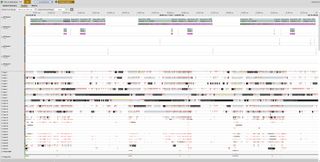
I used Microsoft’s DirectX analytical tool, PIX, to examine what was going with the CPU’s workload and saw two things immediately. Firstly, there’s an awful lot of threads going on with the game’s engine and while you may think that’s a great use of modern CPUs, making sure that all those threads don’t stall each other isn’t a trivial task.
Secondly, it was taking averylong time just to process the command lists from the DirectX API. On the 14700KF system, it took 25 milliseconds on average, in the city area. In comparison, something like Cyberpunk 2077 has API processing times roughly half as long.
While I can’t tell precisely what the command list contains (PIX just wouldn’t attach properly to the game), it’s almost certainly to do with managing all of the assets. Yes, NPCs pop in and out of existence in front of your eyes, and the changes in LOD are very abrupt, but the game is clearly doing too much work in the background for each frame.
And it certainly wasn’t anything to do with the quality settings used during testing. At 1080p, with everything on its lowest value or off, the Ryzen 5 5600X + Radeon RX 6600 system achieved 39 fps on average, with the 1% low value being 20 fps, in the Vernworth city. Oh, and it lookedhorriblewith those settings.
Upscaling Performance
You might think upscaling would help, but you only get a relatively small improvement in the city, as the overall performance on a system with a decent graphics card is always going to be CPU-limited. Even out in the open world, where the CPU load is much lower, there’s still not a massive gain to be had.
The anti-aliasing in Dragon’s Dogma 2 isn’t particularly good, and even on maximum settings (TAA+FXAA) trees and grass exhibit lots of aliasing, with edges constantly shimmering against each other. FSR 3 and DLSS both do a great job of getting rid of the aliasing, but add a noticeable amount of fuzziness to the overall image.
Image1of3(Image credit: Capcom)(Image credit: Capcom)(Image credit: Capcom)
Image1of3(Image credit: Capcom)(Image credit: Capcom)(Image credit: Capcom)
Image1of3
(Image credit: Capcom)(Image credit: Capcom)(Image credit: Capcom)
(Image credit: Capcom)(Image credit: Capcom)(Image credit: Capcom)
(Image credit: Capcom)
(Image credit: Capcom)
(Image credit: Capcom)
(Image credit: Capcom)
(Image credit: Capcom)

(Image credit: Capcom)
(Image credit: Capcom)
(Image credit: Capcom)
(Image credit: Capcom)
(Image credit: Capcom)
(Image credit: Capcom)
(Image credit: Capcom)
(Image credit: Capcom)
(Image credit: Capcom)
(Image credit: Capcom)
That said, I prefer using Quality or Balanced upscaling to the game’s native anti-aliasing solution. There’s little in the way of any performance gain, but it certainly makes the open world easier on the eye and the lack of sharpness isn’t a massive issue for me. But if you were hoping to use FSR or DLSS to significantly boost your frame rate, you’ll have to use Performance or Ultra Performance mode, and the drop in image quality is pretty large.
The game would certainly benefit from supporting frame generation and it’s a little odd that Capcom didn’t implement it, even though the dll file forDLSS Frame Genis present in the installation folder. Radeon owners could tryFluid Motion Frames, though I found it nade no difference at all.
Dragon’s Dogma 2 also offers ray tracing as a graphics option, but other than mildly improving the ambient lighting, the hit to the performance isn’t really worth it. For example, with the RTX 4070 Ti, the average fps drop was around 20% without any upscaling, which is pretty good and it’s a smaller drop in the city area, but you’ll probably not want to bother with it.
TOPICSRadeonRyzen
TOPICS
More about hardwareIf you’re trying to convince me your ‘companionship’ robot is ‘lifelike’, maybe don’t rip her face off in the demo videoIs the new RTX 5070 really as fast as Nvidia’s previous flagship RTX 4090 GPU? Turns out the answer is yes. Kinda.LatestToday’s Wordle answer for Saturday, January 11See more latest►
More about hardwareIf you’re trying to convince me your ‘companionship’ robot is ‘lifelike’, maybe don’t rip her face off in the demo videoIs the new RTX 5070 really as fast as Nvidia’s previous flagship RTX 4090 GPU? Turns out the answer is yes. Kinda.LatestToday’s Wordle answer for Saturday, January 11See more latest►
More about hardwareIf you’re trying to convince me your ‘companionship’ robot is ‘lifelike’, maybe don’t rip her face off in the demo videoIs the new RTX 5070 really as fast as Nvidia’s previous flagship RTX 4090 GPU? Turns out the answer is yes. Kinda.
More about hardware
If you’re trying to convince me your ‘companionship’ robot is ‘lifelike’, maybe don’t rip her face off in the demo videoIs the new RTX 5070 really as fast as Nvidia’s previous flagship RTX 4090 GPU? Turns out the answer is yes. Kinda.
If you’re trying to convince me your ‘companionship’ robot is ‘lifelike’, maybe don’t rip her face off in the demo video
If you’re trying to convince me your ‘companionship’ robot is ‘lifelike’, maybe don’t rip her face off in the demo video
Is the new RTX 5070 really as fast as Nvidia’s previous flagship RTX 4090 GPU? Turns out the answer is yes. Kinda.
Is the new RTX 5070 really as fast as Nvidia’s previous flagship RTX 4090 GPU? Turns out the answer is yes. Kinda.
LatestToday’s Wordle answer for Saturday, January 11See more latest►
Latest
Today’s Wordle answer for Saturday, January 11
Today’s Wordle answer for Saturday, January 11
Today’s Wordle answer for Saturday, January 11
See more latest►
Most Popular
The Witcher 3’s now 2-year-old bonus quest is our first taste of the ‘vibe’ CD Projekt is going for in The Witcher 4
2024 was the year updates for old games beat out all the new ones for me
Train like you game with this adventure-inspired workout
‘It’s simply impossible to make a difficulty level that’s just right for all players’: How Final Fantasy 14’s lead battle designer has been playing a precarious balancing game for Dawntrail’s dungeons and raids
Please join me in getting super excited for all the cool looking survival games coming in 2025 (and beyond)
Competitive shooters are at a crucial crossroads in 2025: ‘sweaty’ teamplay vs. casual fun
Call of Duty’s $28 Squid Game skins are the perfect crossover for our capitalist dystopia, and Activision knows exactly what it’s doing
These are the 14 biggest upcoming RPGs of 2025—get ready for another amazing year for the genre
Five new Steam games you probably missed (January 6, 2025)
I’ve seen enough: No more forcing singleplayer studios to make mediocre live service games
HARDWARE BUYING GUIDESLATEST GAME REVIEWS1Best Steam Deck accessories in Australia for 2025: Our favorite docks, powerbanks and gamepads2Best graphics card for laptops: the mobile GPUs I’d want in my next gaming laptop3Best mini PCs in 2025: The compact computers I love the most4Best 14-inch gaming laptop: The top compact gaming laptops I’ve held in these hands5Best Mini-ITX motherboards in 2025: My pick from all the mini mobo marvels I’ve tested1Thank Goodness You’re Here! review: An anarchic treasure trove of jokes and skits2Shiren the Wanderer: The Mystery Dungeon of Serpentcoil Island review—like juggling chainsaws on horseback3WD Black SN850X 8 TB NVMe SSD review4Ikea Utespelare desk review5Asus ROG Harpe Ace Mini wireless mouse review
HARDWARE BUYING GUIDESLATEST GAME REVIEWS1Best Steam Deck accessories in Australia for 2025: Our favorite docks, powerbanks and gamepads2Best graphics card for laptops: the mobile GPUs I’d want in my next gaming laptop3Best mini PCs in 2025: The compact computers I love the most4Best 14-inch gaming laptop: The top compact gaming laptops I’ve held in these hands5Best Mini-ITX motherboards in 2025: My pick from all the mini mobo marvels I’ve tested1Thank Goodness You’re Here! review: An anarchic treasure trove of jokes and skits2Shiren the Wanderer: The Mystery Dungeon of Serpentcoil Island review—like juggling chainsaws on horseback3WD Black SN850X 8 TB NVMe SSD review4Ikea Utespelare desk review5Asus ROG Harpe Ace Mini wireless mouse review
HARDWARE BUYING GUIDESLATEST GAME REVIEWS1Best Steam Deck accessories in Australia for 2025: Our favorite docks, powerbanks and gamepads2Best graphics card for laptops: the mobile GPUs I’d want in my next gaming laptop3Best mini PCs in 2025: The compact computers I love the most4Best 14-inch gaming laptop: The top compact gaming laptops I’ve held in these hands5Best Mini-ITX motherboards in 2025: My pick from all the mini mobo marvels I’ve tested1Thank Goodness You’re Here! review: An anarchic treasure trove of jokes and skits2Shiren the Wanderer: The Mystery Dungeon of Serpentcoil Island review—like juggling chainsaws on horseback3WD Black SN850X 8 TB NVMe SSD review4Ikea Utespelare desk review5Asus ROG Harpe Ace Mini wireless mouse review
HARDWARE BUYING GUIDESLATEST GAME REVIEWS1Best Steam Deck accessories in Australia for 2025: Our favorite docks, powerbanks and gamepads2Best graphics card for laptops: the mobile GPUs I’d want in my next gaming laptop3Best mini PCs in 2025: The compact computers I love the most4Best 14-inch gaming laptop: The top compact gaming laptops I’ve held in these hands5Best Mini-ITX motherboards in 2025: My pick from all the mini mobo marvels I’ve tested1Thank Goodness You’re Here! review: An anarchic treasure trove of jokes and skits2Shiren the Wanderer: The Mystery Dungeon of Serpentcoil Island review—like juggling chainsaws on horseback3WD Black SN850X 8 TB NVMe SSD review4Ikea Utespelare desk review5Asus ROG Harpe Ace Mini wireless mouse review
HARDWARE BUYING GUIDESLATEST GAME REVIEWS
1Best Steam Deck accessories in Australia for 2025: Our favorite docks, powerbanks and gamepads
1Best Steam Deck accessories in Australia for 2025: Our favorite docks, powerbanks and gamepads
1
Best Steam Deck accessories in Australia for 2025: Our favorite docks, powerbanks and gamepads
2Best graphics card for laptops: the mobile GPUs I’d want in my next gaming laptop
2Best graphics card for laptops: the mobile GPUs I’d want in my next gaming laptop
2
Best graphics card for laptops: the mobile GPUs I’d want in my next gaming laptop
3Best mini PCs in 2025: The compact computers I love the most
3Best mini PCs in 2025: The compact computers I love the most
3
Best mini PCs in 2025: The compact computers I love the most
4Best 14-inch gaming laptop: The top compact gaming laptops I’ve held in these hands
4Best 14-inch gaming laptop: The top compact gaming laptops I’ve held in these hands
4
Best 14-inch gaming laptop: The top compact gaming laptops I’ve held in these hands
5Best Mini-ITX motherboards in 2025: My pick from all the mini mobo marvels I’ve tested
5Best Mini-ITX motherboards in 2025: My pick from all the mini mobo marvels I’ve tested
5
Best Mini-ITX motherboards in 2025: My pick from all the mini mobo marvels I’ve tested
1Thank Goodness You’re Here! review: An anarchic treasure trove of jokes and skits
1Thank Goodness You’re Here! review: An anarchic treasure trove of jokes and skits
1
Thank Goodness You’re Here! review: An anarchic treasure trove of jokes and skits
2Shiren the Wanderer: The Mystery Dungeon of Serpentcoil Island review—like juggling chainsaws on horseback
2Shiren the Wanderer: The Mystery Dungeon of Serpentcoil Island review—like juggling chainsaws on horseback
2
Shiren the Wanderer: The Mystery Dungeon of Serpentcoil Island review—like juggling chainsaws on horseback
3WD Black SN850X 8 TB NVMe SSD review
3WD Black SN850X 8 TB NVMe SSD review
3
WD Black SN850X 8 TB NVMe SSD review
4Ikea Utespelare desk review
4Ikea Utespelare desk review
4
Ikea Utespelare desk review
5Asus ROG Harpe Ace Mini wireless mouse review
5Asus ROG Harpe Ace Mini wireless mouse review
5
Asus ROG Harpe Ace Mini wireless mouse review
