Our Verdict
Our Verdict
ForWonderfully smooth switchesGreat constructionVivid and clever RGB effectsAgainstIt’s quite expensive……and it’s not wireless
ForWonderfully smooth switchesGreat constructionVivid and clever RGB effects
AgainstIt’s quite expensive……and it’s not wireless
PC Gamer’s got your backOur experienced team dedicates many hours to every review, to really get to the heart of what matters most to you.Find out more about how we evaluate games and hardware.
PC Gamer’s got your backOur experienced team dedicates many hours to every review, to really get to the heart of what matters most to you.Find out more about how we evaluate games and hardware.
Finding a ‘conventional’ keyboard in the world of mechanical options can be a bit difficult, especially if you want to please both mainstream folks and us weirdos who find building their own options a fun way to spend a Saturday afternoon. However, one of Drop’s most recent additions to their burgeoning lineup of great keyboards, the all-new Shift V2, represents an ideal halfway house that will please a lot of people.The nerds in the crowd will be pleased to learn of some of the major improvements that the Shift V2 features over the original: new Phantom stabilisers for better acoustics, more foam inside, new switches, a new and improved chipset for the RGB lighting, support for 5-pin switches with a new PCB, and a brand new black colourway. It demonstrates the power of little things in the mechanical keyboard world, and they all combine to make the Shift V2 a truly great keyboard.It’s new black colourway looks sublime when contrasted with the two-tone black and grey keycaps that have adorned Drop’s own keyboards in the past. Combined with this, the machined aluminium case is gorgeous and means the Shift V2 offers no deck flex whatsoever, while also looking and feeling like a Drop keyboard should—excellent. Around the bottom of this machined chassis is a translucent bar which, when the Shift V2 is plugged in, transforms into a sea of RGB, sandwiched between the black case.The layout here may leave you scratching your head if it isn’t one you’ve come across before. It looks like someone has stolen the Nav cluster and moved it above the number pad! Well, that’s exactly what’s happened to the Shift V2. This is what’s known as a 96%, or 1800 layout, named after the Cherry G80-1800 keyboard that has been around for at least the last twenty five years, if not longer.Drop V2 specs(Image credit: Future)Switch:Gateron Yellow, 50gKeycaps:PBT, double-shotLighting:Configurable with QMKOnboard storage:NoneExtra ports:USB-C pass-throughConnection type:WiredCable:USB Type-C, detachableWeight:1.117kg/2.463lbsPrice:$250 (on sale, $199)With it, you get the full benefit of pretty much all the normal keys of a 105 key keyboard, but slightly pushed together to give more space. It’s a comfortable layout to use once you get used to key placement, although you may find yourself initially hitting the right hand arrow key when looking for the zero key on the number pad. I know I did in my first few days of using the Shift V2, as some double-sized keys are now a single unit wide.It also comes with some convenient measures such as detachable magnetic feet to raise the keyboard up to a more comfortable angle. These are typical of Drop’s keyboards, given they also come with the Ctrl and Alt models—it’s a nice touch, and they do genuinely make a difference to the comfort factor of the Shift V2. It also comes with a pair of USB-C ports on the back, one of which is for plugging the keyboard in, and the other a pass-through for connecting other low power USB-C devices, such as a mouse cable, or a USB DAC.Elsewhere you’ll also find PBT keycaps adorning the Shift V2, reinforcing its status as an enthusiast-grade keyboard. On one that’s this expensive however, it’s perhaps a given rather than something that’s nice to have.Image1of2(Image credit: Future)(Image credit: Future)The Shift V2 is available with a choice of two switches: either the soft tactile Holy Panda X Clears or the linear Gateron Yellows. Both of these switches are new to this keyboard, where the previous variant came had a much wider selection of options from Cherry, Kalih or Halo. My sample came with Gateron Yellows, which are a 50g linear switch that carry enough extra weight compared to the more standard 45g Red options to make it a better keyboard to type on for day to day work.I’ve often had a bit of a mixed relationship with Gateron switches. Their tactile offerings have sometimes felt inconsistent across a variety of different keyboards, while some of their linear switches have just lacked a certain something. I’m pleased to report that the Yellows inside the Shift V2 aren’t plagued with any inconsistencies or issues with feeling. They’re a buttery smooth switch with no scratchiness, and felt excellent to use in my day to day. While I’m never the biggest fan of linear switches, they are some of the better options I’ve used in a while.However, if neither switch option tickles your fancy (or anywhere else on you for that matter), then the Shift V2 is hot-swappable. This second-gen model comes with a new PCB which now supports 5-pin switches as well as 3-pin options, so you’ve got plenty to choose from. I had some Cherry MX Clear-Top Blacks laying around in a bag from ages ago, and swapped them into the Shift V2.(Image credit: Future)Swapping switches out is simple enough thanks to Drop bundling a keycap and switch puller in the box. Simply take the keycap off and pull out your old switch with the puller, making sure to line up the hooks on the puller with the nibs on the top and bottom of the switch. Then, pull straight up and the switch should pull out. To add a new switch in its place, line up the switch’s pins with the relevant holes in the PCB, and press down until it clicks into place, making sure that the pins aren’t bent beneath you. If they are, the keys won’t work, and you’ll have to reseat the switches. It can be a little fiddly at first—I’ll confess to still bending the odd pin or two when changing my switches, but it’s easier than dealing with a soldering iron!Acoustically, the Shift V2 impresses as well, with those layers of case foam and the new stabilisers working absolutely wonders to make this keyboard an aural dream. There’s no rattle or ping or any other unwanted noises, and the Shift V2 is a keyboard I could use happily for a long time without opening it up and poking around.(Image credit: Future)Its RGB lighting is bright and flash, both underneath the individual keys and in the RGB sandwich between the case. Drop’s keyboards have often impressed me with their RGB, and the Shift V2 is no different, with vivid colours across the board (no pun intended). The addition of QMK and VIA support for convenient remapping of keys and fiddling with the RGB lighting using the online Drop Keyboard Configurator. Using that online system does require you to flash the firmware onto the keyboard, which is a bit of a fiddly process, but its presence is a welcome one.The big thing though is whether all these changes and additions are worth $250 (currently on sale at$199), though. For existing Drop Shift owners, I’ll tell you to go and pay a much lower price of$75for the newer PCBA, which gets you some of the way to a V2 model without a lot more expense.For the rest of you, though, it’s a different proposition. $199 is alotof money for a pre-built keyboard in any guise, but the Drop Shift V2 is an excellent option if you value sound acoustics, a great typing experience, bright lighting and a fuller-sized layout.However, we’ve also seen another 96% competitor emerge in the form of theAsus ROG Strix Scope II 96%, which adds wireless connectivity to the party alongside a lot of similar features to the Shift V2, and it’s cheaper. It makes the Shift V2 a bit of a harder sell, to be honest, but there’s no denying that this is a seriously good keyboard, and it’s one I could leave on my desk for a long time. But against some of the competition, it falls just a little bit short.
Finding a ‘conventional’ keyboard in the world of mechanical options can be a bit difficult, especially if you want to please both mainstream folks and us weirdos who find building their own options a fun way to spend a Saturday afternoon. However, one of Drop’s most recent additions to their burgeoning lineup of great keyboards, the all-new Shift V2, represents an ideal halfway house that will please a lot of people.
The nerds in the crowd will be pleased to learn of some of the major improvements that the Shift V2 features over the original: new Phantom stabilisers for better acoustics, more foam inside, new switches, a new and improved chipset for the RGB lighting, support for 5-pin switches with a new PCB, and a brand new black colourway. It demonstrates the power of little things in the mechanical keyboard world, and they all combine to make the Shift V2 a truly great keyboard.
It’s new black colourway looks sublime when contrasted with the two-tone black and grey keycaps that have adorned Drop’s own keyboards in the past. Combined with this, the machined aluminium case is gorgeous and means the Shift V2 offers no deck flex whatsoever, while also looking and feeling like a Drop keyboard should—excellent. Around the bottom of this machined chassis is a translucent bar which, when the Shift V2 is plugged in, transforms into a sea of RGB, sandwiched between the black case.
The layout here may leave you scratching your head if it isn’t one you’ve come across before. It looks like someone has stolen the Nav cluster and moved it above the number pad! Well, that’s exactly what’s happened to the Shift V2. This is what’s known as a 96%, or 1800 layout, named after the Cherry G80-1800 keyboard that has been around for at least the last twenty five years, if not longer.
Drop V2 specs(Image credit: Future)Switch:Gateron Yellow, 50gKeycaps:PBT, double-shotLighting:Configurable with QMKOnboard storage:NoneExtra ports:USB-C pass-throughConnection type:WiredCable:USB Type-C, detachableWeight:1.117kg/2.463lbsPrice:$250 (on sale, $199)
Drop V2 specs
(Image credit: Future)Switch:Gateron Yellow, 50gKeycaps:PBT, double-shotLighting:Configurable with QMKOnboard storage:NoneExtra ports:USB-C pass-throughConnection type:WiredCable:USB Type-C, detachableWeight:1.117kg/2.463lbsPrice:$250 (on sale, $199)
(Image credit: Future)
Switch:Gateron Yellow, 50gKeycaps:PBT, double-shotLighting:Configurable with QMKOnboard storage:NoneExtra ports:USB-C pass-throughConnection type:WiredCable:USB Type-C, detachableWeight:1.117kg/2.463lbsPrice:$250 (on sale, $199)
With it, you get the full benefit of pretty much all the normal keys of a 105 key keyboard, but slightly pushed together to give more space. It’s a comfortable layout to use once you get used to key placement, although you may find yourself initially hitting the right hand arrow key when looking for the zero key on the number pad. I know I did in my first few days of using the Shift V2, as some double-sized keys are now a single unit wide.
It also comes with some convenient measures such as detachable magnetic feet to raise the keyboard up to a more comfortable angle. These are typical of Drop’s keyboards, given they also come with the Ctrl and Alt models—it’s a nice touch, and they do genuinely make a difference to the comfort factor of the Shift V2. It also comes with a pair of USB-C ports on the back, one of which is for plugging the keyboard in, and the other a pass-through for connecting other low power USB-C devices, such as a mouse cable, or a USB DAC.
Elsewhere you’ll also find PBT keycaps adorning the Shift V2, reinforcing its status as an enthusiast-grade keyboard. On one that’s this expensive however, it’s perhaps a given rather than something that’s nice to have.
Image1of2(Image credit: Future)(Image credit: Future)
Image1of2(Image credit: Future)(Image credit: Future)
Image1of2
(Image credit: Future)(Image credit: Future)
(Image credit: Future)(Image credit: Future)
(Image credit: Future)
(Image credit: Future)
(Image credit: Future)
(Image credit: Future)
(Image credit: Future)

(Image credit: Future)
(Image credit: Future)
(Image credit: Future)
(Image credit: Future)
(Image credit: Future)
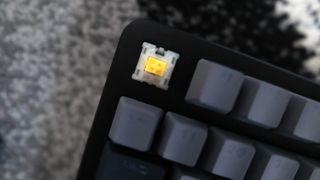
The Shift V2 is available with a choice of two switches: either the soft tactile Holy Panda X Clears or the linear Gateron Yellows. Both of these switches are new to this keyboard, where the previous variant came had a much wider selection of options from Cherry, Kalih or Halo. My sample came with Gateron Yellows, which are a 50g linear switch that carry enough extra weight compared to the more standard 45g Red options to make it a better keyboard to type on for day to day work.
I’ve often had a bit of a mixed relationship with Gateron switches. Their tactile offerings have sometimes felt inconsistent across a variety of different keyboards, while some of their linear switches have just lacked a certain something. I’m pleased to report that the Yellows inside the Shift V2 aren’t plagued with any inconsistencies or issues with feeling. They’re a buttery smooth switch with no scratchiness, and felt excellent to use in my day to day. While I’m never the biggest fan of linear switches, they are some of the better options I’ve used in a while.
However, if neither switch option tickles your fancy (or anywhere else on you for that matter), then the Shift V2 is hot-swappable. This second-gen model comes with a new PCB which now supports 5-pin switches as well as 3-pin options, so you’ve got plenty to choose from. I had some Cherry MX Clear-Top Blacks laying around in a bag from ages ago, and swapped them into the Shift V2.
(Image credit: Future)

Swapping switches out is simple enough thanks to Drop bundling a keycap and switch puller in the box. Simply take the keycap off and pull out your old switch with the puller, making sure to line up the hooks on the puller with the nibs on the top and bottom of the switch. Then, pull straight up and the switch should pull out. To add a new switch in its place, line up the switch’s pins with the relevant holes in the PCB, and press down until it clicks into place, making sure that the pins aren’t bent beneath you. If they are, the keys won’t work, and you’ll have to reseat the switches. It can be a little fiddly at first—I’ll confess to still bending the odd pin or two when changing my switches, but it’s easier than dealing with a soldering iron!
Acoustically, the Shift V2 impresses as well, with those layers of case foam and the new stabilisers working absolutely wonders to make this keyboard an aural dream. There’s no rattle or ping or any other unwanted noises, and the Shift V2 is a keyboard I could use happily for a long time without opening it up and poking around.
(Image credit: Future)

Its RGB lighting is bright and flash, both underneath the individual keys and in the RGB sandwich between the case. Drop’s keyboards have often impressed me with their RGB, and the Shift V2 is no different, with vivid colours across the board (no pun intended). The addition of QMK and VIA support for convenient remapping of keys and fiddling with the RGB lighting using the online Drop Keyboard Configurator. Using that online system does require you to flash the firmware onto the keyboard, which is a bit of a fiddly process, but its presence is a welcome one.
The big thing though is whether all these changes and additions are worth $250 (currently on sale at$199), though. For existing Drop Shift owners, I’ll tell you to go and pay a much lower price of$75for the newer PCBA, which gets you some of the way to a V2 model without a lot more expense.
For the rest of you, though, it’s a different proposition. $199 is alotof money for a pre-built keyboard in any guise, but the Drop Shift V2 is an excellent option if you value sound acoustics, a great typing experience, bright lighting and a fuller-sized layout.
However, we’ve also seen another 96% competitor emerge in the form of theAsus ROG Strix Scope II 96%, which adds wireless connectivity to the party alongside a lot of similar features to the Shift V2, and it’s cheaper. It makes the Shift V2 a bit of a harder sell, to be honest, but there’s no denying that this is a seriously good keyboard, and it’s one I could leave on my desk for a long time. But against some of the competition, it falls just a little bit short.
The Verdict
The Verdict
79Read our review policy
79
Drop Shift V2
LatestThe Last of Us season 2 trailer is a brief look at a story you should probably just play yourself in AprilWorld of Warcraft’s most recent patch soars with fun additions that last just long enoughLords of the Fallen studio embraces fear of the DEI boogeyman, says it will not include ‘any social or political agendas’ in its gamesSee more latest►
LatestThe Last of Us season 2 trailer is a brief look at a story you should probably just play yourself in AprilWorld of Warcraft’s most recent patch soars with fun additions that last just long enoughLords of the Fallen studio embraces fear of the DEI boogeyman, says it will not include ‘any social or political agendas’ in its gamesSee more latest►
LatestThe Last of Us season 2 trailer is a brief look at a story you should probably just play yourself in AprilWorld of Warcraft’s most recent patch soars with fun additions that last just long enoughLords of the Fallen studio embraces fear of the DEI boogeyman, says it will not include ‘any social or political agendas’ in its gamesSee more latest►
Latest
The Last of Us season 2 trailer is a brief look at a story you should probably just play yourself in AprilWorld of Warcraft’s most recent patch soars with fun additions that last just long enoughLords of the Fallen studio embraces fear of the DEI boogeyman, says it will not include ‘any social or political agendas’ in its games
The Last of Us season 2 trailer is a brief look at a story you should probably just play yourself in April
The Last of Us season 2 trailer is a brief look at a story you should probably just play yourself in April
World of Warcraft’s most recent patch soars with fun additions that last just long enough
World of Warcraft’s most recent patch soars with fun additions that last just long enough
Lords of the Fallen studio embraces fear of the DEI boogeyman, says it will not include ‘any social or political agendas’ in its games
Lords of the Fallen studio embraces fear of the DEI boogeyman, says it will not include ‘any social or political agendas’ in its games
See more latest►
Most PopularTurtle Beach Stealth Pivot reviewIkea Matchspel gaming chair reviewASRock DeskMini X600 reviewZotac Zbox Magnus EN374070C reviewMinisforum AtomMan G7 Ti reviewSamsung Galaxy Book4 Ultra reviewNoctua NH-D15 G2 reviewGulikit KK3 Max reviewBallionaire reviewMarvel Rivals reviewBe Quiet! Dark Rock 5 review
Most PopularTurtle Beach Stealth Pivot reviewIkea Matchspel gaming chair reviewASRock DeskMini X600 reviewZotac Zbox Magnus EN374070C reviewMinisforum AtomMan G7 Ti reviewSamsung Galaxy Book4 Ultra reviewNoctua NH-D15 G2 reviewGulikit KK3 Max reviewBallionaire reviewMarvel Rivals reviewBe Quiet! Dark Rock 5 review
Most PopularTurtle Beach Stealth Pivot reviewIkea Matchspel gaming chair reviewASRock DeskMini X600 reviewZotac Zbox Magnus EN374070C reviewMinisforum AtomMan G7 Ti reviewSamsung Galaxy Book4 Ultra reviewNoctua NH-D15 G2 reviewGulikit KK3 Max reviewBallionaire reviewMarvel Rivals reviewBe Quiet! Dark Rock 5 review
Most Popular
Turtle Beach Stealth Pivot review
Ikea Matchspel gaming chair review
ASRock DeskMini X600 review
Zotac Zbox Magnus EN374070C review
Minisforum AtomMan G7 Ti review
Samsung Galaxy Book4 Ultra review
Noctua NH-D15 G2 review
Gulikit KK3 Max review
Ballionaire review
Marvel Rivals review
Be Quiet! Dark Rock 5 review
HARDWARE BUYING GUIDESLATEST GAME REVIEWS1Best Steam Deck accessories in Australia for 2025: Our favorite docks, powerbanks and gamepads2Best graphics card for laptops: the mobile GPUs I’d want in my next gaming laptop3Best mini PCs in 2025: The compact computers I love the most4Best 14-inch gaming laptop: The top compact gaming laptops I’ve held in these hands5Best Mini-ITX motherboards in 2025: My pick from all the mini mobo marvels I’ve tested1Thank Goodness You’re Here! review: An anarchic treasure trove of jokes and skits2Shiren the Wanderer: The Mystery Dungeon of Serpentcoil Island review—like juggling chainsaws on horseback3WD Black SN850X 8 TB NVMe SSD review4Ikea Utespelare desk review5Asus ROG Harpe Ace Mini wireless mouse review
HARDWARE BUYING GUIDESLATEST GAME REVIEWS1Best Steam Deck accessories in Australia for 2025: Our favorite docks, powerbanks and gamepads2Best graphics card for laptops: the mobile GPUs I’d want in my next gaming laptop3Best mini PCs in 2025: The compact computers I love the most4Best 14-inch gaming laptop: The top compact gaming laptops I’ve held in these hands5Best Mini-ITX motherboards in 2025: My pick from all the mini mobo marvels I’ve tested1Thank Goodness You’re Here! review: An anarchic treasure trove of jokes and skits2Shiren the Wanderer: The Mystery Dungeon of Serpentcoil Island review—like juggling chainsaws on horseback3WD Black SN850X 8 TB NVMe SSD review4Ikea Utespelare desk review5Asus ROG Harpe Ace Mini wireless mouse review
HARDWARE BUYING GUIDESLATEST GAME REVIEWS1Best Steam Deck accessories in Australia for 2025: Our favorite docks, powerbanks and gamepads2Best graphics card for laptops: the mobile GPUs I’d want in my next gaming laptop3Best mini PCs in 2025: The compact computers I love the most4Best 14-inch gaming laptop: The top compact gaming laptops I’ve held in these hands5Best Mini-ITX motherboards in 2025: My pick from all the mini mobo marvels I’ve tested1Thank Goodness You’re Here! review: An anarchic treasure trove of jokes and skits2Shiren the Wanderer: The Mystery Dungeon of Serpentcoil Island review—like juggling chainsaws on horseback3WD Black SN850X 8 TB NVMe SSD review4Ikea Utespelare desk review5Asus ROG Harpe Ace Mini wireless mouse review
HARDWARE BUYING GUIDESLATEST GAME REVIEWS1Best Steam Deck accessories in Australia for 2025: Our favorite docks, powerbanks and gamepads2Best graphics card for laptops: the mobile GPUs I’d want in my next gaming laptop3Best mini PCs in 2025: The compact computers I love the most4Best 14-inch gaming laptop: The top compact gaming laptops I’ve held in these hands5Best Mini-ITX motherboards in 2025: My pick from all the mini mobo marvels I’ve tested1Thank Goodness You’re Here! review: An anarchic treasure trove of jokes and skits2Shiren the Wanderer: The Mystery Dungeon of Serpentcoil Island review—like juggling chainsaws on horseback3WD Black SN850X 8 TB NVMe SSD review4Ikea Utespelare desk review5Asus ROG Harpe Ace Mini wireless mouse review
HARDWARE BUYING GUIDESLATEST GAME REVIEWS
1Best Steam Deck accessories in Australia for 2025: Our favorite docks, powerbanks and gamepads
1Best Steam Deck accessories in Australia for 2025: Our favorite docks, powerbanks and gamepads
1
Best Steam Deck accessories in Australia for 2025: Our favorite docks, powerbanks and gamepads
2Best graphics card for laptops: the mobile GPUs I’d want in my next gaming laptop
2Best graphics card for laptops: the mobile GPUs I’d want in my next gaming laptop
2
Best graphics card for laptops: the mobile GPUs I’d want in my next gaming laptop
3Best mini PCs in 2025: The compact computers I love the most
3Best mini PCs in 2025: The compact computers I love the most
3
Best mini PCs in 2025: The compact computers I love the most
4Best 14-inch gaming laptop: The top compact gaming laptops I’ve held in these hands
4Best 14-inch gaming laptop: The top compact gaming laptops I’ve held in these hands
4
Best 14-inch gaming laptop: The top compact gaming laptops I’ve held in these hands
5Best Mini-ITX motherboards in 2025: My pick from all the mini mobo marvels I’ve tested
5Best Mini-ITX motherboards in 2025: My pick from all the mini mobo marvels I’ve tested
5
Best Mini-ITX motherboards in 2025: My pick from all the mini mobo marvels I’ve tested
1Thank Goodness You’re Here! review: An anarchic treasure trove of jokes and skits
1Thank Goodness You’re Here! review: An anarchic treasure trove of jokes and skits
1
Thank Goodness You’re Here! review: An anarchic treasure trove of jokes and skits
2Shiren the Wanderer: The Mystery Dungeon of Serpentcoil Island review—like juggling chainsaws on horseback
2Shiren the Wanderer: The Mystery Dungeon of Serpentcoil Island review—like juggling chainsaws on horseback
2
Shiren the Wanderer: The Mystery Dungeon of Serpentcoil Island review—like juggling chainsaws on horseback
3WD Black SN850X 8 TB NVMe SSD review
3WD Black SN850X 8 TB NVMe SSD review
3
WD Black SN850X 8 TB NVMe SSD review
4Ikea Utespelare desk review
4Ikea Utespelare desk review
4
Ikea Utespelare desk review
5Asus ROG Harpe Ace Mini wireless mouse review
5Asus ROG Harpe Ace Mini wireless mouse review
5
Asus ROG Harpe Ace Mini wireless mouse review
