Our VerdictThe OP1 8K is a swift, smooth and well built mouse that’s been stripped down to its basics, and while it champions the right to repair and all but alleviates the issue of drag, it’s lacking in features against mice in its price range.ForEasy to replace switches, skates and gripsSuper smooth with a high polling rateDrag is non-existentAgainstRudimentary software with no macro creationNo recesses for gripsCan get mice with better features for $5 morePC Gamer’s got your backOur experienced team dedicates many hours to every review, to really get to the heart of what matters most to you.Find out more about how we evaluate games and hardware.When playing games with a wired gaming mouse, you expect to encounter a little drag from said wire. As much as light cables help reduce drag, it’s generally an inevitability. But there are mouse designers out there, such as those at Endgame Gear, working to ease our suffering with gaming mice like the new OP1 8K.See, when it comes to mice with ridiculous 8K polling rates, reducing drag wherever possible is imperative, because yanking your mouse around kind of undermines the concept of a smooth, speedy gaming mouse. Hit a snag mid-game and your rank could be in jeopardy. Thankfully, with the OP1 8K, Endgame Gear has set about reducing drag in a few different ways.The most obvious is the angle on the wired connection. Unlike most wired mice I’ve reviewed, the OP1 8K’s braided cable actually snakes up out of the front of the mouse at an angle. Not only does it prevent the wire getting caught under the mouse when I’m flinging it around in the heat of battle, there’s a little leeway before the cable actually hits the mouse pad too. More leeway means less drag; less drag means less frustration. It’s a simple solution, but a much appreciated one. The Flex Cord 5.0 is nice and light, too.Then there are the skates. The OP1 8K comes with a second set of skates for the bottom, so you can pick and choose which ones suit your playstyle and surface better. Out of the box, it’s been pretty darn smooth on my soft mouse pad, thanks to how raised and silky these are, and I can swap them out if I want to use it on a glass surface.OP1 8K spec(Image credit: Future)Sensor:26,000 DPI, Pixart PAW 3395Polling rate:8,000 HzWeight:50.5 gSize:118 x 60 x 37 mmButtons:6Ergonomic:Claw gripPrice:$75|£70Aside from the attempts to keep it moving around smoothly, the OP1 8K’s looks are damn smooth, too. I got hold of the model with the lush, matte white finish, which is serving that stormtrooper aesthetic thanks to the black scroll wheel and side buttons. The Endgame Gear logo actually adds to the style as opposed to looking out of place like some do. It has the same subtle look of theRazer DeathAdder V3 Pro, only a bit less pointy. In other words, this mouse certainly has looks on its side.If you’re ok with changing the look up a bit, in the box are a couple of grip sticker pads, both black, and one for either side. The sticker for the left side feels a little oversized as, if you don’t want to partially cover the logo, you’ll likely end up with it hanging over the edge of the buttonhole. There’s also no recess for the stickers since you can use the mouse without them, which means they’re pretty noticeable to the touch and potentially easier to accidentally peel off. Still, these are comfortable grips that’ll be super easy to replace if you do find them coming off.Using the OP1 8K without grips is also a viable option, and I never feel like it’s going to slip even when things get warm.(Image credit: Future)On top of being able to swap out the skates and grips, Endgame Gear has given us the option to change the switches on the main mouse buttons. It’s not hot-swap and requires some screwing around (the non-metaphorical kind), but there’s no soldering necessary. The Kailh GX switches you get with the base model give a satisfying click and take just the right effort to press, but if you prefer a lighter click it’s nice to have the option to swap. And if they break (which might take a while with an 80 million actuation rating), you can just nab some replacements.As expected with FPS focussed gaming mice, this one is super lightweight. The OP1 8K comes in at 50.5 grams (1.78oz), which I was worried might make it feel cheap. There’s a slight hollow clunk noise when you tap the mouse on the desk, but there’s nothing about this mouse that feels cheap. It doesn’t rattle, and it feels sturdy in your hand. They needn’t change a thing with the design.What I’m hoping Endgame Gearwillfix is the current UI in the OP1 8K software. It looks like it’s come straight out of the early ’90s, and is a little rudimentary for my liking. It’s missing the option to make and assign macros, giving you only a few options for each button (play/pause media, skip, etc.).Image1of2(Image credit: Future)(Image credit: Future)Buy if…✅ You enjoy mouse modding:The OP1 8K gives you a chance to swap out the internal switches, as well as the external grip and skate stickers. It’s a bit like a Kinder Egg toy, but much better quality.✅ You’re an FPS player:This is a super simple, lightweight gaming mouse with a focus on precision and build quality. It has everything your average FPS player needs, plus some smoothing features to play with.Don’t buy if…❌ You’re an MMO player:You’re going to be disappointed at not only the lack of buttons for the money, but also the omission of macro features.❌ You’re looking for something flashy:The OP1 8K is a stripped-back gaming mouse with very little in the way of features.That said, there are a couple of options that come in handy for calibrating the OP1 8K such as the Motion-Sync feature—which allows for more consistent data intervals, though tops out at a 4,000Hz polling rate. Honestly, as much as Endgame Gear and others rate super-high polling, I’ve never seen it have a tangible effect on my gaming prowess. The average person doesn’t, so unless you’re a nerd for data there’s not that much to get out of all those fancy settings.The OP1 8K is a third of the price of one of its closest lookalikes, the DeathAdder V3 Pro, which is currently top of ourbest gaming micelist. And while the Pro is wireless with a 30,000 DPI sensor, I’d certainly be tempted to pick the OP1 8K over it. It’s cheaper and simpler in its execution. Though compare it to the wired alternative, theRazer DeathAdder V2that’s currently sub-$50 in a lot of places, and it’s a little more difficult to warrant the OP1 8K’s $75/£70 price tag simply for higher polling rates, an angled cable, and some fancy smoothing settings. Still, while the OP1 8K software leaves something to be desired, it’s less hassle than Razer’s infamous Synapse software.The OP1 8K leaves out all the aesthetic greebles, stripping things back to their basics and delivering a well-built gaming mouse that champions not only smooth, snagless gaming, but also the right to repair. That’s respectable. And while it does what it does well, pit it against theLogitech G502 Xand it’s easy to see what Endgame Gear could have achieved with the OP1 8K. The G502 X comes with better ergonomics; a special, infinite scroll wheel with side click feature; and five extra buttons; not to mention Logitech’s exemplary software. All that for five dollars more sounds like a bargain to me.The Verdict81Read our review policyEndgame Gear OP1 8K wired gaming mouse reviewThe OP1 8K is a swift, smooth and well built mouse that’s been stripped down to its basics, and while it champions the right to repair and all but alleviates the issue of drag, it’s lacking in features against mice in its price range.TOPICSHardwareMore about gaming miceThe HyperX Saga and Saga Pro are magnetic build-a-mouse kits with interchangeable components and the option to add 3D printed partsPC Gamer Hardware Awards: The best gaming mouse of 2024LatestMarvel Rivals' latest update quietly killed the game’s burgeoning mod sceneSee more latest►Most PopularTurtle Beach Stealth Pivot reviewIkea Matchspel gaming chair reviewASRock DeskMini X600 reviewZotac Zbox Magnus EN374070C reviewMinisforum AtomMan G7 Ti reviewSamsung Galaxy Book4 Ultra reviewNoctua NH-D15 G2 reviewGulikit KK3 Max reviewBallionaire reviewMarvel Rivals reviewBe Quiet! Dark Rock 5 reviewHARDWARE BUYING GUIDESLATEST GAME REVIEWS1Best Steam Deck accessories in Australia for 2025: Our favorite docks, powerbanks and gamepads2Best graphics card for laptops: the mobile GPUs I’d want in my next gaming laptop3Best mini PCs in 2025: The compact computers I love the most4Best 14-inch gaming laptop: The top compact gaming laptops I’ve held in these hands5Best Mini-ITX motherboards in 2025: My pick from all the mini mobo marvels I’ve tested1Thank Goodness You’re Here! review: An anarchic treasure trove of jokes and skits2Shiren the Wanderer: The Mystery Dungeon of Serpentcoil Island review—like juggling chainsaws on horseback3WD Black SN850X 8 TB NVMe SSD review4Ikea Utespelare desk review5Asus ROG Harpe Ace Mini wireless mouse review
Our VerdictThe OP1 8K is a swift, smooth and well built mouse that’s been stripped down to its basics, and while it champions the right to repair and all but alleviates the issue of drag, it’s lacking in features against mice in its price range.ForEasy to replace switches, skates and gripsSuper smooth with a high polling rateDrag is non-existentAgainstRudimentary software with no macro creationNo recesses for gripsCan get mice with better features for $5 morePC Gamer’s got your backOur experienced team dedicates many hours to every review, to really get to the heart of what matters most to you.Find out more about how we evaluate games and hardware.When playing games with a wired gaming mouse, you expect to encounter a little drag from said wire. As much as light cables help reduce drag, it’s generally an inevitability. But there are mouse designers out there, such as those at Endgame Gear, working to ease our suffering with gaming mice like the new OP1 8K.See, when it comes to mice with ridiculous 8K polling rates, reducing drag wherever possible is imperative, because yanking your mouse around kind of undermines the concept of a smooth, speedy gaming mouse. Hit a snag mid-game and your rank could be in jeopardy. Thankfully, with the OP1 8K, Endgame Gear has set about reducing drag in a few different ways.The most obvious is the angle on the wired connection. Unlike most wired mice I’ve reviewed, the OP1 8K’s braided cable actually snakes up out of the front of the mouse at an angle. Not only does it prevent the wire getting caught under the mouse when I’m flinging it around in the heat of battle, there’s a little leeway before the cable actually hits the mouse pad too. More leeway means less drag; less drag means less frustration. It’s a simple solution, but a much appreciated one. The Flex Cord 5.0 is nice and light, too.Then there are the skates. The OP1 8K comes with a second set of skates for the bottom, so you can pick and choose which ones suit your playstyle and surface better. Out of the box, it’s been pretty darn smooth on my soft mouse pad, thanks to how raised and silky these are, and I can swap them out if I want to use it on a glass surface.OP1 8K spec(Image credit: Future)Sensor:26,000 DPI, Pixart PAW 3395Polling rate:8,000 HzWeight:50.5 gSize:118 x 60 x 37 mmButtons:6Ergonomic:Claw gripPrice:$75|£70Aside from the attempts to keep it moving around smoothly, the OP1 8K’s looks are damn smooth, too. I got hold of the model with the lush, matte white finish, which is serving that stormtrooper aesthetic thanks to the black scroll wheel and side buttons. The Endgame Gear logo actually adds to the style as opposed to looking out of place like some do. It has the same subtle look of theRazer DeathAdder V3 Pro, only a bit less pointy. In other words, this mouse certainly has looks on its side.If you’re ok with changing the look up a bit, in the box are a couple of grip sticker pads, both black, and one for either side. The sticker for the left side feels a little oversized as, if you don’t want to partially cover the logo, you’ll likely end up with it hanging over the edge of the buttonhole. There’s also no recess for the stickers since you can use the mouse without them, which means they’re pretty noticeable to the touch and potentially easier to accidentally peel off. Still, these are comfortable grips that’ll be super easy to replace if you do find them coming off.Using the OP1 8K without grips is also a viable option, and I never feel like it’s going to slip even when things get warm.(Image credit: Future)On top of being able to swap out the skates and grips, Endgame Gear has given us the option to change the switches on the main mouse buttons. It’s not hot-swap and requires some screwing around (the non-metaphorical kind), but there’s no soldering necessary. The Kailh GX switches you get with the base model give a satisfying click and take just the right effort to press, but if you prefer a lighter click it’s nice to have the option to swap. And if they break (which might take a while with an 80 million actuation rating), you can just nab some replacements.As expected with FPS focussed gaming mice, this one is super lightweight. The OP1 8K comes in at 50.5 grams (1.78oz), which I was worried might make it feel cheap. There’s a slight hollow clunk noise when you tap the mouse on the desk, but there’s nothing about this mouse that feels cheap. It doesn’t rattle, and it feels sturdy in your hand. They needn’t change a thing with the design.What I’m hoping Endgame Gearwillfix is the current UI in the OP1 8K software. It looks like it’s come straight out of the early ’90s, and is a little rudimentary for my liking. It’s missing the option to make and assign macros, giving you only a few options for each button (play/pause media, skip, etc.).Image1of2(Image credit: Future)(Image credit: Future)Buy if…✅ You enjoy mouse modding:The OP1 8K gives you a chance to swap out the internal switches, as well as the external grip and skate stickers. It’s a bit like a Kinder Egg toy, but much better quality.✅ You’re an FPS player:This is a super simple, lightweight gaming mouse with a focus on precision and build quality. It has everything your average FPS player needs, plus some smoothing features to play with.Don’t buy if…❌ You’re an MMO player:You’re going to be disappointed at not only the lack of buttons for the money, but also the omission of macro features.❌ You’re looking for something flashy:The OP1 8K is a stripped-back gaming mouse with very little in the way of features.That said, there are a couple of options that come in handy for calibrating the OP1 8K such as the Motion-Sync feature—which allows for more consistent data intervals, though tops out at a 4,000Hz polling rate. Honestly, as much as Endgame Gear and others rate super-high polling, I’ve never seen it have a tangible effect on my gaming prowess. The average person doesn’t, so unless you’re a nerd for data there’s not that much to get out of all those fancy settings.The OP1 8K is a third of the price of one of its closest lookalikes, the DeathAdder V3 Pro, which is currently top of ourbest gaming micelist. And while the Pro is wireless with a 30,000 DPI sensor, I’d certainly be tempted to pick the OP1 8K over it. It’s cheaper and simpler in its execution. Though compare it to the wired alternative, theRazer DeathAdder V2that’s currently sub-$50 in a lot of places, and it’s a little more difficult to warrant the OP1 8K’s $75/£70 price tag simply for higher polling rates, an angled cable, and some fancy smoothing settings. Still, while the OP1 8K software leaves something to be desired, it’s less hassle than Razer’s infamous Synapse software.The OP1 8K leaves out all the aesthetic greebles, stripping things back to their basics and delivering a well-built gaming mouse that champions not only smooth, snagless gaming, but also the right to repair. That’s respectable. And while it does what it does well, pit it against theLogitech G502 Xand it’s easy to see what Endgame Gear could have achieved with the OP1 8K. The G502 X comes with better ergonomics; a special, infinite scroll wheel with side click feature; and five extra buttons; not to mention Logitech’s exemplary software. All that for five dollars more sounds like a bargain to me.The Verdict81Read our review policyEndgame Gear OP1 8K wired gaming mouse reviewThe OP1 8K is a swift, smooth and well built mouse that’s been stripped down to its basics, and while it champions the right to repair and all but alleviates the issue of drag, it’s lacking in features against mice in its price range.TOPICSHardwareMore about gaming miceThe HyperX Saga and Saga Pro are magnetic build-a-mouse kits with interchangeable components and the option to add 3D printed partsPC Gamer Hardware Awards: The best gaming mouse of 2024LatestMarvel Rivals' latest update quietly killed the game’s burgeoning mod sceneSee more latest►Most PopularTurtle Beach Stealth Pivot reviewIkea Matchspel gaming chair reviewASRock DeskMini X600 reviewZotac Zbox Magnus EN374070C reviewMinisforum AtomMan G7 Ti reviewSamsung Galaxy Book4 Ultra reviewNoctua NH-D15 G2 reviewGulikit KK3 Max reviewBallionaire reviewMarvel Rivals reviewBe Quiet! Dark Rock 5 review
Our VerdictThe OP1 8K is a swift, smooth and well built mouse that’s been stripped down to its basics, and while it champions the right to repair and all but alleviates the issue of drag, it’s lacking in features against mice in its price range.ForEasy to replace switches, skates and gripsSuper smooth with a high polling rateDrag is non-existentAgainstRudimentary software with no macro creationNo recesses for gripsCan get mice with better features for $5 morePC Gamer’s got your backOur experienced team dedicates many hours to every review, to really get to the heart of what matters most to you.Find out more about how we evaluate games and hardware.When playing games with a wired gaming mouse, you expect to encounter a little drag from said wire. As much as light cables help reduce drag, it’s generally an inevitability. But there are mouse designers out there, such as those at Endgame Gear, working to ease our suffering with gaming mice like the new OP1 8K.See, when it comes to mice with ridiculous 8K polling rates, reducing drag wherever possible is imperative, because yanking your mouse around kind of undermines the concept of a smooth, speedy gaming mouse. Hit a snag mid-game and your rank could be in jeopardy. Thankfully, with the OP1 8K, Endgame Gear has set about reducing drag in a few different ways.The most obvious is the angle on the wired connection. Unlike most wired mice I’ve reviewed, the OP1 8K’s braided cable actually snakes up out of the front of the mouse at an angle. Not only does it prevent the wire getting caught under the mouse when I’m flinging it around in the heat of battle, there’s a little leeway before the cable actually hits the mouse pad too. More leeway means less drag; less drag means less frustration. It’s a simple solution, but a much appreciated one. The Flex Cord 5.0 is nice and light, too.Then there are the skates. The OP1 8K comes with a second set of skates for the bottom, so you can pick and choose which ones suit your playstyle and surface better. Out of the box, it’s been pretty darn smooth on my soft mouse pad, thanks to how raised and silky these are, and I can swap them out if I want to use it on a glass surface.OP1 8K spec(Image credit: Future)Sensor:26,000 DPI, Pixart PAW 3395Polling rate:8,000 HzWeight:50.5 gSize:118 x 60 x 37 mmButtons:6Ergonomic:Claw gripPrice:$75|£70Aside from the attempts to keep it moving around smoothly, the OP1 8K’s looks are damn smooth, too. I got hold of the model with the lush, matte white finish, which is serving that stormtrooper aesthetic thanks to the black scroll wheel and side buttons. The Endgame Gear logo actually adds to the style as opposed to looking out of place like some do. It has the same subtle look of theRazer DeathAdder V3 Pro, only a bit less pointy. In other words, this mouse certainly has looks on its side.If you’re ok with changing the look up a bit, in the box are a couple of grip sticker pads, both black, and one for either side. The sticker for the left side feels a little oversized as, if you don’t want to partially cover the logo, you’ll likely end up with it hanging over the edge of the buttonhole. There’s also no recess for the stickers since you can use the mouse without them, which means they’re pretty noticeable to the touch and potentially easier to accidentally peel off. Still, these are comfortable grips that’ll be super easy to replace if you do find them coming off.Using the OP1 8K without grips is also a viable option, and I never feel like it’s going to slip even when things get warm.(Image credit: Future)On top of being able to swap out the skates and grips, Endgame Gear has given us the option to change the switches on the main mouse buttons. It’s not hot-swap and requires some screwing around (the non-metaphorical kind), but there’s no soldering necessary. The Kailh GX switches you get with the base model give a satisfying click and take just the right effort to press, but if you prefer a lighter click it’s nice to have the option to swap. And if they break (which might take a while with an 80 million actuation rating), you can just nab some replacements.As expected with FPS focussed gaming mice, this one is super lightweight. The OP1 8K comes in at 50.5 grams (1.78oz), which I was worried might make it feel cheap. There’s a slight hollow clunk noise when you tap the mouse on the desk, but there’s nothing about this mouse that feels cheap. It doesn’t rattle, and it feels sturdy in your hand. They needn’t change a thing with the design.What I’m hoping Endgame Gearwillfix is the current UI in the OP1 8K software. It looks like it’s come straight out of the early ’90s, and is a little rudimentary for my liking. It’s missing the option to make and assign macros, giving you only a few options for each button (play/pause media, skip, etc.).Image1of2(Image credit: Future)(Image credit: Future)Buy if…✅ You enjoy mouse modding:The OP1 8K gives you a chance to swap out the internal switches, as well as the external grip and skate stickers. It’s a bit like a Kinder Egg toy, but much better quality.✅ You’re an FPS player:This is a super simple, lightweight gaming mouse with a focus on precision and build quality. It has everything your average FPS player needs, plus some smoothing features to play with.Don’t buy if…❌ You’re an MMO player:You’re going to be disappointed at not only the lack of buttons for the money, but also the omission of macro features.❌ You’re looking for something flashy:The OP1 8K is a stripped-back gaming mouse with very little in the way of features.That said, there are a couple of options that come in handy for calibrating the OP1 8K such as the Motion-Sync feature—which allows for more consistent data intervals, though tops out at a 4,000Hz polling rate. Honestly, as much as Endgame Gear and others rate super-high polling, I’ve never seen it have a tangible effect on my gaming prowess. The average person doesn’t, so unless you’re a nerd for data there’s not that much to get out of all those fancy settings.The OP1 8K is a third of the price of one of its closest lookalikes, the DeathAdder V3 Pro, which is currently top of ourbest gaming micelist. And while the Pro is wireless with a 30,000 DPI sensor, I’d certainly be tempted to pick the OP1 8K over it. It’s cheaper and simpler in its execution. Though compare it to the wired alternative, theRazer DeathAdder V2that’s currently sub-$50 in a lot of places, and it’s a little more difficult to warrant the OP1 8K’s $75/£70 price tag simply for higher polling rates, an angled cable, and some fancy smoothing settings. Still, while the OP1 8K software leaves something to be desired, it’s less hassle than Razer’s infamous Synapse software.The OP1 8K leaves out all the aesthetic greebles, stripping things back to their basics and delivering a well-built gaming mouse that champions not only smooth, snagless gaming, but also the right to repair. That’s respectable. And while it does what it does well, pit it against theLogitech G502 Xand it’s easy to see what Endgame Gear could have achieved with the OP1 8K. The G502 X comes with better ergonomics; a special, infinite scroll wheel with side click feature; and five extra buttons; not to mention Logitech’s exemplary software. All that for five dollars more sounds like a bargain to me.The Verdict81Read our review policyEndgame Gear OP1 8K wired gaming mouse reviewThe OP1 8K is a swift, smooth and well built mouse that’s been stripped down to its basics, and while it champions the right to repair and all but alleviates the issue of drag, it’s lacking in features against mice in its price range.TOPICSHardwareMore about gaming miceThe HyperX Saga and Saga Pro are magnetic build-a-mouse kits with interchangeable components and the option to add 3D printed partsPC Gamer Hardware Awards: The best gaming mouse of 2024LatestMarvel Rivals' latest update quietly killed the game’s burgeoning mod sceneSee more latest►Most PopularTurtle Beach Stealth Pivot reviewIkea Matchspel gaming chair reviewASRock DeskMini X600 reviewZotac Zbox Magnus EN374070C reviewMinisforum AtomMan G7 Ti reviewSamsung Galaxy Book4 Ultra reviewNoctua NH-D15 G2 reviewGulikit KK3 Max reviewBallionaire reviewMarvel Rivals reviewBe Quiet! Dark Rock 5 review
Our VerdictThe OP1 8K is a swift, smooth and well built mouse that’s been stripped down to its basics, and while it champions the right to repair and all but alleviates the issue of drag, it’s lacking in features against mice in its price range.ForEasy to replace switches, skates and gripsSuper smooth with a high polling rateDrag is non-existentAgainstRudimentary software with no macro creationNo recesses for gripsCan get mice with better features for $5 morePC Gamer’s got your backOur experienced team dedicates many hours to every review, to really get to the heart of what matters most to you.Find out more about how we evaluate games and hardware.When playing games with a wired gaming mouse, you expect to encounter a little drag from said wire. As much as light cables help reduce drag, it’s generally an inevitability. But there are mouse designers out there, such as those at Endgame Gear, working to ease our suffering with gaming mice like the new OP1 8K.See, when it comes to mice with ridiculous 8K polling rates, reducing drag wherever possible is imperative, because yanking your mouse around kind of undermines the concept of a smooth, speedy gaming mouse. Hit a snag mid-game and your rank could be in jeopardy. Thankfully, with the OP1 8K, Endgame Gear has set about reducing drag in a few different ways.The most obvious is the angle on the wired connection. Unlike most wired mice I’ve reviewed, the OP1 8K’s braided cable actually snakes up out of the front of the mouse at an angle. Not only does it prevent the wire getting caught under the mouse when I’m flinging it around in the heat of battle, there’s a little leeway before the cable actually hits the mouse pad too. More leeway means less drag; less drag means less frustration. It’s a simple solution, but a much appreciated one. The Flex Cord 5.0 is nice and light, too.Then there are the skates. The OP1 8K comes with a second set of skates for the bottom, so you can pick and choose which ones suit your playstyle and surface better. Out of the box, it’s been pretty darn smooth on my soft mouse pad, thanks to how raised and silky these are, and I can swap them out if I want to use it on a glass surface.OP1 8K spec(Image credit: Future)Sensor:26,000 DPI, Pixart PAW 3395Polling rate:8,000 HzWeight:50.5 gSize:118 x 60 x 37 mmButtons:6Ergonomic:Claw gripPrice:$75|£70Aside from the attempts to keep it moving around smoothly, the OP1 8K’s looks are damn smooth, too. I got hold of the model with the lush, matte white finish, which is serving that stormtrooper aesthetic thanks to the black scroll wheel and side buttons. The Endgame Gear logo actually adds to the style as opposed to looking out of place like some do. It has the same subtle look of theRazer DeathAdder V3 Pro, only a bit less pointy. In other words, this mouse certainly has looks on its side.If you’re ok with changing the look up a bit, in the box are a couple of grip sticker pads, both black, and one for either side. The sticker for the left side feels a little oversized as, if you don’t want to partially cover the logo, you’ll likely end up with it hanging over the edge of the buttonhole. There’s also no recess for the stickers since you can use the mouse without them, which means they’re pretty noticeable to the touch and potentially easier to accidentally peel off. Still, these are comfortable grips that’ll be super easy to replace if you do find them coming off.Using the OP1 8K without grips is also a viable option, and I never feel like it’s going to slip even when things get warm.(Image credit: Future)On top of being able to swap out the skates and grips, Endgame Gear has given us the option to change the switches on the main mouse buttons. It’s not hot-swap and requires some screwing around (the non-metaphorical kind), but there’s no soldering necessary. The Kailh GX switches you get with the base model give a satisfying click and take just the right effort to press, but if you prefer a lighter click it’s nice to have the option to swap. And if they break (which might take a while with an 80 million actuation rating), you can just nab some replacements.As expected with FPS focussed gaming mice, this one is super lightweight. The OP1 8K comes in at 50.5 grams (1.78oz), which I was worried might make it feel cheap. There’s a slight hollow clunk noise when you tap the mouse on the desk, but there’s nothing about this mouse that feels cheap. It doesn’t rattle, and it feels sturdy in your hand. They needn’t change a thing with the design.What I’m hoping Endgame Gearwillfix is the current UI in the OP1 8K software. It looks like it’s come straight out of the early ’90s, and is a little rudimentary for my liking. It’s missing the option to make and assign macros, giving you only a few options for each button (play/pause media, skip, etc.).Image1of2(Image credit: Future)(Image credit: Future)Buy if…✅ You enjoy mouse modding:The OP1 8K gives you a chance to swap out the internal switches, as well as the external grip and skate stickers. It’s a bit like a Kinder Egg toy, but much better quality.✅ You’re an FPS player:This is a super simple, lightweight gaming mouse with a focus on precision and build quality. It has everything your average FPS player needs, plus some smoothing features to play with.Don’t buy if…❌ You’re an MMO player:You’re going to be disappointed at not only the lack of buttons for the money, but also the omission of macro features.❌ You’re looking for something flashy:The OP1 8K is a stripped-back gaming mouse with very little in the way of features.That said, there are a couple of options that come in handy for calibrating the OP1 8K such as the Motion-Sync feature—which allows for more consistent data intervals, though tops out at a 4,000Hz polling rate. Honestly, as much as Endgame Gear and others rate super-high polling, I’ve never seen it have a tangible effect on my gaming prowess. The average person doesn’t, so unless you’re a nerd for data there’s not that much to get out of all those fancy settings.The OP1 8K is a third of the price of one of its closest lookalikes, the DeathAdder V3 Pro, which is currently top of ourbest gaming micelist. And while the Pro is wireless with a 30,000 DPI sensor, I’d certainly be tempted to pick the OP1 8K over it. It’s cheaper and simpler in its execution. Though compare it to the wired alternative, theRazer DeathAdder V2that’s currently sub-$50 in a lot of places, and it’s a little more difficult to warrant the OP1 8K’s $75/£70 price tag simply for higher polling rates, an angled cable, and some fancy smoothing settings. Still, while the OP1 8K software leaves something to be desired, it’s less hassle than Razer’s infamous Synapse software.The OP1 8K leaves out all the aesthetic greebles, stripping things back to their basics and delivering a well-built gaming mouse that champions not only smooth, snagless gaming, but also the right to repair. That’s respectable. And while it does what it does well, pit it against theLogitech G502 Xand it’s easy to see what Endgame Gear could have achieved with the OP1 8K. The G502 X comes with better ergonomics; a special, infinite scroll wheel with side click feature; and five extra buttons; not to mention Logitech’s exemplary software. All that for five dollars more sounds like a bargain to me.The Verdict81Read our review policyEndgame Gear OP1 8K wired gaming mouse reviewThe OP1 8K is a swift, smooth and well built mouse that’s been stripped down to its basics, and while it champions the right to repair and all but alleviates the issue of drag, it’s lacking in features against mice in its price range.TOPICSHardwareMore about gaming miceThe HyperX Saga and Saga Pro are magnetic build-a-mouse kits with interchangeable components and the option to add 3D printed partsPC Gamer Hardware Awards: The best gaming mouse of 2024LatestMarvel Rivals' latest update quietly killed the game’s burgeoning mod sceneSee more latest►Most PopularTurtle Beach Stealth Pivot reviewIkea Matchspel gaming chair reviewASRock DeskMini X600 reviewZotac Zbox Magnus EN374070C reviewMinisforum AtomMan G7 Ti reviewSamsung Galaxy Book4 Ultra reviewNoctua NH-D15 G2 reviewGulikit KK3 Max reviewBallionaire reviewMarvel Rivals reviewBe Quiet! Dark Rock 5 review
Our VerdictThe OP1 8K is a swift, smooth and well built mouse that’s been stripped down to its basics, and while it champions the right to repair and all but alleviates the issue of drag, it’s lacking in features against mice in its price range.
Our VerdictThe OP1 8K is a swift, smooth and well built mouse that’s been stripped down to its basics, and while it champions the right to repair and all but alleviates the issue of drag, it’s lacking in features against mice in its price range.
Our Verdict
Our Verdict
The OP1 8K is a swift, smooth and well built mouse that’s been stripped down to its basics, and while it champions the right to repair and all but alleviates the issue of drag, it’s lacking in features against mice in its price range.
ForEasy to replace switches, skates and gripsSuper smooth with a high polling rateDrag is non-existentAgainstRudimentary software with no macro creationNo recesses for gripsCan get mice with better features for $5 more
ForEasy to replace switches, skates and gripsSuper smooth with a high polling rateDrag is non-existent
AgainstRudimentary software with no macro creationNo recesses for gripsCan get mice with better features for $5 more
PC Gamer’s got your backOur experienced team dedicates many hours to every review, to really get to the heart of what matters most to you.Find out more about how we evaluate games and hardware.
PC Gamer’s got your backOur experienced team dedicates many hours to every review, to really get to the heart of what matters most to you.Find out more about how we evaluate games and hardware.
When playing games with a wired gaming mouse, you expect to encounter a little drag from said wire. As much as light cables help reduce drag, it’s generally an inevitability. But there are mouse designers out there, such as those at Endgame Gear, working to ease our suffering with gaming mice like the new OP1 8K.See, when it comes to mice with ridiculous 8K polling rates, reducing drag wherever possible is imperative, because yanking your mouse around kind of undermines the concept of a smooth, speedy gaming mouse. Hit a snag mid-game and your rank could be in jeopardy. Thankfully, with the OP1 8K, Endgame Gear has set about reducing drag in a few different ways.The most obvious is the angle on the wired connection. Unlike most wired mice I’ve reviewed, the OP1 8K’s braided cable actually snakes up out of the front of the mouse at an angle. Not only does it prevent the wire getting caught under the mouse when I’m flinging it around in the heat of battle, there’s a little leeway before the cable actually hits the mouse pad too. More leeway means less drag; less drag means less frustration. It’s a simple solution, but a much appreciated one. The Flex Cord 5.0 is nice and light, too.Then there are the skates. The OP1 8K comes with a second set of skates for the bottom, so you can pick and choose which ones suit your playstyle and surface better. Out of the box, it’s been pretty darn smooth on my soft mouse pad, thanks to how raised and silky these are, and I can swap them out if I want to use it on a glass surface.OP1 8K spec(Image credit: Future)Sensor:26,000 DPI, Pixart PAW 3395Polling rate:8,000 HzWeight:50.5 gSize:118 x 60 x 37 mmButtons:6Ergonomic:Claw gripPrice:$75|£70Aside from the attempts to keep it moving around smoothly, the OP1 8K’s looks are damn smooth, too. I got hold of the model with the lush, matte white finish, which is serving that stormtrooper aesthetic thanks to the black scroll wheel and side buttons. The Endgame Gear logo actually adds to the style as opposed to looking out of place like some do. It has the same subtle look of theRazer DeathAdder V3 Pro, only a bit less pointy. In other words, this mouse certainly has looks on its side.If you’re ok with changing the look up a bit, in the box are a couple of grip sticker pads, both black, and one for either side. The sticker for the left side feels a little oversized as, if you don’t want to partially cover the logo, you’ll likely end up with it hanging over the edge of the buttonhole. There’s also no recess for the stickers since you can use the mouse without them, which means they’re pretty noticeable to the touch and potentially easier to accidentally peel off. Still, these are comfortable grips that’ll be super easy to replace if you do find them coming off.Using the OP1 8K without grips is also a viable option, and I never feel like it’s going to slip even when things get warm.(Image credit: Future)On top of being able to swap out the skates and grips, Endgame Gear has given us the option to change the switches on the main mouse buttons. It’s not hot-swap and requires some screwing around (the non-metaphorical kind), but there’s no soldering necessary. The Kailh GX switches you get with the base model give a satisfying click and take just the right effort to press, but if you prefer a lighter click it’s nice to have the option to swap. And if they break (which might take a while with an 80 million actuation rating), you can just nab some replacements.As expected with FPS focussed gaming mice, this one is super lightweight. The OP1 8K comes in at 50.5 grams (1.78oz), which I was worried might make it feel cheap. There’s a slight hollow clunk noise when you tap the mouse on the desk, but there’s nothing about this mouse that feels cheap. It doesn’t rattle, and it feels sturdy in your hand. They needn’t change a thing with the design.What I’m hoping Endgame Gearwillfix is the current UI in the OP1 8K software. It looks like it’s come straight out of the early ’90s, and is a little rudimentary for my liking. It’s missing the option to make and assign macros, giving you only a few options for each button (play/pause media, skip, etc.).Image1of2(Image credit: Future)(Image credit: Future)Buy if…✅ You enjoy mouse modding:The OP1 8K gives you a chance to swap out the internal switches, as well as the external grip and skate stickers. It’s a bit like a Kinder Egg toy, but much better quality.✅ You’re an FPS player:This is a super simple, lightweight gaming mouse with a focus on precision and build quality. It has everything your average FPS player needs, plus some smoothing features to play with.Don’t buy if…❌ You’re an MMO player:You’re going to be disappointed at not only the lack of buttons for the money, but also the omission of macro features.❌ You’re looking for something flashy:The OP1 8K is a stripped-back gaming mouse with very little in the way of features.That said, there are a couple of options that come in handy for calibrating the OP1 8K such as the Motion-Sync feature—which allows for more consistent data intervals, though tops out at a 4,000Hz polling rate. Honestly, as much as Endgame Gear and others rate super-high polling, I’ve never seen it have a tangible effect on my gaming prowess. The average person doesn’t, so unless you’re a nerd for data there’s not that much to get out of all those fancy settings.The OP1 8K is a third of the price of one of its closest lookalikes, the DeathAdder V3 Pro, which is currently top of ourbest gaming micelist. And while the Pro is wireless with a 30,000 DPI sensor, I’d certainly be tempted to pick the OP1 8K over it. It’s cheaper and simpler in its execution. Though compare it to the wired alternative, theRazer DeathAdder V2that’s currently sub-$50 in a lot of places, and it’s a little more difficult to warrant the OP1 8K’s $75/£70 price tag simply for higher polling rates, an angled cable, and some fancy smoothing settings. Still, while the OP1 8K software leaves something to be desired, it’s less hassle than Razer’s infamous Synapse software.The OP1 8K leaves out all the aesthetic greebles, stripping things back to their basics and delivering a well-built gaming mouse that champions not only smooth, snagless gaming, but also the right to repair. That’s respectable. And while it does what it does well, pit it against theLogitech G502 Xand it’s easy to see what Endgame Gear could have achieved with the OP1 8K. The G502 X comes with better ergonomics; a special, infinite scroll wheel with side click feature; and five extra buttons; not to mention Logitech’s exemplary software. All that for five dollars more sounds like a bargain to me.
When playing games with a wired gaming mouse, you expect to encounter a little drag from said wire. As much as light cables help reduce drag, it’s generally an inevitability. But there are mouse designers out there, such as those at Endgame Gear, working to ease our suffering with gaming mice like the new OP1 8K.
See, when it comes to mice with ridiculous 8K polling rates, reducing drag wherever possible is imperative, because yanking your mouse around kind of undermines the concept of a smooth, speedy gaming mouse. Hit a snag mid-game and your rank could be in jeopardy. Thankfully, with the OP1 8K, Endgame Gear has set about reducing drag in a few different ways.
The most obvious is the angle on the wired connection. Unlike most wired mice I’ve reviewed, the OP1 8K’s braided cable actually snakes up out of the front of the mouse at an angle. Not only does it prevent the wire getting caught under the mouse when I’m flinging it around in the heat of battle, there’s a little leeway before the cable actually hits the mouse pad too. More leeway means less drag; less drag means less frustration. It’s a simple solution, but a much appreciated one. The Flex Cord 5.0 is nice and light, too.
Then there are the skates. The OP1 8K comes with a second set of skates for the bottom, so you can pick and choose which ones suit your playstyle and surface better. Out of the box, it’s been pretty darn smooth on my soft mouse pad, thanks to how raised and silky these are, and I can swap them out if I want to use it on a glass surface.
OP1 8K spec(Image credit: Future)Sensor:26,000 DPI, Pixart PAW 3395Polling rate:8,000 HzWeight:50.5 gSize:118 x 60 x 37 mmButtons:6Ergonomic:Claw gripPrice:$75|£70
OP1 8K spec
(Image credit: Future)Sensor:26,000 DPI, Pixart PAW 3395Polling rate:8,000 HzWeight:50.5 gSize:118 x 60 x 37 mmButtons:6Ergonomic:Claw gripPrice:$75|£70
(Image credit: Future)
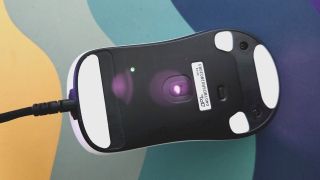
Sensor:26,000 DPI, Pixart PAW 3395Polling rate:8,000 HzWeight:50.5 gSize:118 x 60 x 37 mmButtons:6Ergonomic:Claw gripPrice:$75|£70
Aside from the attempts to keep it moving around smoothly, the OP1 8K’s looks are damn smooth, too. I got hold of the model with the lush, matte white finish, which is serving that stormtrooper aesthetic thanks to the black scroll wheel and side buttons. The Endgame Gear logo actually adds to the style as opposed to looking out of place like some do. It has the same subtle look of theRazer DeathAdder V3 Pro, only a bit less pointy. In other words, this mouse certainly has looks on its side.
If you’re ok with changing the look up a bit, in the box are a couple of grip sticker pads, both black, and one for either side. The sticker for the left side feels a little oversized as, if you don’t want to partially cover the logo, you’ll likely end up with it hanging over the edge of the buttonhole. There’s also no recess for the stickers since you can use the mouse without them, which means they’re pretty noticeable to the touch and potentially easier to accidentally peel off. Still, these are comfortable grips that’ll be super easy to replace if you do find them coming off.
Using the OP1 8K without grips is also a viable option, and I never feel like it’s going to slip even when things get warm.
(Image credit: Future)
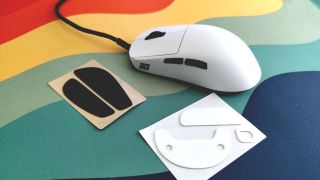
On top of being able to swap out the skates and grips, Endgame Gear has given us the option to change the switches on the main mouse buttons. It’s not hot-swap and requires some screwing around (the non-metaphorical kind), but there’s no soldering necessary. The Kailh GX switches you get with the base model give a satisfying click and take just the right effort to press, but if you prefer a lighter click it’s nice to have the option to swap. And if they break (which might take a while with an 80 million actuation rating), you can just nab some replacements.
As expected with FPS focussed gaming mice, this one is super lightweight. The OP1 8K comes in at 50.5 grams (1.78oz), which I was worried might make it feel cheap. There’s a slight hollow clunk noise when you tap the mouse on the desk, but there’s nothing about this mouse that feels cheap. It doesn’t rattle, and it feels sturdy in your hand. They needn’t change a thing with the design.
What I’m hoping Endgame Gearwillfix is the current UI in the OP1 8K software. It looks like it’s come straight out of the early ’90s, and is a little rudimentary for my liking. It’s missing the option to make and assign macros, giving you only a few options for each button (play/pause media, skip, etc.).
Image1of2(Image credit: Future)(Image credit: Future)
Image1of2(Image credit: Future)(Image credit: Future)
Image1of2
(Image credit: Future)(Image credit: Future)
(Image credit: Future)(Image credit: Future)
(Image credit: Future)
(Image credit: Future)
(Image credit: Future)
(Image credit: Future)
(Image credit: Future)

(Image credit: Future)
(Image credit: Future)
(Image credit: Future)
(Image credit: Future)
(Image credit: Future)
Buy if…✅ You enjoy mouse modding:The OP1 8K gives you a chance to swap out the internal switches, as well as the external grip and skate stickers. It’s a bit like a Kinder Egg toy, but much better quality.✅ You’re an FPS player:This is a super simple, lightweight gaming mouse with a focus on precision and build quality. It has everything your average FPS player needs, plus some smoothing features to play with.
Buy if…
✅ You enjoy mouse modding:The OP1 8K gives you a chance to swap out the internal switches, as well as the external grip and skate stickers. It’s a bit like a Kinder Egg toy, but much better quality.✅ You’re an FPS player:This is a super simple, lightweight gaming mouse with a focus on precision and build quality. It has everything your average FPS player needs, plus some smoothing features to play with.
✅ You enjoy mouse modding:The OP1 8K gives you a chance to swap out the internal switches, as well as the external grip and skate stickers. It’s a bit like a Kinder Egg toy, but much better quality.
✅ You’re an FPS player:This is a super simple, lightweight gaming mouse with a focus on precision and build quality. It has everything your average FPS player needs, plus some smoothing features to play with.
Don’t buy if…❌ You’re an MMO player:You’re going to be disappointed at not only the lack of buttons for the money, but also the omission of macro features.❌ You’re looking for something flashy:The OP1 8K is a stripped-back gaming mouse with very little in the way of features.
Don’t buy if…
❌ You’re an MMO player:You’re going to be disappointed at not only the lack of buttons for the money, but also the omission of macro features.❌ You’re looking for something flashy:The OP1 8K is a stripped-back gaming mouse with very little in the way of features.
❌ You’re an MMO player:You’re going to be disappointed at not only the lack of buttons for the money, but also the omission of macro features.
❌ You’re looking for something flashy:The OP1 8K is a stripped-back gaming mouse with very little in the way of features.
That said, there are a couple of options that come in handy for calibrating the OP1 8K such as the Motion-Sync feature—which allows for more consistent data intervals, though tops out at a 4,000Hz polling rate. Honestly, as much as Endgame Gear and others rate super-high polling, I’ve never seen it have a tangible effect on my gaming prowess. The average person doesn’t, so unless you’re a nerd for data there’s not that much to get out of all those fancy settings.
The OP1 8K is a third of the price of one of its closest lookalikes, the DeathAdder V3 Pro, which is currently top of ourbest gaming micelist. And while the Pro is wireless with a 30,000 DPI sensor, I’d certainly be tempted to pick the OP1 8K over it. It’s cheaper and simpler in its execution. Though compare it to the wired alternative, theRazer DeathAdder V2that’s currently sub-$50 in a lot of places, and it’s a little more difficult to warrant the OP1 8K’s $75/£70 price tag simply for higher polling rates, an angled cable, and some fancy smoothing settings. Still, while the OP1 8K software leaves something to be desired, it’s less hassle than Razer’s infamous Synapse software.
The OP1 8K leaves out all the aesthetic greebles, stripping things back to their basics and delivering a well-built gaming mouse that champions not only smooth, snagless gaming, but also the right to repair. That’s respectable. And while it does what it does well, pit it against theLogitech G502 Xand it’s easy to see what Endgame Gear could have achieved with the OP1 8K. The G502 X comes with better ergonomics; a special, infinite scroll wheel with side click feature; and five extra buttons; not to mention Logitech’s exemplary software. All that for five dollars more sounds like a bargain to me.
The Verdict81Read our review policyEndgame Gear OP1 8K wired gaming mouse reviewThe OP1 8K is a swift, smooth and well built mouse that’s been stripped down to its basics, and while it champions the right to repair and all but alleviates the issue of drag, it’s lacking in features against mice in its price range.
The Verdict
The Verdict
81Read our review policyEndgame Gear OP1 8K wired gaming mouse reviewThe OP1 8K is a swift, smooth and well built mouse that’s been stripped down to its basics, and while it champions the right to repair and all but alleviates the issue of drag, it’s lacking in features against mice in its price range.
81Read our review policy
81
Endgame Gear OP1 8K wired gaming mouse reviewThe OP1 8K is a swift, smooth and well built mouse that’s been stripped down to its basics, and while it champions the right to repair and all but alleviates the issue of drag, it’s lacking in features against mice in its price range.
Endgame Gear OP1 8K wired gaming mouse review
The OP1 8K is a swift, smooth and well built mouse that’s been stripped down to its basics, and while it champions the right to repair and all but alleviates the issue of drag, it’s lacking in features against mice in its price range.
TOPICSHardware
TOPICS
More about gaming miceThe HyperX Saga and Saga Pro are magnetic build-a-mouse kits with interchangeable components and the option to add 3D printed partsPC Gamer Hardware Awards: The best gaming mouse of 2024LatestMarvel Rivals' latest update quietly killed the game’s burgeoning mod sceneSee more latest►
More about gaming miceThe HyperX Saga and Saga Pro are magnetic build-a-mouse kits with interchangeable components and the option to add 3D printed partsPC Gamer Hardware Awards: The best gaming mouse of 2024LatestMarvel Rivals' latest update quietly killed the game’s burgeoning mod sceneSee more latest►
More about gaming miceThe HyperX Saga and Saga Pro are magnetic build-a-mouse kits with interchangeable components and the option to add 3D printed partsPC Gamer Hardware Awards: The best gaming mouse of 2024
More about gaming mice
The HyperX Saga and Saga Pro are magnetic build-a-mouse kits with interchangeable components and the option to add 3D printed partsPC Gamer Hardware Awards: The best gaming mouse of 2024
The HyperX Saga and Saga Pro are magnetic build-a-mouse kits with interchangeable components and the option to add 3D printed parts
The HyperX Saga and Saga Pro are magnetic build-a-mouse kits with interchangeable components and the option to add 3D printed parts
PC Gamer Hardware Awards: The best gaming mouse of 2024
PC Gamer Hardware Awards: The best gaming mouse of 2024
LatestMarvel Rivals' latest update quietly killed the game’s burgeoning mod sceneSee more latest►
Latest
Marvel Rivals' latest update quietly killed the game’s burgeoning mod scene
Marvel Rivals' latest update quietly killed the game’s burgeoning mod scene
Marvel Rivals' latest update quietly killed the game’s burgeoning mod scene
See more latest►
Most PopularTurtle Beach Stealth Pivot reviewIkea Matchspel gaming chair reviewASRock DeskMini X600 reviewZotac Zbox Magnus EN374070C reviewMinisforum AtomMan G7 Ti reviewSamsung Galaxy Book4 Ultra reviewNoctua NH-D15 G2 reviewGulikit KK3 Max reviewBallionaire reviewMarvel Rivals reviewBe Quiet! Dark Rock 5 review
Most PopularTurtle Beach Stealth Pivot reviewIkea Matchspel gaming chair reviewASRock DeskMini X600 reviewZotac Zbox Magnus EN374070C reviewMinisforum AtomMan G7 Ti reviewSamsung Galaxy Book4 Ultra reviewNoctua NH-D15 G2 reviewGulikit KK3 Max reviewBallionaire reviewMarvel Rivals reviewBe Quiet! Dark Rock 5 review
Most PopularTurtle Beach Stealth Pivot reviewIkea Matchspel gaming chair reviewASRock DeskMini X600 reviewZotac Zbox Magnus EN374070C reviewMinisforum AtomMan G7 Ti reviewSamsung Galaxy Book4 Ultra reviewNoctua NH-D15 G2 reviewGulikit KK3 Max reviewBallionaire reviewMarvel Rivals reviewBe Quiet! Dark Rock 5 review
Most Popular
Turtle Beach Stealth Pivot review
Ikea Matchspel gaming chair review
ASRock DeskMini X600 review
Zotac Zbox Magnus EN374070C review
Minisforum AtomMan G7 Ti review
Samsung Galaxy Book4 Ultra review
Noctua NH-D15 G2 review
Gulikit KK3 Max review
Ballionaire review
Marvel Rivals review
Be Quiet! Dark Rock 5 review
HARDWARE BUYING GUIDESLATEST GAME REVIEWS1Best Steam Deck accessories in Australia for 2025: Our favorite docks, powerbanks and gamepads2Best graphics card for laptops: the mobile GPUs I’d want in my next gaming laptop3Best mini PCs in 2025: The compact computers I love the most4Best 14-inch gaming laptop: The top compact gaming laptops I’ve held in these hands5Best Mini-ITX motherboards in 2025: My pick from all the mini mobo marvels I’ve tested1Thank Goodness You’re Here! review: An anarchic treasure trove of jokes and skits2Shiren the Wanderer: The Mystery Dungeon of Serpentcoil Island review—like juggling chainsaws on horseback3WD Black SN850X 8 TB NVMe SSD review4Ikea Utespelare desk review5Asus ROG Harpe Ace Mini wireless mouse review
HARDWARE BUYING GUIDESLATEST GAME REVIEWS1Best Steam Deck accessories in Australia for 2025: Our favorite docks, powerbanks and gamepads2Best graphics card for laptops: the mobile GPUs I’d want in my next gaming laptop3Best mini PCs in 2025: The compact computers I love the most4Best 14-inch gaming laptop: The top compact gaming laptops I’ve held in these hands5Best Mini-ITX motherboards in 2025: My pick from all the mini mobo marvels I’ve tested1Thank Goodness You’re Here! review: An anarchic treasure trove of jokes and skits2Shiren the Wanderer: The Mystery Dungeon of Serpentcoil Island review—like juggling chainsaws on horseback3WD Black SN850X 8 TB NVMe SSD review4Ikea Utespelare desk review5Asus ROG Harpe Ace Mini wireless mouse review
HARDWARE BUYING GUIDESLATEST GAME REVIEWS1Best Steam Deck accessories in Australia for 2025: Our favorite docks, powerbanks and gamepads2Best graphics card for laptops: the mobile GPUs I’d want in my next gaming laptop3Best mini PCs in 2025: The compact computers I love the most4Best 14-inch gaming laptop: The top compact gaming laptops I’ve held in these hands5Best Mini-ITX motherboards in 2025: My pick from all the mini mobo marvels I’ve tested1Thank Goodness You’re Here! review: An anarchic treasure trove of jokes and skits2Shiren the Wanderer: The Mystery Dungeon of Serpentcoil Island review—like juggling chainsaws on horseback3WD Black SN850X 8 TB NVMe SSD review4Ikea Utespelare desk review5Asus ROG Harpe Ace Mini wireless mouse review
HARDWARE BUYING GUIDESLATEST GAME REVIEWS1Best Steam Deck accessories in Australia for 2025: Our favorite docks, powerbanks and gamepads2Best graphics card for laptops: the mobile GPUs I’d want in my next gaming laptop3Best mini PCs in 2025: The compact computers I love the most4Best 14-inch gaming laptop: The top compact gaming laptops I’ve held in these hands5Best Mini-ITX motherboards in 2025: My pick from all the mini mobo marvels I’ve tested1Thank Goodness You’re Here! review: An anarchic treasure trove of jokes and skits2Shiren the Wanderer: The Mystery Dungeon of Serpentcoil Island review—like juggling chainsaws on horseback3WD Black SN850X 8 TB NVMe SSD review4Ikea Utespelare desk review5Asus ROG Harpe Ace Mini wireless mouse review
HARDWARE BUYING GUIDESLATEST GAME REVIEWS
1Best Steam Deck accessories in Australia for 2025: Our favorite docks, powerbanks and gamepads
1Best Steam Deck accessories in Australia for 2025: Our favorite docks, powerbanks and gamepads
1
Best Steam Deck accessories in Australia for 2025: Our favorite docks, powerbanks and gamepads
2Best graphics card for laptops: the mobile GPUs I’d want in my next gaming laptop
2Best graphics card for laptops: the mobile GPUs I’d want in my next gaming laptop
2
Best graphics card for laptops: the mobile GPUs I’d want in my next gaming laptop
3Best mini PCs in 2025: The compact computers I love the most
3Best mini PCs in 2025: The compact computers I love the most
3
Best mini PCs in 2025: The compact computers I love the most
4Best 14-inch gaming laptop: The top compact gaming laptops I’ve held in these hands
4Best 14-inch gaming laptop: The top compact gaming laptops I’ve held in these hands
4
Best 14-inch gaming laptop: The top compact gaming laptops I’ve held in these hands
5Best Mini-ITX motherboards in 2025: My pick from all the mini mobo marvels I’ve tested
5Best Mini-ITX motherboards in 2025: My pick from all the mini mobo marvels I’ve tested
5
Best Mini-ITX motherboards in 2025: My pick from all the mini mobo marvels I’ve tested
1Thank Goodness You’re Here! review: An anarchic treasure trove of jokes and skits
1Thank Goodness You’re Here! review: An anarchic treasure trove of jokes and skits
1
Thank Goodness You’re Here! review: An anarchic treasure trove of jokes and skits
2Shiren the Wanderer: The Mystery Dungeon of Serpentcoil Island review—like juggling chainsaws on horseback
2Shiren the Wanderer: The Mystery Dungeon of Serpentcoil Island review—like juggling chainsaws on horseback
2
Shiren the Wanderer: The Mystery Dungeon of Serpentcoil Island review—like juggling chainsaws on horseback
3WD Black SN850X 8 TB NVMe SSD review
3WD Black SN850X 8 TB NVMe SSD review
3
WD Black SN850X 8 TB NVMe SSD review
4Ikea Utespelare desk review
4Ikea Utespelare desk review
4
Ikea Utespelare desk review
5Asus ROG Harpe Ace Mini wireless mouse review
5Asus ROG Harpe Ace Mini wireless mouse review
5
Asus ROG Harpe Ace Mini wireless mouse review
