HardwareHomeworld 3Homeworld 3 performance analysis: Surprisingly scalable but no ultra-high frame ratesWhen you purchase through links on our site, we may earn an affiliate commission.Here’s how it works.
HardwareHomeworld 3Homeworld 3 performance analysis: Surprisingly scalable but no ultra-high frame ratesWhen you purchase through links on our site, we may earn an affiliate commission.Here’s how it works.
When you purchase through links on our site, we may earn an affiliate commission.Here’s how it works.
(Image credit: Blackbird Interactive)

Jump to:Benchmark performanceCPU and GPU balanceIn-game performanceBest settings
Jump to:Benchmark performanceCPU and GPU balanceIn-game performanceBest settings
It’s been over twenty years since the last Homeworld game was released (and eight years since the remastered versions) but at long last, the next chapter in the 3D RTS-in-space series is now upon us. Homeworld 3 has beendelayed a few timesso expectations have been high as to how good the game is and how well it runs on today’s PCs.
Developers Blackbird Interactive issued PC system requirements last year butupdated them fairly recently, and along with amultiplayer demo, we’ve had a good idea as to what to expect in terms of performance. For the past two weeks, I’ve been testing a pre-release version of the full game across a variety of gaming PCs, in both single-player and multiplayer maps, to see what kind of hardware you need to enjoy Homeworld 3.
There are four graphics quality presets: low, medium, high, and epic. Using any of the first three will automatically enable upscaling. Depending on your graphics card, it will default to DLSS for Nvidia GPUs, FSR for AMD, and XeSS for Intel (though you can override these). In my testing, I forced upscaling off but set the render resolution to 100% to give the clearest picture of the GPU load.
Homeworld 3 benchmark performance
As you can see, with the low preset, changing the overall resolution resulted in relatively minor changes in the average and minimum frame rates. However, there’s an immediate drop in performance at medium or high settings, though changing the resolution still doesn’t hurt matters too much. Only when using the Epic quality preset do we see frame rates decrease significantly.
I’ll come to the real culprit behind this later when I go through the best settings to use in Homeworld 3. For now, let’s just focus on what’s going on with the benchmark—initially, there’s very little going on in the battle and for the initial third of the test run, the frame rates are quite high across the board.
The biggest gaming news, reviews and hardware deals
The benchmark indicates where the test run was CPU or GPU-limited, but I’m not convinced it’s completely correct—or rather, not in the sense that most people would expect. Here’s an example of a 1080p low settings run, on the 14700KF system.
(Image credit: Blackbird Interactive)
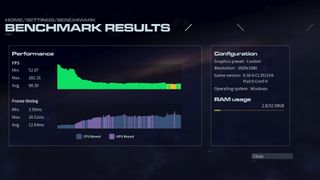
Note how for the early stages of the run, the frame times are marked as being GPU bound. What’s going on there is that there’s very little work for the CPU to do in the early stages, so the bulk of the overall frame time is down to the GPU. So while that technically does mean the benchmark was GPU-bound at that time, it’s more a case that the whole PC just doesn’t have much work to process.
On a quick side note, the RAM usage counter often showed bizarre figures (such as the 2GB shown above) but its inclusion is very puzzling. Surely aVRAMcounter would be of more use? At 4K Epic quality, I recorded a VRAM peak usage of 9.2GB which could potentially cause a few issues for 8GB graphics cards, so keeping track of how much video memory is required is far more important than system RAM usage.
Homeworld 3 CPU and GPU balance
I used Intel’s PresentMon tool to independently record the frame times and it paints a somewhat different picture to Homeworld 3’s built-in benchmark. Here you can see that the CPU is busier for longer than the GPU, throughout the whole test run, and the latter has to wait longer, too.
Homeworld 3 will ask a lot of your central processor but you don’t need one ofthe best gaming CPUsto enjoy the game. All you need is one with six cores and 12 threads, as the engine doesn’t generate dozens of heavy threads—you won’t see any significant scaling beyond eight cores, as shown below.
These figures were obtained from a 5-minute sample of a single-player level, rather than the benchmark, but the data show that the game only generates six to eight threads of note. There are more than that being generated, but they contain very short workloads.
In short, Homeworld 3 likes modern CPU architectures and high clock speeds, rather than lots of cores, and while the game ran perfectly well on the Core i5 9600K gaming PC at 1080p low settings, you’ll get the best experience with something that’s within a generation or two of the latest processors.
The GPU only becomes important once you ramp up the quality settings, adding better lighting effects, higher resolution textures, and nicer space backgrounds.
Homeworld 3 in-game performance
Built-in benchmarks aren’t the same as the full game, though, so it’s time to dig into that. Running through the first few levels of the single-player campaign sometimes showed frame rates similar to those seen in the benchmarks, but generally, the performance was better.
Homeworld 3 likes modern CPU architectures and high clock speeds, rather than lots of cores
Homeworld 3 likes modern CPU architectures and high clock speeds, rather than lots of cores
However, the frame rate was rarely smooth, even on the most powerful of the gaming PCs used. Transitioning between the tactical and normal views often resulted in spikes in the frame rate, especially when using the High or Epic quality settings.
One issue with 3D RTS games is the frame rate will always bounce around, as the camera whips around the environment. Close-up views of multiple objects will make it more GPU-limited, whereas zooming out and taking in a wider view of a complex battle will shift everything toward the CPU.
Where the 14700KF gaming PC had issues with its minimum frame rates in the built-in benchmark, compared to the other systems, the skirmish test showed no such problems. At low/medium quality settings and resolutions, theRyzen 5 5600XandRTX 4070test benchmark performed just as well as theRyzen 9 7900andRX 7800 XTsystems.
The lengthy battles were quite similar to the benchmark, in that the frame rate starts very high, then slowly drops to a steady level once the firefights are in full swing. Multiplayer matches are generally more balanced between the CPU and GPU, even at 1080p low settings.
However, all of the tested graphics cards had little to do with such a configuration, to the point that, due to their low utilisation, most of the GPUs ran with clock speeds 800 to 1,000 MHz lower than their rated boost levels. That’s not ideal and could explain why the frame rate in single-player levels varies so much. Only when using High or Epic quality settings does the GPU work to its full potential and although the frame rates aren’t great with such graphics, it is a lot smoother.
Homeworld 3 best settings
3D RTS games aren’t expected to reach the same fps levels as a competitive shooter, but if you were hoping for 144 fps or more, then you’re going to be disappointed. Fortunately, getting a reasonably steady 60 fps, even on old hardware, is quite easy to achieve.
Image1of2(Image credit: Blackbird Interactive)(Image credit: Blackbird Interactive)
Image1of2(Image credit: Blackbird Interactive)(Image credit: Blackbird Interactive)
Image1of2
(Image credit: Blackbird Interactive)(Image credit: Blackbird Interactive)
(Image credit: Blackbird Interactive)(Image credit: Blackbird Interactive)
(Image credit: Blackbird Interactive)
(Image credit: Blackbird Interactive)
(Image credit: Blackbird Interactive)
(Image credit: Blackbird Interactive)
(Image credit: Blackbird Interactive)

(Image credit: Blackbird Interactive)
(Image credit: Blackbird Interactive)
(Image credit: Blackbird Interactive)
(Image credit: Blackbird Interactive)
(Image credit: Blackbird Interactive)
Homeworld 3 isn’t replete with astounding graphics and the relative lack of visual difference between High and Epic quality settings means the latter isn’t worth using. Neither is the use of ray-traced shadows, even though it barely causes any noticeable hit in performance, regardless of the GPU used.
Just stick with Medium for older or lower-spec hardware, and High if you’ve got more recent/capable components. You’ll get the best balance of performance and graphics with those presets.
So why the developers choose to have it forced on when using most of the quality presets is rather odd. Forcing a 50% resolution scale when using Low is, to be frank, absurd. At 1080p, it makes the graphics look blurry and indistinct, and that’s the kind of monitor a PC gamer will have if they’re going to be using Low settings.
Image1of2(Image credit: Blackbird Interactive)1080p Low quality preset (100% res scale)(Image credit: Blackbird Interactive)1080p Low quality preset (default DLSS 50% res scale)
Image1of2(Image credit: Blackbird Interactive)1080p Low quality preset (100% res scale)(Image credit: Blackbird Interactive)1080p Low quality preset (default DLSS 50% res scale)
Image1of2
(Image credit: Blackbird Interactive)1080p Low quality preset (100% res scale)(Image credit: Blackbird Interactive)1080p Low quality preset (default DLSS 50% res scale)
(Image credit: Blackbird Interactive)1080p Low quality preset (100% res scale)(Image credit: Blackbird Interactive)1080p Low quality preset (default DLSS 50% res scale)
(Image credit: Blackbird Interactive)1080p Low quality preset (100% res scale)
(Image credit: Blackbird Interactive)1080p Low quality preset (100% res scale)
(Image credit: Blackbird Interactive)
(Image credit: Blackbird Interactive)
(Image credit: Blackbird Interactive)
1080p Low quality preset (100% res scale)
1080p Low quality preset (100% res scale)
(Image credit: Blackbird Interactive)1080p Low quality preset (default DLSS 50% res scale)
(Image credit: Blackbird Interactive)1080p Low quality preset (default DLSS 50% res scale)
(Image credit: Blackbird Interactive)
(Image credit: Blackbird Interactive)
(Image credit: Blackbird Interactive)
1080p Low quality preset (default DLSS 50% res scale)
1080p Low quality preset (default DLSS 50% res scale)
The only quality preset tonotforce upscaling is Epic quality, which is the one that needs it most. Low and Medium presets shouldn’t be using upscaling at all and the game’s menu doesn’t use the usual settings that other games employ for upscaling, making it less than obvious how to disable it (just set the resolution scale to 100%).
What the game really needs is a frame generation option, for those wanting high frame rates, and the implementation ofAMD Anti-Lag+andNvidia Reflex Boostto prevent the GPU from running too slowly at low settings. It could also do with an option to raise the resolution scale greater than 100% to get smoother-looking graphics.
Homeworld 3 has been in development for many years, initially starting in 2017 before going through a Kickstarter fund-raising campaign, and then a multitude of delays. This is why Unreal Engine 4 powers the game, rather than the latest version, and perhaps goes some way to explain the inconsistent performance.
Credit where credit is due, though, as Blackbird Interactive has created a game that can be enjoyed on a range of gaming PCs, rather than demanding the very best and most expensive hardware. Just don’t expect ultra-high frame rates and you’ll be fine.
TOPICSHardware
TOPICS
More about hardwareIf you’re trying to convince me your ‘companionship’ robot is ‘lifelike’, maybe don’t rip her face off in the demo videoIs the new RTX 5070 really as fast as Nvidia’s previous flagship RTX 4090 GPU? Turns out the answer is yes. Kinda.LatestToday’s Wordle answer for Sunday, January 12See more latest►
More about hardwareIf you’re trying to convince me your ‘companionship’ robot is ‘lifelike’, maybe don’t rip her face off in the demo videoIs the new RTX 5070 really as fast as Nvidia’s previous flagship RTX 4090 GPU? Turns out the answer is yes. Kinda.LatestToday’s Wordle answer for Sunday, January 12See more latest►
More about hardwareIf you’re trying to convince me your ‘companionship’ robot is ‘lifelike’, maybe don’t rip her face off in the demo videoIs the new RTX 5070 really as fast as Nvidia’s previous flagship RTX 4090 GPU? Turns out the answer is yes. Kinda.
More about hardware
If you’re trying to convince me your ‘companionship’ robot is ‘lifelike’, maybe don’t rip her face off in the demo videoIs the new RTX 5070 really as fast as Nvidia’s previous flagship RTX 4090 GPU? Turns out the answer is yes. Kinda.
If you’re trying to convince me your ‘companionship’ robot is ‘lifelike’, maybe don’t rip her face off in the demo video
If you’re trying to convince me your ‘companionship’ robot is ‘lifelike’, maybe don’t rip her face off in the demo video
Is the new RTX 5070 really as fast as Nvidia’s previous flagship RTX 4090 GPU? Turns out the answer is yes. Kinda.
Is the new RTX 5070 really as fast as Nvidia’s previous flagship RTX 4090 GPU? Turns out the answer is yes. Kinda.
LatestToday’s Wordle answer for Sunday, January 12See more latest►
Latest
Today’s Wordle answer for Sunday, January 12
Today’s Wordle answer for Sunday, January 12
Today’s Wordle answer for Sunday, January 12
See more latest►
Most Popular
This bizarre roguelike has a new take on the Vampire Survivors formula: letting you build your own custom weapons out of brains, eyeballs, and chimpanzee spines
18 games the PC Gamer team can’t wait to play in 2025
The Witcher 3’s now 2-year-old bonus quest is our first taste of the ‘vibe’ CD Projekt is going for in The Witcher 4
2024 was the year updates for old games beat out all the new ones for me
Train like you game with this adventure-inspired workout
‘It’s simply impossible to make a difficulty level that’s just right for all players’: How Final Fantasy 14’s lead battle designer has been playing a precarious balancing game for Dawntrail’s dungeons and raids
Please join me in getting super excited for all the cool looking survival games coming in 2025 (and beyond)
Competitive shooters are at a crucial crossroads in 2025: ‘sweaty’ teamplay vs. casual fun
Call of Duty’s $28 Squid Game skins are the perfect crossover for our capitalist dystopia, and Activision knows exactly what it’s doing
These are the 14 biggest upcoming RPGs of 2025—get ready for another amazing year for the genre
HARDWARE BUYING GUIDESLATEST GAME REVIEWS1Best Steam Deck accessories in Australia for 2025: Our favorite docks, powerbanks and gamepads2Best graphics card for laptops: the mobile GPUs I’d want in my next gaming laptop3Best mini PCs in 2025: The compact computers I love the most4Best 14-inch gaming laptop: The top compact gaming laptops I’ve held in these hands5Best Mini-ITX motherboards in 2025: My pick from all the mini mobo marvels I’ve tested1Thank Goodness You’re Here! review2Shiren the Wanderer: The Mystery Dungeon of Serpentcoil Island review3WD Black SN850X 8 TB NVMe SSD review4Ikea Utespelare desk review5Asus ROG Harpe Ace Mini wireless mouse review
HARDWARE BUYING GUIDESLATEST GAME REVIEWS1Best Steam Deck accessories in Australia for 2025: Our favorite docks, powerbanks and gamepads2Best graphics card for laptops: the mobile GPUs I’d want in my next gaming laptop3Best mini PCs in 2025: The compact computers I love the most4Best 14-inch gaming laptop: The top compact gaming laptops I’ve held in these hands5Best Mini-ITX motherboards in 2025: My pick from all the mini mobo marvels I’ve tested1Thank Goodness You’re Here! review2Shiren the Wanderer: The Mystery Dungeon of Serpentcoil Island review3WD Black SN850X 8 TB NVMe SSD review4Ikea Utespelare desk review5Asus ROG Harpe Ace Mini wireless mouse review
HARDWARE BUYING GUIDESLATEST GAME REVIEWS1Best Steam Deck accessories in Australia for 2025: Our favorite docks, powerbanks and gamepads2Best graphics card for laptops: the mobile GPUs I’d want in my next gaming laptop3Best mini PCs in 2025: The compact computers I love the most4Best 14-inch gaming laptop: The top compact gaming laptops I’ve held in these hands5Best Mini-ITX motherboards in 2025: My pick from all the mini mobo marvels I’ve tested1Thank Goodness You’re Here! review2Shiren the Wanderer: The Mystery Dungeon of Serpentcoil Island review3WD Black SN850X 8 TB NVMe SSD review4Ikea Utespelare desk review5Asus ROG Harpe Ace Mini wireless mouse review
HARDWARE BUYING GUIDESLATEST GAME REVIEWS1Best Steam Deck accessories in Australia for 2025: Our favorite docks, powerbanks and gamepads2Best graphics card for laptops: the mobile GPUs I’d want in my next gaming laptop3Best mini PCs in 2025: The compact computers I love the most4Best 14-inch gaming laptop: The top compact gaming laptops I’ve held in these hands5Best Mini-ITX motherboards in 2025: My pick from all the mini mobo marvels I’ve tested1Thank Goodness You’re Here! review2Shiren the Wanderer: The Mystery Dungeon of Serpentcoil Island review3WD Black SN850X 8 TB NVMe SSD review4Ikea Utespelare desk review5Asus ROG Harpe Ace Mini wireless mouse review
HARDWARE BUYING GUIDESLATEST GAME REVIEWS
1Best Steam Deck accessories in Australia for 2025: Our favorite docks, powerbanks and gamepads
1Best Steam Deck accessories in Australia for 2025: Our favorite docks, powerbanks and gamepads
1
Best Steam Deck accessories in Australia for 2025: Our favorite docks, powerbanks and gamepads
2Best graphics card for laptops: the mobile GPUs I’d want in my next gaming laptop
2Best graphics card for laptops: the mobile GPUs I’d want in my next gaming laptop
2
Best graphics card for laptops: the mobile GPUs I’d want in my next gaming laptop
3Best mini PCs in 2025: The compact computers I love the most
3Best mini PCs in 2025: The compact computers I love the most
3
Best mini PCs in 2025: The compact computers I love the most
4Best 14-inch gaming laptop: The top compact gaming laptops I’ve held in these hands
4Best 14-inch gaming laptop: The top compact gaming laptops I’ve held in these hands
4
Best 14-inch gaming laptop: The top compact gaming laptops I’ve held in these hands
5Best Mini-ITX motherboards in 2025: My pick from all the mini mobo marvels I’ve tested
5Best Mini-ITX motherboards in 2025: My pick from all the mini mobo marvels I’ve tested
5
Best Mini-ITX motherboards in 2025: My pick from all the mini mobo marvels I’ve tested
1Thank Goodness You’re Here! review
1Thank Goodness You’re Here! review
1
Thank Goodness You’re Here! review
2Shiren the Wanderer: The Mystery Dungeon of Serpentcoil Island review
2Shiren the Wanderer: The Mystery Dungeon of Serpentcoil Island review
2
Shiren the Wanderer: The Mystery Dungeon of Serpentcoil Island review
3WD Black SN850X 8 TB NVMe SSD review
3WD Black SN850X 8 TB NVMe SSD review
3
WD Black SN850X 8 TB NVMe SSD review
4Ikea Utespelare desk review
4Ikea Utespelare desk review
4
Ikea Utespelare desk review
5Asus ROG Harpe Ace Mini wireless mouse review
5Asus ROG Harpe Ace Mini wireless mouse review
5
Asus ROG Harpe Ace Mini wireless mouse review
