HardwareGaming PCsHow to buy your first gaming PCWhen you purchase through links on our site, we may earn an affiliate commission.Here’s how it works.
HardwareGaming PCsHow to buy your first gaming PCWhen you purchase through links on our site, we may earn an affiliate commission.Here’s how it works.
When you purchase through links on our site, we may earn an affiliate commission.Here’s how it works.
(Image credit: Future)
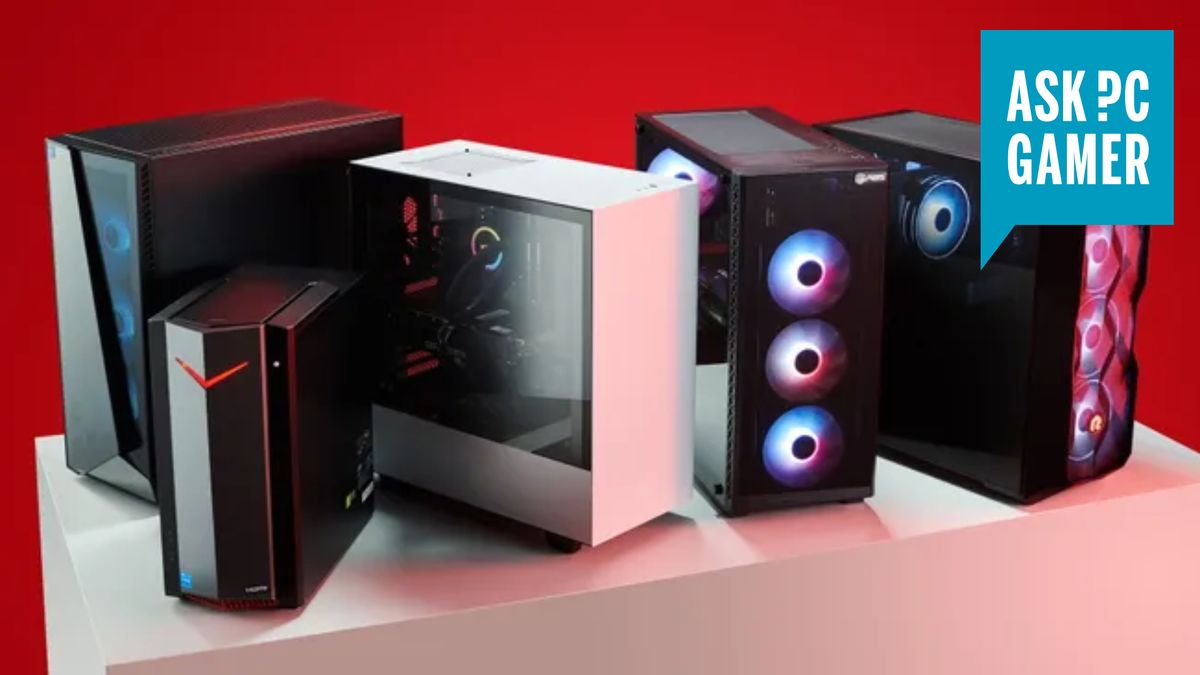
Jump to:System builders we recommendWhere can I find the best deals on gaming PCs?What CPU should I buy?What GPU should I buy?How much RAM do I need, and how fast?How much storage do I need, and what type?What else do I need to buy?
Jump to:System builders we recommendWhere can I find the best deals on gaming PCs?What CPU should I buy?What GPU should I buy?How much RAM do I need, and how fast?How much storage do I need, and what type?What else do I need to buy?
Buying your first gaming PC can be an intimidating task. Acronyms, backronyms, model and part numbers galore, it can be easy to find yourself drowning in terminology that at first glance can seem difficult to decode. While you can absolutely buy the components individually andbuild your own, many first-time buyers opt to buy one ready-made, or “prebuilt” to make the experience easier.
However, even these machines can seem swamped with information and figures that can make your eyes cross if you don’t know what to look for.
That’s where we come in! We’ve got the know-how and experience to break down all this information into an easy-to-follow guide that should make the process much simpler, and ensure that you end up buying thebest gaming PCthat’s right for you, a loved-one, or anyone who wants a great gaming system.
System builders we recommend
Here’s a quick rundown of prebuilt system builders we recommend. In our experience these providers deliver well-specced machines for good prices, and you’ll find gaming PCs from these builders making regular appearances in our buying guides.
Where can I find the best deals on gaming PCs?
Why, on ourcheap gaming PC dealspage of course! Still, seeing as you’re here, here are some outlets that often provide the best deals on prebuilt gaming PCs.
The biggest gaming news, reviews and hardware deals
And here are some examples of systems that we would consider good value to use as reference in terms of the sort of specs you should expect at a given price point.
Skytech Gaming Nebula | Core i5 13400F | Nvidia RTX 4060 | 16GB DDR4-3200 | 1TB NVMe SSD |$849.99 at AmazonThis Skytech prebuilt has a lot going for it, starting with the perfect pairing of the Core i5 13400F and an RTX 4060 for under $900. The only weak area is the fact that the RAM is DDR4 and not the newer DDR5, which the Intel CPU fully supports. It’s not clear how many sticks of RAM it uses, so hopefully it’s two 8GB rather than a single 16GB. Even if it does, though, this is a great 1080p gaming machine for the money.View Deal
Skytech Gaming Nebula | Core i5 13400F | Nvidia RTX 4060 | 16GB DDR4-3200 | 1TB NVMe SSD |$849.99 at AmazonThis Skytech prebuilt has a lot going for it, starting with the perfect pairing of the Core i5 13400F and an RTX 4060 for under $900. The only weak area is the fact that the RAM is DDR4 and not the newer DDR5, which the Intel CPU fully supports. It’s not clear how many sticks of RAM it uses, so hopefully it’s two 8GB rather than a single 16GB. Even if it does, though, this is a great 1080p gaming machine for the money.View Deal
Skytech Gaming Nebula | Core i5 13400F | Nvidia RTX 4060 | 16GB DDR4-3200 | 1TB NVMe SSD |$849.99 at AmazonThis Skytech prebuilt has a lot going for it, starting with the perfect pairing of the Core i5 13400F and an RTX 4060 for under $900. The only weak area is the fact that the RAM is DDR4 and not the newer DDR5, which the Intel CPU fully supports. It’s not clear how many sticks of RAM it uses, so hopefully it’s two 8GB rather than a single 16GB. Even if it does, though, this is a great 1080p gaming machine for the money.View Deal
Skytech Gaming Nebula | Core i5 13400F | Nvidia RTX 4060 | 16GB DDR4-3200 | 1TB NVMe SSD |$849.99 at AmazonThis Skytech prebuilt has a lot going for it, starting with the perfect pairing of the Core i5 13400F and an RTX 4060 for under $900. The only weak area is the fact that the RAM is DDR4 and not the newer DDR5, which the Intel CPU fully supports. It’s not clear how many sticks of RAM it uses, so hopefully it’s two 8GB rather than a single 16GB. Even if it does, though, this is a great 1080p gaming machine for the money.
Skytech Gaming Nebula | Core i5 13400F | Nvidia RTX 4060 | 16GB DDR4-3200 | 1TB NVMe SSD |$849.99 at AmazonThis Skytech prebuilt has a lot going for it, starting with the perfect pairing of the Core i5 13400F and an RTX 4060 for under $900. The only weak area is the fact that the RAM is DDR4 and not the newer DDR5, which the Intel CPU fully supports. It’s not clear how many sticks of RAM it uses, so hopefully it’s two 8GB rather than a single 16GB. Even if it does, though, this is a great 1080p gaming machine for the money.
Skytech Gaming Nebula | Core i5 13400F | Nvidia RTX 4060 | 16GB DDR4-3200 | 1TB NVMe SSD |$849.99 at AmazonThis Skytech prebuilt has a lot going for it, starting with the perfect pairing of the Core i5 13400F and an RTX 4060 for under $900. The only weak area is the fact that the RAM is DDR4 and not the newer DDR5, which the Intel CPU fully supports. It’s not clear how many sticks of RAM it uses, so hopefully it’s two 8GB rather than a single 16GB. Even if it does, though, this is a great 1080p gaming machine for the money.
View Deal
View Deal
View Deal
Yeiyan Tanto | Intel Core i5 13400F | RTX 4070 | 16GB DDR5-5600 | 1TB SSD |$1,599.99$1,159 at Newegg (save $440)RTX 4070 machines can vary in price and specification quite significantly, but here you’re getting that great 1440p GPU (with even some 4K credentials thanks to DLSS 3), a nice and speedy Core i5 paired with some good DDR5 RAM, and a 1TB SSD. For close to a thousand bucks, that’s a really great selection of hardware that makes it a great gaming rig for more like budget prices.View Deal
Yeiyan Tanto | Intel Core i5 13400F | RTX 4070 | 16GB DDR5-5600 | 1TB SSD |$1,599.99$1,159 at Newegg (save $440)RTX 4070 machines can vary in price and specification quite significantly, but here you’re getting that great 1440p GPU (with even some 4K credentials thanks to DLSS 3), a nice and speedy Core i5 paired with some good DDR5 RAM, and a 1TB SSD. For close to a thousand bucks, that’s a really great selection of hardware that makes it a great gaming rig for more like budget prices.View Deal
Yeiyan Tanto | Intel Core i5 13400F | RTX 4070 | 16GB DDR5-5600 | 1TB SSD |$1,599.99$1,159 at Newegg (save $440)RTX 4070 machines can vary in price and specification quite significantly, but here you’re getting that great 1440p GPU (with even some 4K credentials thanks to DLSS 3), a nice and speedy Core i5 paired with some good DDR5 RAM, and a 1TB SSD. For close to a thousand bucks, that’s a really great selection of hardware that makes it a great gaming rig for more like budget prices.View Deal
Yeiyan Tanto | Intel Core i5 13400F | RTX 4070 | 16GB DDR5-5600 | 1TB SSD |$1,599.99$1,159 at Newegg (save $440)RTX 4070 machines can vary in price and specification quite significantly, but here you’re getting that great 1440p GPU (with even some 4K credentials thanks to DLSS 3), a nice and speedy Core i5 paired with some good DDR5 RAM, and a 1TB SSD. For close to a thousand bucks, that’s a really great selection of hardware that makes it a great gaming rig for more like budget prices.
Yeiyan Tanto | Intel Core i5 13400F | RTX 4070 | 16GB DDR5-5600 | 1TB SSD |$1,599.99$1,159 at Newegg (save $440)RTX 4070 machines can vary in price and specification quite significantly, but here you’re getting that great 1440p GPU (with even some 4K credentials thanks to DLSS 3), a nice and speedy Core i5 paired with some good DDR5 RAM, and a 1TB SSD. For close to a thousand bucks, that’s a really great selection of hardware that makes it a great gaming rig for more like budget prices.
Yeiyan Tanto | Intel Core i5 13400F | RTX 4070 | 16GB DDR5-5600 | 1TB SSD |$1,599.99$1,159 at Newegg (save $440)RTX 4070 machines can vary in price and specification quite significantly, but here you’re getting that great 1440p GPU (with even some 4K credentials thanks to DLSS 3), a nice and speedy Core i5 paired with some good DDR5 RAM, and a 1TB SSD. For close to a thousand bucks, that’s a really great selection of hardware that makes it a great gaming rig for more like budget prices.
View Deal
View Deal
View Deal
Skytech Chronos | Core i7 12700F | RX 7900 XTX | 1TB NVMe SSD | 16GB DDR4 RAM |$1,629.99 at NeweggWhile this has a two-gen-old Intel CPU, that’s AMD’s most powerful gaming GPU matched with it. It may not be a consistent RTX 4080 competitor, but it’ll get the job done at 4K. It’d be nice if it had some faster RAM, but regardless it’ll still carve through the latest games with ease.View Deal
Skytech Chronos | Core i7 12700F | RX 7900 XTX | 1TB NVMe SSD | 16GB DDR4 RAM |$1,629.99 at NeweggWhile this has a two-gen-old Intel CPU, that’s AMD’s most powerful gaming GPU matched with it. It may not be a consistent RTX 4080 competitor, but it’ll get the job done at 4K. It’d be nice if it had some faster RAM, but regardless it’ll still carve through the latest games with ease.View Deal
Skytech Chronos | Core i7 12700F | RX 7900 XTX | 1TB NVMe SSD | 16GB DDR4 RAM |$1,629.99 at NeweggWhile this has a two-gen-old Intel CPU, that’s AMD’s most powerful gaming GPU matched with it. It may not be a consistent RTX 4080 competitor, but it’ll get the job done at 4K. It’d be nice if it had some faster RAM, but regardless it’ll still carve through the latest games with ease.View Deal
Skytech Chronos | Core i7 12700F | RX 7900 XTX | 1TB NVMe SSD | 16GB DDR4 RAM |$1,629.99 at NeweggWhile this has a two-gen-old Intel CPU, that’s AMD’s most powerful gaming GPU matched with it. It may not be a consistent RTX 4080 competitor, but it’ll get the job done at 4K. It’d be nice if it had some faster RAM, but regardless it’ll still carve through the latest games with ease.
Skytech Chronos | Core i7 12700F | RX 7900 XTX | 1TB NVMe SSD | 16GB DDR4 RAM |$1,629.99 at NeweggWhile this has a two-gen-old Intel CPU, that’s AMD’s most powerful gaming GPU matched with it. It may not be a consistent RTX 4080 competitor, but it’ll get the job done at 4K. It’d be nice if it had some faster RAM, but regardless it’ll still carve through the latest games with ease.
Skytech Chronos | Core i7 12700F | RX 7900 XTX | 1TB NVMe SSD | 16GB DDR4 RAM |$1,629.99 at NeweggWhile this has a two-gen-old Intel CPU, that’s AMD’s most powerful gaming GPU matched with it. It may not be a consistent RTX 4080 competitor, but it’ll get the job done at 4K. It’d be nice if it had some faster RAM, but regardless it’ll still carve through the latest games with ease.
View Deal
View Deal
View Deal
Yeyian Odachi | RTX 4090 | Core i9 14900KF | 2TB SSD | 32GB DDR5 |$3,699$3,299 at Newegg (save $400)When the price of an RTX 4090 bought on its own these days is getting on for the same price as this entire rig it’s maybe worth taking a look at these high-end PCs as a value proposition after all. Coupled with the latest and greatest Intel CPU, 32GB of DDR5, and a healthy dollop (technical term) of SSD storage, this is a huge amount of gaming PC at a very good price.Price check:Amazon $3,399View Deal
Yeyian Odachi | RTX 4090 | Core i9 14900KF | 2TB SSD | 32GB DDR5 |$3,699$3,299 at Newegg (save $400)When the price of an RTX 4090 bought on its own these days is getting on for the same price as this entire rig it’s maybe worth taking a look at these high-end PCs as a value proposition after all. Coupled with the latest and greatest Intel CPU, 32GB of DDR5, and a healthy dollop (technical term) of SSD storage, this is a huge amount of gaming PC at a very good price.Price check:Amazon $3,399View Deal
Yeyian Odachi | RTX 4090 | Core i9 14900KF | 2TB SSD | 32GB DDR5 |$3,699$3,299 at Newegg (save $400)When the price of an RTX 4090 bought on its own these days is getting on for the same price as this entire rig it’s maybe worth taking a look at these high-end PCs as a value proposition after all. Coupled with the latest and greatest Intel CPU, 32GB of DDR5, and a healthy dollop (technical term) of SSD storage, this is a huge amount of gaming PC at a very good price.Price check:Amazon $3,399View Deal
Yeyian Odachi | RTX 4090 | Core i9 14900KF | 2TB SSD | 32GB DDR5 |$3,699$3,299 at Newegg (save $400)When the price of an RTX 4090 bought on its own these days is getting on for the same price as this entire rig it’s maybe worth taking a look at these high-end PCs as a value proposition after all. Coupled with the latest and greatest Intel CPU, 32GB of DDR5, and a healthy dollop (technical term) of SSD storage, this is a huge amount of gaming PC at a very good price.Price check:Amazon $3,399
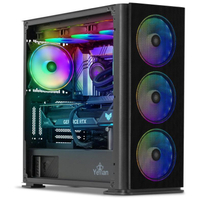
Yeyian Odachi | RTX 4090 | Core i9 14900KF | 2TB SSD | 32GB DDR5 |$3,699$3,299 at Newegg (save $400)When the price of an RTX 4090 bought on its own these days is getting on for the same price as this entire rig it’s maybe worth taking a look at these high-end PCs as a value proposition after all. Coupled with the latest and greatest Intel CPU, 32GB of DDR5, and a healthy dollop (technical term) of SSD storage, this is a huge amount of gaming PC at a very good price.Price check:Amazon $3,399
Yeyian Odachi | RTX 4090 | Core i9 14900KF | 2TB SSD | 32GB DDR5 |$3,699$3,299 at Newegg (save $400)When the price of an RTX 4090 bought on its own these days is getting on for the same price as this entire rig it’s maybe worth taking a look at these high-end PCs as a value proposition after all. Coupled with the latest and greatest Intel CPU, 32GB of DDR5, and a healthy dollop (technical term) of SSD storage, this is a huge amount of gaming PC at a very good price.
Price check:Amazon $3,399
View Deal
View Deal
View Deal
What CPU should I buy?
(Image credit: Future)
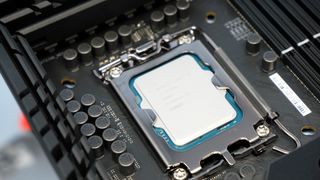
A CPU, or “Central Processing Unit” is one of the absolute core components of any PC, gaming or otherwise. Think of it as the brain of your machine, grabbing and processing information to send to the other components. As a result, for gaming you’ll need a reasonably quick CPU to ensure that your games run smoothly, and any CPU that’s good at gaming should also work well for every other task you can throw at it, from day-to-day productivity tasks to media processing.
There are two major manufacturers to consider here when picking the right gaming PC processor for you: Intel and AMD. Both make chips that are capable of crunching through your games with ease, from very capable budget options all the way up to extreme high-performance CPUs.
Intel gaming CPUs
Let’s start off with Intel. Intel CPUs come in a variety of designations, but for our purposes what you’re likely looking for are PCs featuring chips in the Intel “Core” family, and the main thing to pay attention to is the number after the “i” in the designation i.e. “Core i5”, which designates which sub-family of chips the processor is part of.
For gaming, you’ll likely want to be looking for CPUs designated “Core i5” or above. While Core i3 chips can be used for gaming, they’re a more budget-focussed option, so i5 and upwards is where you want to be for the best performance.
Intel CPUs to look out for✅Best budget:Intel Core i5 13400F✅Best mid-range:Intel Core i5 13600K✅Best high-end:Intel Core i9 13900K
Intel CPUs to look out for
✅Best budget:Intel Core i5 13400F✅Best mid-range:Intel Core i5 13600K✅Best high-end:Intel Core i9 13900K
✅Best budget:Intel Core i5 13400F✅Best mid-range:Intel Core i5 13600K✅Best high-end:Intel Core i9 13900K
After the “i” designation, you’ll then find a long number like “Intel Core i5 14600K”. The first two digits specify which generation the processor is part of, with higher numbers being more recent and “14” being the most up-to-date, while the numbers after indicate which specific model it is.
The letter at the end shows what series the processor is, which can mean things like being unlocked for overclocking, although for now we’ll leave that complicated subject where it is. This is your first gaming PC after all, so really all you’re after is a fast gaming CPU straight out of the box.
Time for another general rule: If the Intel-equipped PC you’re looking at features something like a Core i5 or above, with a number higher than “10000” after it, then it should be suitable as a gaming CPU, although the higher the numbers and the more recent the generation, often the better.
We’ve got a whole list of recommendations for thebest gaming CPUsif you’d like to go more in-depth, but seeing as we’re keeping this as simple as we can for first time buyers, that’s where we’ll leave it for now.
AMD gaming CPUs
Your other option for PC gaming processors is AMD. Both Intel and AMD compete with each other to produce the fastest chips, and are locked in something of an arms race to make the best gaming CPUs. As a result, either manufacturer’s CPUs can make a great option for a good gaming PC, providing you pick the right one.
We’d recommend looking atAMD Ryzenprocessors from the Zen 3 or Zen 4 generation, and you’ll find these use model numbers ranging from “5000” to “7000”.
Here’s where things get slightly tricky. AMD 5000-series processors use an older motherboard socket called AM4. While CPUs using this socket can still be very quick for gaming, the newer 7000-series chips use a different socket referred to as AM5. What this means in practice is that if you buy a gaming PC with a 5000-series processor, if you wanted to upgrade it to one of the newer chips in future you’d need to buy a new motherboard as well.
AMD CPUs to look out for✅Best budget:AMD Ryzen 5 5600 (AM4)✅Best mid-range:AMD Ryzen 7 7700 (AM5)✅Best high-end:AMD Ryzen 7 7800X3D (AM5)
AMD CPUs to look out for
✅Best budget:AMD Ryzen 5 5600 (AM4)✅Best mid-range:AMD Ryzen 7 7700 (AM5)✅Best high-end:AMD Ryzen 7 7800X3D (AM5)
✅Best budget:AMD Ryzen 5 5600 (AM4)✅Best mid-range:AMD Ryzen 7 7700 (AM5)✅Best high-end:AMD Ryzen 7 7800X3D (AM5)
As a result, if you’re planning on buying a PC that you want to use as a base for upgrading as time goes on, it might be worth thinking about buying an AM5 platform (again, 7000-series CPUs) to save you the hassle of upgrading the motherboard as well later down the line.
Apologies about that one, it’s complicated. Still, whatever route you end up taking, an AMD 5000-series or 7000-series CPU is a good pick for a gaming PC CPU. Something else to watch out for is the “X3D” designation on the end of the CPU series number, like theAMD Ryzen 7 5800X3DorAMD Ryzen 7 7800X3D.
These chips make use of something called 3D V-Cache to deliver excellent gaming performance, and in the case of the latter chip means it’s about the fastest gaming CPU you can buy, although machines using it are likely to be fairly expensive as a result.
What graphics card should I buy?
(Image credit: Future)
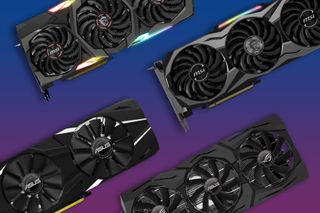
While a fast CPU is definitely important in a good gaming PC, nothing makes quite as much difference as a fully-fledged gaming GPU, sometimes referred to as a graphics card. While modern CPUs do have onboard graphics,the best graphics cardswill deliver stunning image quality at high frame rates, meaning your games will look great and run smoothly too.
There are three main names to look out for here when PC shopping: Nvidia, AMD, and Intel. We’ll deliver a rundown of each manufacturer and what cards to look out for in your gaming PC purchase, to ensure that you get the right GPU for your gaming needs.
A quick jargon buster:You’ll see us using terms like “1080p”, “1440p” and “4K” in the following text. These are common screen resolutions you’ll use for gaming, providing your monitor can support them. 1080p is considered the minimum resolution you’ll want to run your games at, and is the least stressful on your hardware, although arguably the worst-looking. 1440p is considered the sweet-spot for good image quality and performance, whereas 4K looks stunning, but is very demanding on your PC.
Nvidia graphics cards
(Image credit: Future)
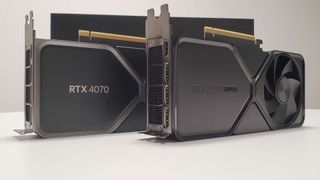
Nvidia is the go-to choice for many gamers, and it makes a range of GPUs that make for great additions to any gaming PC, from the cheap yet powerful all the way through to the fastest gaming graphics card you can currently buy.
If you’re going for a machine with an Nvidia card, we currently recommend buying something from the latest RTX 40-series of GPUs. While cards from the previous generations can still perform well in games, you’ll often find that prebuilts featuring these GPUs are a little dated in other components, and RTX 40-series cards have a distinct advantage over their predecessors in the form ofDLSS3.
The minimum Nvidia GPU we’d recommend for gaming is theRTX 4060. It’s a budget card, but with the help of DLSS 3 it can still deliver decent gaming performance at 1080p and 1440p. Sitting above that is theRTX 4060 Ti, a faster version that’ll do very well for budget gamers looking for great performance.
Nvidia GPUs to look out for✅Best budget:RTX 4060 Ti✅Best mid-range:RTX 4070 Super✅Best high-end:RTX 4090
Nvidia GPUs to look out for
✅Best budget:RTX 4060 Ti✅Best mid-range:RTX 4070 Super✅Best high-end:RTX 4090
✅Best budget:RTX 4060 Ti✅Best mid-range:RTX 4070 Super✅Best high-end:RTX 4090
Above that, we have theRTX 4070. This is a very capable card for 1440p gaming, and can even make some forays into 4K with the help of DLSS 3. It makes a superb mid-range choice for most gamers, and has been a very popular card since its release.
Nvidia also makes Super and Ti variants of many of its cards, and the RTX 4070 is no exception. TheRTX 4070 Superis faster than the regular version and makes a great buy, but if you’re looking to spend a decent chunk more you can find a gaming PC with theRTX 4070 TiorRTX 4070 Ti Superinstead. These are both very fast GPUs, and push beyond mid-range into genuinely high-end territory.
Above that, you’re really getting into some of the most performant cards you can put in a gaming PC right now. These come in the form of theRTX 4080, andRTX 4080 Super. Both make great choices for a gaming rig, and will carve through most games at 1440p and even 4K with the settings turned up if you make use of DLSS.
AMD graphics cards
(Image credit: Future)
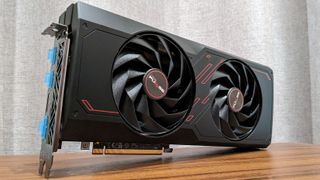
AMD is Nvidia’s biggest competitor in the GPU market, and makes some very powerful graphics cards for gaming. While the RX 7000-series is the most recent generation, the performance gains over the outgoing RX 6000-series are sometimes relatively small, so we still recommend cards from both ranges for a gaming rig.
Modern AMD cards are able to make use of the latest version of FSR, FSR 3, which is AMDs upscaling equivalent to DLSS 3. It’s not hugely well-supported but works relatively well, although FSR will also work on all major modern graphics cards, including those from Nvidia.
Starting off at the bottom, the minimum AMD GPU you should be looking for in a gaming PC is theRadeon RX 7600. It’s an entry level graphics card like the Nvidia RTX 4060, but puts in a reasonable performance for 1080p gaming, and PCs featuring this card should be relatively cheap. There’s also the slightly fasterRadeon RX 7600 XTas another budget option to consider.
Moving upwards, there’s theRadeon RX 6700 XTandRadeon RX 7700 XT. Both of these cards are solid budget to mid-range performers at 1080p and 1440p, but it’s worth mentioning that the next cards up in the stack can sometimes be roughly equivalent in price, and this often translates to gaming prebuilt prices too.
AMD GPUs to look out for✅Best budget:RX 7600✅Best mid-range:RX 7800 XT✅Best high-end:RX 7900 XTX
AMD GPUs to look out for
✅Best budget:RX 7600✅Best mid-range:RX 7800 XT✅Best high-end:RX 7900 XTX
✅Best budget:RX 7600✅Best mid-range:RX 7800 XT✅Best high-end:RX 7900 XTX
Here we find theRadeon RX 6800,RX 6800 XT, andRX 7800 XT. These are powerful upper mid-range cards, and any of them would make a great 1440p gaming GPU, with the more modern Radeon RX 7800 XT slightly leading the pack.
Above that, we’re now into the high-end territory, often with high-end prices to suit. These are called theRadeon RX 7900 GRE, theRadeon RX 7900 XT, and theRadeon RX 7900 XTX, in performance order going from slowest to fastest, although none of these GPUs could be called slow in relative terms. In fact, they’re a group of the fastest graphics cards AMD currently makes, with the RX 7900 XT and RX 7900 XTX standing out as the highest-end cards in the stack.
While neither of these cards can quite stack up the Nvidia RTX 4090 above, you can sometimes find them in cheaper prebuilt PCs than a gaming PC featuring the big Nvidia card, and while the performance is technically lesser they will still provide excellent frame rates and image quality at 1440p and 4K.
Intel graphics cards
(Image credit: Future)
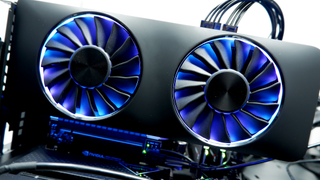
Intel might be a gigantic name in the world of computing in general, but when it comes to graphics cards, it’s a relative newcomer. While Intel does make some relatively powerful gaming GPUs they do tend to struggle with drivers, which are the software interface between the graphics card and your games.
As a result, they can be a bit fiddly and sometimes require some tweaking to get the most out of. For a first time buyer, this is unlikely to be what you’re after, so while Intel GPUs are indeed sometimes a good choice for a gaming PC, for your first machine or a machine for a loved one we’d buy something with one of the Nvidia or AMD GPUs recommended above instead.
How much RAM do I need, and how fast?
(Image credit: G.Skill)
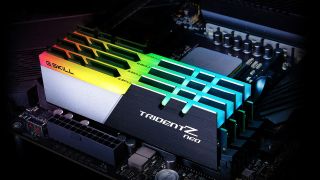
For modern machines, the memory we’re interested in is called DDR RAM, or double data rate. You’ll find that, when looking at PC builds featuring the CPUs recommended above, this will either beDDR4orDDR5. DDR3 and below has now been thoroughly phased out for machines capable of gaming, and would serve as a warning sign that the rest of the PC is not up to snuff for modern games.
If you’re in the market for a very high-performance machine, 32GB of RAM has become a common figure to look for. 32GB of RAM should give your new system plenty of breathing room for even the most demanding of tasks.
While DDR5 is significantly faster than DDR4, in terms of real world performance the difference between the two can be relatively small, although a system with high-speed DDR5 is likely to also have other high-speed components that make it a good performer. DDR4 is an older technology and machines using it may not be able to support DDR5 (like AM4 systems, for example), so a system using DDR4 may not be as upgradeable in future as something that already comes with DDR5.
It’s worth noting that upgrading the RAM is one of the simplest tasks you can perform on a modern PC providing you buy the right type, so if you spot a good deal on something with 16GB of RAM and other good components, remember that you can likely add another 16GB stick to bring it up to 32GB very easily.
It’s literally a matter of buying a compatible RAM stick, undoing the case panel and securely locking it into the correct slot on most machines, and something even a novice can do with very little effort.
How much storage do I need, and what type?
(Image credit: Future)
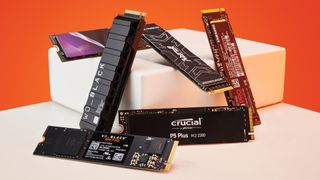
When it comes to storage, you’re going to want a good amount to account for the fact that modern game install sizes are becoming increasingly large, especially for big new releases. While systems are still sold with 512GB drives, we would highly recommend a 1TB drive or larger to give you plenty of space for a Windows install, your commonly used programs and files, and a few large games.
While size of storage is important, more important still is the type of storage your potential new machine uses. Avoid anything with a traditional HDD, or hard disk drive. These are simply too slow for gaming, although having one as a secondary drive purely for storing files is fine.
What you’re looking for is something referred to as anNVMe drive, sometimes called an M.2 drive. These are super-speedy in comparison to all other forms of storage, and a good one will load your operating system, programs and games at lightning fast speeds, keeping stutter to a minimum to boot.
These are a type of SSD, or solid state drive. While you can game from what’s called a SATA SSD, we would tend to avoid them, as they’re a fair bit slower than NVMe drives.
In terms of drive speeds, what you’re ideally looking for is a Gen 3 or Gen 4 NVMe drive, with the latter being the faster of the two. Gen 5 drives do exist on the highest-spec machines, but they offer no real-world performance advantages for gaming, so we consider them unnecessary for most users for the time being.
1TB will do you fine as a starter, and larger drives are relatively cheap to buy (particularly if you find agood deal on an SSD) and painless to install if you need more space in future.
What else do I need to buy?
(Image credit: Getty, Mikkel William)

If you’ve followed this guide, then chances are you’ve been able to nail down some likely candidates for a great gaming PC purchase. However, most prebuilts don’t come with much beyond the actual PC itself, so we’ll give you a quick rundown of everything else you might need to complete the gaming setup of your dreams.
Gaming monitor
(Image credit: LG)

For a start, let’s talk monitors. It’d be a shame if all that graphical horsepower was rendered through an old display you’ve had knocking around for years, as a great monitor can make a simply gigantic difference to how you perceive your games. We’ve got guides on some of the verybest gaming monitorswe’ve had the pleasure of testing along with, of course, deal pages that’ll find youthe best prices on gaming monitors, updated all year round.
1080p is now considered the minimum resolution for good image quality, while 1440p is still the sweet spot for the best balance between strain on your system and great looking games. For those of you that decided to spend up and buy something really high-end, perhaps featuring an immensely powerful GPU like the RTX 4080 or RTX 4090, then a4K displaywill really show off all those pixels your new system is capable of pumping out at high frame rates.
Although you could always buy a panel capable of a very high resolution and drop it down in-game to take some of the strain off your machine, while still enjoying that beautiful panel for high-res media content. Monitors are a great place to invest your money on a really good model, as they’re likely to last from machine to machine and for many years to come.
Gaming keyboards and mice
(Image credit: Future)
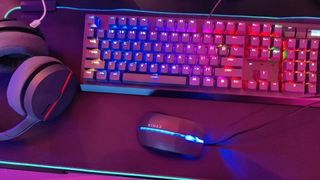
We know what you’re thinking: I’ve got an old keyboard or mouse knocking around that’d do just fine. While that might be the case, a proper gaming keyboard or gaming mouse really does make a big difference, as these are the tools you’ll use to interface with your games. What you’ve physically got your hands on can be the difference between a premium-feeling experience and a cheap and nasty one, and the good news is you don’t have to spend a huge amount to get something really great.
A prime example being theLogitech G305 Lightspeed, currently taking the top budget spot in ourbest gaming mouseguide. You can pick up one of these little squeakersfor around $35, and it’ll likely be much better for gaming than any regular mouse you might be thinking of salvaging from another PC.
Keyboards too. A great gaming keyboard won’t just be something you’ll use for entertainment, asthe best keyboardswill also have lots of functionality, a great typing feel, and build quality that means they’ll last for years to come.
Peripherals might initially feel like a bit of an afterthought, but take it from a team that’s used just about everything you can possibly think of: Good ones are absolutely worth spending a little bit more cash on, to make sure you have the best gaming experience.
Gaming headphones and speakers
(Image credit: Future)

Imagine watching a movie on mute, or through tinny phone speakers. No matter how good the action on screen, less-than-stellar sound will significantly lessen your enjoyment of the film, and games are just the same.
Thebest PC speakers for gamingwill not only deliver seminal sound, but in the case of some of the 2.1 or 5.1 units can even deliver room-shaking and all-encompassing audio that turns your PC into a full on multimedia powerhouse.
If you’re worried about annoying your living companions or neighbours, however, then we’d highly recommenda great set of headphones. Again, these can go from cheap and cheerful but highly effective units all the way up toaudiophile-grade cansthat can genuinely change the way you hear not just your games, but all your favourite music as well. Not to mention that most gaming sets come with great mics, meaning your multiplayer experiences can become a whole lot more social, should you so choose.
Sound is immersion, and immersion in your PC gaming experience can be found through many, many different avenues. Grab a good set of phones or a great set of speakers, and they’ll follow you around delivering exceptional audio for years to come.
Gaming chairs
(Image credit: Noblechairs)

PC gaming is many things, but an active, all-body exercise experience isn’t exactly one of them (unless you’re looking to get into VR, in which case we haveVR headset recommendationstoo). You’re likely going to be sitting, and if your system is as good as we hope it is, you’ll probably be there for a while. You’re going to need a chair that isn’t just comfy, but supportive and good for your spine too.
Thebest gaming chairswill make a long gaming session feel like practically nothing. I know that sounds like salesmanship, but in all honesty, you can ask anyone in the PC Gamer office about which chairs they prefer and they’ll happily chew your ears off about the best and the worst they’ve sat in, and what a difference it made to their lives.
No matter your body shape, size or preferred seating position, there’s absolutely something out there that will make a world of difference to your gaming sessions, and of course can be co-opted into your day-to-day work usage too. Another vital piece of the puzzle that, when bought with an informed perspective, can last for years, even decades with the right model.
Don’t skimp on your spines, people. Get something comfortable, well-made and supportive, and quite literally feel the change it makes to your daily life.
TOPICSHardware
TOPICS
More about gaming pcsThis Jinx-inspired gaming PC is my favorite of CES 2025 and I’m head over heels for the hardwareThe 2025 Asus ROG NUC looks epic and has some mighty specs but a desktop gaming PC will probably be far better value for moneyLatest23 year-old D&D RPG Neverwinter Nights just got a new update thanks to the ‘unpaid software engineers’ of its unkillable communitySee more latest►
More about gaming pcsThis Jinx-inspired gaming PC is my favorite of CES 2025 and I’m head over heels for the hardwareThe 2025 Asus ROG NUC looks epic and has some mighty specs but a desktop gaming PC will probably be far better value for moneyLatest23 year-old D&D RPG Neverwinter Nights just got a new update thanks to the ‘unpaid software engineers’ of its unkillable communitySee more latest►
More about gaming pcsThis Jinx-inspired gaming PC is my favorite of CES 2025 and I’m head over heels for the hardwareThe 2025 Asus ROG NUC looks epic and has some mighty specs but a desktop gaming PC will probably be far better value for money
More about gaming pcs
This Jinx-inspired gaming PC is my favorite of CES 2025 and I’m head over heels for the hardwareThe 2025 Asus ROG NUC looks epic and has some mighty specs but a desktop gaming PC will probably be far better value for money

This Jinx-inspired gaming PC is my favorite of CES 2025 and I’m head over heels for the hardware
This Jinx-inspired gaming PC is my favorite of CES 2025 and I’m head over heels for the hardware
The 2025 Asus ROG NUC looks epic and has some mighty specs but a desktop gaming PC will probably be far better value for money
The 2025 Asus ROG NUC looks epic and has some mighty specs but a desktop gaming PC will probably be far better value for money
Latest23 year-old D&D RPG Neverwinter Nights just got a new update thanks to the ‘unpaid software engineers’ of its unkillable communitySee more latest►
Latest
23 year-old D&D RPG Neverwinter Nights just got a new update thanks to the ‘unpaid software engineers’ of its unkillable community
23 year-old D&D RPG Neverwinter Nights just got a new update thanks to the ‘unpaid software engineers’ of its unkillable community
23 year-old D&D RPG Neverwinter Nights just got a new update thanks to the ‘unpaid software engineers’ of its unkillable community
See more latest►
Most Popular
This bizarre roguelike has a new take on the Vampire Survivors formula: letting you build your own custom weapons out of brains, eyeballs, and chimpanzee spines
18 games the PC Gamer team can’t wait to play in 2025
The Witcher 3’s now 2-year-old bonus quest is our first taste of the ‘vibe’ CD Projekt is going for in The Witcher 4
2024 was the year updates for old games beat out all the new ones for me
Train like you game with this adventure-inspired workout
‘It’s simply impossible to make a difficulty level that’s just right for all players’: How Final Fantasy 14’s lead battle designer has been playing a precarious balancing game for Dawntrail’s dungeons and raids
Please join me in getting super excited for all the cool looking survival games coming in 2025 (and beyond)
Competitive shooters are at a crucial crossroads in 2025: ‘sweaty’ teamplay vs. casual fun
Call of Duty’s $28 Squid Game skins are the perfect crossover for our capitalist dystopia, and Activision knows exactly what it’s doing
These are the 14 biggest upcoming RPGs of 2025—get ready for another amazing year for the genre
HARDWARE BUYING GUIDESLATEST GAME REVIEWS1Best Steam Deck accessories in Australia for 2025: Our favorite docks, powerbanks and gamepads2Best graphics card for laptops: the mobile GPUs I’d want in my next gaming laptop3Best mini PCs in 2025: The compact computers I love the most4Best 14-inch gaming laptop: The top compact gaming laptops I’ve held in these hands5Best Mini-ITX motherboards in 2025: My pick from all the mini mobo marvels I’ve tested1Thank Goodness You’re Here! review: An anarchic treasure trove of jokes and skits2Shiren the Wanderer: The Mystery Dungeon of Serpentcoil Island review—like juggling chainsaws on horseback3WD Black SN850X 8 TB NVMe SSD review4Ikea Utespelare desk review5Asus ROG Harpe Ace Mini wireless mouse review
HARDWARE BUYING GUIDESLATEST GAME REVIEWS1Best Steam Deck accessories in Australia for 2025: Our favorite docks, powerbanks and gamepads2Best graphics card for laptops: the mobile GPUs I’d want in my next gaming laptop3Best mini PCs in 2025: The compact computers I love the most4Best 14-inch gaming laptop: The top compact gaming laptops I’ve held in these hands5Best Mini-ITX motherboards in 2025: My pick from all the mini mobo marvels I’ve tested1Thank Goodness You’re Here! review: An anarchic treasure trove of jokes and skits2Shiren the Wanderer: The Mystery Dungeon of Serpentcoil Island review—like juggling chainsaws on horseback3WD Black SN850X 8 TB NVMe SSD review4Ikea Utespelare desk review5Asus ROG Harpe Ace Mini wireless mouse review
HARDWARE BUYING GUIDESLATEST GAME REVIEWS1Best Steam Deck accessories in Australia for 2025: Our favorite docks, powerbanks and gamepads2Best graphics card for laptops: the mobile GPUs I’d want in my next gaming laptop3Best mini PCs in 2025: The compact computers I love the most4Best 14-inch gaming laptop: The top compact gaming laptops I’ve held in these hands5Best Mini-ITX motherboards in 2025: My pick from all the mini mobo marvels I’ve tested1Thank Goodness You’re Here! review: An anarchic treasure trove of jokes and skits2Shiren the Wanderer: The Mystery Dungeon of Serpentcoil Island review—like juggling chainsaws on horseback3WD Black SN850X 8 TB NVMe SSD review4Ikea Utespelare desk review5Asus ROG Harpe Ace Mini wireless mouse review
HARDWARE BUYING GUIDESLATEST GAME REVIEWS1Best Steam Deck accessories in Australia for 2025: Our favorite docks, powerbanks and gamepads2Best graphics card for laptops: the mobile GPUs I’d want in my next gaming laptop3Best mini PCs in 2025: The compact computers I love the most4Best 14-inch gaming laptop: The top compact gaming laptops I’ve held in these hands5Best Mini-ITX motherboards in 2025: My pick from all the mini mobo marvels I’ve tested1Thank Goodness You’re Here! review: An anarchic treasure trove of jokes and skits2Shiren the Wanderer: The Mystery Dungeon of Serpentcoil Island review—like juggling chainsaws on horseback3WD Black SN850X 8 TB NVMe SSD review4Ikea Utespelare desk review5Asus ROG Harpe Ace Mini wireless mouse review
HARDWARE BUYING GUIDESLATEST GAME REVIEWS
1Best Steam Deck accessories in Australia for 2025: Our favorite docks, powerbanks and gamepads
1Best Steam Deck accessories in Australia for 2025: Our favorite docks, powerbanks and gamepads
1
Best Steam Deck accessories in Australia for 2025: Our favorite docks, powerbanks and gamepads
2Best graphics card for laptops: the mobile GPUs I’d want in my next gaming laptop
2Best graphics card for laptops: the mobile GPUs I’d want in my next gaming laptop
2
Best graphics card for laptops: the mobile GPUs I’d want in my next gaming laptop
3Best mini PCs in 2025: The compact computers I love the most
3Best mini PCs in 2025: The compact computers I love the most
3
Best mini PCs in 2025: The compact computers I love the most
4Best 14-inch gaming laptop: The top compact gaming laptops I’ve held in these hands
4Best 14-inch gaming laptop: The top compact gaming laptops I’ve held in these hands
4
Best 14-inch gaming laptop: The top compact gaming laptops I’ve held in these hands
5Best Mini-ITX motherboards in 2025: My pick from all the mini mobo marvels I’ve tested
5Best Mini-ITX motherboards in 2025: My pick from all the mini mobo marvels I’ve tested
5
Best Mini-ITX motherboards in 2025: My pick from all the mini mobo marvels I’ve tested
1Thank Goodness You’re Here! review: An anarchic treasure trove of jokes and skits
1Thank Goodness You’re Here! review: An anarchic treasure trove of jokes and skits
1
Thank Goodness You’re Here! review: An anarchic treasure trove of jokes and skits
2Shiren the Wanderer: The Mystery Dungeon of Serpentcoil Island review—like juggling chainsaws on horseback
2Shiren the Wanderer: The Mystery Dungeon of Serpentcoil Island review—like juggling chainsaws on horseback
2
Shiren the Wanderer: The Mystery Dungeon of Serpentcoil Island review—like juggling chainsaws on horseback
3WD Black SN850X 8 TB NVMe SSD review
3WD Black SN850X 8 TB NVMe SSD review
3
WD Black SN850X 8 TB NVMe SSD review
4Ikea Utespelare desk review
4Ikea Utespelare desk review
4
Ikea Utespelare desk review
5Asus ROG Harpe Ace Mini wireless mouse review
5Asus ROG Harpe Ace Mini wireless mouse review
5
Asus ROG Harpe Ace Mini wireless mouse review
