HardwarePC CasesHow to clean your computerWhen you purchase through links on our site, we may earn an affiliate commission.Here’s how it works.
HardwarePC CasesHow to clean your computerWhen you purchase through links on our site, we may earn an affiliate commission.Here’s how it works.
When you purchase through links on our site, we may earn an affiliate commission.Here’s how it works.
(Image credit: Future)
Jump to:Dust is the enemyBefore you startTools to helpHow to clean your PC
Jump to:Dust is the enemyBefore you startTools to helpHow to clean your PC
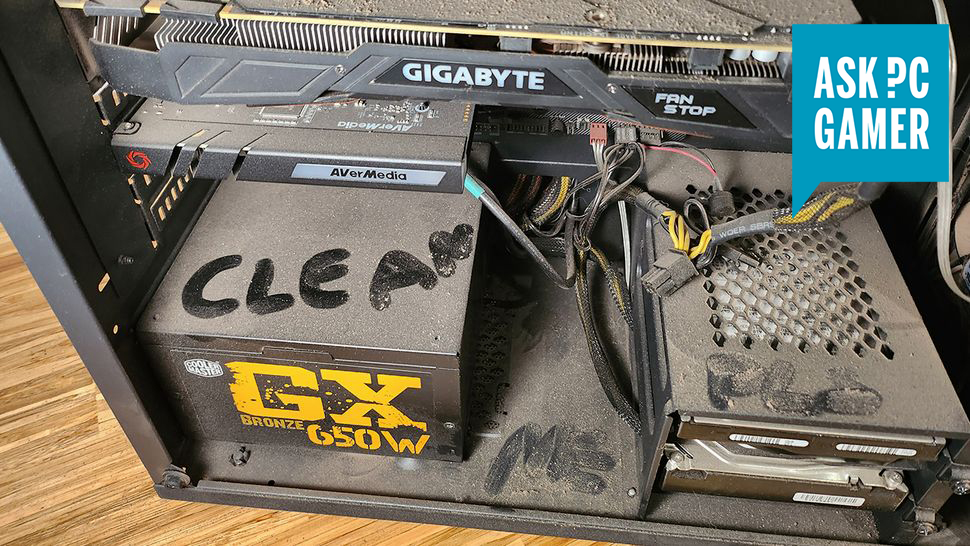
Anyone that owns a PC has to contend with dust buildup. It’s the bane of PC cooling. Even if you keep your area clean, some buildup will occur over time. It’s made much worse of you have a carpeted room and especially if you have pets.
You can configure your fans however you like, use as many dust filters as you can fit, and make sure your PC is well away from carpets and floor-bound fluff, but at some point, the dust comes for us all.
You can’t escape it, and it’s a good idea to clean your PC now and then if you want to keep your components' temperatures manageable. Here are the methods we use to safely and thoroughly clean out our computers.
Dust is the enemy
Too much dust leads to higher temperatures and a loss of performance
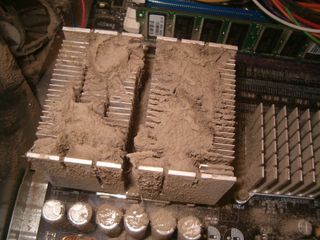
The most important thing to consider when cleaning your case is that we want to make it possible for cool, fresh air to get into the case and hot air to get out. If dust filters are clogged or there’s excess dust collected around the heat sinks, that’s not going to be possible and your system could overheat.
Along with overheating, dust buildup can cost you performance. As temperatures rise, your CPU and GPU will begin to drop below their maximum boost and turbo clocks. In severe cases it can lead to significant throttling, if not shutdowns when your system is under a heavy load.
To counter that, you want to do everything you can to eliminate dust and leave your system fresh and clean.
The biggest gaming news, reviews and hardware deals
Before you start
Getting ready to clean your PC
One of the first signs of a significant dust buildup is when you can see it on the dust filters adjacent to your intake fans. It’s best not to just wipe it off or point a can of compressed air at your PC and hope for the best.
Before you begin, there are a few common sense things to consider.
(Image credit: Future)
Tools to help
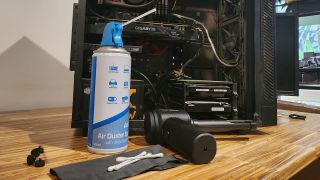
Get the right tools for the job
(Image credit: Future)
How to clean your PC
Dust begone
- Get rid of the dust —Dust is one of the biggest enemies when it comes to keeping a PC clean, and it can get everywhere.
You’ve likely already knocked loose a bunch of dust just moving your PC, use a vacuum cleaner to clean up any dust that ends up on the floor. However,don’t use the vacuum directly on the interiorof your case, as there is a real risk of static damage.
Use your can of air, or blower to get as much dust out of your PC as possible. You can often do a pretty good clean without needing to remove any components this way.
If your PC hasn’t been cleaned in a while, there’s a good chance you have dust caked onto the fans, vents, and heat sinks. In this case, a quick dusting might not be enough.
(Image credit: Future)
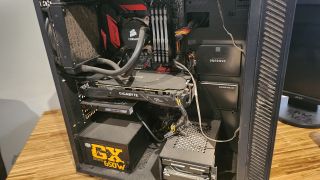
- Remove everything you want to clean —If you display your PC like a work of art as much as a functional tool or gaming machine, then you’ll want to do more than just give it a light dusting. For that, we’d recommend removing everything from the case. That means redoing all of your cable management, draining the water-cooling loop, and unhooking all your drive caddies. The end result, though, is worth it.
Note: We still recommend an anti-static wrist band when handling any components. If you don’t have one to hand, periodically touch your PC case to ground yourself.
If there’s only a few things that need the intensive clean treatment, feel free to just grab those out. That being said, it’s worth doing a thorough clean now and then and now’s as good a time as any. Just make sure you reapply thermal paste if you remove the heat sync. If you’re not sure how,read our guide.
- Lay it out —Lay everything you’ve removed out on a non conductive surface. This should give you a good opportunity to see what really needs your cleaning attention. You can give them another once over with the compressed air or blower while they’re here.
(Image credit: Future)
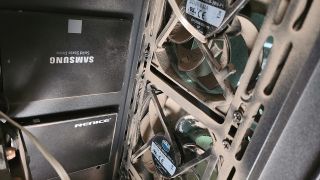
Wipe everything down —Grab your lint free cloth and wipe any dust build up you can still see. Pay particular attention to any crevices, plastic shrouds, and heat sinks. Thoroughly clean any dust filters too. For fans you can hold the blades still to give them a better clean on the individual blades.
Use some Isopropyl —If there are any fingerprint or oily marks or other stubborn grime, use cotton swabs and isopropyl alcohol or equivalent to wipe them clean. Be very careful and of course, make sure to leave them to dry before putting them back together.
Opening components —Some components, like a graphics card, can get dust build-up inside a covered area. Cleaning these may require disassembling the card, which is possible if you have the right tools (small hex and Torx bits are often required). Hopefully this won’t be required, but if your PC has been extra dusty there might be some caked inside.
(Image credit: Future)
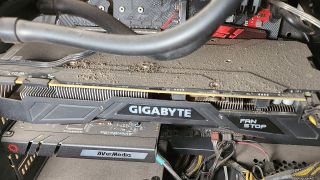
There are certain components, like the interior of your PSU, that you aren’t going to be able to clean effectively without taking it apart and voiding your warranty. Doing so can be dangerous, too. Instead, we’d recommend using a can of compressed air with a long straw attached to give it a little blast to dislodge any stubborn dust. When you next turn it on, its own fan and natural airflow should blow any loosened dust out of the rear.
How often should I clean my PC?
To maintain a healthy system, we recommend a light dusting at least every three to six months, or more often if you have pets or live in an especially dusty environment. For deep cleanings, every six months to a year is recommended if you want to maintain peak performance, or every couple of years at the very least to avoid any potential overheating issues.
TOPICSHardware
TOPICS
More about pc casesColorful PC cases are so in this year’One million street-level deals' worth of methamphetamine smuggled in PC case shipmentLatestWormhole is an impeccable arcade revival of Snake that plays like it fell off the back of Derek Yu’s vanSee more latest►
More about pc casesColorful PC cases are so in this year’One million street-level deals' worth of methamphetamine smuggled in PC case shipmentLatestWormhole is an impeccable arcade revival of Snake that plays like it fell off the back of Derek Yu’s vanSee more latest►
More about pc casesColorful PC cases are so in this year’One million street-level deals' worth of methamphetamine smuggled in PC case shipment
More about pc cases
Colorful PC cases are so in this year’One million street-level deals' worth of methamphetamine smuggled in PC case shipment

Colorful PC cases are so in this year
Colorful PC cases are so in this year
‘One million street-level deals’ worth of methamphetamine smuggled in PC case shipment
‘One million street-level deals’ worth of methamphetamine smuggled in PC case shipment
LatestWormhole is an impeccable arcade revival of Snake that plays like it fell off the back of Derek Yu’s vanSee more latest►
Latest
Wormhole is an impeccable arcade revival of Snake that plays like it fell off the back of Derek Yu’s van
Wormhole is an impeccable arcade revival of Snake that plays like it fell off the back of Derek Yu’s van
Wormhole is an impeccable arcade revival of Snake that plays like it fell off the back of Derek Yu’s van
See more latest►
Most Popular
18 games the PC Gamer team can’t wait to play in 2025
The Witcher 3’s now 2-year-old bonus quest is our first taste of the ‘vibe’ CD Projekt is going for in The Witcher 4
2024 was the year updates for old games beat out all the new ones for me
Train like you game with this adventure-inspired workout
‘It’s simply impossible to make a difficulty level that’s just right for all players’: How Final Fantasy 14’s lead battle designer has been playing a precarious balancing game for Dawntrail’s dungeons and raids
Please join me in getting super excited for all the cool looking survival games coming in 2025 (and beyond)
Competitive shooters are at a crucial crossroads in 2025: ‘sweaty’ teamplay vs. casual fun
Call of Duty’s $28 Squid Game skins are the perfect crossover for our capitalist dystopia, and Activision knows exactly what it’s doing
These are the 14 biggest upcoming RPGs of 2025—get ready for another amazing year for the genre
Five new Steam games you probably missed (January 6, 2025)
HARDWARE BUYING GUIDESLATEST GAME REVIEWS1Best Steam Deck accessories in Australia for 2025: Our favorite docks, powerbanks and gamepads2Best graphics card for laptops: the mobile GPUs I’d want in my next gaming laptop3Best mini PCs in 2025: The compact computers I love the most4Best 14-inch gaming laptop: The top compact gaming laptops I’ve held in these hands5Best Mini-ITX motherboards in 2025: My pick from all the mini mobo marvels I’ve tested1Thank Goodness You’re Here! review2Shiren the Wanderer: The Mystery Dungeon of Serpentcoil Island review3WD Black SN850X 8 TB NVMe SSD review4Ikea Utespelare desk review5Asus ROG Harpe Ace Mini wireless mouse review
HARDWARE BUYING GUIDESLATEST GAME REVIEWS1Best Steam Deck accessories in Australia for 2025: Our favorite docks, powerbanks and gamepads2Best graphics card for laptops: the mobile GPUs I’d want in my next gaming laptop3Best mini PCs in 2025: The compact computers I love the most4Best 14-inch gaming laptop: The top compact gaming laptops I’ve held in these hands5Best Mini-ITX motherboards in 2025: My pick from all the mini mobo marvels I’ve tested1Thank Goodness You’re Here! review2Shiren the Wanderer: The Mystery Dungeon of Serpentcoil Island review3WD Black SN850X 8 TB NVMe SSD review4Ikea Utespelare desk review5Asus ROG Harpe Ace Mini wireless mouse review
HARDWARE BUYING GUIDESLATEST GAME REVIEWS1Best Steam Deck accessories in Australia for 2025: Our favorite docks, powerbanks and gamepads2Best graphics card for laptops: the mobile GPUs I’d want in my next gaming laptop3Best mini PCs in 2025: The compact computers I love the most4Best 14-inch gaming laptop: The top compact gaming laptops I’ve held in these hands5Best Mini-ITX motherboards in 2025: My pick from all the mini mobo marvels I’ve tested1Thank Goodness You’re Here! review2Shiren the Wanderer: The Mystery Dungeon of Serpentcoil Island review3WD Black SN850X 8 TB NVMe SSD review4Ikea Utespelare desk review5Asus ROG Harpe Ace Mini wireless mouse review
HARDWARE BUYING GUIDESLATEST GAME REVIEWS1Best Steam Deck accessories in Australia for 2025: Our favorite docks, powerbanks and gamepads2Best graphics card for laptops: the mobile GPUs I’d want in my next gaming laptop3Best mini PCs in 2025: The compact computers I love the most4Best 14-inch gaming laptop: The top compact gaming laptops I’ve held in these hands5Best Mini-ITX motherboards in 2025: My pick from all the mini mobo marvels I’ve tested1Thank Goodness You’re Here! review2Shiren the Wanderer: The Mystery Dungeon of Serpentcoil Island review3WD Black SN850X 8 TB NVMe SSD review4Ikea Utespelare desk review5Asus ROG Harpe Ace Mini wireless mouse review
HARDWARE BUYING GUIDESLATEST GAME REVIEWS
1Best Steam Deck accessories in Australia for 2025: Our favorite docks, powerbanks and gamepads
1Best Steam Deck accessories in Australia for 2025: Our favorite docks, powerbanks and gamepads
1
Best Steam Deck accessories in Australia for 2025: Our favorite docks, powerbanks and gamepads
2Best graphics card for laptops: the mobile GPUs I’d want in my next gaming laptop
2Best graphics card for laptops: the mobile GPUs I’d want in my next gaming laptop
2
Best graphics card for laptops: the mobile GPUs I’d want in my next gaming laptop
3Best mini PCs in 2025: The compact computers I love the most
3Best mini PCs in 2025: The compact computers I love the most
3
Best mini PCs in 2025: The compact computers I love the most
4Best 14-inch gaming laptop: The top compact gaming laptops I’ve held in these hands
4Best 14-inch gaming laptop: The top compact gaming laptops I’ve held in these hands
4
Best 14-inch gaming laptop: The top compact gaming laptops I’ve held in these hands
5Best Mini-ITX motherboards in 2025: My pick from all the mini mobo marvels I’ve tested
5Best Mini-ITX motherboards in 2025: My pick from all the mini mobo marvels I’ve tested
5
Best Mini-ITX motherboards in 2025: My pick from all the mini mobo marvels I’ve tested
1Thank Goodness You’re Here! review
1Thank Goodness You’re Here! review
1
Thank Goodness You’re Here! review
2Shiren the Wanderer: The Mystery Dungeon of Serpentcoil Island review
2Shiren the Wanderer: The Mystery Dungeon of Serpentcoil Island review
2
Shiren the Wanderer: The Mystery Dungeon of Serpentcoil Island review
3WD Black SN850X 8 TB NVMe SSD review
3WD Black SN850X 8 TB NVMe SSD review
3
WD Black SN850X 8 TB NVMe SSD review
4Ikea Utespelare desk review
4Ikea Utespelare desk review
4
Ikea Utespelare desk review
5Asus ROG Harpe Ace Mini wireless mouse review
5Asus ROG Harpe Ace Mini wireless mouse review
5
Asus ROG Harpe Ace Mini wireless mouse review
