GamesActionPalworldHow to set up a dedicated server in PalworldWhen you purchase through links on our site, we may earn an affiliate commission.Here’s how it works.
GamesActionPalworldHow to set up a dedicated server in PalworldWhen you purchase through links on our site, we may earn an affiliate commission.Here’s how it works.
When you purchase through links on our site, we may earn an affiliate commission.Here’s how it works.
(Image credit: Pocketpair)

Jump to:Initial setupJoining serversServer password fixSaving and closing server
Jump to:Initial setupJoining serversServer password fixSaving and closing server
Palworlddedicated servers can host up to 32 players combing through its islands for Pokémon-like monsters and valuable resources. Developer Pocketpair has plans to increase that number in a future update, as well as add an in-game method for server hosting. Right now, though, hosting your own Palworld dedicated server takes a few extra steps.
To set up a multiplayer server,you need the Steam version of the game.Due tothe complexities of updating games on consoles, the Xbox/Microsoft Store/Game Pass version of the game doesn’t currently allow dedicated servers of any kind. The only way to have a persistent multiplayer server for you and your friends is to buy it on Steam, and because crossplay isn’t a thing yet, your friends will need it there too.
The process to set up a Palworld dedicated server is mostly painless, but keep in mind that other players will need to know your IP address to join. You don’t want to go around announcing your IP address to random people, so be careful with who you give it to.
How to setup a dedicated server
Image1of2(Image credit: Tyler C. / Pocketpair)(Image credit: Tyler C. / Pocketpair)
Image1of2(Image credit: Tyler C. / Pocketpair)(Image credit: Tyler C. / Pocketpair)
Image1of2
(Image credit: Tyler C. / Pocketpair)(Image credit: Tyler C. / Pocketpair)
(Image credit: Tyler C. / Pocketpair)(Image credit: Tyler C. / Pocketpair)
(Image credit: Tyler C. / Pocketpair)
(Image credit: Tyler C. / Pocketpair)
(Image credit: Tyler C. / Pocketpair)
(Image credit: Tyler C. / Pocketpair)
(Image credit: Tyler C. / Pocketpair)

(Image credit: Tyler C. / Pocketpair)
(Image credit: Tyler C. / Pocketpair)
(Image credit: Tyler C. / Pocketpair)
(Image credit: Tyler C. / Pocketpair)
(Image credit: Tyler C. / Pocketpair)
You can find detailed instructions on how to set up your Palworld dedicated server below, buthere’s abrief list of steps:
How to set up your dedicated server
Once you’ve purchased Palworld on Steam, it’ll show up in your game library.You’ll need to launch the game once so it creates all the files it needs in its installation folder.
After that, close the game andlook for “Palworld Dedicated Server” in your Steam library.If it doesn’t show up, click the drop down filter menu above your list of games andenable “Tools”.Before you click Launch, right click Palworld Dedicated Server in the list, hover your cursor over Manage andselect Browse local filesto bring up its installation folder.
The biggest gaming news, reviews and hardware deals
Select and copy all the text below the third linewhere it says “To change the server settings…” It should include “[/Script/Pal.PalGameWorldSettings]” and all the text below it. Close the window and go back to the PalServer folder that you were on a second ago.
Now you need to paste all that text into another file. That one is located inPalServer > Pal > Saved > Config > WindowsServer.Among all the ini files in there, you’ll see"PalWorldSettings.ini".Open it with Notepad just like you did the previous file and paste the text in.
When you’re done,save the file and close it.
It’s finally time to get your Palworld server online.Launch Palworld Dedicated Serverfrom your game library. A window will show up asking you if you want to play on a dedicated server or start a community server. Community servers are public and show up in the game’s multiplayer menu, but some are having trouble getting theirs to work, so let’s skip it for now.Choose Play Palworld Dedicated Server and click Play.
While it’s loading up, Windows might ask you to allow public and private networks to access it.Click “Yes”, and wait for a Command Prompt window to appear.You’ll need to keep that window open for the server to run regardless of whether you’re playing or not.
Best Pals: What to catch earlyPalworld roadmap: The early access planPalworld mods: Best tweaks to installPalworld multiplayer: How to co-opPalworld dedicated server: Full-time PalsPalworld breeding guide: Get started with cake and eggs
Best Pals: What to catch earlyPalworld roadmap: The early access planPalworld mods: Best tweaks to installPalworld multiplayer: How to co-opPalworld dedicated server: Full-time PalsPalworld breeding guide: Get started with cake and eggs
Best Pals: What to catch earlyPalworld roadmap: The early access planPalworld mods: Best tweaks to installPalworld multiplayer: How to co-opPalworld dedicated server: Full-time PalsPalworld breeding guide: Get started with cake and eggs
Best Pals: What to catch earlyPalworld roadmap: The early access planPalworld mods: Best tweaks to installPalworld multiplayer: How to co-opPalworld dedicated server: Full-time PalsPalworld breeding guide: Get started with cake and eggs

Best Pals: What to catch earlyPalworld roadmap: The early access planPalworld mods: Best tweaks to installPalworld multiplayer: How to co-opPalworld dedicated server: Full-time PalsPalworld breeding guide: Get started with cake and eggs
Best Pals: What to catch earlyPalworld roadmap: The early access planPalworld mods: Best tweaks to installPalworld multiplayer: How to co-opPalworld dedicated server: Full-time PalsPalworld breeding guide: Get started with cake and eggs
How to join your dedicated server
(Image credit: Tyler C. / Pocketpair)
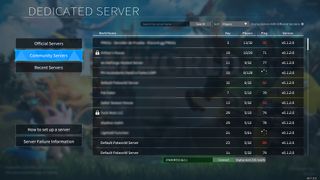
Anyone who wants to play on your new server will need to launch the game and select"Join Multiplayer Game"from the main menu. That option will bring you to the dedicated server browser.
Dedicated server password fix
Server passwords don’t seem to consistently work correctly in Palworld. If the game says “no password has been entered” when you try to join a server, follow these steps to fix it:
How to save and close your server
More about actionAssassin’s Creed Shadows takes a run at improving parkour, as Ubisoft strives to make the system less ‘like a gas pedal’All Zenless Zone Zero 1.5 livestream codesLatestWatching an all-romances speedrun of the legendarily janky Fallout: New Vegas is a delightSee more latest►
More about actionAssassin’s Creed Shadows takes a run at improving parkour, as Ubisoft strives to make the system less ‘like a gas pedal’All Zenless Zone Zero 1.5 livestream codesLatestWatching an all-romances speedrun of the legendarily janky Fallout: New Vegas is a delightSee more latest►
More about actionAssassin’s Creed Shadows takes a run at improving parkour, as Ubisoft strives to make the system less ‘like a gas pedal’All Zenless Zone Zero 1.5 livestream codes
More about action
Assassin’s Creed Shadows takes a run at improving parkour, as Ubisoft strives to make the system less ‘like a gas pedal’All Zenless Zone Zero 1.5 livestream codes
Assassin’s Creed Shadows takes a run at improving parkour, as Ubisoft strives to make the system less ‘like a gas pedal’
Assassin’s Creed Shadows takes a run at improving parkour, as Ubisoft strives to make the system less ‘like a gas pedal’
All Zenless Zone Zero 1.5 livestream codes
All Zenless Zone Zero 1.5 livestream codes
LatestWatching an all-romances speedrun of the legendarily janky Fallout: New Vegas is a delightSee more latest►
Latest
Watching an all-romances speedrun of the legendarily janky Fallout: New Vegas is a delight
Watching an all-romances speedrun of the legendarily janky Fallout: New Vegas is a delight
Watching an all-romances speedrun of the legendarily janky Fallout: New Vegas is a delight
See more latest►
Most Popular
This bizarre roguelike has a new take on the Vampire Survivors formula: letting you build your own custom weapons out of brains, eyeballs, and chimpanzee spines
18 games the PC Gamer team can’t wait to play in 2025
The Witcher 3’s now 2-year-old bonus quest is our first taste of the ‘vibe’ CD Projekt is going for in The Witcher 4
2024 was the year updates for old games beat out all the new ones for me
Train like you game with this adventure-inspired workout
‘It’s simply impossible to make a difficulty level that’s just right for all players’: How Final Fantasy 14’s lead battle designer has been playing a precarious balancing game for Dawntrail’s dungeons and raids
Please join me in getting super excited for all the cool looking survival games coming in 2025 (and beyond)
Competitive shooters are at a crucial crossroads in 2025: ‘sweaty’ teamplay vs. casual fun
Call of Duty’s $28 Squid Game skins are the perfect crossover for our capitalist dystopia, and Activision knows exactly what it’s doing
These are the 14 biggest upcoming RPGs of 2025—get ready for another amazing year for the genre
HARDWARE BUYING GUIDESLATEST GAME REVIEWS1Best Steam Deck accessories in Australia for 2025: Our favorite docks, powerbanks and gamepads2Best graphics card for laptops: the mobile GPUs I’d want in my next gaming laptop3Best mini PCs in 2025: The compact computers I love the most4Best 14-inch gaming laptop: The top compact gaming laptops I’ve held in these hands5Best Mini-ITX motherboards in 2025: My pick from all the mini mobo marvels I’ve tested1Thank Goodness You’re Here! review2Shiren the Wanderer: The Mystery Dungeon of Serpentcoil Island review3WD Black SN850X 8 TB NVMe SSD review4Ikea Utespelare desk review5Asus ROG Harpe Ace Mini wireless mouse review
HARDWARE BUYING GUIDESLATEST GAME REVIEWS1Best Steam Deck accessories in Australia for 2025: Our favorite docks, powerbanks and gamepads2Best graphics card for laptops: the mobile GPUs I’d want in my next gaming laptop3Best mini PCs in 2025: The compact computers I love the most4Best 14-inch gaming laptop: The top compact gaming laptops I’ve held in these hands5Best Mini-ITX motherboards in 2025: My pick from all the mini mobo marvels I’ve tested1Thank Goodness You’re Here! review2Shiren the Wanderer: The Mystery Dungeon of Serpentcoil Island review3WD Black SN850X 8 TB NVMe SSD review4Ikea Utespelare desk review5Asus ROG Harpe Ace Mini wireless mouse review
HARDWARE BUYING GUIDESLATEST GAME REVIEWS1Best Steam Deck accessories in Australia for 2025: Our favorite docks, powerbanks and gamepads2Best graphics card for laptops: the mobile GPUs I’d want in my next gaming laptop3Best mini PCs in 2025: The compact computers I love the most4Best 14-inch gaming laptop: The top compact gaming laptops I’ve held in these hands5Best Mini-ITX motherboards in 2025: My pick from all the mini mobo marvels I’ve tested1Thank Goodness You’re Here! review2Shiren the Wanderer: The Mystery Dungeon of Serpentcoil Island review3WD Black SN850X 8 TB NVMe SSD review4Ikea Utespelare desk review5Asus ROG Harpe Ace Mini wireless mouse review
HARDWARE BUYING GUIDESLATEST GAME REVIEWS1Best Steam Deck accessories in Australia for 2025: Our favorite docks, powerbanks and gamepads2Best graphics card for laptops: the mobile GPUs I’d want in my next gaming laptop3Best mini PCs in 2025: The compact computers I love the most4Best 14-inch gaming laptop: The top compact gaming laptops I’ve held in these hands5Best Mini-ITX motherboards in 2025: My pick from all the mini mobo marvels I’ve tested1Thank Goodness You’re Here! review2Shiren the Wanderer: The Mystery Dungeon of Serpentcoil Island review3WD Black SN850X 8 TB NVMe SSD review4Ikea Utespelare desk review5Asus ROG Harpe Ace Mini wireless mouse review
HARDWARE BUYING GUIDESLATEST GAME REVIEWS
1Best Steam Deck accessories in Australia for 2025: Our favorite docks, powerbanks and gamepads
1Best Steam Deck accessories in Australia for 2025: Our favorite docks, powerbanks and gamepads
1
Best Steam Deck accessories in Australia for 2025: Our favorite docks, powerbanks and gamepads
2Best graphics card for laptops: the mobile GPUs I’d want in my next gaming laptop
2Best graphics card for laptops: the mobile GPUs I’d want in my next gaming laptop
2
Best graphics card for laptops: the mobile GPUs I’d want in my next gaming laptop
3Best mini PCs in 2025: The compact computers I love the most
3Best mini PCs in 2025: The compact computers I love the most
3
Best mini PCs in 2025: The compact computers I love the most
4Best 14-inch gaming laptop: The top compact gaming laptops I’ve held in these hands
4Best 14-inch gaming laptop: The top compact gaming laptops I’ve held in these hands
4
Best 14-inch gaming laptop: The top compact gaming laptops I’ve held in these hands
5Best Mini-ITX motherboards in 2025: My pick from all the mini mobo marvels I’ve tested
5Best Mini-ITX motherboards in 2025: My pick from all the mini mobo marvels I’ve tested
5
Best Mini-ITX motherboards in 2025: My pick from all the mini mobo marvels I’ve tested
1Thank Goodness You’re Here! review
1Thank Goodness You’re Here! review
1
Thank Goodness You’re Here! review
2Shiren the Wanderer: The Mystery Dungeon of Serpentcoil Island review
2Shiren the Wanderer: The Mystery Dungeon of Serpentcoil Island review
2
Shiren the Wanderer: The Mystery Dungeon of Serpentcoil Island review
3WD Black SN850X 8 TB NVMe SSD review
3WD Black SN850X 8 TB NVMe SSD review
3
WD Black SN850X 8 TB NVMe SSD review
4Ikea Utespelare desk review
4Ikea Utespelare desk review
4
Ikea Utespelare desk review
5Asus ROG Harpe Ace Mini wireless mouse review
5Asus ROG Harpe Ace Mini wireless mouse review
5
Asus ROG Harpe Ace Mini wireless mouse review
