HardwareGaming PCsI finally built the mini PC I’ve been dreaming of and it made me realise we’ve come a long way from cramped cases and fiddly connectorsWhen you purchase through links on our site, we may earn an affiliate commission.Here’s how it works.
HardwareGaming PCsI finally built the mini PC I’ve been dreaming of and it made me realise we’ve come a long way from cramped cases and fiddly connectorsWhen you purchase through links on our site, we may earn an affiliate commission.Here’s how it works.
When you purchase through links on our site, we may earn an affiliate commission.Here’s how it works.
(Image credit: Future)
Jump to:The partsThe buildThe performanceThe conclusion
Jump to:The partsThe buildThe performanceThe conclusion
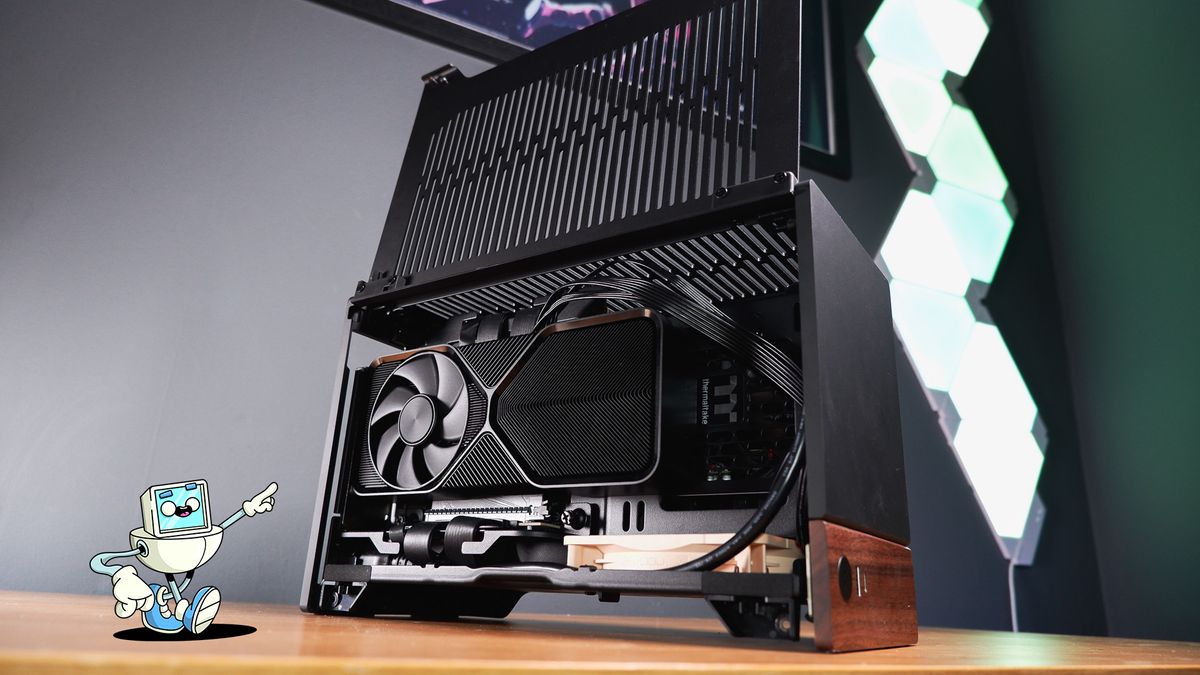
The smaller the PC, the bigger the problems. That’s what I’ve long believed in my many years of building relatively functional computers. You have to consider tolerances, sizes, form factors, and cooling more carefully when working within a tight space. Yet what surprised me about this mini PC build was how easily it came together.
That’s small enough to stuff next to your gaming monitor, even if you’re trying your best with a small desk. It’s also just about big enough to stuff with a high-performance dedicated graphics card and a powerful desktop CPU for superb gaming performance.
Surprise, surprise—that’s exactly what I’ve done.
The parts
(Image credit: Future)

Swipe to scroll horizontallyComponentModelUS priceUK priceRow 0 - Cell 4CPUAMD Ryzen 7 9700X$327£309Buy linkGPUNvidia RTX 4070 Super Founders Edition$599£579Buy linkChassisFractal Design Terra$180£180Buy linkMotherboardAsus ROG Strix X870-I Gaming WiFi$450£420Buy linkMemoryPNY XLR8 Gaming 32 GB DDR5-6200$110£104Buy linkStorageSolidigm P44 Pro$123£115Buy linkCPU coolerNoctua NH-L12S$60£64Buy linkCoolingNoctua NF-A12x25$33£29Buy linkPower supplyThermaltake Toughpower SFX Platinum 750W$126£115Buy link
Swipe to scroll horizontally
ComponentModelUS priceUK priceRow 0 - Cell 4CPUAMD Ryzen 7 9700X$327£309Buy linkGPUNvidia RTX 4070 Super Founders Edition$599£579Buy linkChassisFractal Design Terra$180£180Buy linkMotherboardAsus ROG Strix X870-I Gaming WiFi$450£420Buy linkMemoryPNY XLR8 Gaming 32 GB DDR5-6200$110£104Buy linkStorageSolidigm P44 Pro$123£115Buy linkCPU coolerNoctua NH-L12S$60£64Buy linkCoolingNoctua NF-A12x25$33£29Buy linkPower supplyThermaltake Toughpower SFX Platinum 750W$126£115Buy link
Total: $2,008 | £1,901
The Fractal Terra was my Mini-ITX case of choice for this build. A snazzy metal box with a real bit of a tree stuck to the front of it. There are few cases that speak to me at such a primal level—really, I’m just a sucker for a fine grain. It’s also a renowned chassis and a prime example of what can be accomplished in a tight spot.
You’ll see more of the Terra shortly. What’s important to know about it is it’s a 10.4-litre chassis, which puts it smaller in stature than theNZXT H1at 15.6-litre, and it’s surprisingly accessible thanks to two hinged, vented panels on either side of the case.
The biggest gaming news, reviews and hardware deals
Image1of5(Image credit: Future)(Image credit: Future)(Image credit: Future)(Image credit: Future)(Image credit: Future)
Image1of5(Image credit: Future)(Image credit: Future)(Image credit: Future)(Image credit: Future)(Image credit: Future)
Image1of5
(Image credit: Future)(Image credit: Future)(Image credit: Future)(Image credit: Future)(Image credit: Future)
(Image credit: Future)(Image credit: Future)(Image credit: Future)(Image credit: Future)(Image credit: Future)
(Image credit: Future)
(Image credit: Future)
(Image credit: Future)
(Image credit: Future)
(Image credit: Future)

(Image credit: Future)
(Image credit: Future)
(Image credit: Future)
(Image credit: Future)
(Image credit: Future)
(Image credit: Future)
(Image credit: Future)
(Image credit: Future)
(Image credit: Future)
(Image credit: Future)
(Image credit: Future)
(Image credit: Future)
(Image credit: Future)
(Image credit: Future)
(Image credit: Future)
(Image credit: Future)
(Image credit: Future)
(Image credit: Future)
(Image credit: Future)
(Image credit: Future)
I’ve decided against pushing this case to its limit and settled for the fantasticFounders Edition RTX 4070 Super. We’re reaching the end of the RTX 40-series generation and I’m still yet to be convinced there were many better deals to be had than the original Founders Edition cards—cool, quiet, and pretty slick. If you wanted to go bigger, I’m told you can reliably fit theAsus ProArt GeForce RTX 4080 OC Editionin this case, if your budget allows.
Image1of3(Image credit: Future)(Image credit: Future)(Image credit: Future)
Image1of3(Image credit: Future)(Image credit: Future)(Image credit: Future)
Image1of3
(Image credit: Future)(Image credit: Future)(Image credit: Future)
(Image credit: Future)(Image credit: Future)(Image credit: Future)
(Image credit: Future)
(Image credit: Future)
(Image credit: Future)
(Image credit: Future)
(Image credit: Future)
(Image credit: Future)
(Image credit: Future)
(Image credit: Future)
(Image credit: Future)
(Image credit: Future)
(Image credit: Future)
(Image credit: Future)
(Image credit: Future)
(Image credit: Future)
(Image credit: Future)
At a glance: Asus ROG Strix X870-I Gaming WiFi(Image credit: Future)Chipset:X870Socket:AM5PCIe slots:1x PCIe 5.0 (x16)DIMM slots:2x DDR5NVMe slots:2 (1x PCIe 5.0, 1x PCIe 4.0)Wireless connectivity:Wi-Fi 7, Bluetooth 5.4USB ports:2x USB4 (Type-C), 5x USB 10 Gbps (4x Type-A, 1x Type-C), 3x USB 2.0 (Type-A) + ROG Strix Hive II + ROG FPS card
At a glance: Asus ROG Strix X870-I Gaming WiFi
(Image credit: Future)Chipset:X870Socket:AM5PCIe slots:1x PCIe 5.0 (x16)DIMM slots:2x DDR5NVMe slots:2 (1x PCIe 5.0, 1x PCIe 4.0)Wireless connectivity:Wi-Fi 7, Bluetooth 5.4USB ports:2x USB4 (Type-C), 5x USB 10 Gbps (4x Type-A, 1x Type-C), 3x USB 2.0 (Type-A) + ROG Strix Hive II + ROG FPS card
(Image credit: Future)

Chipset:X870Socket:AM5PCIe slots:1x PCIe 5.0 (x16)DIMM slots:2x DDR5NVMe slots:2 (1x PCIe 5.0, 1x PCIe 4.0)Wireless connectivity:Wi-Fi 7, Bluetooth 5.4USB ports:2x USB4 (Type-C), 5x USB 10 Gbps (4x Type-A, 1x Type-C), 3x USB 2.0 (Type-A) + ROG Strix Hive II + ROG FPS card
There’s no space for a large CPU cooler here. I’m stuck with the distance between the socket, motherboard, and side panel—in the Terra, that’s not a lot. I have measured the gap from socket to side panel at around 8 cm or 3 inches. To fit in that space, the Noctua NH-L12S comes in handy. This extremely low-profile CPU cooler rotates the traditional tower on its side, through four curved heat pipes, and an especially slim 120 mm fan is slotted in underneath. That’s right, the fan sits between the cold plate and the heatsink. It’s a tight squeeze, but it’s sufficient to deal with the 9700X.
I’ve also thrown in another fan into this build, beneath the PSU. ANoctua NF-A12x25. Somehow, the cables just about stay out of its way.
Let’s take a moment to appreciate the beauty that is this ROG motherboard. It’s not hyperbole to say this is the best-looking motherboard I’ve ever laid my hands on. Granted, I do have a penchant for Mini-ITX motherboards, which puts them at something of an advantage over larger units, though the mix of stamped, almost hammered-look metal plating across its IO, SSD slots, and rear. No wonder this thing costs nearly as much as the graphics card.
Image1of2(Image credit: Future)(Image credit: Future)
Image1of2(Image credit: Future)(Image credit: Future)
Image1of2
(Image credit: Future)(Image credit: Future)
(Image credit: Future)(Image credit: Future)
(Image credit: Future)
(Image credit: Future)
(Image credit: Future)
(Image credit: Future)
(Image credit: Future)
(Image credit: Future)
(Image credit: Future)
(Image credit: Future)
(Image credit: Future)
(Image credit: Future)
No small form factor build would be complete without a suitable small power supply. Luckily, I’ve got the Thermaltake Toughpower SFX Platinum 750W at hand. Much like a Mini-ITX motherboard or mini PC, there’s just something about a shrunken power supply that I adore. Miniature, mighty, modular, and rated to a high efficiency to keep excess heat away—the Toughpower is a perfect fit for this build.
The build
Image1of4(Image credit: Future)(Image credit: Future)(Image credit: Future)(Image credit: Future)
Image1of4(Image credit: Future)(Image credit: Future)(Image credit: Future)(Image credit: Future)
Image1of4
(Image credit: Future)(Image credit: Future)(Image credit: Future)(Image credit: Future)
(Image credit: Future)(Image credit: Future)(Image credit: Future)(Image credit: Future)
(Image credit: Future)
(Image credit: Future)
(Image credit: Future)
(Image credit: Future)
(Image credit: Future)
(Image credit: Future)
(Image credit: Future)
(Image credit: Future)
(Image credit: Future)
(Image credit: Future)
(Image credit: Future)
(Image credit: Future)
(Image credit: Future)
(Image credit: Future)
(Image credit: Future)
(Image credit: Future)
(Image credit: Future)
(Image credit: Future)
(Image credit: Future)
(Image credit: Future)
- Ready the motherboard
With the CPU loaded into the motherboard, it’s time for the two sticks of PNY XLR8 DDR5-6200 RAM. This is a slightly faster kit than the 6000 MT/s kit I’d usually recommend here. The reason for that is the memory controller performs at its best when it matches the clock speed of the memory. Above 6000 MT/s, and the memory runs faster than the upper limit of the memory controller, which means the memory controller clock (UCLK) has to be halved. The good news is, if you buy memory between 6200-6400 MT/s, with a bit of luck, you can still run the memory at a 1:1 ratio with the controller.
Lastly, I install the SSD. The NVMe slots on this Mini-ITX are stacked atop of one another, with the PCIe 5.0 slot closest to the board itself. I’m not opting for PCIe 5.0 here, however, so I stick the Solidigm P44 Pro in the top slot. This motherboard doesn’t use any fiddly screws to keep the SSD tied down. Instead, a little pull tab—manufacturers, more of this please.
Image1of4(Image credit: Future)(Image credit: Future)(Image credit: Future)(Image credit: Future)
Image1of4(Image credit: Future)(Image credit: Future)(Image credit: Future)(Image credit: Future)
Image1of4
(Image credit: Future)(Image credit: Future)(Image credit: Future)(Image credit: Future)
(Image credit: Future)(Image credit: Future)(Image credit: Future)(Image credit: Future)
(Image credit: Future)
(Image credit: Future)
(Image credit: Future)
(Image credit: Future)
(Image credit: Future)
(Image credit: Future)
(Image credit: Future)
(Image credit: Future)
(Image credit: Future)
(Image credit: Future)
(Image credit: Future)
(Image credit: Future)
(Image credit: Future)
(Image credit: Future)
(Image credit: Future)
(Image credit: Future)
(Image credit: Future)
(Image credit: Future)
(Image credit: Future)
(Image credit: Future)
- Prep the chassis
This is a simple step. The Fractal Terra comes with two winged doors that are easily opened to expose the innards or removed entirely using a small slider in the top corner. Best to remove these, the top plate, any accessories, and unleash the front panel cables now before loading anything else into it. It’s when I’m messing around with the case here that I notice the Terra is a bit of a fingerprint magnet. It’s a matte finish that marks easily—though I’m able to clean it just as easily, too.
Image1of4(Image credit: Future)(Image credit: Future)(Image credit: Future)(Image credit: Future)
Image1of4(Image credit: Future)(Image credit: Future)(Image credit: Future)(Image credit: Future)
Image1of4
(Image credit: Future)(Image credit: Future)(Image credit: Future)(Image credit: Future)
(Image credit: Future)(Image credit: Future)(Image credit: Future)(Image credit: Future)
(Image credit: Future)
(Image credit: Future)
(Image credit: Future)
(Image credit: Future)
(Image credit: Future)
(Image credit: Future)
(Image credit: Future)
(Image credit: Future)
(Image credit: Future)
(Image credit: Future)
(Image credit: Future)
(Image credit: Future)
(Image credit: Future)
(Image credit: Future)
(Image credit: Future)
(Image credit: Future)
(Image credit: Future)
(Image credit: Future)
(Image credit: Future)
(Image credit: Future)
- Bolt on the CPU cooler
The Noctua NH-L12S uses a straightforward mounting system. Apply the backplate to the rear of the motherboard, put the spacers onto each of the four bolts protruding out from the CPU socket, fit the mounting bars either in a horizontal or vertical position (this bit is important), and attach each of the thumb screws. Apply thermal paste, stick the cooler on top, and tighten down the two captive screws with the provided screwdriver.
It all sounds so simple, and it is, providing you don’t either mess up the orientation (which I did not do) or optimistically try to install the fan on the outside of the cooler (which I did do).
(Image credit: Future)

The Fractal Terra comes with adjustable rails on which the motherboard sits, and you can use these small sliding adjusters to give yourself 30 mm on the GPU side, at the expense of the motherboard side, or vice versa. Unfortunately, no matter how much room I had hoped for on the motherboard side, there’s no space for a 120 mm fan atop of the NH-L12S once I have it installed. So, I have to take the whole thing off, switch the fan, and stick it back in again. Then I’m free to screw the motherboard into the chassis, connect the front panel connectors to the relevant headers, and move onto other jobs.
Image1of2(Image credit: Future)(Image credit: Future)
Image1of2(Image credit: Future)(Image credit: Future)
Image1of2
(Image credit: Future)(Image credit: Future)
(Image credit: Future)(Image credit: Future)
(Image credit: Future)
(Image credit: Future)
(Image credit: Future)
(Image credit: Future)
(Image credit: Future)
(Image credit: Future)
(Image credit: Future)
(Image credit: Future)
(Image credit: Future)
(Image credit: Future)
- Installing the PSU
Usually I’d leave the PSU until closer to the end, but in this build there’s not much more left to do, and I don’t want to be pulling cables through tight spaces with the GPU already installed. The Thermaltake Toughpower SFX is a modular unit, so I can decide ahead of time which cables to install.
That’s all I need to power this compact PC. The PSU mount is removable, so I’m able to slot it into the mount outside of the case and then slide the mount in for an easy install. However, I’d recommend installing a case fan below the PSU, if you want one, before you do this step. It’s just easier to get one in there if you don’t have a PSU in the way.
There’s a power extension cable included in the case due to the PSU’s mounting position, facing upwards, but otherwise all that’s left to do is connect each of the power connectors in turn, bar the GPU.
Image1of5(Image credit: Future)(Image credit: Future)(Image credit: Future)(Image credit: Future)(Image credit: Future)
Image1of5(Image credit: Future)(Image credit: Future)(Image credit: Future)(Image credit: Future)(Image credit: Future)
Image1of5
(Image credit: Future)(Image credit: Future)(Image credit: Future)(Image credit: Future)(Image credit: Future)
(Image credit: Future)(Image credit: Future)(Image credit: Future)(Image credit: Future)(Image credit: Future)
(Image credit: Future)
(Image credit: Future)
(Image credit: Future)
(Image credit: Future)
(Image credit: Future)
(Image credit: Future)
(Image credit: Future)
(Image credit: Future)
(Image credit: Future)
(Image credit: Future)
(Image credit: Future)
(Image credit: Future)
(Image credit: Future)
(Image credit: Future)
(Image credit: Future)
(Image credit: Future)
(Image credit: Future)
(Image credit: Future)
(Image credit: Future)
(Image credit: Future)
(Image credit: Future)
(Image credit: Future)
(Image credit: Future)
(Image credit: Future)
(Image credit: Future)
- Load up the graphics card
The Founders Edition RTX 4070 Super is not a particularly sizeable graphics card, though even it manages to take up a good amount of space inside the Terra. The Terra comes with a riser cable ready to go—it only needs connecting to the PCIe slot on the Mini-ITX motherboard—which means the GPU is a fairly simple installation with a pair of thumbscrews. Albeit slightly annoying to reach thumbscrews.
You could opt for a longer graphics card than I have here. The FE is just 244 mm in length, but the Terra supports up to 322 mm.
The performance
I overestimated the impact a tiny chassis would have on the performance of this PC. In my testing, I measured frame rates that are largely equal to a Velocity Micro prebuilt packing the same CPU/GPU combo in a larger, but not large, chassis.
The conclusion
Image1of4(Image credit: Future)(Image credit: Future)(Image credit: Future)(Image credit: Future)
Image1of4(Image credit: Future)(Image credit: Future)(Image credit: Future)(Image credit: Future)
Image1of4
(Image credit: Future)(Image credit: Future)(Image credit: Future)(Image credit: Future)
(Image credit: Future)(Image credit: Future)(Image credit: Future)(Image credit: Future)
(Image credit: Future)
(Image credit: Future)
(Image credit: Future)
(Image credit: Future)
(Image credit: Future)
(Image credit: Future)
(Image credit: Future)
(Image credit: Future)
(Image credit: Future)
(Image credit: Future)
(Image credit: Future)
(Image credit: Future)
(Image credit: Future)
(Image credit: Future)
(Image credit: Future)
(Image credit: Future)
(Image credit: Future)
(Image credit: Future)
(Image credit: Future)
(Image credit: Future)
Besides my one snag with the CPU fan, which was my own optimistic doing, I ran into no snags, faults, or frustrations with this mini PC build. That’s the thing that surprised me the most, in fact. I was expecting more awkward edges, hard to reach connectors, and squished cables. Okay, there are some squished cables, but I put a whole 120 mm fan in beneath the PSU and it all fit just fine.
Credit where credit’s due, the Fractal Terra made my life easy. The unfurling chassis offers almost entirely unobstructed access to three sides of this PC, and its clever internals with convenient cut-outs show there’s been plenty of attention paid to the finer details. Though, I could say the same for the PSU, cooler, and motherboard—all of which helped make this build a walk in the park.
So, my takeaway from this one? Don’t be afraid to scale down.
TOPICSHardwareNvidia
TOPICS
More about gaming pcsThis Jinx-inspired gaming PC is my favorite of CES 2025 and I’m head over heels for the hardwareThe 2025 Asus ROG NUC looks epic and has some mighty specs but a desktop gaming PC will probably be far better value for moneyLatest23 year-old D&D RPG Neverwinter Nights just got a new update thanks to the ‘unpaid software engineers’ of its unkillable communitySee more latest►
More about gaming pcsThis Jinx-inspired gaming PC is my favorite of CES 2025 and I’m head over heels for the hardwareThe 2025 Asus ROG NUC looks epic and has some mighty specs but a desktop gaming PC will probably be far better value for moneyLatest23 year-old D&D RPG Neverwinter Nights just got a new update thanks to the ‘unpaid software engineers’ of its unkillable communitySee more latest►
More about gaming pcsThis Jinx-inspired gaming PC is my favorite of CES 2025 and I’m head over heels for the hardwareThe 2025 Asus ROG NUC looks epic and has some mighty specs but a desktop gaming PC will probably be far better value for money
More about gaming pcs
This Jinx-inspired gaming PC is my favorite of CES 2025 and I’m head over heels for the hardwareThe 2025 Asus ROG NUC looks epic and has some mighty specs but a desktop gaming PC will probably be far better value for money
This Jinx-inspired gaming PC is my favorite of CES 2025 and I’m head over heels for the hardware
This Jinx-inspired gaming PC is my favorite of CES 2025 and I’m head over heels for the hardware
The 2025 Asus ROG NUC looks epic and has some mighty specs but a desktop gaming PC will probably be far better value for money
The 2025 Asus ROG NUC looks epic and has some mighty specs but a desktop gaming PC will probably be far better value for money
Latest23 year-old D&D RPG Neverwinter Nights just got a new update thanks to the ‘unpaid software engineers’ of its unkillable communitySee more latest►
Latest
23 year-old D&D RPG Neverwinter Nights just got a new update thanks to the ‘unpaid software engineers’ of its unkillable community
23 year-old D&D RPG Neverwinter Nights just got a new update thanks to the ‘unpaid software engineers’ of its unkillable community
23 year-old D&D RPG Neverwinter Nights just got a new update thanks to the ‘unpaid software engineers’ of its unkillable community
See more latest►
Most Popular
This bizarre roguelike has a new take on the Vampire Survivors formula: letting you build your own custom weapons out of brains, eyeballs, and chimpanzee spines
18 games the PC Gamer team can’t wait to play in 2025
The Witcher 3’s now 2-year-old bonus quest is our first taste of the ‘vibe’ CD Projekt is going for in The Witcher 4
2024 was the year updates for old games beat out all the new ones for me
Train like you game with this adventure-inspired workout
‘It’s simply impossible to make a difficulty level that’s just right for all players’: How Final Fantasy 14’s lead battle designer has been playing a precarious balancing game for Dawntrail’s dungeons and raids
Please join me in getting super excited for all the cool looking survival games coming in 2025 (and beyond)
Competitive shooters are at a crucial crossroads in 2025: ‘sweaty’ teamplay vs. casual fun
Call of Duty’s $28 Squid Game skins are the perfect crossover for our capitalist dystopia, and Activision knows exactly what it’s doing
These are the 14 biggest upcoming RPGs of 2025—get ready for another amazing year for the genre
HARDWARE BUYING GUIDESLATEST GAME REVIEWS1Best Steam Deck accessories in Australia for 2025: Our favorite docks, powerbanks and gamepads2Best graphics card for laptops: the mobile GPUs I’d want in my next gaming laptop3Best mini PCs in 2025: The compact computers I love the most4Best 14-inch gaming laptop: The top compact gaming laptops I’ve held in these hands5Best Mini-ITX motherboards in 2025: My pick from all the mini mobo marvels I’ve tested1Thank Goodness You’re Here! review: An anarchic treasure trove of jokes and skits2Shiren the Wanderer: The Mystery Dungeon of Serpentcoil Island review—like juggling chainsaws on horseback3WD Black SN850X 8 TB NVMe SSD review4Ikea Utespelare desk review5Asus ROG Harpe Ace Mini wireless mouse review
HARDWARE BUYING GUIDESLATEST GAME REVIEWS1Best Steam Deck accessories in Australia for 2025: Our favorite docks, powerbanks and gamepads2Best graphics card for laptops: the mobile GPUs I’d want in my next gaming laptop3Best mini PCs in 2025: The compact computers I love the most4Best 14-inch gaming laptop: The top compact gaming laptops I’ve held in these hands5Best Mini-ITX motherboards in 2025: My pick from all the mini mobo marvels I’ve tested1Thank Goodness You’re Here! review: An anarchic treasure trove of jokes and skits2Shiren the Wanderer: The Mystery Dungeon of Serpentcoil Island review—like juggling chainsaws on horseback3WD Black SN850X 8 TB NVMe SSD review4Ikea Utespelare desk review5Asus ROG Harpe Ace Mini wireless mouse review
HARDWARE BUYING GUIDESLATEST GAME REVIEWS1Best Steam Deck accessories in Australia for 2025: Our favorite docks, powerbanks and gamepads2Best graphics card for laptops: the mobile GPUs I’d want in my next gaming laptop3Best mini PCs in 2025: The compact computers I love the most4Best 14-inch gaming laptop: The top compact gaming laptops I’ve held in these hands5Best Mini-ITX motherboards in 2025: My pick from all the mini mobo marvels I’ve tested1Thank Goodness You’re Here! review: An anarchic treasure trove of jokes and skits2Shiren the Wanderer: The Mystery Dungeon of Serpentcoil Island review—like juggling chainsaws on horseback3WD Black SN850X 8 TB NVMe SSD review4Ikea Utespelare desk review5Asus ROG Harpe Ace Mini wireless mouse review
HARDWARE BUYING GUIDESLATEST GAME REVIEWS1Best Steam Deck accessories in Australia for 2025: Our favorite docks, powerbanks and gamepads2Best graphics card for laptops: the mobile GPUs I’d want in my next gaming laptop3Best mini PCs in 2025: The compact computers I love the most4Best 14-inch gaming laptop: The top compact gaming laptops I’ve held in these hands5Best Mini-ITX motherboards in 2025: My pick from all the mini mobo marvels I’ve tested1Thank Goodness You’re Here! review: An anarchic treasure trove of jokes and skits2Shiren the Wanderer: The Mystery Dungeon of Serpentcoil Island review—like juggling chainsaws on horseback3WD Black SN850X 8 TB NVMe SSD review4Ikea Utespelare desk review5Asus ROG Harpe Ace Mini wireless mouse review
HARDWARE BUYING GUIDESLATEST GAME REVIEWS
1Best Steam Deck accessories in Australia for 2025: Our favorite docks, powerbanks and gamepads
1Best Steam Deck accessories in Australia for 2025: Our favorite docks, powerbanks and gamepads
1
Best Steam Deck accessories in Australia for 2025: Our favorite docks, powerbanks and gamepads
2Best graphics card for laptops: the mobile GPUs I’d want in my next gaming laptop
2Best graphics card for laptops: the mobile GPUs I’d want in my next gaming laptop
2
Best graphics card for laptops: the mobile GPUs I’d want in my next gaming laptop
3Best mini PCs in 2025: The compact computers I love the most
3Best mini PCs in 2025: The compact computers I love the most
3
Best mini PCs in 2025: The compact computers I love the most
4Best 14-inch gaming laptop: The top compact gaming laptops I’ve held in these hands
4Best 14-inch gaming laptop: The top compact gaming laptops I’ve held in these hands
4
Best 14-inch gaming laptop: The top compact gaming laptops I’ve held in these hands
5Best Mini-ITX motherboards in 2025: My pick from all the mini mobo marvels I’ve tested
5Best Mini-ITX motherboards in 2025: My pick from all the mini mobo marvels I’ve tested
5
Best Mini-ITX motherboards in 2025: My pick from all the mini mobo marvels I’ve tested
1Thank Goodness You’re Here! review: An anarchic treasure trove of jokes and skits
1Thank Goodness You’re Here! review: An anarchic treasure trove of jokes and skits
1
Thank Goodness You’re Here! review: An anarchic treasure trove of jokes and skits
2Shiren the Wanderer: The Mystery Dungeon of Serpentcoil Island review—like juggling chainsaws on horseback
2Shiren the Wanderer: The Mystery Dungeon of Serpentcoil Island review—like juggling chainsaws on horseback
2
Shiren the Wanderer: The Mystery Dungeon of Serpentcoil Island review—like juggling chainsaws on horseback
3WD Black SN850X 8 TB NVMe SSD review
3WD Black SN850X 8 TB NVMe SSD review
3
WD Black SN850X 8 TB NVMe SSD review
4Ikea Utespelare desk review
4Ikea Utespelare desk review
4
Ikea Utespelare desk review
5Asus ROG Harpe Ace Mini wireless mouse review
5Asus ROG Harpe Ace Mini wireless mouse review
5
Asus ROG Harpe Ace Mini wireless mouse review
