Our VerdictA marvellous Hall effect mechanical keyboard that brings the benefit of wireless connectivity, gorgeous looks and most importantly, rosewood.
Our VerdictA marvellous Hall effect mechanical keyboard that brings the benefit of wireless connectivity, gorgeous looks and most importantly, rosewood.
Our Verdict
Our Verdict
A marvellous Hall effect mechanical keyboard that brings the benefit of wireless connectivity, gorgeous looks and most importantly, rosewood.
ForWOOD!Responsive and smooth HE switchesExcellent battery lifeAgainstLighting effects are a tad basic
ForWOOD!Responsive and smooth HE switchesExcellent battery life
AgainstLighting effects are a tad basic
PC Gamer’s got your backOur experienced team dedicates many hours to every review, to really get to the heart of what matters most to you.Find out more about how we evaluate games and hardware.
PC Gamer’s got your backOur experienced team dedicates many hours to every review, to really get to the heart of what matters most to you.Find out more about how we evaluate games and hardware.
The Keychron K2 HE combines two interesting things in a keyboard: magnetic switches and wood. Alright, that may seem like an odd combination, but that’s at least part of what makes this ‘board such a compelling choice for its $140 asking price.
It’s got an almost Scandinavian quality to it, and come to think of it, would pair beautifully with a Fractal Design North, the makers of whom are, of course, Swedish—hej to you, too.
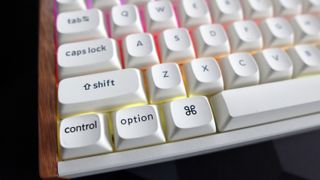
Besides the gorgeous rosewood edges, the K2 HE’s build quality is sublime. It is otherwise plastic, but offers some of the sturdiest I’ve tested on a keyboard at its price point. It’s solid and rigid, while also coming with no deck flex even if you tried to tear it to pieces. A 966g weight also keeps it especially hefty for a board with this small of a form factor, and it dwarfs the older K2’s sub 700g mass.
K2 HE specs(Image credit: Future)Switch type:Gateron HE Double RailKeycaps:PBT, double-shotLighting:RGB, dimmable on keyboard and controllable in softwareOnboard storage:NoneExtra ports:USB-C for chargingConnection type:Wireless - Bluetooth/2.4 GHz receiverCable:USB Type-C/USB Type-A, detachableWeight:966 g/2.13 lbsPrice:$140
K2 HE specs
(Image credit: Future)Switch type:Gateron HE Double RailKeycaps:PBT, double-shotLighting:RGB, dimmable on keyboard and controllable in softwareOnboard storage:NoneExtra ports:USB-C for chargingConnection type:Wireless - Bluetooth/2.4 GHz receiverCable:USB Type-C/USB Type-A, detachableWeight:966 g/2.13 lbsPrice:$140
(Image credit: Future)
Switch type:Gateron HE Double RailKeycaps:PBT, double-shotLighting:RGB, dimmable on keyboard and controllable in softwareOnboard storage:NoneExtra ports:USB-C for chargingConnection type:Wireless - Bluetooth/2.4 GHz receiverCable:USB Type-C/USB Type-A, detachableWeight:966 g/2.13 lbsPrice:$140
The keycaps here are also lovely, with their taller OSA profile leaning into a more retro aesthetic that matches the rosewood finishing nicely. They’re comfortable to type on, being slightly rounded, and are comprised of doubleshot-moulded PBT plastic for an extra dose of quality finishing. I should also shout out the beige accent keycaps for the Esc and Return keys, which are a lovely touch, and the convenient I/O on the left side with selector switches for Windows or Mac operation and for connectivity method between Bluetooth, 2.4 GHz wireless, or wired.
And now to deal in the second part of that odd combo: the magnetic switches. These are right on trend with what we’re seeing with other keyboards from an array of manufacturers, with Keychron opting to go for Gateron Hall effect switches in the name of providing as snappy inputs as possible. These are Gateron’s new double rail Hall effect switches, which offer no real key wobble and benefit from being increasingly stable under finger.
For those unaware, Hall effect magnetic switches are slightly different to your standard mechanical options. In essence, it means they work via a magnet as opposed to more standard means. A magnet is sent down the switch’s stem to a sensor, where an input is then registered—there isn’t a defined actuation point with them, as such. This means that you can change the actuation point for each switch, so you can have snappy inputs for games, for instance, to provide you with a bit of a competitive edge.
Image1of2(Image credit: Future)(Image credit: Future)
Image1of2(Image credit: Future)(Image credit: Future)
Image1of2
(Image credit: Future)(Image credit: Future)
(Image credit: Future)(Image credit: Future)
(Image credit: Future)
(Image credit: Future)
(Image credit: Future)
(Image credit: Future)
(Image credit: Future)

(Image credit: Future)
(Image credit: Future)
(Image credit: Future)
(Image credit: Future)
(Image credit: Future)
Customisation of said actuation points is handled with Keychron’s Launcher software which is actually a web-based configurator that runs in a browser window. This keeps life especially easy, and means the K2 HE can be customised on both Windows and macOS without a hitch. Here you can not only fiddle with actuation points on a scale from 0.5 mm to 3.8 mm of the switch’s total travel in super-precise 0.1 mm increments on a per-key basis, but you can also adjust RGB lighting to single colour and choose from a range of other presets. You can also remap keys and record macros, too. It’s especially easy to use, and wonderfully refreshing to see in a world where peripherals software in some cases might as well equate to bloatware at times.
Back to the switches themselves, though. The switches felt responsive for both day-to-day productivity workloads and for messing around with bots in Counter Strike 2, where you certainly feel the speed of adjustable actuation points. For the WASD keys and weapon select keys, I set the actuation point as high as possible (0.5 mm), and it’s almost as if you barely need to breathe to register the input.That’s especially useful in quick draw scenarios where you need to bring a weapon out or throw a grenade as quickly as possible.
Image1of4(Image credit: Future)(Image credit: Future)(Image credit: Future)(Image credit: Future)
Image1of4(Image credit: Future)(Image credit: Future)(Image credit: Future)(Image credit: Future)
Image1of4
(Image credit: Future)(Image credit: Future)(Image credit: Future)(Image credit: Future)
(Image credit: Future)(Image credit: Future)(Image credit: Future)(Image credit: Future)
(Image credit: Future)
(Image credit: Future)
(Image credit: Future)
(Image credit: Future)
(Image credit: Future)
(Image credit: Future)
(Image credit: Future)
(Image credit: Future)
(Image credit: Future)
(Image credit: Future)
(Image credit: Future)
(Image credit: Future)
(Image credit: Future)
(Image credit: Future)
(Image credit: Future)
(Image credit: Future)
(Image credit: Future)
(Image credit: Future)
(Image credit: Future)
(Image credit: Future)
Buy if…
Don’t buy if…❌ You don’t want Hall effect switches:If the speediness of HE switches aren’t what you need, then the standard K2 is a fantastic choice for just shy of half of this HE model.
Don’t buy if…
❌ You don’t want Hall effect switches:If the speediness of HE switches aren’t what you need, then the standard K2 is a fantastic choice for just shy of half of this HE model.
❌ You don’t want Hall effect switches:If the speediness of HE switches aren’t what you need, then the standard K2 is a fantastic choice for just shy of half of this HE model.
Technically, the K2 HE is also hot-swappable, although much like theEndgame Gear KB65HEand Wooting 60HE+, the choice of switches you can swap in is minuscule. Not even all of Gateron’s other Hall effect switch models are compatible.
Elsewhere, the K2 HE also benefits from excellent wireless connectivity across both Bluetooth and its bundled 2.4 GHz wireless receiver. It worked on either method without an issue on both Windows and macOS, while pairing with the Fn key and 1, 2, 3 or 4 on the number row is convenient. The 4000 mAh battery inside is also rather large for a keyboard of this size, and powers the K2 HE for up to 72 hours with the vivid backlighting on. Turn it off, and that rises to 240 hours, which is excellent endurance.
So, the Keychron K2 HE then. This is an excellent keyboard that brings a lot of style to proceedings while also feeling responsive with its Hall effect switches. It brings a lot of noteworthy improvements against the standard K2 that has lived on our list of thebest gaming keyboardsfor several years. At $140 for this special edition, it’s a compelling choice for those who want a blend of style and substance, as opposed to the traditional dilemma of picking one over the other. Against other HE boards too, you’re getting the benefit of more interesting looks, convenient wireless connectivity and simple software. That seems like more than a fair deal.
The Verdict88Read our review policyKeychron K2 HEA marvellous Hall effect mechanical keyboard that brings the benefit of wireless connectivity, gorgeous looks and most importantly, rosewood.
The Verdict
The Verdict
88Read our review policyKeychron K2 HEA marvellous Hall effect mechanical keyboard that brings the benefit of wireless connectivity, gorgeous looks and most importantly, rosewood.
88Read our review policy
88
Keychron K2 HEA marvellous Hall effect mechanical keyboard that brings the benefit of wireless connectivity, gorgeous looks and most importantly, rosewood.
Keychron K2 HE
A marvellous Hall effect mechanical keyboard that brings the benefit of wireless connectivity, gorgeous looks and most importantly, rosewood.
LatestIt’s time for me to admit that AI-accelerated frame generation might actually be the way of the future and that’s a good thingElden Ring: Nightreign is getting a closed network test, and I’m totally not fuming because PC players aren’t invited to the party, or anythingHow to feed pegasus in Disney Dreamlight ValleySee more latest►
LatestIt’s time for me to admit that AI-accelerated frame generation might actually be the way of the future and that’s a good thingElden Ring: Nightreign is getting a closed network test, and I’m totally not fuming because PC players aren’t invited to the party, or anythingHow to feed pegasus in Disney Dreamlight ValleySee more latest►
LatestIt’s time for me to admit that AI-accelerated frame generation might actually be the way of the future and that’s a good thingElden Ring: Nightreign is getting a closed network test, and I’m totally not fuming because PC players aren’t invited to the party, or anythingHow to feed pegasus in Disney Dreamlight ValleySee more latest►
Latest
It’s time for me to admit that AI-accelerated frame generation might actually be the way of the future and that’s a good thingElden Ring: Nightreign is getting a closed network test, and I’m totally not fuming because PC players aren’t invited to the party, or anythingHow to feed pegasus in Disney Dreamlight Valley
It’s time for me to admit that AI-accelerated frame generation might actually be the way of the future and that’s a good thing
It’s time for me to admit that AI-accelerated frame generation might actually be the way of the future and that’s a good thing
Elden Ring: Nightreign is getting a closed network test, and I’m totally not fuming because PC players aren’t invited to the party, or anything
Elden Ring: Nightreign is getting a closed network test, and I’m totally not fuming because PC players aren’t invited to the party, or anything
How to feed pegasus in Disney Dreamlight Valley
How to feed pegasus in Disney Dreamlight Valley
See more latest►
Most PopularTurtle Beach Stealth Pivot reviewIkea Matchspel gaming chair reviewASRock DeskMini X600 reviewZotac Zbox Magnus EN374070C reviewMinisforum AtomMan G7 Ti reviewSamsung Galaxy Book4 Ultra reviewNoctua NH-D15 G2 reviewGulikit KK3 Max reviewBallionaire reviewMarvel Rivals reviewBe Quiet! Dark Rock 5 review
Most PopularTurtle Beach Stealth Pivot reviewIkea Matchspel gaming chair reviewASRock DeskMini X600 reviewZotac Zbox Magnus EN374070C reviewMinisforum AtomMan G7 Ti reviewSamsung Galaxy Book4 Ultra reviewNoctua NH-D15 G2 reviewGulikit KK3 Max reviewBallionaire reviewMarvel Rivals reviewBe Quiet! Dark Rock 5 review
Most PopularTurtle Beach Stealth Pivot reviewIkea Matchspel gaming chair reviewASRock DeskMini X600 reviewZotac Zbox Magnus EN374070C reviewMinisforum AtomMan G7 Ti reviewSamsung Galaxy Book4 Ultra reviewNoctua NH-D15 G2 reviewGulikit KK3 Max reviewBallionaire reviewMarvel Rivals reviewBe Quiet! Dark Rock 5 review
Most Popular
Turtle Beach Stealth Pivot review
Ikea Matchspel gaming chair review
ASRock DeskMini X600 review
Zotac Zbox Magnus EN374070C review
Minisforum AtomMan G7 Ti review
Samsung Galaxy Book4 Ultra review
Noctua NH-D15 G2 review
Gulikit KK3 Max review
Ballionaire review
Marvel Rivals review
Be Quiet! Dark Rock 5 review
HARDWARE BUYING GUIDESLATEST GAME REVIEWS1Best Steam Deck accessories in Australia for 2025: Our favorite docks, powerbanks and gamepads2Best graphics card for laptops: the mobile GPUs I’d want in my next gaming laptop3Best mini PCs in 2025: The compact computers I love the most4Best 14-inch gaming laptop: The top compact gaming laptops I’ve held in these hands5Best Mini-ITX motherboards in 2025: My pick from all the mini mobo marvels I’ve tested1Thank Goodness You’re Here! review: An anarchic treasure trove of jokes and skits2Shiren the Wanderer: The Mystery Dungeon of Serpentcoil Island review—like juggling chainsaws on horseback3WD Black SN850X 8 TB NVMe SSD review4Ikea Utespelare desk review5Asus ROG Harpe Ace Mini wireless mouse review
HARDWARE BUYING GUIDESLATEST GAME REVIEWS1Best Steam Deck accessories in Australia for 2025: Our favorite docks, powerbanks and gamepads2Best graphics card for laptops: the mobile GPUs I’d want in my next gaming laptop3Best mini PCs in 2025: The compact computers I love the most4Best 14-inch gaming laptop: The top compact gaming laptops I’ve held in these hands5Best Mini-ITX motherboards in 2025: My pick from all the mini mobo marvels I’ve tested1Thank Goodness You’re Here! review: An anarchic treasure trove of jokes and skits2Shiren the Wanderer: The Mystery Dungeon of Serpentcoil Island review—like juggling chainsaws on horseback3WD Black SN850X 8 TB NVMe SSD review4Ikea Utespelare desk review5Asus ROG Harpe Ace Mini wireless mouse review
HARDWARE BUYING GUIDESLATEST GAME REVIEWS1Best Steam Deck accessories in Australia for 2025: Our favorite docks, powerbanks and gamepads2Best graphics card for laptops: the mobile GPUs I’d want in my next gaming laptop3Best mini PCs in 2025: The compact computers I love the most4Best 14-inch gaming laptop: The top compact gaming laptops I’ve held in these hands5Best Mini-ITX motherboards in 2025: My pick from all the mini mobo marvels I’ve tested1Thank Goodness You’re Here! review: An anarchic treasure trove of jokes and skits2Shiren the Wanderer: The Mystery Dungeon of Serpentcoil Island review—like juggling chainsaws on horseback3WD Black SN850X 8 TB NVMe SSD review4Ikea Utespelare desk review5Asus ROG Harpe Ace Mini wireless mouse review
HARDWARE BUYING GUIDESLATEST GAME REVIEWS1Best Steam Deck accessories in Australia for 2025: Our favorite docks, powerbanks and gamepads2Best graphics card for laptops: the mobile GPUs I’d want in my next gaming laptop3Best mini PCs in 2025: The compact computers I love the most4Best 14-inch gaming laptop: The top compact gaming laptops I’ve held in these hands5Best Mini-ITX motherboards in 2025: My pick from all the mini mobo marvels I’ve tested1Thank Goodness You’re Here! review: An anarchic treasure trove of jokes and skits2Shiren the Wanderer: The Mystery Dungeon of Serpentcoil Island review—like juggling chainsaws on horseback3WD Black SN850X 8 TB NVMe SSD review4Ikea Utespelare desk review5Asus ROG Harpe Ace Mini wireless mouse review
HARDWARE BUYING GUIDESLATEST GAME REVIEWS
1Best Steam Deck accessories in Australia for 2025: Our favorite docks, powerbanks and gamepads
1Best Steam Deck accessories in Australia for 2025: Our favorite docks, powerbanks and gamepads
1
Best Steam Deck accessories in Australia for 2025: Our favorite docks, powerbanks and gamepads
2Best graphics card for laptops: the mobile GPUs I’d want in my next gaming laptop
2Best graphics card for laptops: the mobile GPUs I’d want in my next gaming laptop
2
Best graphics card for laptops: the mobile GPUs I’d want in my next gaming laptop
3Best mini PCs in 2025: The compact computers I love the most
3Best mini PCs in 2025: The compact computers I love the most
3
Best mini PCs in 2025: The compact computers I love the most
4Best 14-inch gaming laptop: The top compact gaming laptops I’ve held in these hands
4Best 14-inch gaming laptop: The top compact gaming laptops I’ve held in these hands
4
Best 14-inch gaming laptop: The top compact gaming laptops I’ve held in these hands
5Best Mini-ITX motherboards in 2025: My pick from all the mini mobo marvels I’ve tested
5Best Mini-ITX motherboards in 2025: My pick from all the mini mobo marvels I’ve tested
5
Best Mini-ITX motherboards in 2025: My pick from all the mini mobo marvels I’ve tested
1Thank Goodness You’re Here! review: An anarchic treasure trove of jokes and skits
1Thank Goodness You’re Here! review: An anarchic treasure trove of jokes and skits
1
Thank Goodness You’re Here! review: An anarchic treasure trove of jokes and skits
2Shiren the Wanderer: The Mystery Dungeon of Serpentcoil Island review—like juggling chainsaws on horseback
2Shiren the Wanderer: The Mystery Dungeon of Serpentcoil Island review—like juggling chainsaws on horseback
2
Shiren the Wanderer: The Mystery Dungeon of Serpentcoil Island review—like juggling chainsaws on horseback
3WD Black SN850X 8 TB NVMe SSD review
3WD Black SN850X 8 TB NVMe SSD review
3
WD Black SN850X 8 TB NVMe SSD review
4Ikea Utespelare desk review
4Ikea Utespelare desk review
4
Ikea Utespelare desk review
5Asus ROG Harpe Ace Mini wireless mouse review
5Asus ROG Harpe Ace Mini wireless mouse review
5
Asus ROG Harpe Ace Mini wireless mouse review
