Our VerdictA keyboard that has (and does) it all, the Keychron Q3 Max is a complete solution for those after a mechanical keeb with everything from creamy acoustics and smooth switches to incredible build quality and convenient connectivity choices.
Our VerdictA keyboard that has (and does) it all, the Keychron Q3 Max is a complete solution for those after a mechanical keeb with everything from creamy acoustics and smooth switches to incredible build quality and convenient connectivity choices.
Our Verdict
Our Verdict
A keyboard that has (and does) it all, the Keychron Q3 Max is a complete solution for those after a mechanical keeb with everything from creamy acoustics and smooth switches to incredible build quality and convenient connectivity choices.
ForRidiculously sturdySmooth, lubed switchesSolid battery lifeAgainstQuite expensiveSide mounted keycaps may not be for everyone
ForRidiculously sturdySmooth, lubed switchesSolid battery life
AgainstQuite expensiveSide mounted keycaps may not be for everyone
PC Gamer’s got your backOur experienced team dedicates many hours to every review, to really get to the heart of what matters most to you.Find out more about how we evaluate games and hardware.
PC Gamer’s got your backOur experienced team dedicates many hours to every review, to really get to the heart of what matters most to you.Find out more about how we evaluate games and hardware.
$234.99ViewWe check over 250 million products every day for the best prices
$234.99ViewWe check over 250 million products every day for the best prices
$234.99View
$234.99View
$234.99View

$234.99View
$234.99
$234.99
We check over 250 million products every day for the best prices
We check over 250 million products every day for the best prices
This is a TKL keyboard, or tenkeyless, which is a layout that chops off the numpad from the right side of the keyboard in the name of providing more desk space. While layouts such as the 65 percent and 75 percent have become more popular in recent years, the TKL layout was one of the first real small form factor layouts available. It’s functional, while not sacrificing too much in terms of additional features, apart from the numpad.
TKL is a more standard layout than some, which is good for peeps who may just be getting into mechanical keyboards and don’t want to go all-in on an odd-looking layout at first.
That’s usually where Keychron has been best—in offering a practical entry point for people as their first mechanical keyboards, especially with their pre-built solutions. It’s a case in point that one of their more affordable keyboards, the K2, has been one of the constants of our ranking of thebest wireless gaming keyboardsout there for several years. To this end, as well as offering a sensible layout, the Q3 Max is also incredibly well-built with a thick, machined aluminium case that tips the scales at 2.045 kg—that’s rather hefty for a keyboard of its size.
Q3 Max specs(Image credit: Future)Switch type:Gateron Jupiter RedKeycaps:PBT, double-shotLighting:RGB, dimmable on keyboard and controllable in softwareOnboard storage:NoneExtra ports:USB-C for chargingConnection type:Wireless - Bluetooth/2.4 GHz receiverCable:USB Type-C/USB Type-A, detachableWeight:2.045 kg/4.499 lbsPrice:$214/£209
Q3 Max specs
(Image credit: Future)Switch type:Gateron Jupiter RedKeycaps:PBT, double-shotLighting:RGB, dimmable on keyboard and controllable in softwareOnboard storage:NoneExtra ports:USB-C for chargingConnection type:Wireless - Bluetooth/2.4 GHz receiverCable:USB Type-C/USB Type-A, detachableWeight:2.045 kg/4.499 lbsPrice:$214/£209
(Image credit: Future)
Switch type:Gateron Jupiter RedKeycaps:PBT, double-shotLighting:RGB, dimmable on keyboard and controllable in softwareOnboard storage:NoneExtra ports:USB-C for chargingConnection type:Wireless - Bluetooth/2.4 GHz receiverCable:USB Type-C/USB Type-A, detachableWeight:2.045 kg/4.499 lbsPrice:$214/£209
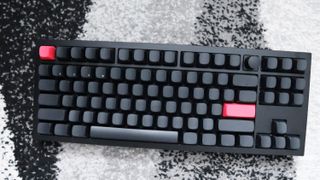
Elsewhere, the all-black look makes the Q3 Max a little mean, although the red accent keys for the Escape and Return keys elevate its aesthetic, as do the rounded keycaps. The keycaps are made from doubleshot PBT plastics for maximum durability and go a long way in helping the Q3 Max’s premium fit and finish.
The interesting thing about these keycaps is the position of their legends. As opposed to being on top, the Q3 Max opts to have side-mounted legends for some extra flair. I don’t know what it is about them, but I’ve always wanted a keyboard with legends on the side of the keycaps. It just looks naffing cool, although has the downside of making the tops of the keycaps blank. If you aren’t a keen touch typist, the side legends may not be for you.
Image1of2(Image credit: Future)(Image credit: Future)
Image1of2(Image credit: Future)(Image credit: Future)
Image1of2
(Image credit: Future)(Image credit: Future)
(Image credit: Future)(Image credit: Future)
(Image credit: Future)
(Image credit: Future)
(Image credit: Future)
(Image credit: Future)
(Image credit: Future)

(Image credit: Future)
(Image credit: Future)
(Image credit: Future)
(Image credit: Future)
(Image credit: Future)
Inside, my sample came with Gateron Jupiter Red switches, although is also available with tactile Jupiter Banana or Brown switches if you’d prefer some feedback under finger. The Jupiter Reds are a 45 g linear switch in the same vein as Cherry’s MX Reds, coming with a standard-issue 4 mm travel distance and 2 mm actuation point. They are pre-lubed, so feel super smooth with no scratchiness under finger, and work well for both gaming workloads in testing with CS:2, and for general workloads when typing up reviews and other articles. My job anyway lends itself to writing a lot of words in a day, so having responsive switches is key for that.
As well as offering a smooth feel under finger, the lubrication of these switches also has the consequence of making the Q3 Max sound sublime, With the combination of several layers of foam inside, as well as those lubed switches, the only way I can describe the Q3 Max’s sound profile iscreamy. This is a popular term among a certain portion of mechanical keyboard enthusiasts for a certain way a mechanical keyboard can sound. It offers a reasonably high pitched noise, although when you get your typing rhythm right, it just sounds lovely.
Image1of2(Image credit: Future)(Image credit: Future)
Image1of2(Image credit: Future)(Image credit: Future)
Image1of2
(Image credit: Future)(Image credit: Future)
(Image credit: Future)(Image credit: Future)
(Image credit: Future)
(Image credit: Future)
(Image credit: Future)
(Image credit: Future)
(Image credit: Future)
(Image credit: Future)
(Image credit: Future)
(Image credit: Future)
(Image credit: Future)
(Image credit: Future)
This is also gasket-mounted, as with other Keychron keyboards, lending the Q3 Max to have a slightly bouncier typing feel if you push down hard enough. It arguably helps to keep you engaged a little more. If you don’t like the switches inside, then they can always be swapped out with no need for soldering or desoldering as the Q3 Max is hot-swappable. This is always a useful feature—I had some spare Cherry MX Purple switches from my own Q1 Pro and swapping them in was simple.
Connectivity is a doddle over wireless or wired means, with the Q3 Max offering three Bluetooth channels, as well as the 2.4 GHz USB-A receiver bundled in the box. That technically means you could use this keyboard with up to four devices wirelessly at once, if you’re a true power user. Having used it with both my Windows gaming PC and my 16-inch MacBook Pro for work use, the Q3 Max worked a treat with plug and play connectivity over the receiver, and convenient pairing over Bluetooth. To do so, simply hold the function key down with either 1, 2 or 3 on the number row depending on which Bluetooth channel you wish to use until the small blue light underneath the key flashes quickly. The keyboard should then show up in the pairing settings on the device you want to connect to—press ‘connect’ and you should be off to the races in a matter of moments.
Image1of4(Image credit: Future)(Image credit: Future)(Image credit: Future)(Image credit: Future)
Image1of4(Image credit: Future)(Image credit: Future)(Image credit: Future)(Image credit: Future)
Image1of4
(Image credit: Future)(Image credit: Future)(Image credit: Future)(Image credit: Future)
(Image credit: Future)(Image credit: Future)(Image credit: Future)(Image credit: Future)
(Image credit: Future)
(Image credit: Future)
(Image credit: Future)
(Image credit: Future)
(Image credit: Future)
(Image credit: Future)
(Image credit: Future)
(Image credit: Future)
(Image credit: Future)
(Image credit: Future)
(Image credit: Future)
(Image credit: Future)
(Image credit: Future)
(Image credit: Future)
(Image credit: Future)
(Image credit: Future)
(Image credit: Future)
(Image credit: Future)
(Image credit: Future)
(Image credit: Future)
Buy if…✅ You want a complete mechanical keyboard:Keychron’s Q3 Max leaves no stone unturned when it comes to features, and ticks all the boxes with regards to fantastic build quality, a top-notch typing experience and versatile software and connectivity.
Buy if…
✅ You want a complete mechanical keyboard:Keychron’s Q3 Max leaves no stone unturned when it comes to features, and ticks all the boxes with regards to fantastic build quality, a top-notch typing experience and versatile software and connectivity.
✅ You want a complete mechanical keyboard:Keychron’s Q3 Max leaves no stone unturned when it comes to features, and ticks all the boxes with regards to fantastic build quality, a top-notch typing experience and versatile software and connectivity.
Don’t buy if…❌ You want a more affordable choice:The only thing that isn’t on the Q3 Max’s side is its higher price tag. If you’re after a keyboard that isn’t £200/$200+, then there are other choices out there.
Don’t buy if…
❌ You want a more affordable choice:The only thing that isn’t on the Q3 Max’s side is its higher price tag. If you’re after a keyboard that isn’t £200/$200+, then there are other choices out there.
❌ You want a more affordable choice:The only thing that isn’t on the Q3 Max’s side is its higher price tag. If you’re after a keyboard that isn’t £200/$200+, then there are other choices out there.
As for battery life, the Q3 Max is rated to last for up to 180 hours with no backlighting on, or up to 100 hours when its on its lowest setting. This means you’ll be able to get a good couple of weeks out of the Q3 Max before even needing to think about charging it back up again. In my couple of weeks with the keyboard, I only had to charge it once.
There is RGB lighting, if you’re into that sort of thing, and it works well with the Q3 Max’s side-mounted legends. The LEDs are also south-facing for better coverage, while the switches’ clear housings also help to dissipate the light well. As for software, the Q3 Max comes with the tried-and-tested support for QMK firmware. You can also use Keychron’s own web-based solution for a more visual interface, which works in a similar way to the VIA system, with a key tester, function assigning and RGB lighting control, too.
All of this comes in at$214/£209, which is quite expensive for a keyboard of its size. That comes especially considering that Keychron’s own ‘Pro’ branded models offer much of the same feature set, only sacrificing on some aesthetic choices and 2.4GHz wireless connectivity. The likes of theDrop Shift V2also offer as good looks as well as a larger layout and some fantastic tactile switches, but sacrifices on wireless connectivity.
However, there aren’t many keyboards out there which offer as rich of a feature set in the enthusiast-level space for the price as the Q3 Max. You simply can’t get a keyboard that offers as much in the way of class-leading build quality, smooth switches, excellent acoustics and handy creature comforts such as dual means of wireless connectivity, versatile software options and decent battery life as this one. If you’re looking to make the jump to a mechanical board with lots of features for the price, the Keychron Q3 Max is truly sublime.
Keychron Q3 Max: Price Comparison
$234.99View
$234.99View
$234.99View
$234.99View
$234.99
$234.99
We check over 250 million products every day for the best prices

The Verdict92Read our review policyKeychron Q3 MaxA keyboard that has (and does) it all, the Keychron Q3 Max is a complete solution for those after a mechanical keeb with everything from creamy acoustics and smooth switches to incredible build quality and convenient connectivity choices.
The Verdict
The Verdict
92Read our review policyKeychron Q3 MaxA keyboard that has (and does) it all, the Keychron Q3 Max is a complete solution for those after a mechanical keeb with everything from creamy acoustics and smooth switches to incredible build quality and convenient connectivity choices.
92Read our review policy
92
Keychron Q3 MaxA keyboard that has (and does) it all, the Keychron Q3 Max is a complete solution for those after a mechanical keeb with everything from creamy acoustics and smooth switches to incredible build quality and convenient connectivity choices.
Keychron Q3 Max
A keyboard that has (and does) it all, the Keychron Q3 Max is a complete solution for those after a mechanical keeb with everything from creamy acoustics and smooth switches to incredible build quality and convenient connectivity choices.
TOPICSHardware
TOPICS
LatestAsus reveals three new Slash Travel Bags for carting around your ROG Ally—however, none of them are particularly fashion forwardToday’s Wordle answer for Friday, January 10We may not have a roadmap or balance patch just yet, but at least Path of Exile 2’s bugfix patch notes are funnySee more latest►
LatestAsus reveals three new Slash Travel Bags for carting around your ROG Ally—however, none of them are particularly fashion forwardToday’s Wordle answer for Friday, January 10We may not have a roadmap or balance patch just yet, but at least Path of Exile 2’s bugfix patch notes are funnySee more latest►
LatestAsus reveals three new Slash Travel Bags for carting around your ROG Ally—however, none of them are particularly fashion forwardToday’s Wordle answer for Friday, January 10We may not have a roadmap or balance patch just yet, but at least Path of Exile 2’s bugfix patch notes are funnySee more latest►
Latest
Asus reveals three new Slash Travel Bags for carting around your ROG Ally—however, none of them are particularly fashion forwardToday’s Wordle answer for Friday, January 10We may not have a roadmap or balance patch just yet, but at least Path of Exile 2’s bugfix patch notes are funny
Asus reveals three new Slash Travel Bags for carting around your ROG Ally—however, none of them are particularly fashion forward
Asus reveals three new Slash Travel Bags for carting around your ROG Ally—however, none of them are particularly fashion forward
Today’s Wordle answer for Friday, January 10
Today’s Wordle answer for Friday, January 10
We may not have a roadmap or balance patch just yet, but at least Path of Exile 2’s bugfix patch notes are funny
We may not have a roadmap or balance patch just yet, but at least Path of Exile 2’s bugfix patch notes are funny
See more latest►
Most PopularTurtle Beach Stealth Pivot reviewIkea Matchspel gaming chair reviewASRock DeskMini X600 reviewZotac Zbox Magnus EN374070C reviewMinisforum AtomMan G7 Ti reviewSamsung Galaxy Book4 Ultra reviewNoctua NH-D15 G2 reviewGulikit KK3 Max reviewBallionaire reviewMarvel Rivals reviewBe Quiet! Dark Rock 5 review
Most PopularTurtle Beach Stealth Pivot reviewIkea Matchspel gaming chair reviewASRock DeskMini X600 reviewZotac Zbox Magnus EN374070C reviewMinisforum AtomMan G7 Ti reviewSamsung Galaxy Book4 Ultra reviewNoctua NH-D15 G2 reviewGulikit KK3 Max reviewBallionaire reviewMarvel Rivals reviewBe Quiet! Dark Rock 5 review
Most PopularTurtle Beach Stealth Pivot reviewIkea Matchspel gaming chair reviewASRock DeskMini X600 reviewZotac Zbox Magnus EN374070C reviewMinisforum AtomMan G7 Ti reviewSamsung Galaxy Book4 Ultra reviewNoctua NH-D15 G2 reviewGulikit KK3 Max reviewBallionaire reviewMarvel Rivals reviewBe Quiet! Dark Rock 5 review
Most Popular
Turtle Beach Stealth Pivot review
Ikea Matchspel gaming chair review
ASRock DeskMini X600 review
Zotac Zbox Magnus EN374070C review
Minisforum AtomMan G7 Ti review
Samsung Galaxy Book4 Ultra review
Noctua NH-D15 G2 review
Gulikit KK3 Max review
Ballionaire review
Marvel Rivals review
Be Quiet! Dark Rock 5 review
HARDWARE BUYING GUIDESLATEST GAME REVIEWS1Best Steam Deck accessories in Australia for 2025: Our favorite docks, powerbanks and gamepads2Best graphics card for laptops: the mobile GPUs I’d want in my next gaming laptop3Best mini PCs in 2025: The compact computers I love the most4Best 14-inch gaming laptop: The top compact gaming laptops I’ve held in these hands5Best Mini-ITX motherboards in 2025: My pick from all the mini mobo marvels I’ve tested1Thank Goodness You’re Here! review: An anarchic treasure trove of jokes and skits2Shiren the Wanderer: The Mystery Dungeon of Serpentcoil Island review—like juggling chainsaws on horseback3WD Black SN850X 8 TB NVMe SSD review4Ikea Utespelare desk review5Asus ROG Harpe Ace Mini wireless mouse review
HARDWARE BUYING GUIDESLATEST GAME REVIEWS1Best Steam Deck accessories in Australia for 2025: Our favorite docks, powerbanks and gamepads2Best graphics card for laptops: the mobile GPUs I’d want in my next gaming laptop3Best mini PCs in 2025: The compact computers I love the most4Best 14-inch gaming laptop: The top compact gaming laptops I’ve held in these hands5Best Mini-ITX motherboards in 2025: My pick from all the mini mobo marvels I’ve tested1Thank Goodness You’re Here! review: An anarchic treasure trove of jokes and skits2Shiren the Wanderer: The Mystery Dungeon of Serpentcoil Island review—like juggling chainsaws on horseback3WD Black SN850X 8 TB NVMe SSD review4Ikea Utespelare desk review5Asus ROG Harpe Ace Mini wireless mouse review
HARDWARE BUYING GUIDESLATEST GAME REVIEWS1Best Steam Deck accessories in Australia for 2025: Our favorite docks, powerbanks and gamepads2Best graphics card for laptops: the mobile GPUs I’d want in my next gaming laptop3Best mini PCs in 2025: The compact computers I love the most4Best 14-inch gaming laptop: The top compact gaming laptops I’ve held in these hands5Best Mini-ITX motherboards in 2025: My pick from all the mini mobo marvels I’ve tested1Thank Goodness You’re Here! review: An anarchic treasure trove of jokes and skits2Shiren the Wanderer: The Mystery Dungeon of Serpentcoil Island review—like juggling chainsaws on horseback3WD Black SN850X 8 TB NVMe SSD review4Ikea Utespelare desk review5Asus ROG Harpe Ace Mini wireless mouse review
HARDWARE BUYING GUIDESLATEST GAME REVIEWS1Best Steam Deck accessories in Australia for 2025: Our favorite docks, powerbanks and gamepads2Best graphics card for laptops: the mobile GPUs I’d want in my next gaming laptop3Best mini PCs in 2025: The compact computers I love the most4Best 14-inch gaming laptop: The top compact gaming laptops I’ve held in these hands5Best Mini-ITX motherboards in 2025: My pick from all the mini mobo marvels I’ve tested1Thank Goodness You’re Here! review: An anarchic treasure trove of jokes and skits2Shiren the Wanderer: The Mystery Dungeon of Serpentcoil Island review—like juggling chainsaws on horseback3WD Black SN850X 8 TB NVMe SSD review4Ikea Utespelare desk review5Asus ROG Harpe Ace Mini wireless mouse review
HARDWARE BUYING GUIDESLATEST GAME REVIEWS
1Best Steam Deck accessories in Australia for 2025: Our favorite docks, powerbanks and gamepads
1Best Steam Deck accessories in Australia for 2025: Our favorite docks, powerbanks and gamepads
1
Best Steam Deck accessories in Australia for 2025: Our favorite docks, powerbanks and gamepads
2Best graphics card for laptops: the mobile GPUs I’d want in my next gaming laptop
2Best graphics card for laptops: the mobile GPUs I’d want in my next gaming laptop
2
Best graphics card for laptops: the mobile GPUs I’d want in my next gaming laptop
3Best mini PCs in 2025: The compact computers I love the most
3Best mini PCs in 2025: The compact computers I love the most
3
Best mini PCs in 2025: The compact computers I love the most
4Best 14-inch gaming laptop: The top compact gaming laptops I’ve held in these hands
4Best 14-inch gaming laptop: The top compact gaming laptops I’ve held in these hands
4
Best 14-inch gaming laptop: The top compact gaming laptops I’ve held in these hands
5Best Mini-ITX motherboards in 2025: My pick from all the mini mobo marvels I’ve tested
5Best Mini-ITX motherboards in 2025: My pick from all the mini mobo marvels I’ve tested
5
Best Mini-ITX motherboards in 2025: My pick from all the mini mobo marvels I’ve tested
1Thank Goodness You’re Here! review: An anarchic treasure trove of jokes and skits
1Thank Goodness You’re Here! review: An anarchic treasure trove of jokes and skits
1
Thank Goodness You’re Here! review: An anarchic treasure trove of jokes and skits
2Shiren the Wanderer: The Mystery Dungeon of Serpentcoil Island review—like juggling chainsaws on horseback
2Shiren the Wanderer: The Mystery Dungeon of Serpentcoil Island review—like juggling chainsaws on horseback
2
Shiren the Wanderer: The Mystery Dungeon of Serpentcoil Island review—like juggling chainsaws on horseback
3WD Black SN850X 8 TB NVMe SSD review
3WD Black SN850X 8 TB NVMe SSD review
3
WD Black SN850X 8 TB NVMe SSD review
4Ikea Utespelare desk review
4Ikea Utespelare desk review
4
Ikea Utespelare desk review
5Asus ROG Harpe Ace Mini wireless mouse review
5Asus ROG Harpe Ace Mini wireless mouse review
5
Asus ROG Harpe Ace Mini wireless mouse review
