Our VerdictA capable and relatively fuss-free solution, but pricey for what is essentially a decent but uninspiring 4K webcam.
Our VerdictA capable and relatively fuss-free solution, but pricey for what is essentially a decent but uninspiring 4K webcam.
Our Verdict
Our Verdict
A capable and relatively fuss-free solution, but pricey for what is essentially a decent but uninspiring 4K webcam.
ForExcellent auto focusGood microphones for a webcamIntegrated privacy shutterSoftware is well thought outAgainstExpensiveRelies on software help a little too heavilyExtra features are nothing to write home about
ForExcellent auto focusGood microphones for a webcamIntegrated privacy shutterSoftware is well thought out
AgainstExpensiveRelies on software help a little too heavilyExtra features are nothing to write home about
PC Gamer’s got your backOur experienced team dedicates many hours to every review, to really get to the heart of what matters most to you.Find out more about how we evaluate games and hardware.
PC Gamer’s got your backOur experienced team dedicates many hours to every review, to really get to the heart of what matters most to you.Find out more about how we evaluate games and hardware.
Logitech webcams have become something of a staple over the years for anyone looking for an affordable camera from a trusted brand. Given my tendency towards observing (and judging) any piece of PC hardware I can find on my travels, I’m often surprised at the variety of choices people make when it comes to monitors, speakers, headsets, and more.
Glance up at the top of the display though, and yep, that’s another Logitech webcam nestling on top, more often than you might expect.
Well, here comes something a bit more premium than your average Logitech offering to take your fancy: The Logitech MX Brio. And premium comes right to the forefront the second you clock the price. At$200/£220this puts it firmly at the upper end of the market for an all-in-one cam, and price-wise it’s right next to the best overall pick in ourbest webcam guide, theElgato Facecam.
Better be good then, hadn’t it?
MX Brio specs(Image credit: Future)Recording resolution:4K at 30 fps, 1080p at 60 fpsFOV:90°/78°/65°Features:Auto-focus, HDR, white balance adjustment, low light compensation, show modePrice:$200/£220
MX Brio specs
(Image credit: Future)Recording resolution:4K at 30 fps, 1080p at 60 fpsFOV:90°/78°/65°Features:Auto-focus, HDR, white balance adjustment, low light compensation, show modePrice:$200/£220
(Image credit: Future)
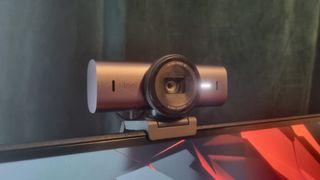
Recording resolution:4K at 30 fps, 1080p at 60 fpsFOV:90°/78°/65°Features:Auto-focus, HDR, white balance adjustment, low light compensation, show modePrice:$200/£220
The initial signs are promising. This is the first Logitech webcam to receive its “MX” branding, and Logitech says it’s the most advanced camera it’s made to date. On paper the specs look good, including 4K 30 fps capture capabilities (or 60 fps at 1080p) with an 8.5MP Sony STARVIS image sensor, twin beamforming microphones and supposedly twice the finer image detail versus the regularBrio 4K.
Included in the packaging is the camera unit itself, a detachable mount, and a 1.5m USB-C to USB-C Cable. I’m not quite sure what I was expecting otherwise, but it feels a little bit of a non-event for such a high-priced product, although perhaps those are some eco-credentials on display.
Not only is the paper packaging sourced from controlled sources, but Logitech says that the plastic parts used include up to 82% recycled material. And the aluminium camera housing is apparently manufactured using renewable energy, too.
It’s a pleasant feeling mechanism, and the curious 10-year old boy in me spent some time spinning it back and forth. Mmm, smooth.
Image1of6(Image credit: Future)(Image credit: Future)(Image credit: Future)(Image credit: Future)(Image credit: Future)(Image credit: Future)
Image1of6(Image credit: Future)(Image credit: Future)(Image credit: Future)(Image credit: Future)(Image credit: Future)(Image credit: Future)
Image1of6
(Image credit: Future)(Image credit: Future)(Image credit: Future)(Image credit: Future)(Image credit: Future)(Image credit: Future)
(Image credit: Future)(Image credit: Future)(Image credit: Future)(Image credit: Future)(Image credit: Future)(Image credit: Future)
(Image credit: Future)
(Image credit: Future)
(Image credit: Future)
(Image credit: Future)
(Image credit: Future)

(Image credit: Future)
(Image credit: Future)
(Image credit: Future)
(Image credit: Future)
(Image credit: Future)
(Image credit: Future)
(Image credit: Future)
(Image credit: Future)
(Image credit: Future)
(Image credit: Future)
(Image credit: Future)
(Image credit: Future)
(Image credit: Future)
(Image credit: Future)
(Image credit: Future)
(Image credit: Future)
(Image credit: Future)
(Image credit: Future)
(Image credit: Future)
(Image credit: Future)
(Image credit: Future)
(Image credit: Future)
(Image credit: Future)
(Image credit: Future)
(Image credit: Future)
The mounting clip is also of the large-and-in-charge variety, and the camera unit attaches to it with a powerful magnetic snap. No worries here about the camera falling off its clamp or the top of your screen then, as every care seems to have been taken to make things as robust as possible.
Should you prefer to use the MX Brio on a tripod, a hidden thread is found underneath the magnetic mount.
(Image credit: Future)
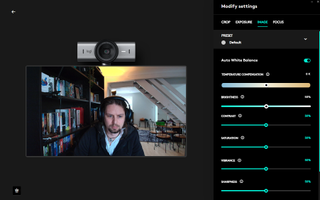
The auto-focus here is definitely a highlight. Anyone who’s had a play with a budget camera has had those brief moments of focus blur when moving quickly or holding an object up to the lens, but try as I might I couldn’t quite catch the MX Brio out. It’s very quick to react, despite playing peekaboo with it and various objects on my desk, or shifting around in shot like someone desperate to end a meeting to use the bathroom facilities.
Years of sitting in darkened rooms has not done wonders for my complexion, but I did feel that the default settings made me look a little more vampiric than I have done on other cameras. Flattering it wasn’t, although the warm setting did at least make me look more like a Vitamin D sufficient creature of a sociable inclination.
(Image credit: Future)
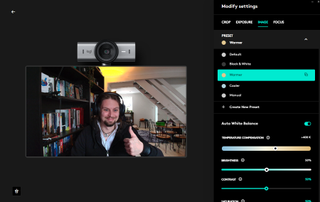
Overall the video capture was good, and the software tweaking options allow plenty of flexibility. While it didn’t blow me away with incredible detail or a super vivid capture, it’s certainly a fair bit better than most, although for this kind of cash I was expecting perhaps a little more from the camera itself and less reliance on the settings to really show my stunning visage off at its very best.
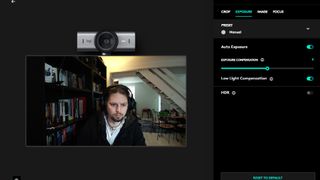
Take a close look at the bookcase next to me in the shot below, with HDR disabled. For reference, I use a non-HDR 1080p webcam on a regular basis in the same lighting conditions, and the bookcase doesn’t look nearly as dark.
(Image credit: Future)
Tucked into the options is something of an MX Brio party-trick: Show mode. When mounted to the top of your screen, the camera can be tilted downwards independent of the rest of the mount to show your desk, simultaneously rotating the image so it’s the correct way round. Meaning that if you were sketching some notes or drawings in a meeting, you could use the feature to show your colleagues what you’re working on right in front of you without fiddling with the settings.
Image1of2(Image credit: Future)(Image credit: Future)
Image1of2(Image credit: Future)(Image credit: Future)
Image1of2
(Image credit: Future)(Image credit: Future)
(Image credit: Future)(Image credit: Future)
(Image credit: Future)
(Image credit: Future)
(Image credit: Future)
(Image credit: Future)
(Image credit: Future)
(Image credit: Future)
(Image credit: Future)
(Image credit: Future)
(Image credit: Future)
(Image credit: Future)
This works well in practice, although as for its overall usefulness, I can’t see myself using it too often. Still, a bonus, and a thoughtful feature for creative types or streamers looking to show off their keyboard skills.
Here’s something you don’t hear very often: The microphones on this webcam are really quite good. I, like everyone else, have become accustomed to rubbish, thin audio from a webcam mic, but while the sound quality here is unlikely to blow you away—and I’d alwaysrecommend a good desktop micfor streaming or podcast purposes—the units here give a good account of themselves, and pick up your vocals clearly for meeting audio or similar.
Buy if…✅If you want relatively fuss-free setup:The MX Brio is easy to configure, with clear and simple settings menus.✅If you’re looking for excellent built-in audio:The two beamforming mics pick up vocals nicely, with good range and a solid, rounded sound for a webcam.
Buy if…
✅If you want relatively fuss-free setup:The MX Brio is easy to configure, with clear and simple settings menus.✅If you’re looking for excellent built-in audio:The two beamforming mics pick up vocals nicely, with good range and a solid, rounded sound for a webcam.
✅If you want relatively fuss-free setup:The MX Brio is easy to configure, with clear and simple settings menus.✅If you’re looking for excellent built-in audio:The two beamforming mics pick up vocals nicely, with good range and a solid, rounded sound for a webcam.
Don’t buy if…❌If you don’t want to overspend:While the MX Brio is a good performer, if you just want a standard webcam with good image quality, there aremuch cheaper options.❌If you’re looking for impressive features:The “Show” feature is a nice touch, and the software settings are very useful, but there’s nothing much here to make you feel like you’re getting extra for the cash.
Don’t buy if…
❌If you don’t want to overspend:While the MX Brio is a good performer, if you just want a standard webcam with good image quality, there aremuch cheaper options.❌If you’re looking for impressive features:The “Show” feature is a nice touch, and the software settings are very useful, but there’s nothing much here to make you feel like you’re getting extra for the cash.
❌If you don’t want to overspend:While the MX Brio is a good performer, if you just want a standard webcam with good image quality, there aremuch cheaper options.❌If you’re looking for impressive features:The “Show” feature is a nice touch, and the software settings are very useful, but there’s nothing much here to make you feel like you’re getting extra for the cash.
It’s a good all-round package, the MX Brio, but when you stack it up to similarly priced competition, things start to look a little less rosy. TheElgato Facecammight not be a 4K unit, but its ability to shoot great-looking video in uncompressed 1080p at 60 fps is likely to be the biggest selling point for someone looking for a high-quality webcam for streaming, with a nice vivid picture to boot.
Ultimately the question you need to ask yourself is whether you really need 4K capture, and my answer would be, probably not. However, if you did you could also check out theDell Ultrasharp WB7022, which initially retailed for similar money but now can often befound for less.
You could also take a look at theOBSBot Tiny 2. While it’s considerably more expensive than the MX Brio, it also has lightning fast auto-focus, 4K capture capability, and you get a truly superb 1.5 CMOS sensor and a motorised 2-axis gimbal mount that tracks your movements and responds to voice commands, and that to me is a feature worth paying for.
The Logitech MX Brio is undoubtedly a solid 4K performer, but for this sort of cash it’s priced itself into high-end and dangerous waters. A good all-rounder, but you can’t help shake the feeling that you should get slightly more for your money than you end up receiving.
Logitech MX Brio: Price Comparison
13 Amazon customer reviews☆☆☆☆☆
13 Amazon customer reviews☆☆☆☆☆
☆☆☆☆☆
$189.99View$199.99View$199.99View$199.99View$199.99View
$189.99View
$189.99View


$189.99View
$189.99
$189.99
$199.99View
$199.99View
$199.99View
$199.99
$199.99
$199.99View
$199.99View

$199.99View
$199.99
$199.99
$199.99View
$199.99View

$199.99View
$199.99
$199.99
$199.99View
$199.99View


$199.99View
$199.99
$199.99
Show More Deals
Show More Deals
We check over 250 million products every day for the best prices

The Verdict78Read our review policyLogitech MX BrioA capable and relatively fuss-free solution, but pricey for what is essentially a decent but uninspiring 4K webcam.
The Verdict
The Verdict
78Read our review policyLogitech MX BrioA capable and relatively fuss-free solution, but pricey for what is essentially a decent but uninspiring 4K webcam.
78Read our review policy
78
Logitech MX BrioA capable and relatively fuss-free solution, but pricey for what is essentially a decent but uninspiring 4K webcam.
Logitech MX Brio
A capable and relatively fuss-free solution, but pricey for what is essentially a decent but uninspiring 4K webcam.
TOPICSHardware
TOPICS
LatestToday’s Wordle answer for Saturday, January 11The Last of Us season 2 trailer is a brief look at a story you should probably just play yourself in AprilWorld of Warcraft’s most recent patch soars with fun additions that last just long enoughSee more latest►
LatestToday’s Wordle answer for Saturday, January 11The Last of Us season 2 trailer is a brief look at a story you should probably just play yourself in AprilWorld of Warcraft’s most recent patch soars with fun additions that last just long enoughSee more latest►
LatestToday’s Wordle answer for Saturday, January 11The Last of Us season 2 trailer is a brief look at a story you should probably just play yourself in AprilWorld of Warcraft’s most recent patch soars with fun additions that last just long enoughSee more latest►
Latest
Today’s Wordle answer for Saturday, January 11The Last of Us season 2 trailer is a brief look at a story you should probably just play yourself in AprilWorld of Warcraft’s most recent patch soars with fun additions that last just long enough
Today’s Wordle answer for Saturday, January 11
Today’s Wordle answer for Saturday, January 11
The Last of Us season 2 trailer is a brief look at a story you should probably just play yourself in April
The Last of Us season 2 trailer is a brief look at a story you should probably just play yourself in April
World of Warcraft’s most recent patch soars with fun additions that last just long enough
World of Warcraft’s most recent patch soars with fun additions that last just long enough
See more latest►
Most PopularTurtle Beach Stealth Pivot reviewIkea Matchspel gaming chair reviewASRock DeskMini X600 reviewZotac Zbox Magnus EN374070C reviewMinisforum AtomMan G7 Ti reviewSamsung Galaxy Book4 Ultra reviewNoctua NH-D15 G2 reviewGulikit KK3 Max reviewBallionaire reviewMarvel Rivals reviewBe Quiet! Dark Rock 5 review
Most PopularTurtle Beach Stealth Pivot reviewIkea Matchspel gaming chair reviewASRock DeskMini X600 reviewZotac Zbox Magnus EN374070C reviewMinisforum AtomMan G7 Ti reviewSamsung Galaxy Book4 Ultra reviewNoctua NH-D15 G2 reviewGulikit KK3 Max reviewBallionaire reviewMarvel Rivals reviewBe Quiet! Dark Rock 5 review
Most PopularTurtle Beach Stealth Pivot reviewIkea Matchspel gaming chair reviewASRock DeskMini X600 reviewZotac Zbox Magnus EN374070C reviewMinisforum AtomMan G7 Ti reviewSamsung Galaxy Book4 Ultra reviewNoctua NH-D15 G2 reviewGulikit KK3 Max reviewBallionaire reviewMarvel Rivals reviewBe Quiet! Dark Rock 5 review
Most Popular
Turtle Beach Stealth Pivot review
Ikea Matchspel gaming chair review
ASRock DeskMini X600 review
Zotac Zbox Magnus EN374070C review
Minisforum AtomMan G7 Ti review
Samsung Galaxy Book4 Ultra review
Noctua NH-D15 G2 review
Gulikit KK3 Max review
Ballionaire review
Marvel Rivals review
Be Quiet! Dark Rock 5 review
HARDWARE BUYING GUIDESLATEST GAME REVIEWS1Best Steam Deck accessories in Australia for 2025: Our favorite docks, powerbanks and gamepads2Best graphics card for laptops: the mobile GPUs I’d want in my next gaming laptop3Best mini PCs in 2025: The compact computers I love the most4Best 14-inch gaming laptop: The top compact gaming laptops I’ve held in these hands5Best Mini-ITX motherboards in 2025: My pick from all the mini mobo marvels I’ve tested1Thank Goodness You’re Here! review2Shiren the Wanderer: The Mystery Dungeon of Serpentcoil Island review3WD Black SN850X 8 TB NVMe SSD review4Ikea Utespelare desk review5Asus ROG Harpe Ace Mini wireless mouse review
HARDWARE BUYING GUIDESLATEST GAME REVIEWS1Best Steam Deck accessories in Australia for 2025: Our favorite docks, powerbanks and gamepads2Best graphics card for laptops: the mobile GPUs I’d want in my next gaming laptop3Best mini PCs in 2025: The compact computers I love the most4Best 14-inch gaming laptop: The top compact gaming laptops I’ve held in these hands5Best Mini-ITX motherboards in 2025: My pick from all the mini mobo marvels I’ve tested1Thank Goodness You’re Here! review2Shiren the Wanderer: The Mystery Dungeon of Serpentcoil Island review3WD Black SN850X 8 TB NVMe SSD review4Ikea Utespelare desk review5Asus ROG Harpe Ace Mini wireless mouse review
HARDWARE BUYING GUIDESLATEST GAME REVIEWS1Best Steam Deck accessories in Australia for 2025: Our favorite docks, powerbanks and gamepads2Best graphics card for laptops: the mobile GPUs I’d want in my next gaming laptop3Best mini PCs in 2025: The compact computers I love the most4Best 14-inch gaming laptop: The top compact gaming laptops I’ve held in these hands5Best Mini-ITX motherboards in 2025: My pick from all the mini mobo marvels I’ve tested1Thank Goodness You’re Here! review2Shiren the Wanderer: The Mystery Dungeon of Serpentcoil Island review3WD Black SN850X 8 TB NVMe SSD review4Ikea Utespelare desk review5Asus ROG Harpe Ace Mini wireless mouse review
HARDWARE BUYING GUIDESLATEST GAME REVIEWS1Best Steam Deck accessories in Australia for 2025: Our favorite docks, powerbanks and gamepads2Best graphics card for laptops: the mobile GPUs I’d want in my next gaming laptop3Best mini PCs in 2025: The compact computers I love the most4Best 14-inch gaming laptop: The top compact gaming laptops I’ve held in these hands5Best Mini-ITX motherboards in 2025: My pick from all the mini mobo marvels I’ve tested1Thank Goodness You’re Here! review2Shiren the Wanderer: The Mystery Dungeon of Serpentcoil Island review3WD Black SN850X 8 TB NVMe SSD review4Ikea Utespelare desk review5Asus ROG Harpe Ace Mini wireless mouse review
HARDWARE BUYING GUIDESLATEST GAME REVIEWS
1Best Steam Deck accessories in Australia for 2025: Our favorite docks, powerbanks and gamepads
1Best Steam Deck accessories in Australia for 2025: Our favorite docks, powerbanks and gamepads
1
Best Steam Deck accessories in Australia for 2025: Our favorite docks, powerbanks and gamepads
2Best graphics card for laptops: the mobile GPUs I’d want in my next gaming laptop
2Best graphics card for laptops: the mobile GPUs I’d want in my next gaming laptop
2
Best graphics card for laptops: the mobile GPUs I’d want in my next gaming laptop
3Best mini PCs in 2025: The compact computers I love the most
3Best mini PCs in 2025: The compact computers I love the most
3
Best mini PCs in 2025: The compact computers I love the most
4Best 14-inch gaming laptop: The top compact gaming laptops I’ve held in these hands
4Best 14-inch gaming laptop: The top compact gaming laptops I’ve held in these hands
4
Best 14-inch gaming laptop: The top compact gaming laptops I’ve held in these hands
5Best Mini-ITX motherboards in 2025: My pick from all the mini mobo marvels I’ve tested
5Best Mini-ITX motherboards in 2025: My pick from all the mini mobo marvels I’ve tested
5
Best Mini-ITX motherboards in 2025: My pick from all the mini mobo marvels I’ve tested
1Thank Goodness You’re Here! review
1Thank Goodness You’re Here! review
1
Thank Goodness You’re Here! review
2Shiren the Wanderer: The Mystery Dungeon of Serpentcoil Island review
2Shiren the Wanderer: The Mystery Dungeon of Serpentcoil Island review
2
Shiren the Wanderer: The Mystery Dungeon of Serpentcoil Island review
3WD Black SN850X 8 TB NVMe SSD review
3WD Black SN850X 8 TB NVMe SSD review
3
WD Black SN850X 8 TB NVMe SSD review
4Ikea Utespelare desk review
4Ikea Utespelare desk review
4
Ikea Utespelare desk review
5Asus ROG Harpe Ace Mini wireless mouse review
5Asus ROG Harpe Ace Mini wireless mouse review
5
Asus ROG Harpe Ace Mini wireless mouse review
