Our VerdictAn accurate and lightning fast keyboard with great customisation options, but unless you’re a professional gamer you’re paying for features you really don’t need.
Our VerdictAn accurate and lightning fast keyboard with great customisation options, but unless you’re a professional gamer you’re paying for features you really don’t need.
Our Verdict
Our Verdict
An accurate and lightning fast keyboard with great customisation options, but unless you’re a professional gamer you’re paying for features you really don’t need.
ForFast and responsive inputsVery customisableAccurate typing feelAgainstLoud, “clacky” keycapsBacklighting is unevenExpensive
ForFast and responsive inputsVery customisableAccurate typing feel
AgainstLoud, “clacky” keycapsBacklighting is unevenExpensive
PC Gamer’s got your backOur experienced team dedicates many hours to every review, to really get to the heart of what matters most to you.Find out more about how we evaluate games and hardware.
PC Gamer’s got your backOur experienced team dedicates many hours to every review, to really get to the heart of what matters most to you.Find out more about how we evaluate games and hardware.
I am not an esportist. In fact, in terms of gaming ability, I’m what the kids might call “washed”, and as a result I’m not exactly the target market for high-performance esports focused hardware. Still, if you fancy yourself a future esports pro and are looking for a keeb that might help you achieve that level of skill, Logitech has made a keyboard designed in collaboration with a bunch of the world’s top esports players, “engineered to break every barrier between you and the win”.
It’s called the Pro X 60, and can be yours for$180/£180, which, let’s face it, is a lot of money for any peripheral. Especially as this is a 60% keeb, meaning that it’s a small form factor board that’s missing a few keys many of us would consider to be a requirement. That means no cursor keys and no numpad, although it does have a few software tricks up its sleeve to get around these limitations that we’ll be getting on to later.
What you do get, however, is a backlit wireless keyboard with a USB Lightspeed dongle, a USB-A to USB-C charging and data cable, an extra Escape keycap, and a rather nifty carrying case. Because you’ll be carrying it to esports tournaments, supposedly, but in my case it was quite handy for keeping crumbs out of the switches when I slung it in my backpack to take to the office.
My review unit came in white, with one black G key in the top left corner where the escape key would normally reside. As mentioned, Logitech provides you with an extra keycap if you’d prefer one labelled in the more traditional way, although there’s no key-puller to help you fit it. Still, the dual-shot PBT keycaps are easy enough to pull off with a bit of force.
Pro X 60 specs(Image credit: Future)Size:60%Switches:GX optical, choice of tactile or linearConnectivity:wireless (USB 2.4 GHz receiver or Bluetooth), USB connectionKeys:61 in total, remappableTilting:fold-out legsBacklighting:customisableMedia controls:side mounted volume wheelSoftware:Logitech G HubPrice:$180/£180
Pro X 60 specs
(Image credit: Future)Size:60%Switches:GX optical, choice of tactile or linearConnectivity:wireless (USB 2.4 GHz receiver or Bluetooth), USB connectionKeys:61 in total, remappableTilting:fold-out legsBacklighting:customisableMedia controls:side mounted volume wheelSoftware:Logitech G HubPrice:$180/£180
(Image credit: Future)

Size:60%Switches:GX optical, choice of tactile or linearConnectivity:wireless (USB 2.4 GHz receiver or Bluetooth), USB connectionKeys:61 in total, remappableTilting:fold-out legsBacklighting:customisableMedia controls:side mounted volume wheelSoftware:Logitech G HubPrice:$180/£180
Speaking of those keycaps, these are apparently built “for the intensity of esports athletes”. While I won’t pretend I have the mighty digits of an esportist, what I can say is they feel very robust underneath your fingertips, although this does come with a caveat—they’re really quite “clacky” as you type.
Keyboard noise is about as subjective a topic as they come, but for me I found the noise fairly distracting, and my partner was clearly resisting the urge to throttle me as I hammered out this review.
The switches here are the tactile version of Logitech’s GX optical units—although you can opt for linear models instead—and they feel pretty clicky and responsive underneath your fingers. The key travel, however, has a level of resistance that took a bit of getting used to, as I do my daily typing on aCorsair K65 RGB Minifitted with Cherry MX RGB Speed switches that feel a bit “slippier”, for want of a better term.
Still, once I was used to the heavier switch resistance I did find that my typing accuracy was slightly better than I was used to on the Corsair keeb, so notch one up for the esports pros—they do apparently favour an accurate switch feel. This is a keyboard that likes you to really hammer the keys, and while it took some adjustment to dial my finger movements in, I did appreciate the boost in overall input accuracy.
There are a couple of features here that strike as unusual. Firstly, the Pro X 60 does have a volume wheel, but it comes in the form of a tiny control mounted on the left side of the chassis. This is apparently because traditional volume wheels get in the way when you’re gaming at professional levels, so here Logitech seems to want you to reach out to the side of the board with your pinky and adjust the volume, while keeping the rest of your fingers right next to the keys you’ll be using most—presumably WASD.
Image1of2(Image credit: Future)(Image credit: Future)
Image1of2(Image credit: Future)(Image credit: Future)
Image1of2
(Image credit: Future)(Image credit: Future)
(Image credit: Future)(Image credit: Future)
(Image credit: Future)
(Image credit: Future)
(Image credit: Future)
(Image credit: Future)
(Image credit: Future)

(Image credit: Future)
(Image credit: Future)
(Image credit: Future)
(Image credit: Future)
(Image credit: Future)
Hmm. As you can see from the images above, I am in possession of a set of long, skinny digits that come in handy for all sorts of fiddly tasks. However, even with my slenderman-like sausages this movement feels really odd, and I can’t imagine that anyone’s adjusting the volume often enough for a traditionally-placed volume control to become an issue. And even if they were, this tiny wheel is still a pain to find mid-game.
Ah yes, the software. Logitech’s G Hub suite opens up a plethora of customisation options for this board that’s really quite impressive in its thoroughness. Not only can you customise each individual key to perform just about any key combination or rebind you can think of, you can also download community presets for individual games, or upload versions of your own for others to make use of.
(Image credit: Logitech)
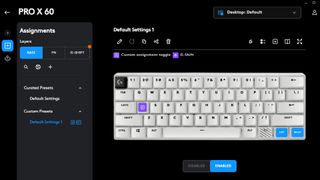
It’s a fairly intuitive system, although I will admit that I jumped straight into it primarily to rebind the right Ctrl and Menu keys to Right and Left cursor keys respectively, because, well, I’m a writer and youneedthose. 60% keyboards are an acquired taste and I’d much rather have those keys back than all the fancy software to help rebind others to do the same job.
If you’re an MMO or MOBA player all this customisation will likely be very useful. Though maybe so is a numpad. Still, it’s a well-thought-out system, with easy switching options to jump from preset to preset in an instant.
You can also customise the backlighting. Huge colour ranges and options are available here, although none are going to get around a physical disadvantage inherent to the switch design itself—on the longer keys, like Caps Lock or left and right Shift, the lighting doesn’t illuminate the text on both sides, making the effect look inconsistent.
A minor niggle, perhaps, but it doesn’t look quite as premium as you’d hope in low-lighting for a keyboard this pricey.
Image1of5(Image credit: Future)(Image credit: Future)(Image credit: Future)(Image credit: Future)(Image credit: Future)
Image1of5(Image credit: Future)(Image credit: Future)(Image credit: Future)(Image credit: Future)(Image credit: Future)
Image1of5
(Image credit: Future)(Image credit: Future)(Image credit: Future)(Image credit: Future)(Image credit: Future)
(Image credit: Future)(Image credit: Future)(Image credit: Future)(Image credit: Future)(Image credit: Future)
(Image credit: Future)
(Image credit: Future)
(Image credit: Future)
(Image credit: Future)
(Image credit: Future)
(Image credit: Future)
(Image credit: Future)
(Image credit: Future)
(Image credit: Future)
(Image credit: Future)
(Image credit: Future)
(Image credit: Future)
(Image credit: Future)
(Image credit: Future)
(Image credit: Future)
(Image credit: Future)
(Image credit: Future)
(Image credit: Future)
(Image credit: Future)
(Image credit: Future)
(Image credit: Future)
(Image credit: Future)
(Image credit: Future)
(Image credit: Future)
(Image credit: Future)
Really though, this keyboard shouts loudly from the rooftops that it’s all about gaming performance, and I’m pleased to report that my multiplayer scores were…exactly the same. Of course. No peripheral is going to make up for shoddy reflexes, and while the accurate switchfeel and Game Mode function were useful additions, I do wonder as to the legitimacy of leaning on esports pro endorsements to sell a very expensive keyboard that, for the majority of gamers, will make little difference over a much cheaper wireless unit.
Like theKeychron K2 Version 2, for instance. You even get some cursor keys to play with there, in a compact chassis, for less than half the price.
Buy if…✅You want extreme accuracy:While I wasn’t a huge fan of the feel at first, I found the resistance in the key travel meant that my typing accuracy was improved, and it’s very responsive for gaming, too.✅You want a huge amount of customisation:Logitech’s G Hub software allows you to customise key inputs, lighting and function options in just about every way you can think of.
Buy if…
✅You want extreme accuracy:While I wasn’t a huge fan of the feel at first, I found the resistance in the key travel meant that my typing accuracy was improved, and it’s very responsive for gaming, too.✅You want a huge amount of customisation:Logitech’s G Hub software allows you to customise key inputs, lighting and function options in just about every way you can think of.
✅You want extreme accuracy:While I wasn’t a huge fan of the feel at first, I found the resistance in the key travel meant that my typing accuracy was improved, and it’s very responsive for gaming, too.✅You want a huge amount of customisation:Logitech’s G Hub software allows you to customise key inputs, lighting and function options in just about every way you can think of.
Don’t buy if…
What I will say, however, is that the customisation features are great, the inputs very accurate, and the build quality feels like it will last. Connectivity was stable and lightning fast (at least, to my, non-esports-professional assessment) no matter whether I was using the Lightspeed dongle, the Bluetooth connection, or just the mini-dongle itself plugged directly into my PC.
And as for feel? It takes a bit of getting used to, but I have to say that after several days of using it, I came around to those slightly chunkier switches.
For my money, I’d still plump for my Corsair K65 RGB Mini and its diminutive size in combination with its useful cursor keys, or theAsus ROG Strix Scope II 96 Wireless, a full size board that sits at the top of ourbest gaming keyboard guidefor slightly less cash. It’s got features out the wazoo, a proper multimedia wheel, PBT keycaps, partner-friendly sound dampening and is surprisingly compact for a full-size board.
What it doesn’t have, however, is that nifty carrying case for taking your keyboard on its travels. Which it looks like I might be needing, as after spending the morning bashing out this review on the Pro X 60’s clacking keys, I may have to find somewhere else to live.
The Verdict77Read our review policyLogitech Pro X 60An accurate and lightning fast keyboard with great customisation options, but unless you’re a professional gamer you’re paying for features you really don’t need.
The Verdict
The Verdict
77Read our review policyLogitech Pro X 60An accurate and lightning fast keyboard with great customisation options, but unless you’re a professional gamer you’re paying for features you really don’t need.
77Read our review policy
77
Logitech Pro X 60An accurate and lightning fast keyboard with great customisation options, but unless you’re a professional gamer you’re paying for features you really don’t need.
Logitech Pro X 60
An accurate and lightning fast keyboard with great customisation options, but unless you’re a professional gamer you’re paying for features you really don’t need.
Latest
World of Warcraft’s competitive dungeon mode is struggling
World of Warcraft’s competitive dungeon mode is struggling
Piranha Games will lay off employees after Mechwarrior 5: Clans ‘performed below projections’
Piranha Games will lay off employees after Mechwarrior 5: Clans ‘performed below projections’
See more latest►
Most PopularTurtle Beach Stealth Pivot reviewIkea Matchspel gaming chair reviewASRock DeskMini X600 reviewZotac Zbox Magnus EN374070C reviewMinisforum AtomMan G7 Ti reviewSamsung Galaxy Book4 Ultra reviewNoctua NH-D15 G2 reviewGulikit KK3 Max reviewBallionaire reviewMarvel Rivals reviewBe Quiet! Dark Rock 5 review
Most PopularTurtle Beach Stealth Pivot reviewIkea Matchspel gaming chair reviewASRock DeskMini X600 reviewZotac Zbox Magnus EN374070C reviewMinisforum AtomMan G7 Ti reviewSamsung Galaxy Book4 Ultra reviewNoctua NH-D15 G2 reviewGulikit KK3 Max reviewBallionaire reviewMarvel Rivals reviewBe Quiet! Dark Rock 5 review
Most PopularTurtle Beach Stealth Pivot reviewIkea Matchspel gaming chair reviewASRock DeskMini X600 reviewZotac Zbox Magnus EN374070C reviewMinisforum AtomMan G7 Ti reviewSamsung Galaxy Book4 Ultra reviewNoctua NH-D15 G2 reviewGulikit KK3 Max reviewBallionaire reviewMarvel Rivals reviewBe Quiet! Dark Rock 5 review
Most Popular
Turtle Beach Stealth Pivot review
Ikea Matchspel gaming chair review
ASRock DeskMini X600 review
Zotac Zbox Magnus EN374070C review
Minisforum AtomMan G7 Ti review
Samsung Galaxy Book4 Ultra review
Noctua NH-D15 G2 review
Gulikit KK3 Max review
Ballionaire review
Marvel Rivals review
Be Quiet! Dark Rock 5 review
HARDWARE BUYING GUIDESLATEST GAME REVIEWS1Best Steam Deck accessories in Australia for 2025: Our favorite docks, powerbanks and gamepads2Best graphics card for laptops: the mobile GPUs I’d want in my next gaming laptop3Best mini PCs in 2025: The compact computers I love the most4Best 14-inch gaming laptop: The top compact gaming laptops I’ve held in these hands5Best Mini-ITX motherboards in 2025: My pick from all the mini mobo marvels I’ve tested1Thank Goodness You’re Here! review2Shiren the Wanderer: The Mystery Dungeon of Serpentcoil Island review3WD Black SN850X 8 TB NVMe SSD review4Ikea Utespelare desk review5Asus ROG Harpe Ace Mini wireless mouse review
HARDWARE BUYING GUIDESLATEST GAME REVIEWS1Best Steam Deck accessories in Australia for 2025: Our favorite docks, powerbanks and gamepads2Best graphics card for laptops: the mobile GPUs I’d want in my next gaming laptop3Best mini PCs in 2025: The compact computers I love the most4Best 14-inch gaming laptop: The top compact gaming laptops I’ve held in these hands5Best Mini-ITX motherboards in 2025: My pick from all the mini mobo marvels I’ve tested1Thank Goodness You’re Here! review2Shiren the Wanderer: The Mystery Dungeon of Serpentcoil Island review3WD Black SN850X 8 TB NVMe SSD review4Ikea Utespelare desk review5Asus ROG Harpe Ace Mini wireless mouse review
HARDWARE BUYING GUIDESLATEST GAME REVIEWS1Best Steam Deck accessories in Australia for 2025: Our favorite docks, powerbanks and gamepads2Best graphics card for laptops: the mobile GPUs I’d want in my next gaming laptop3Best mini PCs in 2025: The compact computers I love the most4Best 14-inch gaming laptop: The top compact gaming laptops I’ve held in these hands5Best Mini-ITX motherboards in 2025: My pick from all the mini mobo marvels I’ve tested1Thank Goodness You’re Here! review2Shiren the Wanderer: The Mystery Dungeon of Serpentcoil Island review3WD Black SN850X 8 TB NVMe SSD review4Ikea Utespelare desk review5Asus ROG Harpe Ace Mini wireless mouse review
HARDWARE BUYING GUIDESLATEST GAME REVIEWS1Best Steam Deck accessories in Australia for 2025: Our favorite docks, powerbanks and gamepads2Best graphics card for laptops: the mobile GPUs I’d want in my next gaming laptop3Best mini PCs in 2025: The compact computers I love the most4Best 14-inch gaming laptop: The top compact gaming laptops I’ve held in these hands5Best Mini-ITX motherboards in 2025: My pick from all the mini mobo marvels I’ve tested1Thank Goodness You’re Here! review2Shiren the Wanderer: The Mystery Dungeon of Serpentcoil Island review3WD Black SN850X 8 TB NVMe SSD review4Ikea Utespelare desk review5Asus ROG Harpe Ace Mini wireless mouse review
HARDWARE BUYING GUIDESLATEST GAME REVIEWS
1Best Steam Deck accessories in Australia for 2025: Our favorite docks, powerbanks and gamepads
1Best Steam Deck accessories in Australia for 2025: Our favorite docks, powerbanks and gamepads
1
Best Steam Deck accessories in Australia for 2025: Our favorite docks, powerbanks and gamepads
2Best graphics card for laptops: the mobile GPUs I’d want in my next gaming laptop
2Best graphics card for laptops: the mobile GPUs I’d want in my next gaming laptop
2
Best graphics card for laptops: the mobile GPUs I’d want in my next gaming laptop
3Best mini PCs in 2025: The compact computers I love the most
3Best mini PCs in 2025: The compact computers I love the most
3
Best mini PCs in 2025: The compact computers I love the most
4Best 14-inch gaming laptop: The top compact gaming laptops I’ve held in these hands
4Best 14-inch gaming laptop: The top compact gaming laptops I’ve held in these hands
4
Best 14-inch gaming laptop: The top compact gaming laptops I’ve held in these hands
5Best Mini-ITX motherboards in 2025: My pick from all the mini mobo marvels I’ve tested
5Best Mini-ITX motherboards in 2025: My pick from all the mini mobo marvels I’ve tested
5
Best Mini-ITX motherboards in 2025: My pick from all the mini mobo marvels I’ve tested
1Thank Goodness You’re Here! review
1Thank Goodness You’re Here! review
1
Thank Goodness You’re Here! review
2Shiren the Wanderer: The Mystery Dungeon of Serpentcoil Island review
2Shiren the Wanderer: The Mystery Dungeon of Serpentcoil Island review
2
Shiren the Wanderer: The Mystery Dungeon of Serpentcoil Island review
3WD Black SN850X 8 TB NVMe SSD review
3WD Black SN850X 8 TB NVMe SSD review
3
WD Black SN850X 8 TB NVMe SSD review
4Ikea Utespelare desk review
4Ikea Utespelare desk review
4
Ikea Utespelare desk review
5Asus ROG Harpe Ace Mini wireless mouse review
5Asus ROG Harpe Ace Mini wireless mouse review
5
Asus ROG Harpe Ace Mini wireless mouse review
