Our VerdictLike a Quest 2 in some ways, the Quest 3 in others—this half-step hybrid is the best way to get into VR on a budget. Though if you can splurge on a Quest 3, you more than get your money’s worth in improvements.
Our VerdictLike a Quest 2 in some ways, the Quest 3 in others—this half-step hybrid is the best way to get into VR on a budget. Though if you can splurge on a Quest 3, you more than get your money’s worth in improvements.
Our Verdict
Our Verdict
Like a Quest 2 in some ways, the Quest 3 in others—this half-step hybrid is the best way to get into VR on a budget. Though if you can splurge on a Quest 3, you more than get your money’s worth in improvements.
ForAccessible priceEasy to connect to PC wirelessy or wiredFaster processor for standalone gamingResponsiveFull-colour passthroughStable trackingAgainstQuest 2 opticsYou will likely want to replace the cloth strap for something better256 GB model is priced too close to Quest 3No 3.5 mm audio jack
ForAccessible priceEasy to connect to PC wirelessy or wiredFaster processor for standalone gamingResponsiveFull-colour passthroughStable tracking
AgainstQuest 2 opticsYou will likely want to replace the cloth strap for something better256 GB model is priced too close to Quest 3No 3.5 mm audio jack
PC Gamer’s got your backOur experienced team dedicates many hours to every review, to really get to the heart of what matters most to you.Find out more about how we evaluate games and hardware.
PC Gamer’s got your backOur experienced team dedicates many hours to every review, to really get to the heart of what matters most to you.Find out more about how we evaluate games and hardware.
$299View$299View$299ViewShow More DealsWe check over 250 million products every day for the best prices
$299View$299View$299ViewShow More DealsWe check over 250 million products every day for the best prices
$299View$299View$299View
$299View
$299View


$299View
$299
$299
$299View
$299View

$299View
$299
$299
$299View
$299View


$299View
$299
$299
Show More Deals
Show More Deals
We check over 250 million products every day for the best prices
We check over 250 million products every day for the best prices
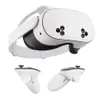
The first time I put the Quest 3S on my head, I was met with a familiar sight. “This is quite a lot like the Quest 2”, I thought to myself. My opinion hasn’t changed on that since I’ve got more familiar with Meta’s latest VR headset. Neither should it. Turns out, the Quest 3S and Quest 2 are practically the same when it comes to optics. But I have come to appreciate the rest of the Quest 3 package a whole lot more. It does a few things alotbetter than the Quest 2.
The Quest 3S comes in two storage sizes: 128 GB and 256 GB. To get one, you’ll need to depart with$299/$400, depending on which model you go for.
I have the larger capacity for review and if you’re going to want to install a large library of games on the device itself, i.e. use it as a standalone headset, the larger capacity sure helps. Though I wouldn’t generally recommend the 256 GB model.
For reasons I’ll get to throughout this review, if you’re considering spending $400 on a Quest 3S, you instead should consider splurging on the $500Quest 3. Further to that, more storage isn’t necessary if you’re using this primarily planning on tethering to the PC, nor if you have fast internet connection and don’t mind deleting and redownloading games on demand. VR games don’t usually require large file sizes—for example, the hot new ticket in town, Batman: Arkham Shadow, only requires 19 GB.
Quest 3S specs(Image credit: Future)Screen:LCDResolution:1832 x 1920 (per-eye)Refresh rate:72Hz, 90Hz, 120HzField of view:96 degrees horizontal, 90 degrees verticalLens type:FresnelIPD adjustment:58, 63, 68 mmProcessor:Snapdragon XR2 Gen 2RAM:8 GBPC connectivity:Wireless or wired over Type-CControllers:2x includedWeight (without strap):464 gramsPrice:128 GB:$299/£289| 256 GB:$400/£379
Quest 3S specs
(Image credit: Future)Screen:LCDResolution:1832 x 1920 (per-eye)Refresh rate:72Hz, 90Hz, 120HzField of view:96 degrees horizontal, 90 degrees verticalLens type:FresnelIPD adjustment:58, 63, 68 mmProcessor:Snapdragon XR2 Gen 2RAM:8 GBPC connectivity:Wireless or wired over Type-CControllers:2x includedWeight (without strap):464 gramsPrice:128 GB:$299/£289| 256 GB:$400/£379
(Image credit: Future)
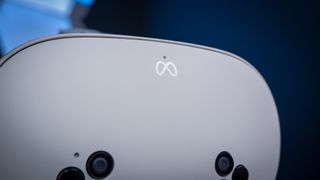
Screen:LCDResolution:1832 x 1920 (per-eye)Refresh rate:72Hz, 90Hz, 120HzField of view:96 degrees horizontal, 90 degrees verticalLens type:FresnelIPD adjustment:58, 63, 68 mmProcessor:Snapdragon XR2 Gen 2RAM:8 GBPC connectivity:Wireless or wired over Type-CControllers:2x includedWeight (without strap):464 gramsPrice:128 GB:$299/£289| 256 GB:$400/£379
Batman actually helps to explain one of the main improvements with the Quest 3S over the Quest 2. That’s the Snapdragon XR2 Gen 2 processor. You see, this is the same processor as within the Quest 3—the 3S and S even share the same 8 GB of RAM—and as a result, the Quest 3S has a lot more power available to it versus the older Quest 2. That means it is able to play games that might otherwise been Quest 3 exclusive, such as Batman: Arkham Shadow.
Now whether Batman could be made to run on a Quest 2—well, it can, people have done it—but it’s a Quest 3/3S exclusive whether it could or not. The Quest 3S is likely to see increasing support for software that takes advantage of that more powerful Qualcomm chip as time goes on.
This new processor feels like a pretty darn good quality of life upgrade, as it improves various aspects of the headset. Gaming through the built-in chip feels responsive and latency-free, which is key to avoiding vom-inducing visuals, but it also feels snappy outside of games when navigating through menus or entering your details on a login page. Speaking of logins, just a reminder that youdon’t need a Facebook account to use a Quest, but you will have to make a broader Meta account. Whether you connect that to your Facebook profile is up to you.
(Image credit: Future)
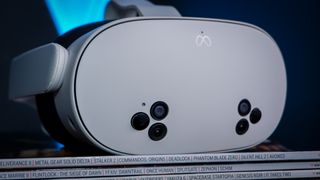
The Quest 3S also features full-colour passthrough thanks to the improved cameras on its exterior—2 RGB cameras, 4 IR tracking cameras, and 2 IR illiminators—and this is one of the biggest upgrades that Ifeltwhen using the headset. It’s part the full-colour passthrough just illuminating the world around you and reducing the need to lift the headset off, then back on, your head. But it’s also the ‘action’ button added to the headset beneath your right eye that lets me swiftly toggle between passthrough and full VR modes.
You can also tap the side of the headset to use passthrough, as with previous Quest models, but I find the action button more reliable.
I found the main benefit to this new and improved passthrough as a PC VR user is the ability to quickly switch between VR and actually seeing what’s happening on my computer screen. That’s pretty handy if you’re troubleshooting SteamVR or some PC VR game. Admittedly, these new cameras still aren’t anywhere near the sort of resolution required to actually use your PC adroitly and then flick back into VR without issue—it’s still a pretty grainy picture—but you can see much more of what’s going on than the Quest 2’s greyscale affair.
(Image credit: Future)
One good use case for this is when you’re setting up the Quest Link connection, which allows you to use the Quest 3S as a stand-in PC VR headset. This process requires downloading the app on your PC, logging in, and confirming some details about your headset. After that, enabling the Quest Link connection in your headset to discover your PC, which requires entering some codes on both devices. You can do all of this pretty comfortably from within the headset, using the passthrough to glance between devices.
Considering connecting a VR headset to a gaming PC was a fiddly job not all that long ago, Air Link—Meta’s built-in wireless protocol—is actually pretty easy to set-up. Not only that, VR games are playable without a cable. I booted up a couple of games via the fairly recently updated SteamVR UI and it’s pretty slick. I only ran into issues once my Steam started downloading a game in the background, which killed my network stability.
Image1of6(Image credit: Future)(Image credit: Future)(Image credit: Future)(Image credit: Future)(Image credit: Future)(Image credit: Future)
Image1of6(Image credit: Future)(Image credit: Future)(Image credit: Future)(Image credit: Future)(Image credit: Future)(Image credit: Future)
Image1of6
(Image credit: Future)(Image credit: Future)(Image credit: Future)(Image credit: Future)(Image credit: Future)(Image credit: Future)
(Image credit: Future)(Image credit: Future)(Image credit: Future)(Image credit: Future)(Image credit: Future)(Image credit: Future)
(Image credit: Future)
(Image credit: Future)
(Image credit: Future)
(Image credit: Future)
(Image credit: Future)

(Image credit: Future)
(Image credit: Future)
(Image credit: Future)
(Image credit: Future)
(Image credit: Future)
(Image credit: Future)
(Image credit: Future)
(Image credit: Future)
(Image credit: Future)
(Image credit: Future)
(Image credit: Future)
(Image credit: Future)
(Image credit: Future)
(Image credit: Future)
(Image credit: Future)
(Image credit: Future)
(Image credit: Future)
(Image credit: Future)
(Image credit: Future)
(Image credit: Future)
(Image credit: Future)
(Image credit: Future)
(Image credit: Future)
(Image credit: Future)
(Image credit: Future)
There are a few other options for streaming your PC over to your headset wirelessly: Virtual Desktop and Valve’s own Steam Link. I used to use Virtual Desktop a lot but I tend to stick with the built-in Air Link nowadays. Mostly just for ease of use—it’s right there in the Quest’s menu. The main thing is, while these wireless connections are quite good, I still prefer to use my extra long Type-C cable connection for a more reliable and snappy experience. And to keep some charge going back into the device.
Comparing the Quest 3S to the Quest 2, the newer headset is a similar size to the older one. The ‘arms’ that hold the strap are a little longer on the Quest 3S, however, which means straps intended for the Quest 2 aren’t compatible. Boo. Also the speakers within these ‘arms’ are downward facing on the Quest 3S, which, in theory, directs the audio more towards your ears. I say in theory just as I didn’t notice a massive difference in practice, but it seems like a good change nonetheless.
The Quest 3 (left) next to a Quest 2 (right).(Image credit: Future)
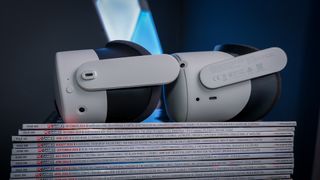
Though I’m yet to try it, the Quest 3S is also compatible with straps made for the Quest 3, including Meta’s own Elite Strap. Though they share the same standard strap in most ways, which is made of a white fabric and alittlebetter than the one included on the Quest 2, there is one difference: the Quest 3S strap doesn’t come with a cut-out for a 3.5 mm audio jack. That’s because it doesn’t have one.
The Quest 3S, Quest 3, and Quest 2 are more or less the same weight. I measured all three without straps or extenders for glasses and they all were within four grams of one another.
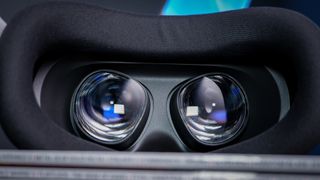
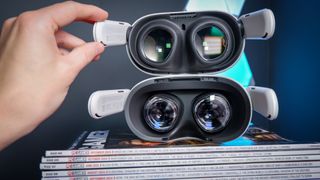
The Quest 3S appears the more trimmed model compared to the Quest 2, but it’s more of a style tweak than anything else. They both share practically the same Fresnel optics, which means they’re about as compact as they can be. The Quest 3, on the other hand, uses pancake lenses, which allow for a much reduced size.
The Quest 3S (left), Quest 2 (middle), and Quest 3 (right) without facial padding and straps.(Image credit: Future)

I wore all three headsets one after the other, turning my head left and right rapidly like a wild man, and I didn’t notice amassivedifference between them. While the weights are similar across all models, the Quest 3S and Quest 2 are minutely more cumbersome for their larger profiles. But there’s not a huge amount in it.
The Quest 3S sticks with a plastic extender for people that wear glasses, which includes me. I tend to keep it installed most of the time, as it only marginally increases the profile of the headset, though the Quest 3S is one of the few headsets I’ve used where I can happily wear my glasses without hitting lenses against one another. The Quest 3S also blocks out a good amount of the light around your nose while wearing it and it’s just as effective as the Quest 3 in this regard.
(Image credit: Future)

But at some point I have to deal with the elephant in the room. And not just one inserted into my office through the power of XR. The Quest 3 is $200 more than the Quest 3S but the pricier model is worth spending the extra to get, if you’re able.
It helps to compare a couple of key specifications between the Quest 3S and Quest 3.
The Quest 3 (left) and the Quest 3S (right).(Image credit: Future)

Swipe to scroll horizontallyQuest 3S versus Quest 3Header Cell - Column 0Quest 3SQuest 3LCD screensOneTwoResolution (per-eye)1,832 × 1,9202,064 × 2,208OpticsFresnelPancakeField of view (horizontal)96 degrees110 degreesField of view (vertical)90 degrees96 degreesIPD adjustment58, 63, 68 mm53 – 75 mm (any value between)Price128 GB: $299256 GB: $400512 GB: $500(128 GB model phased out)
Swipe to scroll horizontally
Quest 3S versus Quest 3Header Cell - Column 0Quest 3SQuest 3LCD screensOneTwoResolution (per-eye)1,832 × 1,9202,064 × 2,208OpticsFresnelPancakeField of view (horizontal)96 degrees110 degreesField of view (vertical)90 degrees96 degreesIPD adjustment58, 63, 68 mm53 – 75 mm (any value between)Price128 GB: $299256 GB: $400512 GB: $500(128 GB model phased out)
These numbers in a table make a big difference to the clarity and quality of the VR experience. When I first put the Quest 3S on, I noticed when you look to the extremities of the lenses the image is blurry and slightly distorted. It’s the same on the Quest 2. The Quest 3, on the other hand, is much clearer. You can look around to the top, bottom, and far left and right of the picture in the Quest 3 and it looks more or less the same as anywhere else.
Both Quest 3S and Quest 3 have a slight chromatic aberration effect when viewed through the extremities of the lenses, or when not correctly aligned with your eyes, though the Quest 3 is undeniably a much sharper image overall and its imperfections appear less noticeable as a result while gaming.
The Quest 3 (top) and Quest 3S (bottom) showing the two different lens types.(Image credit: Future)
Buy if…✅ You want to try VR for the first time:There’s no simpler set-up than a Quest 3/S, thanks to solid inside-out tracking.✅ You want to mix-and-match between playing standalone and on your PC:You can get play loads of great games without even a PC, thanks to the Qualcomm chip inside this headset. Quest Link and Air Link are easy ways to connect this headset to your PC, via a cable or Wi-Fi, when you’re ready.
Buy if…
✅ You want to try VR for the first time:There’s no simpler set-up than a Quest 3/S, thanks to solid inside-out tracking.✅ You want to mix-and-match between playing standalone and on your PC:You can get play loads of great games without even a PC, thanks to the Qualcomm chip inside this headset. Quest Link and Air Link are easy ways to connect this headset to your PC, via a cable or Wi-Fi, when you’re ready.
✅ You want to try VR for the first time:There’s no simpler set-up than a Quest 3/S, thanks to solid inside-out tracking.✅ You want to mix-and-match between playing standalone and on your PC:You can get play loads of great games without even a PC, thanks to the Qualcomm chip inside this headset. Quest Link and Air Link are easy ways to connect this headset to your PC, via a cable or Wi-Fi, when you’re ready.
Don’t buy if…❌You already own a Quest 2:While there are some Quest 3/S exclusives that won’t run on a Quest 2, the Quest 3S doesn’t offer such an improvement in key ways over its predecessor as to be worthy of upgrading. The Quest 3, however, does.
Don’t buy if…
❌You already own a Quest 2:While there are some Quest 3/S exclusives that won’t run on a Quest 2, the Quest 3S doesn’t offer such an improvement in key ways over its predecessor as to be worthy of upgrading. The Quest 3, however, does.
❌You already own a Quest 2:While there are some Quest 3/S exclusives that won’t run on a Quest 2, the Quest 3S doesn’t offer such an improvement in key ways over its predecessor as to be worthy of upgrading. The Quest 3, however, does.
In comparing the Quest 3 to the Quest 3S, it’s in an entirely different class for VR headsets. Even in the finer details, such as the built in glasses adjustment, IPD scroller, or auto-wake functionality that the Quest 3S lacks, it’s a step above. The Quest 3 is up there with the latest generation of VR headsets, such asSony’s PS VR2I tested last year, whereas the Quest 3S feels older out of the box.
Sony’s PS VR2 now has aPC adapter, I should add, though it’s reportedly a bit of a flaky experience. Priced the same as a Quest 3 but without the standalone features or slick experience, its comfortable design and OLED screen is still largely wasted on PC gamers.
For someone looking to try VR for the first time or looking for a gift for a gamer, there’s absolutely value in the Quest 3S. It is more of a quality of life improvement over the Quest 2, and for that reason isn’t a worthy upgrade for owners of a Quest 2, but it’s nonetheless a fantastic one. The improved processor is a massive leap and the full-colour passthrough make set-up and finding where you placed your damned controller a breeze.
Considering the Quest 3S launches at the same price the Quest 2 was at for most of its life—the 128 GB Quest 2 was reduced to $199 briefly before it was sent to the scrapyard—it’s a simple swap-in as my pick for thebest budget VR headset. Only the 128 GB model, however. If you’re thinking of buying the 256 GB model for $400, save up a little longer and buy a Quest 3. It’s worth it.
Meta Quest 3S: Price Comparison
$299View$299View$299View$349View$399.99View
$299View
$299View
$299View
$299
$299
$299View
$299View
$299View
$299
$299
$299View
$299View
$299View
$299
$299
$349View
$349View

$349View
$349
$349
$399.99View
$399.99View


$399.99View
$399.99
$399.99
Show More Deals
Show More Deals
We check over 250 million products every day for the best prices

The Verdict83Read our review policyMeta Quest 3SLike a Quest 2 in some ways, the Quest 3 in others—this half-step hybrid is the best way to get into VR on a budget. Though if you can splurge on a Quest 3, you more than get your money’s worth in improvements.
The Verdict
The Verdict
83Read our review policyMeta Quest 3SLike a Quest 2 in some ways, the Quest 3 in others—this half-step hybrid is the best way to get into VR on a budget. Though if you can splurge on a Quest 3, you more than get your money’s worth in improvements.
83Read our review policy
83
Meta Quest 3SLike a Quest 2 in some ways, the Quest 3 in others—this half-step hybrid is the best way to get into VR on a budget. Though if you can splurge on a Quest 3, you more than get your money’s worth in improvements.
Meta Quest 3S
Like a Quest 2 in some ways, the Quest 3 in others—this half-step hybrid is the best way to get into VR on a budget. Though if you can splurge on a Quest 3, you more than get your money’s worth in improvements.
TOPICSHardware
TOPICS
LatestWorld of Warcraft’s competitive dungeon mode is strugglingPiranha Games will lay off employees after Mechwarrior 5: Clans ‘performed below projections’Marvel Rivals’ latest update quietly killed the game’s burgeoning mod sceneSee more latest►
LatestWorld of Warcraft’s competitive dungeon mode is strugglingPiranha Games will lay off employees after Mechwarrior 5: Clans ‘performed below projections’Marvel Rivals’ latest update quietly killed the game’s burgeoning mod sceneSee more latest►
LatestWorld of Warcraft’s competitive dungeon mode is strugglingPiranha Games will lay off employees after Mechwarrior 5: Clans ‘performed below projections’Marvel Rivals’ latest update quietly killed the game’s burgeoning mod sceneSee more latest►
Latest
World of Warcraft’s competitive dungeon mode is strugglingPiranha Games will lay off employees after Mechwarrior 5: Clans ‘performed below projections’Marvel Rivals’ latest update quietly killed the game’s burgeoning mod scene
World of Warcraft’s competitive dungeon mode is struggling
World of Warcraft’s competitive dungeon mode is struggling
Piranha Games will lay off employees after Mechwarrior 5: Clans ‘performed below projections’
Piranha Games will lay off employees after Mechwarrior 5: Clans ‘performed below projections’
Marvel Rivals' latest update quietly killed the game’s burgeoning mod scene
Marvel Rivals' latest update quietly killed the game’s burgeoning mod scene
See more latest►
Most PopularTurtle Beach Stealth Pivot reviewIkea Matchspel gaming chair reviewASRock DeskMini X600 reviewZotac Zbox Magnus EN374070C reviewMinisforum AtomMan G7 Ti reviewSamsung Galaxy Book4 Ultra reviewNoctua NH-D15 G2 reviewGulikit KK3 Max reviewBallionaire reviewMarvel Rivals reviewBe Quiet! Dark Rock 5 review
Most PopularTurtle Beach Stealth Pivot reviewIkea Matchspel gaming chair reviewASRock DeskMini X600 reviewZotac Zbox Magnus EN374070C reviewMinisforum AtomMan G7 Ti reviewSamsung Galaxy Book4 Ultra reviewNoctua NH-D15 G2 reviewGulikit KK3 Max reviewBallionaire reviewMarvel Rivals reviewBe Quiet! Dark Rock 5 review
Most PopularTurtle Beach Stealth Pivot reviewIkea Matchspel gaming chair reviewASRock DeskMini X600 reviewZotac Zbox Magnus EN374070C reviewMinisforum AtomMan G7 Ti reviewSamsung Galaxy Book4 Ultra reviewNoctua NH-D15 G2 reviewGulikit KK3 Max reviewBallionaire reviewMarvel Rivals reviewBe Quiet! Dark Rock 5 review
Most Popular
Turtle Beach Stealth Pivot review
Ikea Matchspel gaming chair review
ASRock DeskMini X600 review
Zotac Zbox Magnus EN374070C review
Minisforum AtomMan G7 Ti review
Samsung Galaxy Book4 Ultra review
Noctua NH-D15 G2 review
Gulikit KK3 Max review
Ballionaire review
Marvel Rivals review
Be Quiet! Dark Rock 5 review
HARDWARE BUYING GUIDESLATEST GAME REVIEWS1Best Steam Deck accessories in Australia for 2025: Our favorite docks, powerbanks and gamepads2Best graphics card for laptops: the mobile GPUs I’d want in my next gaming laptop3Best mini PCs in 2025: The compact computers I love the most4Best 14-inch gaming laptop: The top compact gaming laptops I’ve held in these hands5Best Mini-ITX motherboards in 2025: My pick from all the mini mobo marvels I’ve tested1Thank Goodness You’re Here! review2Shiren the Wanderer: The Mystery Dungeon of Serpentcoil Island review3WD Black SN850X 8 TB NVMe SSD review4Ikea Utespelare desk review5Asus ROG Harpe Ace Mini wireless mouse review
HARDWARE BUYING GUIDESLATEST GAME REVIEWS1Best Steam Deck accessories in Australia for 2025: Our favorite docks, powerbanks and gamepads2Best graphics card for laptops: the mobile GPUs I’d want in my next gaming laptop3Best mini PCs in 2025: The compact computers I love the most4Best 14-inch gaming laptop: The top compact gaming laptops I’ve held in these hands5Best Mini-ITX motherboards in 2025: My pick from all the mini mobo marvels I’ve tested1Thank Goodness You’re Here! review2Shiren the Wanderer: The Mystery Dungeon of Serpentcoil Island review3WD Black SN850X 8 TB NVMe SSD review4Ikea Utespelare desk review5Asus ROG Harpe Ace Mini wireless mouse review
HARDWARE BUYING GUIDESLATEST GAME REVIEWS1Best Steam Deck accessories in Australia for 2025: Our favorite docks, powerbanks and gamepads2Best graphics card for laptops: the mobile GPUs I’d want in my next gaming laptop3Best mini PCs in 2025: The compact computers I love the most4Best 14-inch gaming laptop: The top compact gaming laptops I’ve held in these hands5Best Mini-ITX motherboards in 2025: My pick from all the mini mobo marvels I’ve tested1Thank Goodness You’re Here! review2Shiren the Wanderer: The Mystery Dungeon of Serpentcoil Island review3WD Black SN850X 8 TB NVMe SSD review4Ikea Utespelare desk review5Asus ROG Harpe Ace Mini wireless mouse review
HARDWARE BUYING GUIDESLATEST GAME REVIEWS1Best Steam Deck accessories in Australia for 2025: Our favorite docks, powerbanks and gamepads2Best graphics card for laptops: the mobile GPUs I’d want in my next gaming laptop3Best mini PCs in 2025: The compact computers I love the most4Best 14-inch gaming laptop: The top compact gaming laptops I’ve held in these hands5Best Mini-ITX motherboards in 2025: My pick from all the mini mobo marvels I’ve tested1Thank Goodness You’re Here! review2Shiren the Wanderer: The Mystery Dungeon of Serpentcoil Island review3WD Black SN850X 8 TB NVMe SSD review4Ikea Utespelare desk review5Asus ROG Harpe Ace Mini wireless mouse review
HARDWARE BUYING GUIDESLATEST GAME REVIEWS
1Best Steam Deck accessories in Australia for 2025: Our favorite docks, powerbanks and gamepads
1Best Steam Deck accessories in Australia for 2025: Our favorite docks, powerbanks and gamepads
1
Best Steam Deck accessories in Australia for 2025: Our favorite docks, powerbanks and gamepads
2Best graphics card for laptops: the mobile GPUs I’d want in my next gaming laptop
2Best graphics card for laptops: the mobile GPUs I’d want in my next gaming laptop
2
Best graphics card for laptops: the mobile GPUs I’d want in my next gaming laptop
3Best mini PCs in 2025: The compact computers I love the most
3Best mini PCs in 2025: The compact computers I love the most
3
Best mini PCs in 2025: The compact computers I love the most
4Best 14-inch gaming laptop: The top compact gaming laptops I’ve held in these hands
4Best 14-inch gaming laptop: The top compact gaming laptops I’ve held in these hands
4
Best 14-inch gaming laptop: The top compact gaming laptops I’ve held in these hands
5Best Mini-ITX motherboards in 2025: My pick from all the mini mobo marvels I’ve tested
5Best Mini-ITX motherboards in 2025: My pick from all the mini mobo marvels I’ve tested
5
Best Mini-ITX motherboards in 2025: My pick from all the mini mobo marvels I’ve tested
1Thank Goodness You’re Here! review
1Thank Goodness You’re Here! review
1
Thank Goodness You’re Here! review
2Shiren the Wanderer: The Mystery Dungeon of Serpentcoil Island review
2Shiren the Wanderer: The Mystery Dungeon of Serpentcoil Island review
2
Shiren the Wanderer: The Mystery Dungeon of Serpentcoil Island review
3WD Black SN850X 8 TB NVMe SSD review
3WD Black SN850X 8 TB NVMe SSD review
3
WD Black SN850X 8 TB NVMe SSD review
4Ikea Utespelare desk review
4Ikea Utespelare desk review
4
Ikea Utespelare desk review
5Asus ROG Harpe Ace Mini wireless mouse review
5Asus ROG Harpe Ace Mini wireless mouse review
5
Asus ROG Harpe Ace Mini wireless mouse review
