HardwareDragon Age: The VeilguardNo matter what gaming PC you have, you should disable DoF, motion blur, and vignette in Dragon Age: The Veilguard before changing any other settingWhen you purchase through links on our site, we may earn an affiliate commission.Here’s how it works.
HardwareDragon Age: The VeilguardNo matter what gaming PC you have, you should disable DoF, motion blur, and vignette in Dragon Age: The Veilguard before changing any other settingWhen you purchase through links on our site, we may earn an affiliate commission.Here’s how it works.
When you purchase through links on our site, we may earn an affiliate commission.Here’s how it works.
(Image credit: BioWare/Electronic Arts)
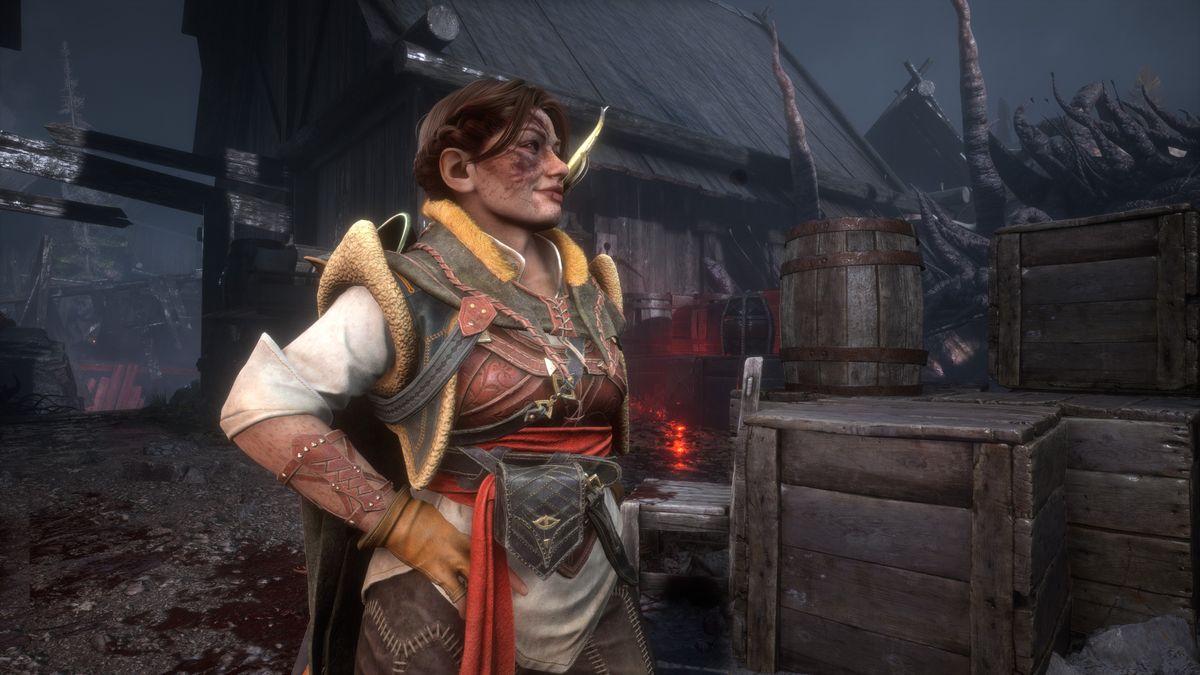
Dragon Age: The Veilguardwill soon be available to play around the world and while it lacks the narrative depth of its forefathers, it’s still a rollicking blast to play. The combat is nice and weighty, and you’ll have endless fun just going around whacking everyone with a ruddy big hammer. But no matter what hardware you have in your gaming PC andwhat graphics options you want to use, there are three graphics settings that you really should disable before jumping in.
However, it just applies a blur filter to said objects and it’s not very convincing. Fortunately, it’s used quite sparingly, as you can see in the images below. The first shows the use of DoF, and the second with it disabled.
Image1of2(Image credit: BioWare/Electronic Arts)(Image credit: BioWare/Electronic Arts)
Image1of2(Image credit: BioWare/Electronic Arts)(Image credit: BioWare/Electronic Arts)
Image1of2
(Image credit: BioWare/Electronic Arts)(Image credit: BioWare/Electronic Arts)
(Image credit: BioWare/Electronic Arts)(Image credit: BioWare/Electronic Arts)
(Image credit: BioWare/Electronic Arts)
(Image credit: BioWare/Electronic Arts)
(Image credit: BioWare/Electronic Arts)
(Image credit: BioWare/Electronic Arts)
(Image credit: BioWare/Electronic Arts)

(Image credit: BioWare/Electronic Arts)
(Image credit: BioWare/Electronic Arts)
(Image credit: BioWare/Electronic Arts)
(Image credit: BioWare/Electronic Arts)
(Image credit: BioWare/Electronic Arts)
The same is true for motion blur. It’s actually one of the better implementations I’ve seen in recent games but I find it distracting and, more importantly, it’s entirely unnecessary. Anything moving rapidly in my peripheral vision won’t be clearly in focus anyway, so there’s just no need to blur it all out.
Image1of2(Image credit: BioWare/Electronic Arts)(Image credit: BioWare/Electronic Arts)
Image1of2(Image credit: BioWare/Electronic Arts)(Image credit: BioWare/Electronic Arts)
Image1of2
(Image credit: BioWare/Electronic Arts)(Image credit: BioWare/Electronic Arts)
(Image credit: BioWare/Electronic Arts)(Image credit: BioWare/Electronic Arts)
(Image credit: BioWare/Electronic Arts)
(Image credit: BioWare/Electronic Arts)
(Image credit: BioWare/Electronic Arts)
(Image credit: BioWare/Electronic Arts)
(Image credit: BioWare/Electronic Arts)
(Image credit: BioWare/Electronic Arts)
(Image credit: BioWare/Electronic Arts)
(Image credit: BioWare/Electronic Arts)
(Image credit: BioWare/Electronic Arts)
(Image credit: BioWare/Electronic Arts)
The above images were taken while frantically whipping the mouse around and then taking a screenshot. As you can see in the first image, it’s not a bad effect but the second screenshot shows how much nicer it is without it.
The biggest gaming news, reviews and hardware deals
The final setting that really needs to be disabled is the vignette option. This darkens the outer edges of the frame, simulating how poorly set cameras or old lenses produce brightness ‘hotspots’—the centre of the frame is at full brightness but the edges are all dark. It can be used as a creative tool, drawing one’s eye to the framed object, but it’s just one more unnecessary addition here.
Just compare the two images below. The use of a vignette stands out like a sore thumb.
Image1of2(Image credit: BioWare/Electronic Arts)(Image credit: BioWare/Electronic Arts)
Image1of2(Image credit: BioWare/Electronic Arts)(Image credit: BioWare/Electronic Arts)
Image1of2
(Image credit: BioWare/Electronic Arts)(Image credit: BioWare/Electronic Arts)
(Image credit: BioWare/Electronic Arts)(Image credit: BioWare/Electronic Arts)
(Image credit: BioWare/Electronic Arts)
(Image credit: BioWare/Electronic Arts)
(Image credit: BioWare/Electronic Arts)
(Image credit: BioWare/Electronic Arts)
(Image credit: BioWare/Electronic Arts)
(Image credit: BioWare/Electronic Arts)
(Image credit: BioWare/Electronic Arts)
(Image credit: BioWare/Electronic Arts)
(Image credit: BioWare/Electronic Arts)
(Image credit: BioWare/Electronic Arts)
Unfortunately, disabling the vignette exposes one particular weakness in Dragon Age: The Veilguard’s graphics settings and it’s that there is no option to disable or reduce the amount of bloom being applied. Youcando it in the game’s photo mode but there’s no way to do it for normal gameplay.
In the pictures below, you can clearly see the difference between having no bloom applied and the default 18% level used in the photo mode. One might feel that the lack of bloom makes the image too dark overall but I find disabling it adds a lot more depth to the image. Dark areas appear darker, textures a tad grittier, and the whole thing is less ‘early 2000s gaming’ in style.
Image1of2(Image credit: BioWare/Electronic Arts)(Image credit: BioWare/Electronic Arts)
Image1of2(Image credit: BioWare/Electronic Arts)(Image credit: BioWare/Electronic Arts)
Image1of2
(Image credit: BioWare/Electronic Arts)(Image credit: BioWare/Electronic Arts)
(Image credit: BioWare/Electronic Arts)(Image credit: BioWare/Electronic Arts)
(Image credit: BioWare/Electronic Arts)
(Image credit: BioWare/Electronic Arts)
(Image credit: BioWare/Electronic Arts)
(Image credit: BioWare/Electronic Arts)
(Image credit: BioWare/Electronic Arts)
(Image credit: BioWare/Electronic Arts)
(Image credit: BioWare/Electronic Arts)
(Image credit: BioWare/Electronic Arts)
(Image credit: BioWare/Electronic Arts)
(Image credit: BioWare/Electronic Arts)
Hopefully, BioWare will add the option to adjust the in-game level of bloom in a later patch. Until then, I’ll just have to put up with it, though at least I can bin depth of field, motion blur, and vignette—along with chromatic aberration, these are the settings Ialwaysdisable, where possible, in every game I play.
Call me a curmudgeon but I really don’t like them, and honestly don’t see what the appeal is. This makes me wonder just how many peopledolike them because if they were universally hated, I can’t see why any developer would make the effort to include them. Answers on a postcard, please.
Best gaming PC: The top pre-built machines.Best gaming laptop: Great devices for mobile gaming.
Best gaming PC: The top pre-built machines.Best gaming laptop: Great devices for mobile gaming.
Best gaming PC: The top pre-built machines.Best gaming laptop: Great devices for mobile gaming.
Best gaming PC: The top pre-built machines.Best gaming laptop: Great devices for mobile gaming.

Best gaming PC: The top pre-built machines.Best gaming laptop: Great devices for mobile gaming.
Best gaming PC: The top pre-built machines.Best gaming laptop: Great devices for mobile gaming.
TOPICSHardware
TOPICS
More about hardwareIs the new RTX 5070 really as fast as Nvidia’s previous flagship RTX 4090 GPU? Turns out the answer is yes. Kinda.It’s time for me to admit that AI-accelerated frame generation might actually be the way of the future and that’s a good thingLatestSorry everyone, Minecraft 2 is cancelled, and it might be our faultSee more latest►
More about hardwareIs the new RTX 5070 really as fast as Nvidia’s previous flagship RTX 4090 GPU? Turns out the answer is yes. Kinda.It’s time for me to admit that AI-accelerated frame generation might actually be the way of the future and that’s a good thingLatestSorry everyone, Minecraft 2 is cancelled, and it might be our faultSee more latest►
More about hardwareIs the new RTX 5070 really as fast as Nvidia’s previous flagship RTX 4090 GPU? Turns out the answer is yes. Kinda.It’s time for me to admit that AI-accelerated frame generation might actually be the way of the future and that’s a good thing
More about hardware
Is the new RTX 5070 really as fast as Nvidia’s previous flagship RTX 4090 GPU? Turns out the answer is yes. Kinda.It’s time for me to admit that AI-accelerated frame generation might actually be the way of the future and that’s a good thing
Is the new RTX 5070 really as fast as Nvidia’s previous flagship RTX 4090 GPU? Turns out the answer is yes. Kinda.
Is the new RTX 5070 really as fast as Nvidia’s previous flagship RTX 4090 GPU? Turns out the answer is yes. Kinda.
It’s time for me to admit that AI-accelerated frame generation might actually be the way of the future and that’s a good thing
It’s time for me to admit that AI-accelerated frame generation might actually be the way of the future and that’s a good thing
LatestSorry everyone, Minecraft 2 is cancelled, and it might be our faultSee more latest►
Latest
Sorry everyone, Minecraft 2 is cancelled, and it might be our fault
Sorry everyone, Minecraft 2 is cancelled, and it might be our fault
Sorry everyone, Minecraft 2 is cancelled, and it might be our fault
See more latest►
Most Popular
‘It’s simply impossible to make a difficulty level that’s just right for all players’: How Final Fantasy 14’s lead battle designer has been playing a precarious balancing game for Dawntrail’s dungeons and raids
Please join me in getting super excited for all the cool looking survival games coming in 2025 (and beyond)
Competitive shooters are at a crucial crossroads in 2025: ‘sweaty’ teamplay vs. casual fun
Call of Duty’s $28 Squid Game skins are the perfect crossover for our capitalist dystopia, and Activision knows exactly what it’s doing
These are the 14 biggest upcoming RPGs of 2025—get ready for another amazing year for the genre
Five new Steam games you probably missed (January 6, 2025)
I’ve seen enough: No more forcing singleplayer studios to make mediocre live service games
6 games that could be bigger hits than you’re expecting in 2025
What are your 2025 gaming resolutions?
The FBI put a $5 million bounty on the ‘Cryptoqueen’ last year but still hasn’t found her, so take your pick: Russia, South Africa, or murdered on a yacht in 2018
HARDWARE BUYING GUIDESLATEST GAME REVIEWS1Best Steam Deck accessories in Australia for 2025: Our favorite docks, powerbanks and gamepads2Best graphics card for laptops: the mobile GPUs I’d want in my next gaming laptop3Best mini PCs in 2025: The compact computers I love the most4Best 14-inch gaming laptop: The top compact gaming laptops I’ve held in these hands5Best Mini-ITX motherboards in 2025: My pick from all the mini mobo marvels I’ve tested1Thank Goodness You’re Here! review2Shiren the Wanderer: The Mystery Dungeon of Serpentcoil Island review3WD Black SN850X 8 TB NVMe SSD review4Ikea Utespelare desk review5Asus ROG Harpe Ace Mini wireless mouse review
HARDWARE BUYING GUIDESLATEST GAME REVIEWS1Best Steam Deck accessories in Australia for 2025: Our favorite docks, powerbanks and gamepads2Best graphics card for laptops: the mobile GPUs I’d want in my next gaming laptop3Best mini PCs in 2025: The compact computers I love the most4Best 14-inch gaming laptop: The top compact gaming laptops I’ve held in these hands5Best Mini-ITX motherboards in 2025: My pick from all the mini mobo marvels I’ve tested1Thank Goodness You’re Here! review2Shiren the Wanderer: The Mystery Dungeon of Serpentcoil Island review3WD Black SN850X 8 TB NVMe SSD review4Ikea Utespelare desk review5Asus ROG Harpe Ace Mini wireless mouse review
HARDWARE BUYING GUIDESLATEST GAME REVIEWS1Best Steam Deck accessories in Australia for 2025: Our favorite docks, powerbanks and gamepads2Best graphics card for laptops: the mobile GPUs I’d want in my next gaming laptop3Best mini PCs in 2025: The compact computers I love the most4Best 14-inch gaming laptop: The top compact gaming laptops I’ve held in these hands5Best Mini-ITX motherboards in 2025: My pick from all the mini mobo marvels I’ve tested1Thank Goodness You’re Here! review2Shiren the Wanderer: The Mystery Dungeon of Serpentcoil Island review3WD Black SN850X 8 TB NVMe SSD review4Ikea Utespelare desk review5Asus ROG Harpe Ace Mini wireless mouse review
HARDWARE BUYING GUIDESLATEST GAME REVIEWS1Best Steam Deck accessories in Australia for 2025: Our favorite docks, powerbanks and gamepads2Best graphics card for laptops: the mobile GPUs I’d want in my next gaming laptop3Best mini PCs in 2025: The compact computers I love the most4Best 14-inch gaming laptop: The top compact gaming laptops I’ve held in these hands5Best Mini-ITX motherboards in 2025: My pick from all the mini mobo marvels I’ve tested1Thank Goodness You’re Here! review2Shiren the Wanderer: The Mystery Dungeon of Serpentcoil Island review3WD Black SN850X 8 TB NVMe SSD review4Ikea Utespelare desk review5Asus ROG Harpe Ace Mini wireless mouse review
HARDWARE BUYING GUIDESLATEST GAME REVIEWS
1Best Steam Deck accessories in Australia for 2025: Our favorite docks, powerbanks and gamepads
1Best Steam Deck accessories in Australia for 2025: Our favorite docks, powerbanks and gamepads
1
Best Steam Deck accessories in Australia for 2025: Our favorite docks, powerbanks and gamepads
2Best graphics card for laptops: the mobile GPUs I’d want in my next gaming laptop
2Best graphics card for laptops: the mobile GPUs I’d want in my next gaming laptop
2
Best graphics card for laptops: the mobile GPUs I’d want in my next gaming laptop
3Best mini PCs in 2025: The compact computers I love the most
3Best mini PCs in 2025: The compact computers I love the most
3
Best mini PCs in 2025: The compact computers I love the most
4Best 14-inch gaming laptop: The top compact gaming laptops I’ve held in these hands
4Best 14-inch gaming laptop: The top compact gaming laptops I’ve held in these hands
4
Best 14-inch gaming laptop: The top compact gaming laptops I’ve held in these hands
5Best Mini-ITX motherboards in 2025: My pick from all the mini mobo marvels I’ve tested
5Best Mini-ITX motherboards in 2025: My pick from all the mini mobo marvels I’ve tested
5
Best Mini-ITX motherboards in 2025: My pick from all the mini mobo marvels I’ve tested
1Thank Goodness You’re Here! review
1Thank Goodness You’re Here! review
1
Thank Goodness You’re Here! review
2Shiren the Wanderer: The Mystery Dungeon of Serpentcoil Island review
2Shiren the Wanderer: The Mystery Dungeon of Serpentcoil Island review
2
Shiren the Wanderer: The Mystery Dungeon of Serpentcoil Island review
3WD Black SN850X 8 TB NVMe SSD review
3WD Black SN850X 8 TB NVMe SSD review
3
WD Black SN850X 8 TB NVMe SSD review
4Ikea Utespelare desk review
4Ikea Utespelare desk review
4
Ikea Utespelare desk review
5Asus ROG Harpe Ace Mini wireless mouse review
5Asus ROG Harpe Ace Mini wireless mouse review
5
Asus ROG Harpe Ace Mini wireless mouse review
