Our VerdictIf you' ve got all the necessary kit already—PS5, PS VR 2, gaming PC that hits the right specs, a love of VR—then this adapter makes sense, but for the vast majority of PC gamers a Quest or Index would probably be a better buy until a firmware update makes it truly great.ForPS VR 2 is a great headsetConnected easilySmooth setup and useAgainstDisplayPort, not HDMISeparate power supplyNiche appealPC Gamer’s got your backOur experienced team dedicates many hours to every review, to really get to the heart of what matters most to you.Find out more about how we evaluate games and hardware.Ever since Sony launched thePS VR 2, with its handy do-it-all USB-C plug, back at the beginning of 2023, PC gamers have been wondering when they’ll be able to use it too. It seemed so obvious—just plug it into a spare USB-C port on your PC and let SteamVR do the rest.Of course it’s not quite that simple. After years of waiting, Sony has finally released an adapter, possibly the most boring-looking PC peripheral set loose on the world in the past few years, that you’ll require to use your $500 headset for your $500 console with your $1,000+ PC. It takes a USB-A connection and a DisplayPort plug from your PC, and a power feed from the wall (would a USB-C power plug have hurt, Sony?) and provides a single USB-C for the PS VR 2 unit to plug into.It’s deeply dull, just a black square with a captive USB cord rather than the sleek white design that characterises the PS5 and PS VR 2. It’s so plain that I resorted to photographing the power brick in an attempt to add some visual interest to this review, but that’s a black block too. It’s almost enough to make you long for RGB.The plastic finish has a texture to it that’s going to collect dust. And while I’m not one to shy away from an obvious joke, it might be better to keep it in a drawer rather than on a shelf.PC adapter specs(Image credit: Future)Connection (to PC):USB Type-A, DisplayPort 1.4Connection (to PSVR2):USB Type-CConnection (to controllers):Bluetooth 4.0 or laterDimensions:approx. 79 x 79 x 17 mmPrice:$60|£50The choice of DisplayPort 1.4 is an odd one, as HDMI sockets are much more common (DisplayPort being an open standard may have something to do with it) and you may find yourself picking up a USB-C to DisplayPort adapter in order to use the PSVR adapter—although Sony says this won’t officially work and it needs to be a native port, something that rules out most gaming laptops. It feels a bit like you’re using an outdated piece of equipment that requires multiple adapters strung together to coax into life, though it’s still better than the six or so USB cables early Oculus Rift headsets, with their extra sensors, required.You’ll also need Bluetooth to connect the Sony hand controllers to your PC. It needs to be Bluetooth 4.0 or later, which most PCs powerful enough to think about VR should be able to manage. Theofficial compatibility listfor USB Bluetooth dongles is very small though, just four products long, and Sony has decided not to incorporate Bluetooth into the adapter, which it could have in order to make it as much like a PS5 as possible.Your GPU also matters, with Sony recommending a GeForce GTX 1650 / Radeon RX 5500XT or later (the RX 5700 is about PS5 level, though opinion on that varies wildly), and this needs to be paired with a Core i5 7600 / Ryzen 3 3100 or better. These specs sit between those for the Valve Index (lower) and the Meta Quest 3 (higher), though the specs for the games themselves are more important and will outstrip these basics.Image1of2(Image credit: Future)(Image credit: Future)Inside, you’ll find the thing that sets the PS VR 2 apart from the Quest and Index—120 Hz OLED screens. They’re not quite as high-res as those in the Quest 3, or as fast as those in the Index, but the fact you get vibrant colours and proper blacks (all the reasons OLED gaming monitors get pushed so hard) should help make the PS VR 2 one of the best, if not the best, PC VR headsets available today.The instruction manual in the box is little more than a folded piece of paper, but setup means installing the SteamVR and PlayStation VR 2 apps in Steam, which are both free, and you’ll need a game or two as well.Half-Life Alyx is pretty good. Next, you pair the hand controllers with your PC’s Bluetooth, which involves holding down two buttons on each controller and pairing through Windows Settings. They connected immediately on a laptop packing Bluetooth 5.4, which is encouraging.The system I used to test the PS VR 2 adapter was the one with the biggest GPU available to me, the GeForce RTX 4090 in the ludicrously expensive Acer Predator Helios 18. It doesn’t have a full-size DisplayPort socket, however, so I used an adapter from a USB-C port in exactly the way Sony says not to do. On first launching the PlayStation VR 2 app in Steam it runs an install script and downloads some .NET components, then goes through a setup checklist that ended for me with a ‘the DisplayPort cable is not connected’ message.Image1of3(Image credit: Future)(Image credit: Future)(Image credit: Future)This turned out to be because it wasn’t: the cable had slipped out of the USB-C adapter, and pushing it back in produced a ‘connected’ screen. Suck it, Sony.Firing up Alyx, I’m reminded of just how good VR can be when it’s done well. At the very beginning of the game (it leaves you in an empty space for a worryingly long time while it’s loading, which led me to wonder if it was all working correctly—a ‘loading’ message wouldn’t have gone amiss) when you’re standing on your City 17 balcony watching the pigeons and Combine scurry about, there was some jerking in the complex scene as the frame rate tanked.This passed after I teleported inside, and while there were occasional glitches in frame rate, everything from that point on passed fairly smoothly, including bringing up the menu to save the game, and the SteamVR overlay. My major issue with the PS VR 2 is that I seem to be constantly adjusting it to sharpen up text, prevent the rubber surround from squishing my nose or poking me in the eye, and striking a balance between the centre being in focus or the edges being blurry.Buy if…✅You already have a PS5 VR setup and want to broaden your games library:There are maybe five PSVR2 games worth playing and a plethora on SteamVR.Don’t buy if…❌You’re looking for a PC-specific VR solution:At least not yet.The great thing about the PlayStation VR 2 on the PlayStation 5 is that it just works. It connects over a single cable, which is a generous length. You press a button on the hand controllers and they connect first time. And the software is excellent, allowing you to pop up an overlay any time you like. It’s a bit finicky about space, preferring you to play every game standing in the centre of a football field, but that’s true of many VR options. In my experience, the PC adapter and Steam VR come pretty close to replicating this, though Steam seems less concerned with furniture positioning.There are horror stories online about Bluetooth not connecting, hand controllers freezing, DisplayPort errors and more. For me, it all worked first time, though I was using a monster laptop to test it with.Any recommendation of this as a PC VR system is going to come with a lot of the word ‘if’.Ifyou already own a PS5, andifyou already own a PS VR 2, andifyou’re really into VR games, andifthe selection on PlayStation isn’t giving you everything you want, andifyou have a good enough gaming PC, then this adapter is a much better idea than buying a second headset. It might, however, be one firmware update away from being the best PC VR hat, and if Sony can iron out any connectivity glitches and keep the price down, there’s no reason why it couldn’t ascend to that crown.The Verdict65Read our review policyPlayStation VR2 PC AdapterIf you' ve got all the necessary kit already—PS5, PS VR 2, gaming PC that hits the right specs, a love of VR—then this adapter makes sense, but for the vast majority of PC gamers a Quest or Index would probably be a better buy until a firmware update makes it truly great.TOPICSHardwareLatestThis Jinx-inspired gaming PC is my favorite of CES 2025 and I’m head over heels for the hardwareHarrowing report alleges years of horrific abuse at Brandoville Studios, an Indonesian support studio that worked on Assassin’s Creed Shadows and The Last of Us RemakeTencent says it’s not a Chinese military company and is willing to sue the US Department of Defense if it isn’t removed from a blacklistSee more latest►Most PopularTurtle Beach Stealth Pivot reviewIkea Matchspel gaming chair reviewASRock DeskMini X600 reviewZotac Zbox Magnus EN374070C reviewMinisforum AtomMan G7 Ti reviewSamsung Galaxy Book4 Ultra reviewNoctua NH-D15 G2 reviewGulikit KK3 Max reviewBallionaire reviewMarvel Rivals reviewBe Quiet! Dark Rock 5 reviewHARDWARE BUYING GUIDESLATEST GAME REVIEWS1Best Steam Deck accessories in Australia for 2025: Our favorite docks, powerbanks and gamepads2Best graphics card for laptops: the mobile GPUs I’d want in my next gaming laptop3Best mini PCs in 2025: The compact computers I love the most4Best 14-inch gaming laptop: The top compact gaming laptops I’ve held in these hands5Best Mini-ITX motherboards in 2025: My pick from all the mini mobo marvels I’ve tested1Thank Goodness You’re Here! review: An anarchic treasure trove of jokes and skits2Shiren the Wanderer: The Mystery Dungeon of Serpentcoil Island review—like juggling chainsaws on horseback3WD Black SN850X 8 TB NVMe SSD review4Ikea Utespelare desk review5Asus ROG Harpe Ace Mini wireless mouse review
Our VerdictIf you' ve got all the necessary kit already—PS5, PS VR 2, gaming PC that hits the right specs, a love of VR—then this adapter makes sense, but for the vast majority of PC gamers a Quest or Index would probably be a better buy until a firmware update makes it truly great.ForPS VR 2 is a great headsetConnected easilySmooth setup and useAgainstDisplayPort, not HDMISeparate power supplyNiche appealPC Gamer’s got your backOur experienced team dedicates many hours to every review, to really get to the heart of what matters most to you.Find out more about how we evaluate games and hardware.Ever since Sony launched thePS VR 2, with its handy do-it-all USB-C plug, back at the beginning of 2023, PC gamers have been wondering when they’ll be able to use it too. It seemed so obvious—just plug it into a spare USB-C port on your PC and let SteamVR do the rest.Of course it’s not quite that simple. After years of waiting, Sony has finally released an adapter, possibly the most boring-looking PC peripheral set loose on the world in the past few years, that you’ll require to use your $500 headset for your $500 console with your $1,000+ PC. It takes a USB-A connection and a DisplayPort plug from your PC, and a power feed from the wall (would a USB-C power plug have hurt, Sony?) and provides a single USB-C for the PS VR 2 unit to plug into.It’s deeply dull, just a black square with a captive USB cord rather than the sleek white design that characterises the PS5 and PS VR 2. It’s so plain that I resorted to photographing the power brick in an attempt to add some visual interest to this review, but that’s a black block too. It’s almost enough to make you long for RGB.The plastic finish has a texture to it that’s going to collect dust. And while I’m not one to shy away from an obvious joke, it might be better to keep it in a drawer rather than on a shelf.PC adapter specs(Image credit: Future)Connection (to PC):USB Type-A, DisplayPort 1.4Connection (to PSVR2):USB Type-CConnection (to controllers):Bluetooth 4.0 or laterDimensions:approx. 79 x 79 x 17 mmPrice:$60|£50The choice of DisplayPort 1.4 is an odd one, as HDMI sockets are much more common (DisplayPort being an open standard may have something to do with it) and you may find yourself picking up a USB-C to DisplayPort adapter in order to use the PSVR adapter—although Sony says this won’t officially work and it needs to be a native port, something that rules out most gaming laptops. It feels a bit like you’re using an outdated piece of equipment that requires multiple adapters strung together to coax into life, though it’s still better than the six or so USB cables early Oculus Rift headsets, with their extra sensors, required.You’ll also need Bluetooth to connect the Sony hand controllers to your PC. It needs to be Bluetooth 4.0 or later, which most PCs powerful enough to think about VR should be able to manage. Theofficial compatibility listfor USB Bluetooth dongles is very small though, just four products long, and Sony has decided not to incorporate Bluetooth into the adapter, which it could have in order to make it as much like a PS5 as possible.Your GPU also matters, with Sony recommending a GeForce GTX 1650 / Radeon RX 5500XT or later (the RX 5700 is about PS5 level, though opinion on that varies wildly), and this needs to be paired with a Core i5 7600 / Ryzen 3 3100 or better. These specs sit between those for the Valve Index (lower) and the Meta Quest 3 (higher), though the specs for the games themselves are more important and will outstrip these basics.Image1of2(Image credit: Future)(Image credit: Future)Inside, you’ll find the thing that sets the PS VR 2 apart from the Quest and Index—120 Hz OLED screens. They’re not quite as high-res as those in the Quest 3, or as fast as those in the Index, but the fact you get vibrant colours and proper blacks (all the reasons OLED gaming monitors get pushed so hard) should help make the PS VR 2 one of the best, if not the best, PC VR headsets available today.The instruction manual in the box is little more than a folded piece of paper, but setup means installing the SteamVR and PlayStation VR 2 apps in Steam, which are both free, and you’ll need a game or two as well.Half-Life Alyx is pretty good. Next, you pair the hand controllers with your PC’s Bluetooth, which involves holding down two buttons on each controller and pairing through Windows Settings. They connected immediately on a laptop packing Bluetooth 5.4, which is encouraging.The system I used to test the PS VR 2 adapter was the one with the biggest GPU available to me, the GeForce RTX 4090 in the ludicrously expensive Acer Predator Helios 18. It doesn’t have a full-size DisplayPort socket, however, so I used an adapter from a USB-C port in exactly the way Sony says not to do. On first launching the PlayStation VR 2 app in Steam it runs an install script and downloads some .NET components, then goes through a setup checklist that ended for me with a ‘the DisplayPort cable is not connected’ message.Image1of3(Image credit: Future)(Image credit: Future)(Image credit: Future)This turned out to be because it wasn’t: the cable had slipped out of the USB-C adapter, and pushing it back in produced a ‘connected’ screen. Suck it, Sony.Firing up Alyx, I’m reminded of just how good VR can be when it’s done well. At the very beginning of the game (it leaves you in an empty space for a worryingly long time while it’s loading, which led me to wonder if it was all working correctly—a ‘loading’ message wouldn’t have gone amiss) when you’re standing on your City 17 balcony watching the pigeons and Combine scurry about, there was some jerking in the complex scene as the frame rate tanked.This passed after I teleported inside, and while there were occasional glitches in frame rate, everything from that point on passed fairly smoothly, including bringing up the menu to save the game, and the SteamVR overlay. My major issue with the PS VR 2 is that I seem to be constantly adjusting it to sharpen up text, prevent the rubber surround from squishing my nose or poking me in the eye, and striking a balance between the centre being in focus or the edges being blurry.Buy if…✅You already have a PS5 VR setup and want to broaden your games library:There are maybe five PSVR2 games worth playing and a plethora on SteamVR.Don’t buy if…❌You’re looking for a PC-specific VR solution:At least not yet.The great thing about the PlayStation VR 2 on the PlayStation 5 is that it just works. It connects over a single cable, which is a generous length. You press a button on the hand controllers and they connect first time. And the software is excellent, allowing you to pop up an overlay any time you like. It’s a bit finicky about space, preferring you to play every game standing in the centre of a football field, but that’s true of many VR options. In my experience, the PC adapter and Steam VR come pretty close to replicating this, though Steam seems less concerned with furniture positioning.There are horror stories online about Bluetooth not connecting, hand controllers freezing, DisplayPort errors and more. For me, it all worked first time, though I was using a monster laptop to test it with.Any recommendation of this as a PC VR system is going to come with a lot of the word ‘if’.Ifyou already own a PS5, andifyou already own a PS VR 2, andifyou’re really into VR games, andifthe selection on PlayStation isn’t giving you everything you want, andifyou have a good enough gaming PC, then this adapter is a much better idea than buying a second headset. It might, however, be one firmware update away from being the best PC VR hat, and if Sony can iron out any connectivity glitches and keep the price down, there’s no reason why it couldn’t ascend to that crown.The Verdict65Read our review policyPlayStation VR2 PC AdapterIf you' ve got all the necessary kit already—PS5, PS VR 2, gaming PC that hits the right specs, a love of VR—then this adapter makes sense, but for the vast majority of PC gamers a Quest or Index would probably be a better buy until a firmware update makes it truly great.TOPICSHardwareLatestThis Jinx-inspired gaming PC is my favorite of CES 2025 and I’m head over heels for the hardwareHarrowing report alleges years of horrific abuse at Brandoville Studios, an Indonesian support studio that worked on Assassin’s Creed Shadows and The Last of Us RemakeTencent says it’s not a Chinese military company and is willing to sue the US Department of Defense if it isn’t removed from a blacklistSee more latest►Most PopularTurtle Beach Stealth Pivot reviewIkea Matchspel gaming chair reviewASRock DeskMini X600 reviewZotac Zbox Magnus EN374070C reviewMinisforum AtomMan G7 Ti reviewSamsung Galaxy Book4 Ultra reviewNoctua NH-D15 G2 reviewGulikit KK3 Max reviewBallionaire reviewMarvel Rivals reviewBe Quiet! Dark Rock 5 review
Our VerdictIf you' ve got all the necessary kit already—PS5, PS VR 2, gaming PC that hits the right specs, a love of VR—then this adapter makes sense, but for the vast majority of PC gamers a Quest or Index would probably be a better buy until a firmware update makes it truly great.ForPS VR 2 is a great headsetConnected easilySmooth setup and useAgainstDisplayPort, not HDMISeparate power supplyNiche appealPC Gamer’s got your backOur experienced team dedicates many hours to every review, to really get to the heart of what matters most to you.Find out more about how we evaluate games and hardware.Ever since Sony launched thePS VR 2, with its handy do-it-all USB-C plug, back at the beginning of 2023, PC gamers have been wondering when they’ll be able to use it too. It seemed so obvious—just plug it into a spare USB-C port on your PC and let SteamVR do the rest.Of course it’s not quite that simple. After years of waiting, Sony has finally released an adapter, possibly the most boring-looking PC peripheral set loose on the world in the past few years, that you’ll require to use your $500 headset for your $500 console with your $1,000+ PC. It takes a USB-A connection and a DisplayPort plug from your PC, and a power feed from the wall (would a USB-C power plug have hurt, Sony?) and provides a single USB-C for the PS VR 2 unit to plug into.It’s deeply dull, just a black square with a captive USB cord rather than the sleek white design that characterises the PS5 and PS VR 2. It’s so plain that I resorted to photographing the power brick in an attempt to add some visual interest to this review, but that’s a black block too. It’s almost enough to make you long for RGB.The plastic finish has a texture to it that’s going to collect dust. And while I’m not one to shy away from an obvious joke, it might be better to keep it in a drawer rather than on a shelf.PC adapter specs(Image credit: Future)Connection (to PC):USB Type-A, DisplayPort 1.4Connection (to PSVR2):USB Type-CConnection (to controllers):Bluetooth 4.0 or laterDimensions:approx. 79 x 79 x 17 mmPrice:$60|£50The choice of DisplayPort 1.4 is an odd one, as HDMI sockets are much more common (DisplayPort being an open standard may have something to do with it) and you may find yourself picking up a USB-C to DisplayPort adapter in order to use the PSVR adapter—although Sony says this won’t officially work and it needs to be a native port, something that rules out most gaming laptops. It feels a bit like you’re using an outdated piece of equipment that requires multiple adapters strung together to coax into life, though it’s still better than the six or so USB cables early Oculus Rift headsets, with their extra sensors, required.You’ll also need Bluetooth to connect the Sony hand controllers to your PC. It needs to be Bluetooth 4.0 or later, which most PCs powerful enough to think about VR should be able to manage. Theofficial compatibility listfor USB Bluetooth dongles is very small though, just four products long, and Sony has decided not to incorporate Bluetooth into the adapter, which it could have in order to make it as much like a PS5 as possible.Your GPU also matters, with Sony recommending a GeForce GTX 1650 / Radeon RX 5500XT or later (the RX 5700 is about PS5 level, though opinion on that varies wildly), and this needs to be paired with a Core i5 7600 / Ryzen 3 3100 or better. These specs sit between those for the Valve Index (lower) and the Meta Quest 3 (higher), though the specs for the games themselves are more important and will outstrip these basics.Image1of2(Image credit: Future)(Image credit: Future)Inside, you’ll find the thing that sets the PS VR 2 apart from the Quest and Index—120 Hz OLED screens. They’re not quite as high-res as those in the Quest 3, or as fast as those in the Index, but the fact you get vibrant colours and proper blacks (all the reasons OLED gaming monitors get pushed so hard) should help make the PS VR 2 one of the best, if not the best, PC VR headsets available today.The instruction manual in the box is little more than a folded piece of paper, but setup means installing the SteamVR and PlayStation VR 2 apps in Steam, which are both free, and you’ll need a game or two as well.Half-Life Alyx is pretty good. Next, you pair the hand controllers with your PC’s Bluetooth, which involves holding down two buttons on each controller and pairing through Windows Settings. They connected immediately on a laptop packing Bluetooth 5.4, which is encouraging.The system I used to test the PS VR 2 adapter was the one with the biggest GPU available to me, the GeForce RTX 4090 in the ludicrously expensive Acer Predator Helios 18. It doesn’t have a full-size DisplayPort socket, however, so I used an adapter from a USB-C port in exactly the way Sony says not to do. On first launching the PlayStation VR 2 app in Steam it runs an install script and downloads some .NET components, then goes through a setup checklist that ended for me with a ‘the DisplayPort cable is not connected’ message.Image1of3(Image credit: Future)(Image credit: Future)(Image credit: Future)This turned out to be because it wasn’t: the cable had slipped out of the USB-C adapter, and pushing it back in produced a ‘connected’ screen. Suck it, Sony.Firing up Alyx, I’m reminded of just how good VR can be when it’s done well. At the very beginning of the game (it leaves you in an empty space for a worryingly long time while it’s loading, which led me to wonder if it was all working correctly—a ‘loading’ message wouldn’t have gone amiss) when you’re standing on your City 17 balcony watching the pigeons and Combine scurry about, there was some jerking in the complex scene as the frame rate tanked.This passed after I teleported inside, and while there were occasional glitches in frame rate, everything from that point on passed fairly smoothly, including bringing up the menu to save the game, and the SteamVR overlay. My major issue with the PS VR 2 is that I seem to be constantly adjusting it to sharpen up text, prevent the rubber surround from squishing my nose or poking me in the eye, and striking a balance between the centre being in focus or the edges being blurry.Buy if…✅You already have a PS5 VR setup and want to broaden your games library:There are maybe five PSVR2 games worth playing and a plethora on SteamVR.Don’t buy if…❌You’re looking for a PC-specific VR solution:At least not yet.The great thing about the PlayStation VR 2 on the PlayStation 5 is that it just works. It connects over a single cable, which is a generous length. You press a button on the hand controllers and they connect first time. And the software is excellent, allowing you to pop up an overlay any time you like. It’s a bit finicky about space, preferring you to play every game standing in the centre of a football field, but that’s true of many VR options. In my experience, the PC adapter and Steam VR come pretty close to replicating this, though Steam seems less concerned with furniture positioning.There are horror stories online about Bluetooth not connecting, hand controllers freezing, DisplayPort errors and more. For me, it all worked first time, though I was using a monster laptop to test it with.Any recommendation of this as a PC VR system is going to come with a lot of the word ‘if’.Ifyou already own a PS5, andifyou already own a PS VR 2, andifyou’re really into VR games, andifthe selection on PlayStation isn’t giving you everything you want, andifyou have a good enough gaming PC, then this adapter is a much better idea than buying a second headset. It might, however, be one firmware update away from being the best PC VR hat, and if Sony can iron out any connectivity glitches and keep the price down, there’s no reason why it couldn’t ascend to that crown.The Verdict65Read our review policyPlayStation VR2 PC AdapterIf you' ve got all the necessary kit already—PS5, PS VR 2, gaming PC that hits the right specs, a love of VR—then this adapter makes sense, but for the vast majority of PC gamers a Quest or Index would probably be a better buy until a firmware update makes it truly great.TOPICSHardwareLatestThis Jinx-inspired gaming PC is my favorite of CES 2025 and I’m head over heels for the hardwareHarrowing report alleges years of horrific abuse at Brandoville Studios, an Indonesian support studio that worked on Assassin’s Creed Shadows and The Last of Us RemakeTencent says it’s not a Chinese military company and is willing to sue the US Department of Defense if it isn’t removed from a blacklistSee more latest►Most PopularTurtle Beach Stealth Pivot reviewIkea Matchspel gaming chair reviewASRock DeskMini X600 reviewZotac Zbox Magnus EN374070C reviewMinisforum AtomMan G7 Ti reviewSamsung Galaxy Book4 Ultra reviewNoctua NH-D15 G2 reviewGulikit KK3 Max reviewBallionaire reviewMarvel Rivals reviewBe Quiet! Dark Rock 5 review
Our VerdictIf you' ve got all the necessary kit already—PS5, PS VR 2, gaming PC that hits the right specs, a love of VR—then this adapter makes sense, but for the vast majority of PC gamers a Quest or Index would probably be a better buy until a firmware update makes it truly great.ForPS VR 2 is a great headsetConnected easilySmooth setup and useAgainstDisplayPort, not HDMISeparate power supplyNiche appealPC Gamer’s got your backOur experienced team dedicates many hours to every review, to really get to the heart of what matters most to you.Find out more about how we evaluate games and hardware.Ever since Sony launched thePS VR 2, with its handy do-it-all USB-C plug, back at the beginning of 2023, PC gamers have been wondering when they’ll be able to use it too. It seemed so obvious—just plug it into a spare USB-C port on your PC and let SteamVR do the rest.Of course it’s not quite that simple. After years of waiting, Sony has finally released an adapter, possibly the most boring-looking PC peripheral set loose on the world in the past few years, that you’ll require to use your $500 headset for your $500 console with your $1,000+ PC. It takes a USB-A connection and a DisplayPort plug from your PC, and a power feed from the wall (would a USB-C power plug have hurt, Sony?) and provides a single USB-C for the PS VR 2 unit to plug into.It’s deeply dull, just a black square with a captive USB cord rather than the sleek white design that characterises the PS5 and PS VR 2. It’s so plain that I resorted to photographing the power brick in an attempt to add some visual interest to this review, but that’s a black block too. It’s almost enough to make you long for RGB.The plastic finish has a texture to it that’s going to collect dust. And while I’m not one to shy away from an obvious joke, it might be better to keep it in a drawer rather than on a shelf.PC adapter specs(Image credit: Future)Connection (to PC):USB Type-A, DisplayPort 1.4Connection (to PSVR2):USB Type-CConnection (to controllers):Bluetooth 4.0 or laterDimensions:approx. 79 x 79 x 17 mmPrice:$60|£50The choice of DisplayPort 1.4 is an odd one, as HDMI sockets are much more common (DisplayPort being an open standard may have something to do with it) and you may find yourself picking up a USB-C to DisplayPort adapter in order to use the PSVR adapter—although Sony says this won’t officially work and it needs to be a native port, something that rules out most gaming laptops. It feels a bit like you’re using an outdated piece of equipment that requires multiple adapters strung together to coax into life, though it’s still better than the six or so USB cables early Oculus Rift headsets, with their extra sensors, required.You’ll also need Bluetooth to connect the Sony hand controllers to your PC. It needs to be Bluetooth 4.0 or later, which most PCs powerful enough to think about VR should be able to manage. Theofficial compatibility listfor USB Bluetooth dongles is very small though, just four products long, and Sony has decided not to incorporate Bluetooth into the adapter, which it could have in order to make it as much like a PS5 as possible.Your GPU also matters, with Sony recommending a GeForce GTX 1650 / Radeon RX 5500XT or later (the RX 5700 is about PS5 level, though opinion on that varies wildly), and this needs to be paired with a Core i5 7600 / Ryzen 3 3100 or better. These specs sit between those for the Valve Index (lower) and the Meta Quest 3 (higher), though the specs for the games themselves are more important and will outstrip these basics.Image1of2(Image credit: Future)(Image credit: Future)Inside, you’ll find the thing that sets the PS VR 2 apart from the Quest and Index—120 Hz OLED screens. They’re not quite as high-res as those in the Quest 3, or as fast as those in the Index, but the fact you get vibrant colours and proper blacks (all the reasons OLED gaming monitors get pushed so hard) should help make the PS VR 2 one of the best, if not the best, PC VR headsets available today.The instruction manual in the box is little more than a folded piece of paper, but setup means installing the SteamVR and PlayStation VR 2 apps in Steam, which are both free, and you’ll need a game or two as well.Half-Life Alyx is pretty good. Next, you pair the hand controllers with your PC’s Bluetooth, which involves holding down two buttons on each controller and pairing through Windows Settings. They connected immediately on a laptop packing Bluetooth 5.4, which is encouraging.The system I used to test the PS VR 2 adapter was the one with the biggest GPU available to me, the GeForce RTX 4090 in the ludicrously expensive Acer Predator Helios 18. It doesn’t have a full-size DisplayPort socket, however, so I used an adapter from a USB-C port in exactly the way Sony says not to do. On first launching the PlayStation VR 2 app in Steam it runs an install script and downloads some .NET components, then goes through a setup checklist that ended for me with a ‘the DisplayPort cable is not connected’ message.Image1of3(Image credit: Future)(Image credit: Future)(Image credit: Future)This turned out to be because it wasn’t: the cable had slipped out of the USB-C adapter, and pushing it back in produced a ‘connected’ screen. Suck it, Sony.Firing up Alyx, I’m reminded of just how good VR can be when it’s done well. At the very beginning of the game (it leaves you in an empty space for a worryingly long time while it’s loading, which led me to wonder if it was all working correctly—a ‘loading’ message wouldn’t have gone amiss) when you’re standing on your City 17 balcony watching the pigeons and Combine scurry about, there was some jerking in the complex scene as the frame rate tanked.This passed after I teleported inside, and while there were occasional glitches in frame rate, everything from that point on passed fairly smoothly, including bringing up the menu to save the game, and the SteamVR overlay. My major issue with the PS VR 2 is that I seem to be constantly adjusting it to sharpen up text, prevent the rubber surround from squishing my nose or poking me in the eye, and striking a balance between the centre being in focus or the edges being blurry.Buy if…✅You already have a PS5 VR setup and want to broaden your games library:There are maybe five PSVR2 games worth playing and a plethora on SteamVR.Don’t buy if…❌You’re looking for a PC-specific VR solution:At least not yet.The great thing about the PlayStation VR 2 on the PlayStation 5 is that it just works. It connects over a single cable, which is a generous length. You press a button on the hand controllers and they connect first time. And the software is excellent, allowing you to pop up an overlay any time you like. It’s a bit finicky about space, preferring you to play every game standing in the centre of a football field, but that’s true of many VR options. In my experience, the PC adapter and Steam VR come pretty close to replicating this, though Steam seems less concerned with furniture positioning.There are horror stories online about Bluetooth not connecting, hand controllers freezing, DisplayPort errors and more. For me, it all worked first time, though I was using a monster laptop to test it with.Any recommendation of this as a PC VR system is going to come with a lot of the word ‘if’.Ifyou already own a PS5, andifyou already own a PS VR 2, andifyou’re really into VR games, andifthe selection on PlayStation isn’t giving you everything you want, andifyou have a good enough gaming PC, then this adapter is a much better idea than buying a second headset. It might, however, be one firmware update away from being the best PC VR hat, and if Sony can iron out any connectivity glitches and keep the price down, there’s no reason why it couldn’t ascend to that crown.The Verdict65Read our review policyPlayStation VR2 PC AdapterIf you' ve got all the necessary kit already—PS5, PS VR 2, gaming PC that hits the right specs, a love of VR—then this adapter makes sense, but for the vast majority of PC gamers a Quest or Index would probably be a better buy until a firmware update makes it truly great.TOPICSHardwareLatestThis Jinx-inspired gaming PC is my favorite of CES 2025 and I’m head over heels for the hardwareHarrowing report alleges years of horrific abuse at Brandoville Studios, an Indonesian support studio that worked on Assassin’s Creed Shadows and The Last of Us RemakeTencent says it’s not a Chinese military company and is willing to sue the US Department of Defense if it isn’t removed from a blacklistSee more latest►Most PopularTurtle Beach Stealth Pivot reviewIkea Matchspel gaming chair reviewASRock DeskMini X600 reviewZotac Zbox Magnus EN374070C reviewMinisforum AtomMan G7 Ti reviewSamsung Galaxy Book4 Ultra reviewNoctua NH-D15 G2 reviewGulikit KK3 Max reviewBallionaire reviewMarvel Rivals reviewBe Quiet! Dark Rock 5 review
Our VerdictIf you' ve got all the necessary kit already—PS5, PS VR 2, gaming PC that hits the right specs, a love of VR—then this adapter makes sense, but for the vast majority of PC gamers a Quest or Index would probably be a better buy until a firmware update makes it truly great.
Our VerdictIf you' ve got all the necessary kit already—PS5, PS VR 2, gaming PC that hits the right specs, a love of VR—then this adapter makes sense, but for the vast majority of PC gamers a Quest or Index would probably be a better buy until a firmware update makes it truly great.
Our Verdict
Our Verdict
If you' ve got all the necessary kit already—PS5, PS VR 2, gaming PC that hits the right specs, a love of VR—then this adapter makes sense, but for the vast majority of PC gamers a Quest or Index would probably be a better buy until a firmware update makes it truly great.
ForPS VR 2 is a great headsetConnected easilySmooth setup and useAgainstDisplayPort, not HDMISeparate power supplyNiche appeal
ForPS VR 2 is a great headsetConnected easilySmooth setup and use
AgainstDisplayPort, not HDMISeparate power supplyNiche appeal
PC Gamer’s got your backOur experienced team dedicates many hours to every review, to really get to the heart of what matters most to you.Find out more about how we evaluate games and hardware.
PC Gamer’s got your backOur experienced team dedicates many hours to every review, to really get to the heart of what matters most to you.Find out more about how we evaluate games and hardware.
Ever since Sony launched thePS VR 2, with its handy do-it-all USB-C plug, back at the beginning of 2023, PC gamers have been wondering when they’ll be able to use it too. It seemed so obvious—just plug it into a spare USB-C port on your PC and let SteamVR do the rest.Of course it’s not quite that simple. After years of waiting, Sony has finally released an adapter, possibly the most boring-looking PC peripheral set loose on the world in the past few years, that you’ll require to use your $500 headset for your $500 console with your $1,000+ PC. It takes a USB-A connection and a DisplayPort plug from your PC, and a power feed from the wall (would a USB-C power plug have hurt, Sony?) and provides a single USB-C for the PS VR 2 unit to plug into.It’s deeply dull, just a black square with a captive USB cord rather than the sleek white design that characterises the PS5 and PS VR 2. It’s so plain that I resorted to photographing the power brick in an attempt to add some visual interest to this review, but that’s a black block too. It’s almost enough to make you long for RGB.The plastic finish has a texture to it that’s going to collect dust. And while I’m not one to shy away from an obvious joke, it might be better to keep it in a drawer rather than on a shelf.PC adapter specs(Image credit: Future)Connection (to PC):USB Type-A, DisplayPort 1.4Connection (to PSVR2):USB Type-CConnection (to controllers):Bluetooth 4.0 or laterDimensions:approx. 79 x 79 x 17 mmPrice:$60|£50The choice of DisplayPort 1.4 is an odd one, as HDMI sockets are much more common (DisplayPort being an open standard may have something to do with it) and you may find yourself picking up a USB-C to DisplayPort adapter in order to use the PSVR adapter—although Sony says this won’t officially work and it needs to be a native port, something that rules out most gaming laptops. It feels a bit like you’re using an outdated piece of equipment that requires multiple adapters strung together to coax into life, though it’s still better than the six or so USB cables early Oculus Rift headsets, with their extra sensors, required.You’ll also need Bluetooth to connect the Sony hand controllers to your PC. It needs to be Bluetooth 4.0 or later, which most PCs powerful enough to think about VR should be able to manage. Theofficial compatibility listfor USB Bluetooth dongles is very small though, just four products long, and Sony has decided not to incorporate Bluetooth into the adapter, which it could have in order to make it as much like a PS5 as possible.Your GPU also matters, with Sony recommending a GeForce GTX 1650 / Radeon RX 5500XT or later (the RX 5700 is about PS5 level, though opinion on that varies wildly), and this needs to be paired with a Core i5 7600 / Ryzen 3 3100 or better. These specs sit between those for the Valve Index (lower) and the Meta Quest 3 (higher), though the specs for the games themselves are more important and will outstrip these basics.Image1of2(Image credit: Future)(Image credit: Future)Inside, you’ll find the thing that sets the PS VR 2 apart from the Quest and Index—120 Hz OLED screens. They’re not quite as high-res as those in the Quest 3, or as fast as those in the Index, but the fact you get vibrant colours and proper blacks (all the reasons OLED gaming monitors get pushed so hard) should help make the PS VR 2 one of the best, if not the best, PC VR headsets available today.The instruction manual in the box is little more than a folded piece of paper, but setup means installing the SteamVR and PlayStation VR 2 apps in Steam, which are both free, and you’ll need a game or two as well.Half-Life Alyx is pretty good. Next, you pair the hand controllers with your PC’s Bluetooth, which involves holding down two buttons on each controller and pairing through Windows Settings. They connected immediately on a laptop packing Bluetooth 5.4, which is encouraging.The system I used to test the PS VR 2 adapter was the one with the biggest GPU available to me, the GeForce RTX 4090 in the ludicrously expensive Acer Predator Helios 18. It doesn’t have a full-size DisplayPort socket, however, so I used an adapter from a USB-C port in exactly the way Sony says not to do. On first launching the PlayStation VR 2 app in Steam it runs an install script and downloads some .NET components, then goes through a setup checklist that ended for me with a ‘the DisplayPort cable is not connected’ message.Image1of3(Image credit: Future)(Image credit: Future)(Image credit: Future)This turned out to be because it wasn’t: the cable had slipped out of the USB-C adapter, and pushing it back in produced a ‘connected’ screen. Suck it, Sony.Firing up Alyx, I’m reminded of just how good VR can be when it’s done well. At the very beginning of the game (it leaves you in an empty space for a worryingly long time while it’s loading, which led me to wonder if it was all working correctly—a ‘loading’ message wouldn’t have gone amiss) when you’re standing on your City 17 balcony watching the pigeons and Combine scurry about, there was some jerking in the complex scene as the frame rate tanked.This passed after I teleported inside, and while there were occasional glitches in frame rate, everything from that point on passed fairly smoothly, including bringing up the menu to save the game, and the SteamVR overlay. My major issue with the PS VR 2 is that I seem to be constantly adjusting it to sharpen up text, prevent the rubber surround from squishing my nose or poking me in the eye, and striking a balance between the centre being in focus or the edges being blurry.Buy if…✅You already have a PS5 VR setup and want to broaden your games library:There are maybe five PSVR2 games worth playing and a plethora on SteamVR.Don’t buy if…❌You’re looking for a PC-specific VR solution:At least not yet.The great thing about the PlayStation VR 2 on the PlayStation 5 is that it just works. It connects over a single cable, which is a generous length. You press a button on the hand controllers and they connect first time. And the software is excellent, allowing you to pop up an overlay any time you like. It’s a bit finicky about space, preferring you to play every game standing in the centre of a football field, but that’s true of many VR options. In my experience, the PC adapter and Steam VR come pretty close to replicating this, though Steam seems less concerned with furniture positioning.There are horror stories online about Bluetooth not connecting, hand controllers freezing, DisplayPort errors and more. For me, it all worked first time, though I was using a monster laptop to test it with.Any recommendation of this as a PC VR system is going to come with a lot of the word ‘if’.Ifyou already own a PS5, andifyou already own a PS VR 2, andifyou’re really into VR games, andifthe selection on PlayStation isn’t giving you everything you want, andifyou have a good enough gaming PC, then this adapter is a much better idea than buying a second headset. It might, however, be one firmware update away from being the best PC VR hat, and if Sony can iron out any connectivity glitches and keep the price down, there’s no reason why it couldn’t ascend to that crown.
Ever since Sony launched thePS VR 2, with its handy do-it-all USB-C plug, back at the beginning of 2023, PC gamers have been wondering when they’ll be able to use it too. It seemed so obvious—just plug it into a spare USB-C port on your PC and let SteamVR do the rest.
Of course it’s not quite that simple. After years of waiting, Sony has finally released an adapter, possibly the most boring-looking PC peripheral set loose on the world in the past few years, that you’ll require to use your $500 headset for your $500 console with your $1,000+ PC. It takes a USB-A connection and a DisplayPort plug from your PC, and a power feed from the wall (would a USB-C power plug have hurt, Sony?) and provides a single USB-C for the PS VR 2 unit to plug into.
It’s deeply dull, just a black square with a captive USB cord rather than the sleek white design that characterises the PS5 and PS VR 2. It’s so plain that I resorted to photographing the power brick in an attempt to add some visual interest to this review, but that’s a black block too. It’s almost enough to make you long for RGB.
The plastic finish has a texture to it that’s going to collect dust. And while I’m not one to shy away from an obvious joke, it might be better to keep it in a drawer rather than on a shelf.
PC adapter specs(Image credit: Future)Connection (to PC):USB Type-A, DisplayPort 1.4Connection (to PSVR2):USB Type-CConnection (to controllers):Bluetooth 4.0 or laterDimensions:approx. 79 x 79 x 17 mmPrice:$60|£50
PC adapter specs
(Image credit: Future)Connection (to PC):USB Type-A, DisplayPort 1.4Connection (to PSVR2):USB Type-CConnection (to controllers):Bluetooth 4.0 or laterDimensions:approx. 79 x 79 x 17 mmPrice:$60|£50
(Image credit: Future)
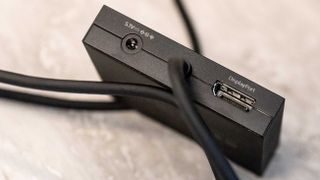
Connection (to PC):USB Type-A, DisplayPort 1.4Connection (to PSVR2):USB Type-CConnection (to controllers):Bluetooth 4.0 or laterDimensions:approx. 79 x 79 x 17 mmPrice:$60|£50
The choice of DisplayPort 1.4 is an odd one, as HDMI sockets are much more common (DisplayPort being an open standard may have something to do with it) and you may find yourself picking up a USB-C to DisplayPort adapter in order to use the PSVR adapter—although Sony says this won’t officially work and it needs to be a native port, something that rules out most gaming laptops. It feels a bit like you’re using an outdated piece of equipment that requires multiple adapters strung together to coax into life, though it’s still better than the six or so USB cables early Oculus Rift headsets, with their extra sensors, required.
You’ll also need Bluetooth to connect the Sony hand controllers to your PC. It needs to be Bluetooth 4.0 or later, which most PCs powerful enough to think about VR should be able to manage. Theofficial compatibility listfor USB Bluetooth dongles is very small though, just four products long, and Sony has decided not to incorporate Bluetooth into the adapter, which it could have in order to make it as much like a PS5 as possible.
Your GPU also matters, with Sony recommending a GeForce GTX 1650 / Radeon RX 5500XT or later (the RX 5700 is about PS5 level, though opinion on that varies wildly), and this needs to be paired with a Core i5 7600 / Ryzen 3 3100 or better. These specs sit between those for the Valve Index (lower) and the Meta Quest 3 (higher), though the specs for the games themselves are more important and will outstrip these basics.
Image1of2(Image credit: Future)(Image credit: Future)
Image1of2(Image credit: Future)(Image credit: Future)
Image1of2
(Image credit: Future)(Image credit: Future)
(Image credit: Future)(Image credit: Future)
(Image credit: Future)
(Image credit: Future)
(Image credit: Future)
(Image credit: Future)
(Image credit: Future)

(Image credit: Future)
(Image credit: Future)
(Image credit: Future)
(Image credit: Future)
(Image credit: Future)
Inside, you’ll find the thing that sets the PS VR 2 apart from the Quest and Index—120 Hz OLED screens. They’re not quite as high-res as those in the Quest 3, or as fast as those in the Index, but the fact you get vibrant colours and proper blacks (all the reasons OLED gaming monitors get pushed so hard) should help make the PS VR 2 one of the best, if not the best, PC VR headsets available today.
The instruction manual in the box is little more than a folded piece of paper, but setup means installing the SteamVR and PlayStation VR 2 apps in Steam, which are both free, and you’ll need a game or two as well.Half-Life Alyx is pretty good. Next, you pair the hand controllers with your PC’s Bluetooth, which involves holding down two buttons on each controller and pairing through Windows Settings. They connected immediately on a laptop packing Bluetooth 5.4, which is encouraging.
The system I used to test the PS VR 2 adapter was the one with the biggest GPU available to me, the GeForce RTX 4090 in the ludicrously expensive Acer Predator Helios 18. It doesn’t have a full-size DisplayPort socket, however, so I used an adapter from a USB-C port in exactly the way Sony says not to do. On first launching the PlayStation VR 2 app in Steam it runs an install script and downloads some .NET components, then goes through a setup checklist that ended for me with a ‘the DisplayPort cable is not connected’ message.
Image1of3(Image credit: Future)(Image credit: Future)(Image credit: Future)
Image1of3(Image credit: Future)(Image credit: Future)(Image credit: Future)
Image1of3
(Image credit: Future)(Image credit: Future)(Image credit: Future)
(Image credit: Future)(Image credit: Future)(Image credit: Future)
(Image credit: Future)
(Image credit: Future)
(Image credit: Future)
(Image credit: Future)
(Image credit: Future)
(Image credit: Future)
(Image credit: Future)
(Image credit: Future)
(Image credit: Future)
(Image credit: Future)
(Image credit: Future)
(Image credit: Future)
(Image credit: Future)
(Image credit: Future)
(Image credit: Future)
This turned out to be because it wasn’t: the cable had slipped out of the USB-C adapter, and pushing it back in produced a ‘connected’ screen. Suck it, Sony.
Firing up Alyx, I’m reminded of just how good VR can be when it’s done well. At the very beginning of the game (it leaves you in an empty space for a worryingly long time while it’s loading, which led me to wonder if it was all working correctly—a ‘loading’ message wouldn’t have gone amiss) when you’re standing on your City 17 balcony watching the pigeons and Combine scurry about, there was some jerking in the complex scene as the frame rate tanked.
This passed after I teleported inside, and while there were occasional glitches in frame rate, everything from that point on passed fairly smoothly, including bringing up the menu to save the game, and the SteamVR overlay. My major issue with the PS VR 2 is that I seem to be constantly adjusting it to sharpen up text, prevent the rubber surround from squishing my nose or poking me in the eye, and striking a balance between the centre being in focus or the edges being blurry.
Buy if…✅You already have a PS5 VR setup and want to broaden your games library:There are maybe five PSVR2 games worth playing and a plethora on SteamVR.
Buy if…
✅You already have a PS5 VR setup and want to broaden your games library:There are maybe five PSVR2 games worth playing and a plethora on SteamVR.
✅You already have a PS5 VR setup and want to broaden your games library:There are maybe five PSVR2 games worth playing and a plethora on SteamVR.
Don’t buy if…❌You’re looking for a PC-specific VR solution:At least not yet.
Don’t buy if…
❌You’re looking for a PC-specific VR solution:At least not yet.
❌You’re looking for a PC-specific VR solution:At least not yet.
The great thing about the PlayStation VR 2 on the PlayStation 5 is that it just works. It connects over a single cable, which is a generous length. You press a button on the hand controllers and they connect first time. And the software is excellent, allowing you to pop up an overlay any time you like. It’s a bit finicky about space, preferring you to play every game standing in the centre of a football field, but that’s true of many VR options. In my experience, the PC adapter and Steam VR come pretty close to replicating this, though Steam seems less concerned with furniture positioning.
There are horror stories online about Bluetooth not connecting, hand controllers freezing, DisplayPort errors and more. For me, it all worked first time, though I was using a monster laptop to test it with.
Any recommendation of this as a PC VR system is going to come with a lot of the word ‘if’.Ifyou already own a PS5, andifyou already own a PS VR 2, andifyou’re really into VR games, andifthe selection on PlayStation isn’t giving you everything you want, andifyou have a good enough gaming PC, then this adapter is a much better idea than buying a second headset. It might, however, be one firmware update away from being the best PC VR hat, and if Sony can iron out any connectivity glitches and keep the price down, there’s no reason why it couldn’t ascend to that crown.
The Verdict65Read our review policyPlayStation VR2 PC AdapterIf you' ve got all the necessary kit already—PS5, PS VR 2, gaming PC that hits the right specs, a love of VR—then this adapter makes sense, but for the vast majority of PC gamers a Quest or Index would probably be a better buy until a firmware update makes it truly great.
The Verdict
The Verdict
65Read our review policyPlayStation VR2 PC AdapterIf you' ve got all the necessary kit already—PS5, PS VR 2, gaming PC that hits the right specs, a love of VR—then this adapter makes sense, but for the vast majority of PC gamers a Quest or Index would probably be a better buy until a firmware update makes it truly great.
65Read our review policy
65
PlayStation VR2 PC AdapterIf you' ve got all the necessary kit already—PS5, PS VR 2, gaming PC that hits the right specs, a love of VR—then this adapter makes sense, but for the vast majority of PC gamers a Quest or Index would probably be a better buy until a firmware update makes it truly great.
PlayStation VR2 PC Adapter
If you' ve got all the necessary kit already—PS5, PS VR 2, gaming PC that hits the right specs, a love of VR—then this adapter makes sense, but for the vast majority of PC gamers a Quest or Index would probably be a better buy until a firmware update makes it truly great.
TOPICSHardware
TOPICS
LatestThis Jinx-inspired gaming PC is my favorite of CES 2025 and I’m head over heels for the hardwareHarrowing report alleges years of horrific abuse at Brandoville Studios, an Indonesian support studio that worked on Assassin’s Creed Shadows and The Last of Us RemakeTencent says it’s not a Chinese military company and is willing to sue the US Department of Defense if it isn’t removed from a blacklistSee more latest►
LatestThis Jinx-inspired gaming PC is my favorite of CES 2025 and I’m head over heels for the hardwareHarrowing report alleges years of horrific abuse at Brandoville Studios, an Indonesian support studio that worked on Assassin’s Creed Shadows and The Last of Us RemakeTencent says it’s not a Chinese military company and is willing to sue the US Department of Defense if it isn’t removed from a blacklistSee more latest►
LatestThis Jinx-inspired gaming PC is my favorite of CES 2025 and I’m head over heels for the hardwareHarrowing report alleges years of horrific abuse at Brandoville Studios, an Indonesian support studio that worked on Assassin’s Creed Shadows and The Last of Us RemakeTencent says it’s not a Chinese military company and is willing to sue the US Department of Defense if it isn’t removed from a blacklistSee more latest►
Latest
This Jinx-inspired gaming PC is my favorite of CES 2025 and I’m head over heels for the hardwareHarrowing report alleges years of horrific abuse at Brandoville Studios, an Indonesian support studio that worked on Assassin’s Creed Shadows and The Last of Us RemakeTencent says it’s not a Chinese military company and is willing to sue the US Department of Defense if it isn’t removed from a blacklist
This Jinx-inspired gaming PC is my favorite of CES 2025 and I’m head over heels for the hardware
This Jinx-inspired gaming PC is my favorite of CES 2025 and I’m head over heels for the hardware
Harrowing report alleges years of horrific abuse at Brandoville Studios, an Indonesian support studio that worked on Assassin’s Creed Shadows and The Last of Us Remake
Harrowing report alleges years of horrific abuse at Brandoville Studios, an Indonesian support studio that worked on Assassin’s Creed Shadows and The Last of Us Remake
Tencent says it’s not a Chinese military company and is willing to sue the US Department of Defense if it isn’t removed from a blacklist
Tencent says it’s not a Chinese military company and is willing to sue the US Department of Defense if it isn’t removed from a blacklist
See more latest►
Most PopularTurtle Beach Stealth Pivot reviewIkea Matchspel gaming chair reviewASRock DeskMini X600 reviewZotac Zbox Magnus EN374070C reviewMinisforum AtomMan G7 Ti reviewSamsung Galaxy Book4 Ultra reviewNoctua NH-D15 G2 reviewGulikit KK3 Max reviewBallionaire reviewMarvel Rivals reviewBe Quiet! Dark Rock 5 review
Most PopularTurtle Beach Stealth Pivot reviewIkea Matchspel gaming chair reviewASRock DeskMini X600 reviewZotac Zbox Magnus EN374070C reviewMinisforum AtomMan G7 Ti reviewSamsung Galaxy Book4 Ultra reviewNoctua NH-D15 G2 reviewGulikit KK3 Max reviewBallionaire reviewMarvel Rivals reviewBe Quiet! Dark Rock 5 review
Most PopularTurtle Beach Stealth Pivot reviewIkea Matchspel gaming chair reviewASRock DeskMini X600 reviewZotac Zbox Magnus EN374070C reviewMinisforum AtomMan G7 Ti reviewSamsung Galaxy Book4 Ultra reviewNoctua NH-D15 G2 reviewGulikit KK3 Max reviewBallionaire reviewMarvel Rivals reviewBe Quiet! Dark Rock 5 review
Most Popular
Turtle Beach Stealth Pivot review
Ikea Matchspel gaming chair review
ASRock DeskMini X600 review
Zotac Zbox Magnus EN374070C review
Minisforum AtomMan G7 Ti review
Samsung Galaxy Book4 Ultra review
Noctua NH-D15 G2 review
Gulikit KK3 Max review
Ballionaire review
Marvel Rivals review
Be Quiet! Dark Rock 5 review
HARDWARE BUYING GUIDESLATEST GAME REVIEWS1Best Steam Deck accessories in Australia for 2025: Our favorite docks, powerbanks and gamepads2Best graphics card for laptops: the mobile GPUs I’d want in my next gaming laptop3Best mini PCs in 2025: The compact computers I love the most4Best 14-inch gaming laptop: The top compact gaming laptops I’ve held in these hands5Best Mini-ITX motherboards in 2025: My pick from all the mini mobo marvels I’ve tested1Thank Goodness You’re Here! review: An anarchic treasure trove of jokes and skits2Shiren the Wanderer: The Mystery Dungeon of Serpentcoil Island review—like juggling chainsaws on horseback3WD Black SN850X 8 TB NVMe SSD review4Ikea Utespelare desk review5Asus ROG Harpe Ace Mini wireless mouse review
HARDWARE BUYING GUIDESLATEST GAME REVIEWS1Best Steam Deck accessories in Australia for 2025: Our favorite docks, powerbanks and gamepads2Best graphics card for laptops: the mobile GPUs I’d want in my next gaming laptop3Best mini PCs in 2025: The compact computers I love the most4Best 14-inch gaming laptop: The top compact gaming laptops I’ve held in these hands5Best Mini-ITX motherboards in 2025: My pick from all the mini mobo marvels I’ve tested1Thank Goodness You’re Here! review: An anarchic treasure trove of jokes and skits2Shiren the Wanderer: The Mystery Dungeon of Serpentcoil Island review—like juggling chainsaws on horseback3WD Black SN850X 8 TB NVMe SSD review4Ikea Utespelare desk review5Asus ROG Harpe Ace Mini wireless mouse review
HARDWARE BUYING GUIDESLATEST GAME REVIEWS1Best Steam Deck accessories in Australia for 2025: Our favorite docks, powerbanks and gamepads2Best graphics card for laptops: the mobile GPUs I’d want in my next gaming laptop3Best mini PCs in 2025: The compact computers I love the most4Best 14-inch gaming laptop: The top compact gaming laptops I’ve held in these hands5Best Mini-ITX motherboards in 2025: My pick from all the mini mobo marvels I’ve tested1Thank Goodness You’re Here! review: An anarchic treasure trove of jokes and skits2Shiren the Wanderer: The Mystery Dungeon of Serpentcoil Island review—like juggling chainsaws on horseback3WD Black SN850X 8 TB NVMe SSD review4Ikea Utespelare desk review5Asus ROG Harpe Ace Mini wireless mouse review
HARDWARE BUYING GUIDESLATEST GAME REVIEWS1Best Steam Deck accessories in Australia for 2025: Our favorite docks, powerbanks and gamepads2Best graphics card for laptops: the mobile GPUs I’d want in my next gaming laptop3Best mini PCs in 2025: The compact computers I love the most4Best 14-inch gaming laptop: The top compact gaming laptops I’ve held in these hands5Best Mini-ITX motherboards in 2025: My pick from all the mini mobo marvels I’ve tested1Thank Goodness You’re Here! review: An anarchic treasure trove of jokes and skits2Shiren the Wanderer: The Mystery Dungeon of Serpentcoil Island review—like juggling chainsaws on horseback3WD Black SN850X 8 TB NVMe SSD review4Ikea Utespelare desk review5Asus ROG Harpe Ace Mini wireless mouse review
HARDWARE BUYING GUIDESLATEST GAME REVIEWS
1Best Steam Deck accessories in Australia for 2025: Our favorite docks, powerbanks and gamepads
1Best Steam Deck accessories in Australia for 2025: Our favorite docks, powerbanks and gamepads
1
Best Steam Deck accessories in Australia for 2025: Our favorite docks, powerbanks and gamepads
2Best graphics card for laptops: the mobile GPUs I’d want in my next gaming laptop
2Best graphics card for laptops: the mobile GPUs I’d want in my next gaming laptop
2
Best graphics card for laptops: the mobile GPUs I’d want in my next gaming laptop
3Best mini PCs in 2025: The compact computers I love the most
3Best mini PCs in 2025: The compact computers I love the most
3
Best mini PCs in 2025: The compact computers I love the most
4Best 14-inch gaming laptop: The top compact gaming laptops I’ve held in these hands
4Best 14-inch gaming laptop: The top compact gaming laptops I’ve held in these hands
4
Best 14-inch gaming laptop: The top compact gaming laptops I’ve held in these hands
5Best Mini-ITX motherboards in 2025: My pick from all the mini mobo marvels I’ve tested
5Best Mini-ITX motherboards in 2025: My pick from all the mini mobo marvels I’ve tested
5
Best Mini-ITX motherboards in 2025: My pick from all the mini mobo marvels I’ve tested
1Thank Goodness You’re Here! review: An anarchic treasure trove of jokes and skits
1Thank Goodness You’re Here! review: An anarchic treasure trove of jokes and skits
1
Thank Goodness You’re Here! review: An anarchic treasure trove of jokes and skits
2Shiren the Wanderer: The Mystery Dungeon of Serpentcoil Island review—like juggling chainsaws on horseback
2Shiren the Wanderer: The Mystery Dungeon of Serpentcoil Island review—like juggling chainsaws on horseback
2
Shiren the Wanderer: The Mystery Dungeon of Serpentcoil Island review—like juggling chainsaws on horseback
3WD Black SN850X 8 TB NVMe SSD review
3WD Black SN850X 8 TB NVMe SSD review
3
WD Black SN850X 8 TB NVMe SSD review
4Ikea Utespelare desk review
4Ikea Utespelare desk review
4
Ikea Utespelare desk review
5Asus ROG Harpe Ace Mini wireless mouse review
5Asus ROG Harpe Ace Mini wireless mouse review
5
Asus ROG Harpe Ace Mini wireless mouse review
