Our VerdictIt’s shocking to me that you can now get a pro controller with hall effect sticks and triggers for the same price as a regular Xbox controller. This one is a no brainer.
Our VerdictIt’s shocking to me that you can now get a pro controller with hall effect sticks and triggers for the same price as a regular Xbox controller. This one is a no brainer.
Our Verdict
Our Verdict
It’s shocking to me that you can now get a pro controller with hall effect sticks and triggers for the same price as a regular Xbox controller. This one is a no brainer.
ForStupidly affordable for a pro controllerAll the essential pro features you needEasy customisabilityAgainstNo swappable thumbsticksRear buttons aren’t particularly ergonomicNo charging dock support
ForStupidly affordable for a pro controllerAll the essential pro features you needEasy customisability
AgainstNo swappable thumbsticksRear buttons aren’t particularly ergonomicNo charging dock support
PC Gamer’s got your backOur experienced team dedicates many hours to every review, to really get to the heart of what matters most to you.Find out more about how we evaluate games and hardware.
PC Gamer’s got your backOur experienced team dedicates many hours to every review, to really get to the heart of what matters most to you.Find out more about how we evaluate games and hardware.
$40.28View$49.99$42.99View$54.99ViewShow More DealsWe check over 250 million products every day for the best prices
$40.28View$49.99$42.99View$54.99ViewShow More DealsWe check over 250 million products every day for the best prices
$40.28View$49.99$42.99View$54.99View
$40.28View
$40.28View


$40.28View
$40.28
$40.28
$49.99$42.99View
$49.99$42.99View

$49.99$42.99View
$49.99$42.99
$42.99
$54.99View
$54.99View

$54.99View
$54.99
$54.99
Show More Deals
Show More Deals
We check over 250 million products every day for the best prices
We check over 250 million products every day for the best prices
I recently reviewed the $99PowerA OPS v3 Pro, calling it one of the best value-for-money pro controllers in 2024. But I may have spoken too soon.PowerA’s OPS v1, priced at just $50, costs pretty much the same as a standard Xbox PC controller but delivers much of what the OPS v3 offers—minus a few premium features. After a few weeks with the OPS v1, I’m honestly questioning why I’d choose its pricier sibling over it.
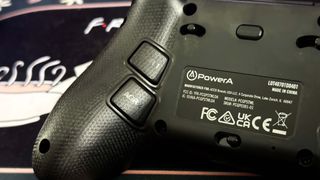
The OPS v1 looks like an Xbox controller with additional buttons on its face and back. The smooth, solid plastic housing feels great, but there are some key differences compared to the OPS v3. Most notably, the OPS v1 lacks the aggressive, textured rubber coating on the grips. Does it matter? Not really—unless you have exceptionally sweaty hands. I still found the controller comfortable to hold, and its smooth finish is easier to keep clean. There’s also a subtle grip on the underside, courtesy of micro-etched PowerA logos.
Another omission is RGB lighting. While the wraparound RGB on the OPS v3 was eye-catching, I didn’t miss it. Similarly, the OPS v1 drops the two remappable shoulder buttons found on the v3, leaving you with just four back buttons—more than enough for most players. Lastly, the OPS v1 lacks the magnetic connector ports for the OPS v3’s charging dock.
Internally, the OPS v1 retains some of the OPS v3’s standout features, like Hall effect triggers and thumbsticks, so stick drift isn’t a concern. The triggers feel smooth and include a 3-way trigger lock for adjustable playstyles. However, the thumbsticks lack the v3’s twist-to-adjust height mechanism. While you can swap out the stick caps (a few are included in the box), that’s the extent of customization here.
OPS v1 specs(Image credit: Future)Compatibility:Windows 11, Cloud and Mobile devicesConnectivity:2.4 GHz, Bluetooth, USB wiredPorts:USB-CTriggers:Hall effectThumbsticks:Hall effectThumbstick layout:Asymmetric (Xbox-style)Weight:269 gPrice:$50|£50|AUD$89
OPS v1 specs
(Image credit: Future)Compatibility:Windows 11, Cloud and Mobile devicesConnectivity:2.4 GHz, Bluetooth, USB wiredPorts:USB-CTriggers:Hall effectThumbsticks:Hall effectThumbstick layout:Asymmetric (Xbox-style)Weight:269 gPrice:$50|£50|AUD$89
(Image credit: Future)
Compatibility:Windows 11, Cloud and Mobile devicesConnectivity:2.4 GHz, Bluetooth, USB wiredPorts:USB-CTriggers:Hall effectThumbsticks:Hall effectThumbstick layout:Asymmetric (Xbox-style)Weight:269 gPrice:$50|£50|AUD$89
Another downgrade is the absence of tactile mechanical face buttons. While the OPS v1’s buttons are still crisp and responsive, they lack the premium feel of the v3’s. As with the OPS v3, I found using all four back buttons simultaneously awkward due to finger placement. To maintain a comfortable grip, I had to choose between the top or bottom pair, which made me miss the extra shoulder buttons on the OPS v3. Your experience may vary depending on your hand size and dexterity.
Customization is nearly identical to the OPS v3, however, with options for on-the-fly remapping or using PowerA’s PC app. The app is straightforward, and you can navigate it using the controller itself—a nice touch compared to apps that require a mouse. Still, on-the-fly remapping is more convenient: hold the remap button on the back, press the source button, then the destination button, and you’re done—all without leaving your game. There’s also a Turbo mode that increases input speed for the ABXY and LB/RB buttons, though I didn’t notice much difference in actual play. Honestly, it’s a niche feature that most players probably won’t bother with, but one that obviously isn’t adding to the pricetag.
The OPS v1 supports 2.4GHz wireless, USB wired, and Bluetooth connections, making it compatible with PC, Mac, smart devices, and smart TVs. The Bluetooth feature is geared toward cloud gaming on smartphones, tablets and smart TV’s running Google or Android TV, though I didn’t have one on hand to test. On my gaming PC, however, the 2.4GHz connection with the included dongle worked flawlessly.
Unlike the OPS v3, which sometimes disconnected mid-session, the OPS v1 stayed solidly connected once paired. However, pairing wasn’t always seamless—sometimes the controller wouldn’t sync with the dongle when I turned it on to play. I’d have to unplug and replug the dongle to reestablish the connection but that was about the extent of my issues.
Image1of7(Image credit: Future)(Image credit: Future)(Image credit: Future)(Image credit: Future)(Image credit: Future)(Image credit: Future)(Image credit: Future)
Image1of7(Image credit: Future)(Image credit: Future)(Image credit: Future)(Image credit: Future)(Image credit: Future)(Image credit: Future)(Image credit: Future)
Image1of7
(Image credit: Future)(Image credit: Future)(Image credit: Future)(Image credit: Future)(Image credit: Future)(Image credit: Future)(Image credit: Future)
(Image credit: Future)(Image credit: Future)(Image credit: Future)(Image credit: Future)(Image credit: Future)(Image credit: Future)(Image credit: Future)
(Image credit: Future)
(Image credit: Future)
(Image credit: Future)
(Image credit: Future)
(Image credit: Future)

(Image credit: Future)
(Image credit: Future)
(Image credit: Future)
(Image credit: Future)
(Image credit: Future)
(Image credit: Future)
(Image credit: Future)
(Image credit: Future)
(Image credit: Future)
(Image credit: Future)
(Image credit: Future)
(Image credit: Future)
(Image credit: Future)
(Image credit: Future)
(Image credit: Future)
(Image credit: Future)
(Image credit: Future)
(Image credit: Future)
(Image credit: Future)
(Image credit: Future)
(Image credit: Future)
(Image credit: Future)
(Image credit: Future)
(Image credit: Future)
(Image credit: Future)
(Image credit: Future)
(Image credit: Future)
(Image credit: Future)
(Image credit: Future)
(Image credit: Future)
Buy if…✅You want an affordable controller with extras:The OPS v1 is an outstanding, feature-rich controller for the same price as the basic Microsoft Xbox pad.✅Your existing Xbox PC controller has drift:If you’re looking for a new pad that will give you peace of mind against the dreaded drift, the Hall effect sticks in the OPS v1 will be just the ticket.
Buy if…
✅You want an affordable controller with extras:The OPS v1 is an outstanding, feature-rich controller for the same price as the basic Microsoft Xbox pad.✅Your existing Xbox PC controller has drift:If you’re looking for a new pad that will give you peace of mind against the dreaded drift, the Hall effect sticks in the OPS v1 will be just the ticket.
✅You want an affordable controller with extras:The OPS v1 is an outstanding, feature-rich controller for the same price as the basic Microsoft Xbox pad.✅Your existing Xbox PC controller has drift:If you’re looking for a new pad that will give you peace of mind against the dreaded drift, the Hall effect sticks in the OPS v1 will be just the ticket.
Don’t buy if…❌You need a really pro controller with swappable parts:The OPS v1 is necessarily more basic than the v3 Pro, and so you are missing those extra luxury customisation features.❌You’re a streamer who needs the flashiest gear possible for on camera:With no RGB LED game, and an otherwise restrained look, the basic OPS v1 is not going to get you noticed. But do you really care?
Don’t buy if…
❌You need a really pro controller with swappable parts:The OPS v1 is necessarily more basic than the v3 Pro, and so you are missing those extra luxury customisation features.❌You’re a streamer who needs the flashiest gear possible for on camera:With no RGB LED game, and an otherwise restrained look, the basic OPS v1 is not going to get you noticed. But do you really care?
❌You need a really pro controller with swappable parts:The OPS v1 is necessarily more basic than the v3 Pro, and so you are missing those extra luxury customisation features.❌You’re a streamer who needs the flashiest gear possible for on camera:With no RGB LED game, and an otherwise restrained look, the basic OPS v1 is not going to get you noticed. But do you really care?
Battery life is where the OPS v1 takes a slight hit compared to the v3, though, lasting around 20 hours versus 30. This is puzzling, given the absence of RGB lighting, but 20 hours is still excellent compared to something like the PlayStation DualSense Edge’s meagre 6-hour lifespan. You don’t have to worry about the OPS v1 dying on you though I would have loved some sort of battery indicator to let you know how much charge is left. Unfortunately, the OPS v1 doesn’t support the OPS v3’s magnetic charging dock, so you’ll need to charge it manually. It would have been nice if the port remained and you could buy the charging puck as an optional extra.
On paper, the OPS v1 might seem like a very stripped-down version of the OPS v3, but at just $50, it’s an absolute steal. It’s solidly built, offers tri-mode connectivity, remappable back buttons, Hall effect triggers and sticks, and great battery life. Even without some of the v3’s flashier features, the OPS v1 delivers durability and control well above a standard Xbox controller—for just a few extra bucks.
At this price, it’s a no-brainer. Whether you’re a pro gamer or just someone looking for a more reliable, feature-packed controller with customisation and great battery life, the OPS v1 is an easy recommendation. Fly, you fools!
PowerA OPS v1: Price Comparison
$40.28View$49.99$42.99View$43.99View$54.99View
$40.28View
$40.28View
$40.28View
$40.28
$40.28
$49.99$42.99View
$49.99$42.99View
$49.99$42.99View
$49.99$42.99
$42.99
$43.99View
$43.99View

$43.99View
$43.99
$43.99
$54.99View
$54.99View
$54.99View
$54.99
$54.99
We check over 250 million products every day for the best prices

The Verdict89Read our review policyPowerA OPS v1It’s shocking to me that you can now get a pro controller with hall effect sticks and triggers for the same price as a regular Xbox controller. This one is a no brainer.
The Verdict
The Verdict
89Read our review policyPowerA OPS v1It’s shocking to me that you can now get a pro controller with hall effect sticks and triggers for the same price as a regular Xbox controller. This one is a no brainer.
89Read our review policy
89
PowerA OPS v1It’s shocking to me that you can now get a pro controller with hall effect sticks and triggers for the same price as a regular Xbox controller. This one is a no brainer.
PowerA OPS v1
It’s shocking to me that you can now get a pro controller with hall effect sticks and triggers for the same price as a regular Xbox controller. This one is a no brainer.
TOPICSHardware
TOPICS
LatestIf you’re trying to convince me your ‘companionship’ robot is ‘lifelike’, maybe don’t rip her face off in the demo videoSquare Enix launches new anti-harassment policy to protect its employees and partners from abusive fansThe Sims begins its 25th anniversary celebration next week with a Behind The Sims episode of news and announcementsSee more latest►
LatestIf you’re trying to convince me your ‘companionship’ robot is ‘lifelike’, maybe don’t rip her face off in the demo videoSquare Enix launches new anti-harassment policy to protect its employees and partners from abusive fansThe Sims begins its 25th anniversary celebration next week with a Behind The Sims episode of news and announcementsSee more latest►
LatestIf you’re trying to convince me your ‘companionship’ robot is ‘lifelike’, maybe don’t rip her face off in the demo videoSquare Enix launches new anti-harassment policy to protect its employees and partners from abusive fansThe Sims begins its 25th anniversary celebration next week with a Behind The Sims episode of news and announcementsSee more latest►
Latest
If you’re trying to convince me your ‘companionship’ robot is ‘lifelike’, maybe don’t rip her face off in the demo videoSquare Enix launches new anti-harassment policy to protect its employees and partners from abusive fansThe Sims begins its 25th anniversary celebration next week with a Behind The Sims episode of news and announcements
If you’re trying to convince me your ‘companionship’ robot is ‘lifelike’, maybe don’t rip her face off in the demo video
If you’re trying to convince me your ‘companionship’ robot is ‘lifelike’, maybe don’t rip her face off in the demo video
Square Enix launches new anti-harassment policy to protect its employees and partners from abusive fans
Square Enix launches new anti-harassment policy to protect its employees and partners from abusive fans
The Sims begins its 25th anniversary celebration next week with a Behind The Sims episode of news and announcements
The Sims begins its 25th anniversary celebration next week with a Behind The Sims episode of news and announcements
See more latest►
Most PopularTurtle Beach Stealth Pivot reviewIkea Matchspel gaming chair reviewASRock DeskMini X600 reviewZotac Zbox Magnus EN374070C reviewMinisforum AtomMan G7 Ti reviewSamsung Galaxy Book4 Ultra reviewNoctua NH-D15 G2 reviewGulikit KK3 Max reviewBallionaire reviewMarvel Rivals reviewBe Quiet! Dark Rock 5 review
Most PopularTurtle Beach Stealth Pivot reviewIkea Matchspel gaming chair reviewASRock DeskMini X600 reviewZotac Zbox Magnus EN374070C reviewMinisforum AtomMan G7 Ti reviewSamsung Galaxy Book4 Ultra reviewNoctua NH-D15 G2 reviewGulikit KK3 Max reviewBallionaire reviewMarvel Rivals reviewBe Quiet! Dark Rock 5 review
Most PopularTurtle Beach Stealth Pivot reviewIkea Matchspel gaming chair reviewASRock DeskMini X600 reviewZotac Zbox Magnus EN374070C reviewMinisforum AtomMan G7 Ti reviewSamsung Galaxy Book4 Ultra reviewNoctua NH-D15 G2 reviewGulikit KK3 Max reviewBallionaire reviewMarvel Rivals reviewBe Quiet! Dark Rock 5 review
Most Popular
Turtle Beach Stealth Pivot review
Ikea Matchspel gaming chair review
ASRock DeskMini X600 review
Zotac Zbox Magnus EN374070C review
Minisforum AtomMan G7 Ti review
Samsung Galaxy Book4 Ultra review
Noctua NH-D15 G2 review
Gulikit KK3 Max review
Ballionaire review
Marvel Rivals review
Be Quiet! Dark Rock 5 review
HARDWARE BUYING GUIDESLATEST GAME REVIEWS1Best Steam Deck accessories in Australia for 2025: Our favorite docks, powerbanks and gamepads2Best graphics card for laptops: the mobile GPUs I’d want in my next gaming laptop3Best mini PCs in 2025: The compact computers I love the most4Best 14-inch gaming laptop: The top compact gaming laptops I’ve held in these hands5Best Mini-ITX motherboards in 2025: My pick from all the mini mobo marvels I’ve tested1Thank Goodness You’re Here! review: An anarchic treasure trove of jokes and skits2Shiren the Wanderer: The Mystery Dungeon of Serpentcoil Island review—like juggling chainsaws on horseback3WD Black SN850X 8 TB NVMe SSD review4Ikea Utespelare desk review5Asus ROG Harpe Ace Mini wireless mouse review
HARDWARE BUYING GUIDESLATEST GAME REVIEWS1Best Steam Deck accessories in Australia for 2025: Our favorite docks, powerbanks and gamepads2Best graphics card for laptops: the mobile GPUs I’d want in my next gaming laptop3Best mini PCs in 2025: The compact computers I love the most4Best 14-inch gaming laptop: The top compact gaming laptops I’ve held in these hands5Best Mini-ITX motherboards in 2025: My pick from all the mini mobo marvels I’ve tested1Thank Goodness You’re Here! review: An anarchic treasure trove of jokes and skits2Shiren the Wanderer: The Mystery Dungeon of Serpentcoil Island review—like juggling chainsaws on horseback3WD Black SN850X 8 TB NVMe SSD review4Ikea Utespelare desk review5Asus ROG Harpe Ace Mini wireless mouse review
HARDWARE BUYING GUIDESLATEST GAME REVIEWS1Best Steam Deck accessories in Australia for 2025: Our favorite docks, powerbanks and gamepads2Best graphics card for laptops: the mobile GPUs I’d want in my next gaming laptop3Best mini PCs in 2025: The compact computers I love the most4Best 14-inch gaming laptop: The top compact gaming laptops I’ve held in these hands5Best Mini-ITX motherboards in 2025: My pick from all the mini mobo marvels I’ve tested1Thank Goodness You’re Here! review: An anarchic treasure trove of jokes and skits2Shiren the Wanderer: The Mystery Dungeon of Serpentcoil Island review—like juggling chainsaws on horseback3WD Black SN850X 8 TB NVMe SSD review4Ikea Utespelare desk review5Asus ROG Harpe Ace Mini wireless mouse review
HARDWARE BUYING GUIDESLATEST GAME REVIEWS1Best Steam Deck accessories in Australia for 2025: Our favorite docks, powerbanks and gamepads2Best graphics card for laptops: the mobile GPUs I’d want in my next gaming laptop3Best mini PCs in 2025: The compact computers I love the most4Best 14-inch gaming laptop: The top compact gaming laptops I’ve held in these hands5Best Mini-ITX motherboards in 2025: My pick from all the mini mobo marvels I’ve tested1Thank Goodness You’re Here! review: An anarchic treasure trove of jokes and skits2Shiren the Wanderer: The Mystery Dungeon of Serpentcoil Island review—like juggling chainsaws on horseback3WD Black SN850X 8 TB NVMe SSD review4Ikea Utespelare desk review5Asus ROG Harpe Ace Mini wireless mouse review
HARDWARE BUYING GUIDESLATEST GAME REVIEWS
1Best Steam Deck accessories in Australia for 2025: Our favorite docks, powerbanks and gamepads
1Best Steam Deck accessories in Australia for 2025: Our favorite docks, powerbanks and gamepads
1
Best Steam Deck accessories in Australia for 2025: Our favorite docks, powerbanks and gamepads
2Best graphics card for laptops: the mobile GPUs I’d want in my next gaming laptop
2Best graphics card for laptops: the mobile GPUs I’d want in my next gaming laptop
2
Best graphics card for laptops: the mobile GPUs I’d want in my next gaming laptop
3Best mini PCs in 2025: The compact computers I love the most
3Best mini PCs in 2025: The compact computers I love the most
3
Best mini PCs in 2025: The compact computers I love the most
4Best 14-inch gaming laptop: The top compact gaming laptops I’ve held in these hands
4Best 14-inch gaming laptop: The top compact gaming laptops I’ve held in these hands
4
Best 14-inch gaming laptop: The top compact gaming laptops I’ve held in these hands
5Best Mini-ITX motherboards in 2025: My pick from all the mini mobo marvels I’ve tested
5Best Mini-ITX motherboards in 2025: My pick from all the mini mobo marvels I’ve tested
5
Best Mini-ITX motherboards in 2025: My pick from all the mini mobo marvels I’ve tested
1Thank Goodness You’re Here! review: An anarchic treasure trove of jokes and skits
1Thank Goodness You’re Here! review: An anarchic treasure trove of jokes and skits
1
Thank Goodness You’re Here! review: An anarchic treasure trove of jokes and skits
2Shiren the Wanderer: The Mystery Dungeon of Serpentcoil Island review—like juggling chainsaws on horseback
2Shiren the Wanderer: The Mystery Dungeon of Serpentcoil Island review—like juggling chainsaws on horseback
2
Shiren the Wanderer: The Mystery Dungeon of Serpentcoil Island review—like juggling chainsaws on horseback
3WD Black SN850X 8 TB NVMe SSD review
3WD Black SN850X 8 TB NVMe SSD review
3
WD Black SN850X 8 TB NVMe SSD review
4Ikea Utespelare desk review
4Ikea Utespelare desk review
4
Ikea Utespelare desk review
5Asus ROG Harpe Ace Mini wireless mouse review
5Asus ROG Harpe Ace Mini wireless mouse review
5
Asus ROG Harpe Ace Mini wireless mouse review
