Our VerdictWe had high hopes based on Thermaltake’s previous 27-inch gaming panel. But the switch from IPS to VA technology has gone badly wrong. This 32 incher suffers from terrible pixel response to the point where it’s very hard to recommend.ForLarge 32-inch panel size170Hz refreshLots of physical adjustabilityAgainstTerrible pixel responseLimited connectivityNot a true HDR displayPC Gamer’s got your backOur experienced team dedicates many hours to every review, to really get to the heart of what matters most to you.Find out more about how we evaluate games and hardware.Two monitors. One brand. And a whole world of difference. Hopes were high for the new 32-inch Thermaltake TGM-V32CQ, after all, its smaller 27-inch sibling, theTGM-I27FQ, wowed us late last year. It doesn’t break any records, but it does deliver a great all-round 1440p gaming experience at a very reasonable price.If the TGM-V32CQ can do the same, Thermaltake is on to a winner, especially given the affordable sub-$250 pricing. But, at risk of giving away too much, too soon, it doesn’t even come close.The reason isn’t this monitor’s basic concept. Admittedly, we’re not huge fans of 32-inch 1440p panels from a pure pixel density perspective. Likewise, the curved panel in a conventional 16:9 monitor like this won’t be to everyone’s taste. But those things are somewhat a matter of preference. For sure, you know exactly what you’re getting even before you buy.Instead, the problem with the monitor is the use of a VA panel. Now, VA panels have arguably become unfairly maligned from a PC gaming perspective. The assumption is that their pixel response is absolutely rubbish. But I just happen to be typing this review on a Samsung VA panel that would beg to differ. It has response that’s right up there with the best IPS monitors.Thermaltake TGM-V32CQ(Image credit: Future)Screen size:32-inchResolution:2,560 x 1,440Brightness:400 nitsColor coverage:95% DCI-P3Response time:4ms GTGRefresh rate:170HzHDR:400 nits, no local dimmingFeatures:VA panel, adaptive sync, 1x DisplayPort, 2x HDMIPrice:$244It’s not just high-end Samsung VA panels that deliver playable response. TheASRock Phantom PG34WQ15R2Bis eminently affordable and has decent response, albeit not quite as good as the best IPS.However, what VA does come with in a general sense is a heightened risk of poor response, all other things being equal. Unfortunately, that risk has been borne out in pretty spectacular fashion with the Thermaltake TGM-V32CQ. It has the worst response we’ve seen for a very, very long time.The blurry, smeary panel performance is obvious from the moment you fire up. At first, the hope is that the panel just needs to warm up. Some VA panels, including the aforementioned ASRock need a few minutes to come up to temp and deliver their best response performance.(Image credit: Future)The blurry, smeary panel performance is obvious from the moment you fire up.Sadly, this Thermaltake specimen starts slow and doesn’t get much, if any better. The same applies to the pixel overdrive functionality. Thermaltake includes three different levels of user configurable overdrive in its OSD menu. But even the fastest setting only had a slight impact on all the smearing and blurring. In fact, even enabling the MPRT mode barely puts a dent in the awful response.Now, it’s sometimes the case that poor response in test images and when jiggling windows around on the desktop doesn’t translate into a really poor gaming experience. But with the Thermaltake TGM-V32CQ you simply can’t escape how bad the response is. You’re conscious of it all the time in-game.It’s bad enough in games that aren’t terribly fast paced. But playing a shooter like CS: GO is not a nice experience at all. For the record, Thermaltake claims a fairly modest 4ms GTG for response, but even that feels pretty optimistic.(Image credit: Future)Thermaltake claims a fairly modest 4ms GTG for response, but even that feels pretty optimistic.Making matters worse, there’s also some visible colour compression and banding, which only adds to the impression of a panel that resembles a monitor from about 10 years ago. All that said, there are some highlights. The backlight is very punchy and if anything exceeds expectations given the 400 nit rating, while the basic colour calibration is decent.What’s more, the SDR calibration in HDR mode is excellent, so you can leave this screen in HDR mode all the time, regardless of what you’re looking at or playing. Of course, this isn’t atrueHDR display. There’s no local dimming, so with the backlight cranked up to maximum, there’s a fair amount of light bleed. But as this class of display goes, the HDR experience is pretty good, in no small part thanks to the inherently strong contrast performance of the 3,000:1 VA panel.VA isn’t all bad, y’know, even here.Image1of5(Image credit: Future)(Image credit: Future)(Image credit: Future)(Image credit: Future)(Image credit: Future)Take a broader view, you get a decent chassis with a fully adjustable stand including tilt, height, rotate into portrait, and swivel support, plus some programmable RGB lighting. Connectivity is somewhat minimal, with HDMI and DisplayPort on the menu but no USB-C, nor a USB-A hub.Buy if…✅You want a big panel for a low price:At 32 inches for under $250, this is a lot of gaming monitor for the money.Don’t buy if…❌You’re expecting half-decent pixel response:Unfortunately, this is VA panel tech at its smeary, blurry worst.Oh, and as for the refresh rate, that’s 170Hz. Which sort of sums up this monitor. That’s the kind of information you’d normally focus on up front. But the frankly shocking response performance is such a distraction, the refresh rate becomes a rather academic afterthought.The same goes for the rather coarse pixel pitch. Were the response better, there would be a discussion to be had over the pros and cons of 1440p on a large 32-inch panel versus the same resolution on the more popular 27-inch form factor. We’d favour the latter for its tighter pixel density and sharper image quality.Some might prefer the sheer scale of 32 inches. But in this context, it’s all pretty irrelevant. When it comes to the Thermaltake TGM-V32CQ, you just wouldn’t, regardless of the pixel density, the resolution, the refresh, or really any other metric. The pixel response is bad enough to make it all but unbuyable, even accounting for the relatively low price.The Verdict65Read our review policyThermaltake TGM-V32CQWe had high hopes based on Thermaltake’s previous 27-inch gaming panel. But the switch from IPS to VA technology has gone badly wrong. This 32 incher suffers from terrible pixel response to the point where it’s very hard to recommend.TOPICSHardwareLatestCruel is a frantic run-and-gun shooter where you boot cultists out of windows in a cursed apartment block that wants you deadValve’s Steam page currently lists a second mystery game alongside Deadlock, sending Half-Life 3 theorists into another frenzy of speculationCD Projekt Red boss says ‘around 100’ Witcher 3 designers still work at the company, while the Witcher 4’s story director is ‘the same person since Witcher 1’See more latest►Most PopularTurtle Beach Stealth Pivot reviewIkea Matchspel gaming chair reviewASRock DeskMini X600 reviewZotac Zbox Magnus EN374070C reviewMinisforum AtomMan G7 Ti reviewSamsung Galaxy Book4 Ultra reviewNoctua NH-D15 G2 reviewGulikit KK3 Max reviewBallionaire reviewMarvel Rivals reviewBe Quiet! Dark Rock 5 reviewHARDWARE BUYING GUIDESLATEST GAME REVIEWS1Best Steam Deck accessories in Australia for 2025: Our favorite docks, powerbanks and gamepads2Best graphics card for laptops: the mobile GPUs I’d want in my next gaming laptop3Best mini PCs in 2025: The compact computers I love the most4Best 14-inch gaming laptop: The top compact gaming laptops I’ve held in these hands5Best Mini-ITX motherboards in 2025: My pick from all the mini mobo marvels I’ve tested1Thank Goodness You’re Here! review: An anarchic treasure trove of jokes and skits2Shiren the Wanderer: The Mystery Dungeon of Serpentcoil Island review—like juggling chainsaws on horseback3WD Black SN850X 8 TB NVMe SSD review4Ikea Utespelare desk review5Asus ROG Harpe Ace Mini wireless mouse review
Our VerdictWe had high hopes based on Thermaltake’s previous 27-inch gaming panel. But the switch from IPS to VA technology has gone badly wrong. This 32 incher suffers from terrible pixel response to the point where it’s very hard to recommend.ForLarge 32-inch panel size170Hz refreshLots of physical adjustabilityAgainstTerrible pixel responseLimited connectivityNot a true HDR displayPC Gamer’s got your backOur experienced team dedicates many hours to every review, to really get to the heart of what matters most to you.Find out more about how we evaluate games and hardware.Two monitors. One brand. And a whole world of difference. Hopes were high for the new 32-inch Thermaltake TGM-V32CQ, after all, its smaller 27-inch sibling, theTGM-I27FQ, wowed us late last year. It doesn’t break any records, but it does deliver a great all-round 1440p gaming experience at a very reasonable price.If the TGM-V32CQ can do the same, Thermaltake is on to a winner, especially given the affordable sub-$250 pricing. But, at risk of giving away too much, too soon, it doesn’t even come close.The reason isn’t this monitor’s basic concept. Admittedly, we’re not huge fans of 32-inch 1440p panels from a pure pixel density perspective. Likewise, the curved panel in a conventional 16:9 monitor like this won’t be to everyone’s taste. But those things are somewhat a matter of preference. For sure, you know exactly what you’re getting even before you buy.Instead, the problem with the monitor is the use of a VA panel. Now, VA panels have arguably become unfairly maligned from a PC gaming perspective. The assumption is that their pixel response is absolutely rubbish. But I just happen to be typing this review on a Samsung VA panel that would beg to differ. It has response that’s right up there with the best IPS monitors.Thermaltake TGM-V32CQ(Image credit: Future)Screen size:32-inchResolution:2,560 x 1,440Brightness:400 nitsColor coverage:95% DCI-P3Response time:4ms GTGRefresh rate:170HzHDR:400 nits, no local dimmingFeatures:VA panel, adaptive sync, 1x DisplayPort, 2x HDMIPrice:$244It’s not just high-end Samsung VA panels that deliver playable response. TheASRock Phantom PG34WQ15R2Bis eminently affordable and has decent response, albeit not quite as good as the best IPS.However, what VA does come with in a general sense is a heightened risk of poor response, all other things being equal. Unfortunately, that risk has been borne out in pretty spectacular fashion with the Thermaltake TGM-V32CQ. It has the worst response we’ve seen for a very, very long time.The blurry, smeary panel performance is obvious from the moment you fire up. At first, the hope is that the panel just needs to warm up. Some VA panels, including the aforementioned ASRock need a few minutes to come up to temp and deliver their best response performance.(Image credit: Future)The blurry, smeary panel performance is obvious from the moment you fire up.Sadly, this Thermaltake specimen starts slow and doesn’t get much, if any better. The same applies to the pixel overdrive functionality. Thermaltake includes three different levels of user configurable overdrive in its OSD menu. But even the fastest setting only had a slight impact on all the smearing and blurring. In fact, even enabling the MPRT mode barely puts a dent in the awful response.Now, it’s sometimes the case that poor response in test images and when jiggling windows around on the desktop doesn’t translate into a really poor gaming experience. But with the Thermaltake TGM-V32CQ you simply can’t escape how bad the response is. You’re conscious of it all the time in-game.It’s bad enough in games that aren’t terribly fast paced. But playing a shooter like CS: GO is not a nice experience at all. For the record, Thermaltake claims a fairly modest 4ms GTG for response, but even that feels pretty optimistic.(Image credit: Future)Thermaltake claims a fairly modest 4ms GTG for response, but even that feels pretty optimistic.Making matters worse, there’s also some visible colour compression and banding, which only adds to the impression of a panel that resembles a monitor from about 10 years ago. All that said, there are some highlights. The backlight is very punchy and if anything exceeds expectations given the 400 nit rating, while the basic colour calibration is decent.What’s more, the SDR calibration in HDR mode is excellent, so you can leave this screen in HDR mode all the time, regardless of what you’re looking at or playing. Of course, this isn’t atrueHDR display. There’s no local dimming, so with the backlight cranked up to maximum, there’s a fair amount of light bleed. But as this class of display goes, the HDR experience is pretty good, in no small part thanks to the inherently strong contrast performance of the 3,000:1 VA panel.VA isn’t all bad, y’know, even here.Image1of5(Image credit: Future)(Image credit: Future)(Image credit: Future)(Image credit: Future)(Image credit: Future)Take a broader view, you get a decent chassis with a fully adjustable stand including tilt, height, rotate into portrait, and swivel support, plus some programmable RGB lighting. Connectivity is somewhat minimal, with HDMI and DisplayPort on the menu but no USB-C, nor a USB-A hub.Buy if…✅You want a big panel for a low price:At 32 inches for under $250, this is a lot of gaming monitor for the money.Don’t buy if…❌You’re expecting half-decent pixel response:Unfortunately, this is VA panel tech at its smeary, blurry worst.Oh, and as for the refresh rate, that’s 170Hz. Which sort of sums up this monitor. That’s the kind of information you’d normally focus on up front. But the frankly shocking response performance is such a distraction, the refresh rate becomes a rather academic afterthought.The same goes for the rather coarse pixel pitch. Were the response better, there would be a discussion to be had over the pros and cons of 1440p on a large 32-inch panel versus the same resolution on the more popular 27-inch form factor. We’d favour the latter for its tighter pixel density and sharper image quality.Some might prefer the sheer scale of 32 inches. But in this context, it’s all pretty irrelevant. When it comes to the Thermaltake TGM-V32CQ, you just wouldn’t, regardless of the pixel density, the resolution, the refresh, or really any other metric. The pixel response is bad enough to make it all but unbuyable, even accounting for the relatively low price.The Verdict65Read our review policyThermaltake TGM-V32CQWe had high hopes based on Thermaltake’s previous 27-inch gaming panel. But the switch from IPS to VA technology has gone badly wrong. This 32 incher suffers from terrible pixel response to the point where it’s very hard to recommend.TOPICSHardwareLatestCruel is a frantic run-and-gun shooter where you boot cultists out of windows in a cursed apartment block that wants you deadValve’s Steam page currently lists a second mystery game alongside Deadlock, sending Half-Life 3 theorists into another frenzy of speculationCD Projekt Red boss says ‘around 100’ Witcher 3 designers still work at the company, while the Witcher 4’s story director is ‘the same person since Witcher 1’See more latest►Most PopularTurtle Beach Stealth Pivot reviewIkea Matchspel gaming chair reviewASRock DeskMini X600 reviewZotac Zbox Magnus EN374070C reviewMinisforum AtomMan G7 Ti reviewSamsung Galaxy Book4 Ultra reviewNoctua NH-D15 G2 reviewGulikit KK3 Max reviewBallionaire reviewMarvel Rivals reviewBe Quiet! Dark Rock 5 review
Our VerdictWe had high hopes based on Thermaltake’s previous 27-inch gaming panel. But the switch from IPS to VA technology has gone badly wrong. This 32 incher suffers from terrible pixel response to the point where it’s very hard to recommend.ForLarge 32-inch panel size170Hz refreshLots of physical adjustabilityAgainstTerrible pixel responseLimited connectivityNot a true HDR displayPC Gamer’s got your backOur experienced team dedicates many hours to every review, to really get to the heart of what matters most to you.Find out more about how we evaluate games and hardware.Two monitors. One brand. And a whole world of difference. Hopes were high for the new 32-inch Thermaltake TGM-V32CQ, after all, its smaller 27-inch sibling, theTGM-I27FQ, wowed us late last year. It doesn’t break any records, but it does deliver a great all-round 1440p gaming experience at a very reasonable price.If the TGM-V32CQ can do the same, Thermaltake is on to a winner, especially given the affordable sub-$250 pricing. But, at risk of giving away too much, too soon, it doesn’t even come close.The reason isn’t this monitor’s basic concept. Admittedly, we’re not huge fans of 32-inch 1440p panels from a pure pixel density perspective. Likewise, the curved panel in a conventional 16:9 monitor like this won’t be to everyone’s taste. But those things are somewhat a matter of preference. For sure, you know exactly what you’re getting even before you buy.Instead, the problem with the monitor is the use of a VA panel. Now, VA panels have arguably become unfairly maligned from a PC gaming perspective. The assumption is that their pixel response is absolutely rubbish. But I just happen to be typing this review on a Samsung VA panel that would beg to differ. It has response that’s right up there with the best IPS monitors.Thermaltake TGM-V32CQ(Image credit: Future)Screen size:32-inchResolution:2,560 x 1,440Brightness:400 nitsColor coverage:95% DCI-P3Response time:4ms GTGRefresh rate:170HzHDR:400 nits, no local dimmingFeatures:VA panel, adaptive sync, 1x DisplayPort, 2x HDMIPrice:$244It’s not just high-end Samsung VA panels that deliver playable response. TheASRock Phantom PG34WQ15R2Bis eminently affordable and has decent response, albeit not quite as good as the best IPS.However, what VA does come with in a general sense is a heightened risk of poor response, all other things being equal. Unfortunately, that risk has been borne out in pretty spectacular fashion with the Thermaltake TGM-V32CQ. It has the worst response we’ve seen for a very, very long time.The blurry, smeary panel performance is obvious from the moment you fire up. At first, the hope is that the panel just needs to warm up. Some VA panels, including the aforementioned ASRock need a few minutes to come up to temp and deliver their best response performance.(Image credit: Future)The blurry, smeary panel performance is obvious from the moment you fire up.Sadly, this Thermaltake specimen starts slow and doesn’t get much, if any better. The same applies to the pixel overdrive functionality. Thermaltake includes three different levels of user configurable overdrive in its OSD menu. But even the fastest setting only had a slight impact on all the smearing and blurring. In fact, even enabling the MPRT mode barely puts a dent in the awful response.Now, it’s sometimes the case that poor response in test images and when jiggling windows around on the desktop doesn’t translate into a really poor gaming experience. But with the Thermaltake TGM-V32CQ you simply can’t escape how bad the response is. You’re conscious of it all the time in-game.It’s bad enough in games that aren’t terribly fast paced. But playing a shooter like CS: GO is not a nice experience at all. For the record, Thermaltake claims a fairly modest 4ms GTG for response, but even that feels pretty optimistic.(Image credit: Future)Thermaltake claims a fairly modest 4ms GTG for response, but even that feels pretty optimistic.Making matters worse, there’s also some visible colour compression and banding, which only adds to the impression of a panel that resembles a monitor from about 10 years ago. All that said, there are some highlights. The backlight is very punchy and if anything exceeds expectations given the 400 nit rating, while the basic colour calibration is decent.What’s more, the SDR calibration in HDR mode is excellent, so you can leave this screen in HDR mode all the time, regardless of what you’re looking at or playing. Of course, this isn’t atrueHDR display. There’s no local dimming, so with the backlight cranked up to maximum, there’s a fair amount of light bleed. But as this class of display goes, the HDR experience is pretty good, in no small part thanks to the inherently strong contrast performance of the 3,000:1 VA panel.VA isn’t all bad, y’know, even here.Image1of5(Image credit: Future)(Image credit: Future)(Image credit: Future)(Image credit: Future)(Image credit: Future)Take a broader view, you get a decent chassis with a fully adjustable stand including tilt, height, rotate into portrait, and swivel support, plus some programmable RGB lighting. Connectivity is somewhat minimal, with HDMI and DisplayPort on the menu but no USB-C, nor a USB-A hub.Buy if…✅You want a big panel for a low price:At 32 inches for under $250, this is a lot of gaming monitor for the money.Don’t buy if…❌You’re expecting half-decent pixel response:Unfortunately, this is VA panel tech at its smeary, blurry worst.Oh, and as for the refresh rate, that’s 170Hz. Which sort of sums up this monitor. That’s the kind of information you’d normally focus on up front. But the frankly shocking response performance is such a distraction, the refresh rate becomes a rather academic afterthought.The same goes for the rather coarse pixel pitch. Were the response better, there would be a discussion to be had over the pros and cons of 1440p on a large 32-inch panel versus the same resolution on the more popular 27-inch form factor. We’d favour the latter for its tighter pixel density and sharper image quality.Some might prefer the sheer scale of 32 inches. But in this context, it’s all pretty irrelevant. When it comes to the Thermaltake TGM-V32CQ, you just wouldn’t, regardless of the pixel density, the resolution, the refresh, or really any other metric. The pixel response is bad enough to make it all but unbuyable, even accounting for the relatively low price.The Verdict65Read our review policyThermaltake TGM-V32CQWe had high hopes based on Thermaltake’s previous 27-inch gaming panel. But the switch from IPS to VA technology has gone badly wrong. This 32 incher suffers from terrible pixel response to the point where it’s very hard to recommend.TOPICSHardwareLatestCruel is a frantic run-and-gun shooter where you boot cultists out of windows in a cursed apartment block that wants you deadValve’s Steam page currently lists a second mystery game alongside Deadlock, sending Half-Life 3 theorists into another frenzy of speculationCD Projekt Red boss says ‘around 100’ Witcher 3 designers still work at the company, while the Witcher 4’s story director is ‘the same person since Witcher 1’See more latest►Most PopularTurtle Beach Stealth Pivot reviewIkea Matchspel gaming chair reviewASRock DeskMini X600 reviewZotac Zbox Magnus EN374070C reviewMinisforum AtomMan G7 Ti reviewSamsung Galaxy Book4 Ultra reviewNoctua NH-D15 G2 reviewGulikit KK3 Max reviewBallionaire reviewMarvel Rivals reviewBe Quiet! Dark Rock 5 review
Our VerdictWe had high hopes based on Thermaltake’s previous 27-inch gaming panel. But the switch from IPS to VA technology has gone badly wrong. This 32 incher suffers from terrible pixel response to the point where it’s very hard to recommend.ForLarge 32-inch panel size170Hz refreshLots of physical adjustabilityAgainstTerrible pixel responseLimited connectivityNot a true HDR displayPC Gamer’s got your backOur experienced team dedicates many hours to every review, to really get to the heart of what matters most to you.Find out more about how we evaluate games and hardware.Two monitors. One brand. And a whole world of difference. Hopes were high for the new 32-inch Thermaltake TGM-V32CQ, after all, its smaller 27-inch sibling, theTGM-I27FQ, wowed us late last year. It doesn’t break any records, but it does deliver a great all-round 1440p gaming experience at a very reasonable price.If the TGM-V32CQ can do the same, Thermaltake is on to a winner, especially given the affordable sub-$250 pricing. But, at risk of giving away too much, too soon, it doesn’t even come close.The reason isn’t this monitor’s basic concept. Admittedly, we’re not huge fans of 32-inch 1440p panels from a pure pixel density perspective. Likewise, the curved panel in a conventional 16:9 monitor like this won’t be to everyone’s taste. But those things are somewhat a matter of preference. For sure, you know exactly what you’re getting even before you buy.Instead, the problem with the monitor is the use of a VA panel. Now, VA panels have arguably become unfairly maligned from a PC gaming perspective. The assumption is that their pixel response is absolutely rubbish. But I just happen to be typing this review on a Samsung VA panel that would beg to differ. It has response that’s right up there with the best IPS monitors.Thermaltake TGM-V32CQ(Image credit: Future)Screen size:32-inchResolution:2,560 x 1,440Brightness:400 nitsColor coverage:95% DCI-P3Response time:4ms GTGRefresh rate:170HzHDR:400 nits, no local dimmingFeatures:VA panel, adaptive sync, 1x DisplayPort, 2x HDMIPrice:$244It’s not just high-end Samsung VA panels that deliver playable response. TheASRock Phantom PG34WQ15R2Bis eminently affordable and has decent response, albeit not quite as good as the best IPS.However, what VA does come with in a general sense is a heightened risk of poor response, all other things being equal. Unfortunately, that risk has been borne out in pretty spectacular fashion with the Thermaltake TGM-V32CQ. It has the worst response we’ve seen for a very, very long time.The blurry, smeary panel performance is obvious from the moment you fire up. At first, the hope is that the panel just needs to warm up. Some VA panels, including the aforementioned ASRock need a few minutes to come up to temp and deliver their best response performance.(Image credit: Future)The blurry, smeary panel performance is obvious from the moment you fire up.Sadly, this Thermaltake specimen starts slow and doesn’t get much, if any better. The same applies to the pixel overdrive functionality. Thermaltake includes three different levels of user configurable overdrive in its OSD menu. But even the fastest setting only had a slight impact on all the smearing and blurring. In fact, even enabling the MPRT mode barely puts a dent in the awful response.Now, it’s sometimes the case that poor response in test images and when jiggling windows around on the desktop doesn’t translate into a really poor gaming experience. But with the Thermaltake TGM-V32CQ you simply can’t escape how bad the response is. You’re conscious of it all the time in-game.It’s bad enough in games that aren’t terribly fast paced. But playing a shooter like CS: GO is not a nice experience at all. For the record, Thermaltake claims a fairly modest 4ms GTG for response, but even that feels pretty optimistic.(Image credit: Future)Thermaltake claims a fairly modest 4ms GTG for response, but even that feels pretty optimistic.Making matters worse, there’s also some visible colour compression and banding, which only adds to the impression of a panel that resembles a monitor from about 10 years ago. All that said, there are some highlights. The backlight is very punchy and if anything exceeds expectations given the 400 nit rating, while the basic colour calibration is decent.What’s more, the SDR calibration in HDR mode is excellent, so you can leave this screen in HDR mode all the time, regardless of what you’re looking at or playing. Of course, this isn’t atrueHDR display. There’s no local dimming, so with the backlight cranked up to maximum, there’s a fair amount of light bleed. But as this class of display goes, the HDR experience is pretty good, in no small part thanks to the inherently strong contrast performance of the 3,000:1 VA panel.VA isn’t all bad, y’know, even here.Image1of5(Image credit: Future)(Image credit: Future)(Image credit: Future)(Image credit: Future)(Image credit: Future)Take a broader view, you get a decent chassis with a fully adjustable stand including tilt, height, rotate into portrait, and swivel support, plus some programmable RGB lighting. Connectivity is somewhat minimal, with HDMI and DisplayPort on the menu but no USB-C, nor a USB-A hub.Buy if…✅You want a big panel for a low price:At 32 inches for under $250, this is a lot of gaming monitor for the money.Don’t buy if…❌You’re expecting half-decent pixel response:Unfortunately, this is VA panel tech at its smeary, blurry worst.Oh, and as for the refresh rate, that’s 170Hz. Which sort of sums up this monitor. That’s the kind of information you’d normally focus on up front. But the frankly shocking response performance is such a distraction, the refresh rate becomes a rather academic afterthought.The same goes for the rather coarse pixel pitch. Were the response better, there would be a discussion to be had over the pros and cons of 1440p on a large 32-inch panel versus the same resolution on the more popular 27-inch form factor. We’d favour the latter for its tighter pixel density and sharper image quality.Some might prefer the sheer scale of 32 inches. But in this context, it’s all pretty irrelevant. When it comes to the Thermaltake TGM-V32CQ, you just wouldn’t, regardless of the pixel density, the resolution, the refresh, or really any other metric. The pixel response is bad enough to make it all but unbuyable, even accounting for the relatively low price.The Verdict65Read our review policyThermaltake TGM-V32CQWe had high hopes based on Thermaltake’s previous 27-inch gaming panel. But the switch from IPS to VA technology has gone badly wrong. This 32 incher suffers from terrible pixel response to the point where it’s very hard to recommend.TOPICSHardwareLatestCruel is a frantic run-and-gun shooter where you boot cultists out of windows in a cursed apartment block that wants you deadValve’s Steam page currently lists a second mystery game alongside Deadlock, sending Half-Life 3 theorists into another frenzy of speculationCD Projekt Red boss says ‘around 100’ Witcher 3 designers still work at the company, while the Witcher 4’s story director is ‘the same person since Witcher 1’See more latest►Most PopularTurtle Beach Stealth Pivot reviewIkea Matchspel gaming chair reviewASRock DeskMini X600 reviewZotac Zbox Magnus EN374070C reviewMinisforum AtomMan G7 Ti reviewSamsung Galaxy Book4 Ultra reviewNoctua NH-D15 G2 reviewGulikit KK3 Max reviewBallionaire reviewMarvel Rivals reviewBe Quiet! Dark Rock 5 review
Our VerdictWe had high hopes based on Thermaltake’s previous 27-inch gaming panel. But the switch from IPS to VA technology has gone badly wrong. This 32 incher suffers from terrible pixel response to the point where it’s very hard to recommend.
Our VerdictWe had high hopes based on Thermaltake’s previous 27-inch gaming panel. But the switch from IPS to VA technology has gone badly wrong. This 32 incher suffers from terrible pixel response to the point where it’s very hard to recommend.
Our Verdict
Our Verdict
We had high hopes based on Thermaltake’s previous 27-inch gaming panel. But the switch from IPS to VA technology has gone badly wrong. This 32 incher suffers from terrible pixel response to the point where it’s very hard to recommend.
ForLarge 32-inch panel size170Hz refreshLots of physical adjustabilityAgainstTerrible pixel responseLimited connectivityNot a true HDR display
ForLarge 32-inch panel size170Hz refreshLots of physical adjustability
AgainstTerrible pixel responseLimited connectivityNot a true HDR display
PC Gamer’s got your backOur experienced team dedicates many hours to every review, to really get to the heart of what matters most to you.Find out more about how we evaluate games and hardware.
PC Gamer’s got your backOur experienced team dedicates many hours to every review, to really get to the heart of what matters most to you.Find out more about how we evaluate games and hardware.
Two monitors. One brand. And a whole world of difference. Hopes were high for the new 32-inch Thermaltake TGM-V32CQ, after all, its smaller 27-inch sibling, theTGM-I27FQ, wowed us late last year. It doesn’t break any records, but it does deliver a great all-round 1440p gaming experience at a very reasonable price.If the TGM-V32CQ can do the same, Thermaltake is on to a winner, especially given the affordable sub-$250 pricing. But, at risk of giving away too much, too soon, it doesn’t even come close.The reason isn’t this monitor’s basic concept. Admittedly, we’re not huge fans of 32-inch 1440p panels from a pure pixel density perspective. Likewise, the curved panel in a conventional 16:9 monitor like this won’t be to everyone’s taste. But those things are somewhat a matter of preference. For sure, you know exactly what you’re getting even before you buy.Instead, the problem with the monitor is the use of a VA panel. Now, VA panels have arguably become unfairly maligned from a PC gaming perspective. The assumption is that their pixel response is absolutely rubbish. But I just happen to be typing this review on a Samsung VA panel that would beg to differ. It has response that’s right up there with the best IPS monitors.Thermaltake TGM-V32CQ(Image credit: Future)Screen size:32-inchResolution:2,560 x 1,440Brightness:400 nitsColor coverage:95% DCI-P3Response time:4ms GTGRefresh rate:170HzHDR:400 nits, no local dimmingFeatures:VA panel, adaptive sync, 1x DisplayPort, 2x HDMIPrice:$244It’s not just high-end Samsung VA panels that deliver playable response. TheASRock Phantom PG34WQ15R2Bis eminently affordable and has decent response, albeit not quite as good as the best IPS.However, what VA does come with in a general sense is a heightened risk of poor response, all other things being equal. Unfortunately, that risk has been borne out in pretty spectacular fashion with the Thermaltake TGM-V32CQ. It has the worst response we’ve seen for a very, very long time.The blurry, smeary panel performance is obvious from the moment you fire up. At first, the hope is that the panel just needs to warm up. Some VA panels, including the aforementioned ASRock need a few minutes to come up to temp and deliver their best response performance.(Image credit: Future)The blurry, smeary panel performance is obvious from the moment you fire up.Sadly, this Thermaltake specimen starts slow and doesn’t get much, if any better. The same applies to the pixel overdrive functionality. Thermaltake includes three different levels of user configurable overdrive in its OSD menu. But even the fastest setting only had a slight impact on all the smearing and blurring. In fact, even enabling the MPRT mode barely puts a dent in the awful response.Now, it’s sometimes the case that poor response in test images and when jiggling windows around on the desktop doesn’t translate into a really poor gaming experience. But with the Thermaltake TGM-V32CQ you simply can’t escape how bad the response is. You’re conscious of it all the time in-game.It’s bad enough in games that aren’t terribly fast paced. But playing a shooter like CS: GO is not a nice experience at all. For the record, Thermaltake claims a fairly modest 4ms GTG for response, but even that feels pretty optimistic.(Image credit: Future)Thermaltake claims a fairly modest 4ms GTG for response, but even that feels pretty optimistic.Making matters worse, there’s also some visible colour compression and banding, which only adds to the impression of a panel that resembles a monitor from about 10 years ago. All that said, there are some highlights. The backlight is very punchy and if anything exceeds expectations given the 400 nit rating, while the basic colour calibration is decent.What’s more, the SDR calibration in HDR mode is excellent, so you can leave this screen in HDR mode all the time, regardless of what you’re looking at or playing. Of course, this isn’t atrueHDR display. There’s no local dimming, so with the backlight cranked up to maximum, there’s a fair amount of light bleed. But as this class of display goes, the HDR experience is pretty good, in no small part thanks to the inherently strong contrast performance of the 3,000:1 VA panel.VA isn’t all bad, y’know, even here.Image1of5(Image credit: Future)(Image credit: Future)(Image credit: Future)(Image credit: Future)(Image credit: Future)Take a broader view, you get a decent chassis with a fully adjustable stand including tilt, height, rotate into portrait, and swivel support, plus some programmable RGB lighting. Connectivity is somewhat minimal, with HDMI and DisplayPort on the menu but no USB-C, nor a USB-A hub.Buy if…✅You want a big panel for a low price:At 32 inches for under $250, this is a lot of gaming monitor for the money.Don’t buy if…❌You’re expecting half-decent pixel response:Unfortunately, this is VA panel tech at its smeary, blurry worst.Oh, and as for the refresh rate, that’s 170Hz. Which sort of sums up this monitor. That’s the kind of information you’d normally focus on up front. But the frankly shocking response performance is such a distraction, the refresh rate becomes a rather academic afterthought.The same goes for the rather coarse pixel pitch. Were the response better, there would be a discussion to be had over the pros and cons of 1440p on a large 32-inch panel versus the same resolution on the more popular 27-inch form factor. We’d favour the latter for its tighter pixel density and sharper image quality.Some might prefer the sheer scale of 32 inches. But in this context, it’s all pretty irrelevant. When it comes to the Thermaltake TGM-V32CQ, you just wouldn’t, regardless of the pixel density, the resolution, the refresh, or really any other metric. The pixel response is bad enough to make it all but unbuyable, even accounting for the relatively low price.
Two monitors. One brand. And a whole world of difference. Hopes were high for the new 32-inch Thermaltake TGM-V32CQ, after all, its smaller 27-inch sibling, theTGM-I27FQ, wowed us late last year. It doesn’t break any records, but it does deliver a great all-round 1440p gaming experience at a very reasonable price.
If the TGM-V32CQ can do the same, Thermaltake is on to a winner, especially given the affordable sub-$250 pricing. But, at risk of giving away too much, too soon, it doesn’t even come close.
The reason isn’t this monitor’s basic concept. Admittedly, we’re not huge fans of 32-inch 1440p panels from a pure pixel density perspective. Likewise, the curved panel in a conventional 16:9 monitor like this won’t be to everyone’s taste. But those things are somewhat a matter of preference. For sure, you know exactly what you’re getting even before you buy.
Instead, the problem with the monitor is the use of a VA panel. Now, VA panels have arguably become unfairly maligned from a PC gaming perspective. The assumption is that their pixel response is absolutely rubbish. But I just happen to be typing this review on a Samsung VA panel that would beg to differ. It has response that’s right up there with the best IPS monitors.
Thermaltake TGM-V32CQ(Image credit: Future)Screen size:32-inchResolution:2,560 x 1,440Brightness:400 nitsColor coverage:95% DCI-P3Response time:4ms GTGRefresh rate:170HzHDR:400 nits, no local dimmingFeatures:VA panel, adaptive sync, 1x DisplayPort, 2x HDMIPrice:$244
Thermaltake TGM-V32CQ
(Image credit: Future)Screen size:32-inchResolution:2,560 x 1,440Brightness:400 nitsColor coverage:95% DCI-P3Response time:4ms GTGRefresh rate:170HzHDR:400 nits, no local dimmingFeatures:VA panel, adaptive sync, 1x DisplayPort, 2x HDMIPrice:$244
(Image credit: Future)
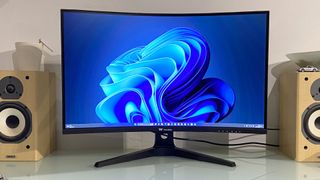
Screen size:32-inchResolution:2,560 x 1,440Brightness:400 nitsColor coverage:95% DCI-P3Response time:4ms GTGRefresh rate:170HzHDR:400 nits, no local dimmingFeatures:VA panel, adaptive sync, 1x DisplayPort, 2x HDMIPrice:$244
It’s not just high-end Samsung VA panels that deliver playable response. TheASRock Phantom PG34WQ15R2Bis eminently affordable and has decent response, albeit not quite as good as the best IPS.
However, what VA does come with in a general sense is a heightened risk of poor response, all other things being equal. Unfortunately, that risk has been borne out in pretty spectacular fashion with the Thermaltake TGM-V32CQ. It has the worst response we’ve seen for a very, very long time.
The blurry, smeary panel performance is obvious from the moment you fire up. At first, the hope is that the panel just needs to warm up. Some VA panels, including the aforementioned ASRock need a few minutes to come up to temp and deliver their best response performance.
(Image credit: Future)
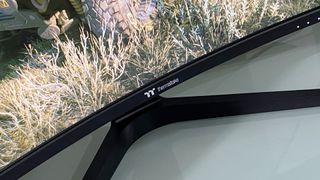
The blurry, smeary panel performance is obvious from the moment you fire up.
The blurry, smeary panel performance is obvious from the moment you fire up.
Sadly, this Thermaltake specimen starts slow and doesn’t get much, if any better. The same applies to the pixel overdrive functionality. Thermaltake includes three different levels of user configurable overdrive in its OSD menu. But even the fastest setting only had a slight impact on all the smearing and blurring. In fact, even enabling the MPRT mode barely puts a dent in the awful response.
Now, it’s sometimes the case that poor response in test images and when jiggling windows around on the desktop doesn’t translate into a really poor gaming experience. But with the Thermaltake TGM-V32CQ you simply can’t escape how bad the response is. You’re conscious of it all the time in-game.
It’s bad enough in games that aren’t terribly fast paced. But playing a shooter like CS: GO is not a nice experience at all. For the record, Thermaltake claims a fairly modest 4ms GTG for response, but even that feels pretty optimistic.
(Image credit: Future)
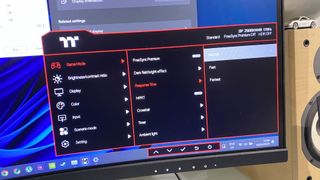
Thermaltake claims a fairly modest 4ms GTG for response, but even that feels pretty optimistic.
Thermaltake claims a fairly modest 4ms GTG for response, but even that feels pretty optimistic.
Making matters worse, there’s also some visible colour compression and banding, which only adds to the impression of a panel that resembles a monitor from about 10 years ago. All that said, there are some highlights. The backlight is very punchy and if anything exceeds expectations given the 400 nit rating, while the basic colour calibration is decent.
What’s more, the SDR calibration in HDR mode is excellent, so you can leave this screen in HDR mode all the time, regardless of what you’re looking at or playing. Of course, this isn’t atrueHDR display. There’s no local dimming, so with the backlight cranked up to maximum, there’s a fair amount of light bleed. But as this class of display goes, the HDR experience is pretty good, in no small part thanks to the inherently strong contrast performance of the 3,000:1 VA panel.
VA isn’t all bad, y’know, even here.
Image1of5(Image credit: Future)(Image credit: Future)(Image credit: Future)(Image credit: Future)(Image credit: Future)
Image1of5(Image credit: Future)(Image credit: Future)(Image credit: Future)(Image credit: Future)(Image credit: Future)
Image1of5
(Image credit: Future)(Image credit: Future)(Image credit: Future)(Image credit: Future)(Image credit: Future)
(Image credit: Future)(Image credit: Future)(Image credit: Future)(Image credit: Future)(Image credit: Future)
(Image credit: Future)
(Image credit: Future)
(Image credit: Future)
(Image credit: Future)
(Image credit: Future)

(Image credit: Future)
(Image credit: Future)
(Image credit: Future)
(Image credit: Future)
(Image credit: Future)
(Image credit: Future)
(Image credit: Future)
(Image credit: Future)
(Image credit: Future)
(Image credit: Future)
(Image credit: Future)
(Image credit: Future)
(Image credit: Future)
(Image credit: Future)
(Image credit: Future)
(Image credit: Future)
(Image credit: Future)
(Image credit: Future)
(Image credit: Future)
(Image credit: Future)
Take a broader view, you get a decent chassis with a fully adjustable stand including tilt, height, rotate into portrait, and swivel support, plus some programmable RGB lighting. Connectivity is somewhat minimal, with HDMI and DisplayPort on the menu but no USB-C, nor a USB-A hub.
Buy if…✅You want a big panel for a low price:At 32 inches for under $250, this is a lot of gaming monitor for the money.
Buy if…
✅You want a big panel for a low price:At 32 inches for under $250, this is a lot of gaming monitor for the money.
✅You want a big panel for a low price:At 32 inches for under $250, this is a lot of gaming monitor for the money.
Don’t buy if…❌You’re expecting half-decent pixel response:Unfortunately, this is VA panel tech at its smeary, blurry worst.
Don’t buy if…
❌You’re expecting half-decent pixel response:Unfortunately, this is VA panel tech at its smeary, blurry worst.
❌You’re expecting half-decent pixel response:Unfortunately, this is VA panel tech at its smeary, blurry worst.
Oh, and as for the refresh rate, that’s 170Hz. Which sort of sums up this monitor. That’s the kind of information you’d normally focus on up front. But the frankly shocking response performance is such a distraction, the refresh rate becomes a rather academic afterthought.
The same goes for the rather coarse pixel pitch. Were the response better, there would be a discussion to be had over the pros and cons of 1440p on a large 32-inch panel versus the same resolution on the more popular 27-inch form factor. We’d favour the latter for its tighter pixel density and sharper image quality.
Some might prefer the sheer scale of 32 inches. But in this context, it’s all pretty irrelevant. When it comes to the Thermaltake TGM-V32CQ, you just wouldn’t, regardless of the pixel density, the resolution, the refresh, or really any other metric. The pixel response is bad enough to make it all but unbuyable, even accounting for the relatively low price.
The Verdict65Read our review policyThermaltake TGM-V32CQWe had high hopes based on Thermaltake’s previous 27-inch gaming panel. But the switch from IPS to VA technology has gone badly wrong. This 32 incher suffers from terrible pixel response to the point where it’s very hard to recommend.
The Verdict
The Verdict
65Read our review policyThermaltake TGM-V32CQWe had high hopes based on Thermaltake’s previous 27-inch gaming panel. But the switch from IPS to VA technology has gone badly wrong. This 32 incher suffers from terrible pixel response to the point where it’s very hard to recommend.
65Read our review policy
65
Thermaltake TGM-V32CQWe had high hopes based on Thermaltake’s previous 27-inch gaming panel. But the switch from IPS to VA technology has gone badly wrong. This 32 incher suffers from terrible pixel response to the point where it’s very hard to recommend.
Thermaltake TGM-V32CQ
We had high hopes based on Thermaltake’s previous 27-inch gaming panel. But the switch from IPS to VA technology has gone badly wrong. This 32 incher suffers from terrible pixel response to the point where it’s very hard to recommend.
TOPICSHardware
TOPICS
LatestCruel is a frantic run-and-gun shooter where you boot cultists out of windows in a cursed apartment block that wants you deadValve’s Steam page currently lists a second mystery game alongside Deadlock, sending Half-Life 3 theorists into another frenzy of speculationCD Projekt Red boss says ‘around 100’ Witcher 3 designers still work at the company, while the Witcher 4’s story director is ‘the same person since Witcher 1’See more latest►
LatestCruel is a frantic run-and-gun shooter where you boot cultists out of windows in a cursed apartment block that wants you deadValve’s Steam page currently lists a second mystery game alongside Deadlock, sending Half-Life 3 theorists into another frenzy of speculationCD Projekt Red boss says ‘around 100’ Witcher 3 designers still work at the company, while the Witcher 4’s story director is ‘the same person since Witcher 1’See more latest►
LatestCruel is a frantic run-and-gun shooter where you boot cultists out of windows in a cursed apartment block that wants you deadValve’s Steam page currently lists a second mystery game alongside Deadlock, sending Half-Life 3 theorists into another frenzy of speculationCD Projekt Red boss says ‘around 100’ Witcher 3 designers still work at the company, while the Witcher 4’s story director is ‘the same person since Witcher 1’See more latest►
Latest
Cruel is a frantic run-and-gun shooter where you boot cultists out of windows in a cursed apartment block that wants you deadValve’s Steam page currently lists a second mystery game alongside Deadlock, sending Half-Life 3 theorists into another frenzy of speculationCD Projekt Red boss says ‘around 100’ Witcher 3 designers still work at the company, while the Witcher 4’s story director is ‘the same person since Witcher 1’
Cruel is a frantic run-and-gun shooter where you boot cultists out of windows in a cursed apartment block that wants you dead
Cruel is a frantic run-and-gun shooter where you boot cultists out of windows in a cursed apartment block that wants you dead
Valve’s Steam page currently lists a second mystery game alongside Deadlock, sending Half-Life 3 theorists into another frenzy of speculation
Valve’s Steam page currently lists a second mystery game alongside Deadlock, sending Half-Life 3 theorists into another frenzy of speculation
CD Projekt Red boss says ‘around 100’ Witcher 3 designers still work at the company, while the Witcher 4’s story director is ‘the same person since Witcher 1’
CD Projekt Red boss says ‘around 100’ Witcher 3 designers still work at the company, while the Witcher 4’s story director is ‘the same person since Witcher 1’
See more latest►
Most PopularTurtle Beach Stealth Pivot reviewIkea Matchspel gaming chair reviewASRock DeskMini X600 reviewZotac Zbox Magnus EN374070C reviewMinisforum AtomMan G7 Ti reviewSamsung Galaxy Book4 Ultra reviewNoctua NH-D15 G2 reviewGulikit KK3 Max reviewBallionaire reviewMarvel Rivals reviewBe Quiet! Dark Rock 5 review
Most PopularTurtle Beach Stealth Pivot reviewIkea Matchspel gaming chair reviewASRock DeskMini X600 reviewZotac Zbox Magnus EN374070C reviewMinisforum AtomMan G7 Ti reviewSamsung Galaxy Book4 Ultra reviewNoctua NH-D15 G2 reviewGulikit KK3 Max reviewBallionaire reviewMarvel Rivals reviewBe Quiet! Dark Rock 5 review
Most PopularTurtle Beach Stealth Pivot reviewIkea Matchspel gaming chair reviewASRock DeskMini X600 reviewZotac Zbox Magnus EN374070C reviewMinisforum AtomMan G7 Ti reviewSamsung Galaxy Book4 Ultra reviewNoctua NH-D15 G2 reviewGulikit KK3 Max reviewBallionaire reviewMarvel Rivals reviewBe Quiet! Dark Rock 5 review
Most Popular
Turtle Beach Stealth Pivot review
Ikea Matchspel gaming chair review
ASRock DeskMini X600 review
Zotac Zbox Magnus EN374070C review
Minisforum AtomMan G7 Ti review
Samsung Galaxy Book4 Ultra review
Noctua NH-D15 G2 review
Gulikit KK3 Max review
Ballionaire review
Marvel Rivals review
Be Quiet! Dark Rock 5 review
HARDWARE BUYING GUIDESLATEST GAME REVIEWS1Best Steam Deck accessories in Australia for 2025: Our favorite docks, powerbanks and gamepads2Best graphics card for laptops: the mobile GPUs I’d want in my next gaming laptop3Best mini PCs in 2025: The compact computers I love the most4Best 14-inch gaming laptop: The top compact gaming laptops I’ve held in these hands5Best Mini-ITX motherboards in 2025: My pick from all the mini mobo marvels I’ve tested1Thank Goodness You’re Here! review: An anarchic treasure trove of jokes and skits2Shiren the Wanderer: The Mystery Dungeon of Serpentcoil Island review—like juggling chainsaws on horseback3WD Black SN850X 8 TB NVMe SSD review4Ikea Utespelare desk review5Asus ROG Harpe Ace Mini wireless mouse review
HARDWARE BUYING GUIDESLATEST GAME REVIEWS1Best Steam Deck accessories in Australia for 2025: Our favorite docks, powerbanks and gamepads2Best graphics card for laptops: the mobile GPUs I’d want in my next gaming laptop3Best mini PCs in 2025: The compact computers I love the most4Best 14-inch gaming laptop: The top compact gaming laptops I’ve held in these hands5Best Mini-ITX motherboards in 2025: My pick from all the mini mobo marvels I’ve tested1Thank Goodness You’re Here! review: An anarchic treasure trove of jokes and skits2Shiren the Wanderer: The Mystery Dungeon of Serpentcoil Island review—like juggling chainsaws on horseback3WD Black SN850X 8 TB NVMe SSD review4Ikea Utespelare desk review5Asus ROG Harpe Ace Mini wireless mouse review
HARDWARE BUYING GUIDESLATEST GAME REVIEWS1Best Steam Deck accessories in Australia for 2025: Our favorite docks, powerbanks and gamepads2Best graphics card for laptops: the mobile GPUs I’d want in my next gaming laptop3Best mini PCs in 2025: The compact computers I love the most4Best 14-inch gaming laptop: The top compact gaming laptops I’ve held in these hands5Best Mini-ITX motherboards in 2025: My pick from all the mini mobo marvels I’ve tested1Thank Goodness You’re Here! review: An anarchic treasure trove of jokes and skits2Shiren the Wanderer: The Mystery Dungeon of Serpentcoil Island review—like juggling chainsaws on horseback3WD Black SN850X 8 TB NVMe SSD review4Ikea Utespelare desk review5Asus ROG Harpe Ace Mini wireless mouse review
HARDWARE BUYING GUIDESLATEST GAME REVIEWS1Best Steam Deck accessories in Australia for 2025: Our favorite docks, powerbanks and gamepads2Best graphics card for laptops: the mobile GPUs I’d want in my next gaming laptop3Best mini PCs in 2025: The compact computers I love the most4Best 14-inch gaming laptop: The top compact gaming laptops I’ve held in these hands5Best Mini-ITX motherboards in 2025: My pick from all the mini mobo marvels I’ve tested1Thank Goodness You’re Here! review: An anarchic treasure trove of jokes and skits2Shiren the Wanderer: The Mystery Dungeon of Serpentcoil Island review—like juggling chainsaws on horseback3WD Black SN850X 8 TB NVMe SSD review4Ikea Utespelare desk review5Asus ROG Harpe Ace Mini wireless mouse review
HARDWARE BUYING GUIDESLATEST GAME REVIEWS
1Best Steam Deck accessories in Australia for 2025: Our favorite docks, powerbanks and gamepads
1Best Steam Deck accessories in Australia for 2025: Our favorite docks, powerbanks and gamepads
1
Best Steam Deck accessories in Australia for 2025: Our favorite docks, powerbanks and gamepads
2Best graphics card for laptops: the mobile GPUs I’d want in my next gaming laptop
2Best graphics card for laptops: the mobile GPUs I’d want in my next gaming laptop
2
Best graphics card for laptops: the mobile GPUs I’d want in my next gaming laptop
3Best mini PCs in 2025: The compact computers I love the most
3Best mini PCs in 2025: The compact computers I love the most
3
Best mini PCs in 2025: The compact computers I love the most
4Best 14-inch gaming laptop: The top compact gaming laptops I’ve held in these hands
4Best 14-inch gaming laptop: The top compact gaming laptops I’ve held in these hands
4
Best 14-inch gaming laptop: The top compact gaming laptops I’ve held in these hands
5Best Mini-ITX motherboards in 2025: My pick from all the mini mobo marvels I’ve tested
5Best Mini-ITX motherboards in 2025: My pick from all the mini mobo marvels I’ve tested
5
Best Mini-ITX motherboards in 2025: My pick from all the mini mobo marvels I’ve tested
1Thank Goodness You’re Here! review: An anarchic treasure trove of jokes and skits
1Thank Goodness You’re Here! review: An anarchic treasure trove of jokes and skits
1
Thank Goodness You’re Here! review: An anarchic treasure trove of jokes and skits
2Shiren the Wanderer: The Mystery Dungeon of Serpentcoil Island review—like juggling chainsaws on horseback
2Shiren the Wanderer: The Mystery Dungeon of Serpentcoil Island review—like juggling chainsaws on horseback
2
Shiren the Wanderer: The Mystery Dungeon of Serpentcoil Island review—like juggling chainsaws on horseback
3WD Black SN850X 8 TB NVMe SSD review
3WD Black SN850X 8 TB NVMe SSD review
3
WD Black SN850X 8 TB NVMe SSD review
4Ikea Utespelare desk review
4Ikea Utespelare desk review
4
Ikea Utespelare desk review
5Asus ROG Harpe Ace Mini wireless mouse review
5Asus ROG Harpe Ace Mini wireless mouse review
5
Asus ROG Harpe Ace Mini wireless mouse review
