HardwareGraphics CardsThunderbolt vs OCuLink external GPU interface-off or: Why I wouldn’t touch Thunderbolt with a bargepole for gamingWhen you purchase through links on our site, we may earn an affiliate commission.Here’s how it works.
HardwareGraphics CardsThunderbolt vs OCuLink external GPU interface-off or: Why I wouldn’t touch Thunderbolt with a bargepole for gamingWhen you purchase through links on our site, we may earn an affiliate commission.Here’s how it works.
When you purchase through links on our site, we may earn an affiliate commission.Here’s how it works.
(Image credit: Future)
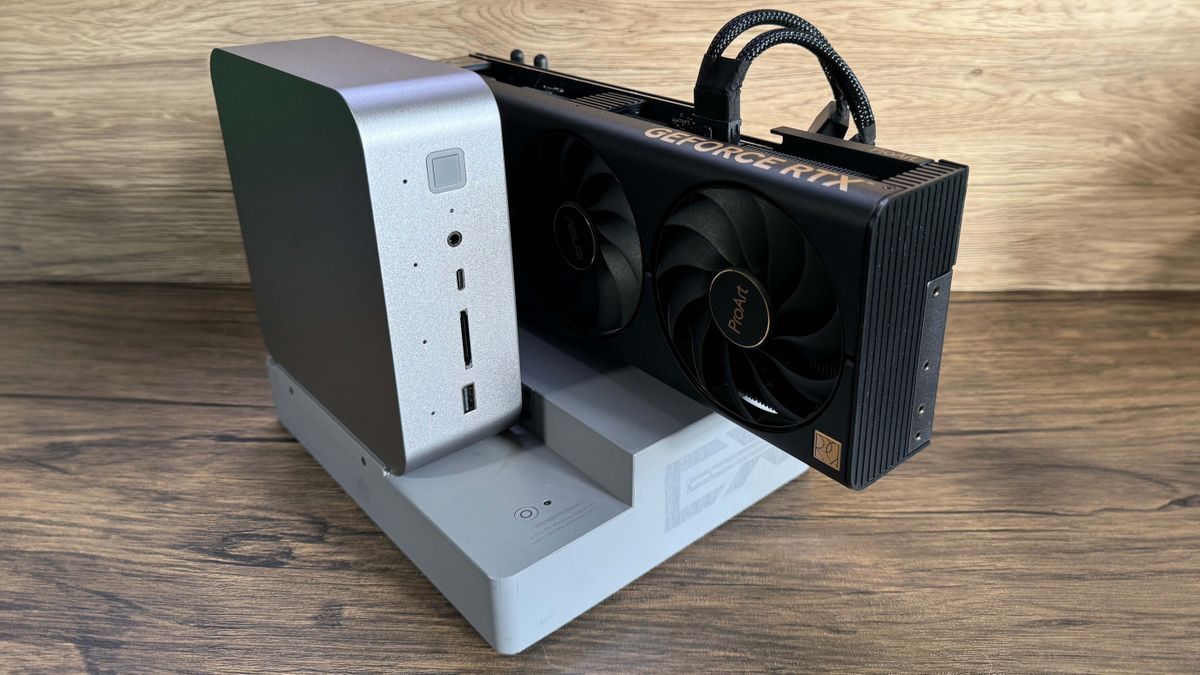
Jump to:Test systemsRTX 4070 Ti performanceRTX 4090 performancePricingFinal thoughts
Jump to:Test systemsRTX 4070 Ti performanceRTX 4090 performancePricingFinal thoughts
Between mini-PCs, laptops and handhelds, there are tons of sub-desktop PCs with gaming-capable CPUs which rely on integrated GPUs to push polygons. Wouldn’t it be neat to bolt on a discrete GPU and unlock higher settings, higher resolutions and higher frame rates, on a lovely high-refresh monitor? Maybe even chuck a nice ray-traced cherry on top?
If only it were that simple. Sadly, external GPUs are still something of a dark art.
They have a reputation for being lossy in terms of quality and performance. Why is that, and are the losses acceptable or significant? Do the costs make sense? Is it cheaper to scratch-build a PC with a PCIe x16 slot that get 100% out of a GPU? In that event, should you reserve your laptop for sightseeing and have a second, stay-at-home machine purely for desktop gaming? What kind of ports do you need to plug an eGPU into, and does your target machine even have them? Is it fiddly to set up? Is it reliable? Is there a single best solution available? What’s the post-purchase support like? Does that evenexist?Aaargh!
This article isn’t designed to persuade you that an eGPU is some sort of silver bullet, or a golden ticket to a glorious high-frame rate world, or the future of PC gaming. The aim here is to kick the tyres of current eGPU tech, weigh up the benefits, spotlight the issues, look ahead to future solutions, and figure out if an eGPU is something you have a use-case for.
(Image credit: Future)
PCI Express delivery
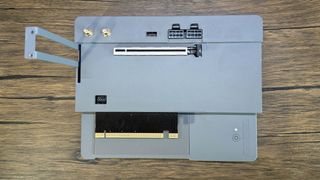
The ability of any GPU to deliver to its full potential is contingent on the interface it uses to connect with your PC. It needs enough bandwidth to send and receive the data it works with unimpeded. But before we examine those interfaces, let’s take a snapshot of how PCI Express works, and where an eGPU gets involved in the system.
The biggest gaming news, reviews and hardware deals
The PCI-express bus is the data-thoroughfare connecting your CPU, RAM and various pluggable devices such as SSDs, GPUs and wireless cards. It consists of bi-directional pathways called lanes which pipe data around the system, and lane-bandwidth doubles with each new generation. PCIe 3.0 had a theoretical maximum of 8 GT/s (giga-transfers per second) per lane, which doubled to 16 GT/s with PCIe 4.0 and 32 GT/s for PCIe 5.0. Gen4 is still the most prevalent version in motherboards, though many modern mobos offer PCIE 5.0 support for M.2 drives, but only a few currently have Gen5 GPU slots. Which is fine right now, as PCIe 5.0 graphics cards don’t even exist yet. For a deeper dive on the PCIe 5.0 state of play, you’ll want to bookmarkNick’s excellent exposéfor later consumption.
The standard interface for graphics cards is the x16 PCIe slot. In a PCIe 4.0 system, that’s 16 lanes, each capable of piping 16 GT/s to and from the PCIe bus. 256 GT/s is a crazy potential amount, more than even the fattest GPUs require to deliver the goods unimpeded; they don’t even touch the sides. Put simply, until PCIe 5.0 graphics cards appear, bellowing demands for greater bandwidth, the PCIe 4.0 x16 slot still offers buckets of transfer headroom.
(Image credit: Future)
Thunderbolt vs. OCuLink
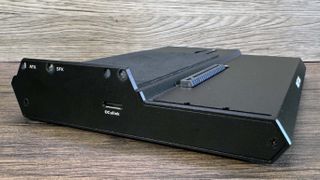
OCuLink—or Optical Copper Link to give it its full title—is a different beast. It’s been around for 12 years, was designed as a competitor to Thunderbolt and is more of a companion standard to PCI Express. Where Thunderbolt employs micro-controllers between device and bus, OCuLink plugs directly into it and is therefore not subject to Thunderbolt’s latency.
The current generation is OCuLink 2, developed to match bandwidth standards and interface with PCIe 4.0, so each lane carries 16 GT/s. This means a four-lane OcuLink cable is capable of transferring 64 GT/s, compared to Thunderbolt’s 40 GT/s. In short, it’s a more direct, higher-bandwidth, lower latency connection to the PCI Express bus than Thunderbolt.
(Image credit: Future)
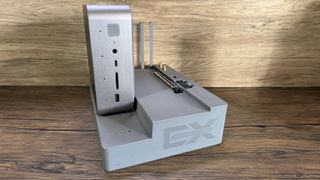
Ali Express, however, is awash with OCuLink GPU docks, cables and M.2-to-OCuLink converter cards, which can theoretically make any machine with an M.2 port talk to an external GPU. Homebrew communities have adopted these components with some success, but quite often this involves some invasive surgery, namely drilling a hole in your device’s case to feed an OCuLink cable out from the M.2 port and into an external GPU dock. It’s fiddly, messy, and the results aren’t guaranteed. Consumer-friendly OCuLink setups are rare, but we’ve procured one for this test.
Who’s better, who’s best?
To get a handle on how eGPU performance differs between the two interfaces, and how they both compare with a desktop PC using the same GPU, we assembled four platforms to benchmark a series of games at 1440p and ultra settings. These platforms test two GPUs—theRTX 4070 Tiand theRTX 4090—connected to PCs using Thunderbolt, OCuLink, x8 PCIe and x16 PCIe.
It’s worth highlighting that these systems aren’t all equal in terms of their other compute components. While Thunderbolt and OCuLink were tested on the same machine, we had to turn to different PCs to test PCIe x8 and x16 connections. There is simply no single machine that enables you to test all these interfaces with identical components elsewhere. However, all systems feature modern, performant CPUs, 32 GB of DDR5 RAM, and all utilise PCI Express 4.0. So, while there’s definitely some margin for error, the systems are broadly similar enough to give us a ballpark picture of performance across the interfaces.
(Image credit: Future)
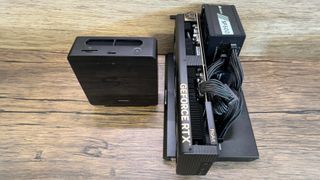
eGPU test systems
System 1: eGPU via Thunderbolt
Minisforum AtomMan X7 TiCPU:Intel Core Ultra 9 185HRAM:32 GB DDR5 5600GPU:RTX 4070 Ti / RTX 4090 via Razer Core X Chroma over USB4 (Thunderbolt)
Notes:The X7 Ti has a pair of Type-C USB4 ports supporting Thunderbolt devices and speeds, which is what we need to test performance using the Razer Core X Chroma. Happily, it also has an OCuLink port, enabling us to get a direct comparison between the two using the same base machine.
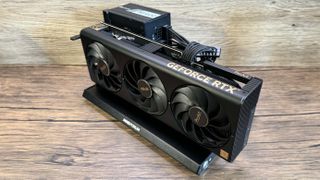
System 2: eGPU via OCuLink
Minisforum AtomMan X7 TiCPU:Intel Core Ultra 9 185hRAM:32 GB DDR5 5600GPU:RTX 4070 Ti / RTX 4090 via Minisforum DEG-1 Dock over OCuLink
Notes:A number of Minisforum’s recent mini-PCs have OCuLink ports, so it makes sense that the company complements these with the DEG-1 OCuLink GPU dock, and it’s the tidiest OCuLink setup I’ve clapped eyes on. The GPU and dock both require a PSU to power them however; we used Corsair’s small form-factor SF650, though the DEG-1 has mounting points for a standard ATX PSU as well.
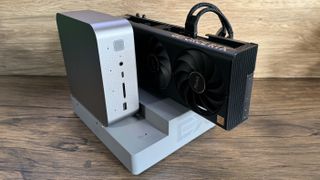
System 3: PCIe x8
Beelink GTi 12CPU:Intel Core i9-12900HRAM:32 GB DDR5 4800GPU:RTX 4070 Ti via Beelink EX Dock over PCIe x8
Notes:The Beelink GTi 12 features a x8 PCIe interface on the underside, and bolts neatly onto the EX dock, which can be bought with it as a bundle. The EX dock has its own internal 600-Watt PSU, which is ample, but it doesn’t support the triple-slot design or power and cabling requirements of the RTX 4090, so we only tested the dual-slot RTX 4070 Ti in this setup.
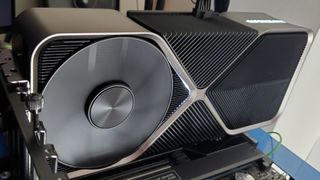
System 4: PCIe x16
My desktop PCCPU:Ryzen9 7900RAM:32 GB DDR5 5600GPU:RTX 4070 Ti / RTX 4090 via motherboard PCIe x16 slot
Notes:as a desktop system, this setup utilises a full-fat x16 PCIe port, so we’d naturally expect it to outperform the eGPU contenders, all of which are limited to four or eight PCIe lanes. We treat the benchmarks generated on this machine as baselines against which we can judge the performance of the eGPU setups.
RTX 4070 Ti performance
(Image credit: Future)
Analysis: RTX 4070 Ti
Given what we know regarding the lower bandwidth and higher latency of Thunderbolt in comparison OCuLink, it’s no surprise to see it coming last in all benchmarks at 1440p. it performs around 25% worse than OCuLink in many scenarios, with lower, more jarring 1% low frame rate drops. It’s prone to much worse stuttering too; generally speaking, it’s easy to ignore stuttering frames if they’re 0.5% or of the total frames generated, but as they climb past 1% and upwards they begin to become more noticeable and irksome. It’s abundantly clear there’s some bottlenecking at work.
That’s not to say Oculink is perfect. It enjoys higher frame rates and better 1% lows, sitting it midway in performance terms between Thunderbolt and a full PCIe x8 or x16 system using the same card. It’s still prone to some stutter though, which we can attribute to some bottlenecking due to the fact it only grants four lanes for these graphics cards to work with. It’s feasible that if you stick a lesser GPU in either a Thunderbolt or OCuLink setup, the lower data-demands of that GPU will match the interface’s throughput and you’ll see reduced —and below a certain grade of GPU, possibly eliminate—bottlenecking and stutter.
RTX 4090 performance
(Image credit: Future)
Analysis: RTX 4090
Looking at Cyberpunk, the RTX 4090 in our x16 PCIe slot sees a 45% frame rate uplift over the RTX 4070 Ti with no stutter. For OCuLink this drops to a 22% uplift, and for Thunderbolt, it’s a miserly 19%. With a little variance per title, these sorts of percentages are seen across all the games we benchmarked.
To make matters worse, the RTX 4090’s hugely higher throughput clearly needs more than four lanes to send and receive data unimpeded. This results in some furious stutter, particularly in the Thunderbolt setup. Let’s just say you don’t want to be playing Total War: Warhammer 3 at 1440p on a RTX 4090 over Thunderbolt… 26 - 28 fps and 3.5 - 4% stutter is a downright horrible experience.
The conclusion we can draw from all this is that the bigger and more expensive the GPU, the worse returns you’ll see in terms of performance. Neither OcuLink or Thunderbolt are worth the outlay on a high-end GPU. The four-lane pipeline can’t handle the much larger throughput without clogging up and creating a stutter-fest, so you’re just throwing good money after bad.
It’s just a shame that our x8 PCIe setup isn’t capable of using the RTX 4090. It would have been academically interesting to note whether the difference between eight lanes and 16 lanes made a major difference when handling such a beast of a card.
Mulling it over
I wouldn’t touch Thunderbolt with a bargepole. Let’s stick it in the cupboard where we keep PS2 mice, the AGP port, and Windows Vista.
I wouldn’t touch Thunderbolt with a bargepole. Let’s stick it in the cupboard where we keep PS2 mice, the AGP port, and Windows Vista.
It’s plain to see that limiting a high-end GPU’s pipeline to four PCIe lanes nobbles its ability to deliver in full, as our x8 and x16 comparison results clearly show.
However, less powerful cards in these eGPU setups come closer to their full potential and with less hitching at our chosen resolution and settings. If I were in a situation where I had a laptop or mini-PC as my main or only machine, I might consider an eGPU setup, but I wouldn’t shell out much on the GPU. I reckon an RTX 3070 or RTX 4060 feels about right. Much more powerful than that, and you just know you’re throwing away sweet frames that you’ve paid dearly for. I’d aim for midrange at best.
OCuLink saw some reasonable results out of the 4070 Ti at 1440p, though with lower 1% lows and higher stutter than you’d expect from an x8 or x16 desktop machine. Again, you’ll get a lower frame rate but likely a smoother result with a lower-end card. And while a Thunderbolt eGPU setup delivers much higher frame rates than an integrated GPU, it falls short of OCuLink’s cleaner performance delivery. Once, it was the only eGPU game in town. Nowadays, with PCIe 4.0 cards, I wouldn’t touch Thunderbolt with a bargepole. Let’s stick it in the cupboard where we keep PS2 mice, the AGP port, and Windows Vista.
This is also worth noting. If you have a laptop with an OCulink port and are considering something like Minisforum’s DEG-1 dock—or an all-in-one eGPU box like theGPD G1—to bolster its gaming performance, you’ll also want to output the signal from the GPU directly to an external monitor. If you use the laptop’s built-in panel, you’re effectively doubling the data-burden on that four-lane OCulink connection, as the signal needs to be piped from the GPU back up the line and over the PCIe bus to the laptop’s display. We didn’t test this, but the outcome is predictable: higher latency, lower frame rates and 1% lows, and troublesome stutter.
A word on costs
(Image credit: Future)
As stated, I wouldn’t consider a Thunderbolt eGPU enclosure as an eGPU solution. It’ll run games better than the integrated GPU of an APU, but it’s the worst-performing solution in terms of what it can get out of a discrete graphics card, and recent options start at around £200/$200 mark—that’s without the GPU or the PSU to power it. So I’m writing it off.
The DEG-1 OCuLink dock we used for this test will set you back £95/$99 and comes with an OCuLink cable. You still need a PSU and a GPU of course. If you’re doing this on a budget and shopping for a 2nd hand GPU, I think you could set a budget of around four hundred bucks and come out of it with an Oculink setup running a RTX 4060, for reasonable 1440p performance at medium to high settings.
The Beelink GTi 12 and EX Dock bundle we tested here is an interesting one. It’s an eight-lane setup which, as we’ve seen, is all an RTX 4070 Ti needs to deliver the goods in full, and it’s well-specced all round. But this isn’t a bolt-on eGPU like a Thunderbolt/OCuLink dock or enclosure; it’s basically an off-the-peg desktop PC without a GPU; it just doesn’t look like one. But it’s banging value for money as the basis for a system. Whack in a second-hand RTX 4070 and you’re looking at a killer 1440p system for around a grand. Just be mindful that buying the dock on its own won’t work as an eGPU solution for anything other than Beelink’s GTi-series mini-PCs. They connect using a full-sized x8 PCIe interface, which you won’t find on any other mini-PCs, laptops or handhelds.
Final thoughts
(Image credit: Future)
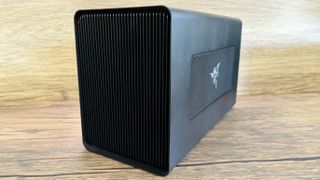
OCuLink fares rather better, and might be a consideration if your target machine already features an OCuLink port. Youcanconvert any machine with a spare X4 M.2 slot to run over OCuLink, but be prepared to get involved with some custom eGPU communities and to put some elbow grease into what’s going to be a fiddly job, I’d only suggest attempting this if you’re seriously DIY-minded, and relish encountering and solving problems. Plus, the four-lane limit means that throwing a high-end card in an OCuLink setup is a recipe for stutter stew. Aim for midrange at best.
Type-C Thunderbolt 5 and USB4v2 ports are beginning to make their way into laptops, and that’s intriguing, as they double Thunderbolt 4 and USB4’s PCIe data throughput to 80 GT/s. And while that’s a solid bandwidth figure—16 GT/s fatter than OCuLink’s 64 GT/s—the jury’s out on whether they’ll suffer the same encode/decode latency issues as the previous generation. There’s no knowing till we get them up on the test-bench, so as they say, watch this space.
More about graphics cardsIs the new RTX 5070 really as fast as Nvidia’s previous flagship RTX 4090 GPU? Turns out the answer is yes. Kinda.It’s time for me to admit that AI-accelerated frame generation might actually be the way of the future and that’s a good thingLatestTeam Fortress 2 just had the single biggest trade in its history, with ‘the absolute best hat you can get’ going for around $40KSee more latest►
More about graphics cardsIs the new RTX 5070 really as fast as Nvidia’s previous flagship RTX 4090 GPU? Turns out the answer is yes. Kinda.It’s time for me to admit that AI-accelerated frame generation might actually be the way of the future and that’s a good thingLatestTeam Fortress 2 just had the single biggest trade in its history, with ‘the absolute best hat you can get’ going for around $40KSee more latest►
More about graphics cardsIs the new RTX 5070 really as fast as Nvidia’s previous flagship RTX 4090 GPU? Turns out the answer is yes. Kinda.It’s time for me to admit that AI-accelerated frame generation might actually be the way of the future and that’s a good thing
More about graphics cards
Is the new RTX 5070 really as fast as Nvidia’s previous flagship RTX 4090 GPU? Turns out the answer is yes. Kinda.It’s time for me to admit that AI-accelerated frame generation might actually be the way of the future and that’s a good thing

Is the new RTX 5070 really as fast as Nvidia’s previous flagship RTX 4090 GPU? Turns out the answer is yes. Kinda.
Is the new RTX 5070 really as fast as Nvidia’s previous flagship RTX 4090 GPU? Turns out the answer is yes. Kinda.
It’s time for me to admit that AI-accelerated frame generation might actually be the way of the future and that’s a good thing
It’s time for me to admit that AI-accelerated frame generation might actually be the way of the future and that’s a good thing
LatestTeam Fortress 2 just had the single biggest trade in its history, with ‘the absolute best hat you can get’ going for around $40KSee more latest►
Latest
Team Fortress 2 just had the single biggest trade in its history, with ‘the absolute best hat you can get’ going for around $40K
Team Fortress 2 just had the single biggest trade in its history, with ‘the absolute best hat you can get’ going for around $40K
Team Fortress 2 just had the single biggest trade in its history, with ‘the absolute best hat you can get’ going for around $40K
See more latest►
Most Popular
‘It’s simply impossible to make a difficulty level that’s just right for all players’: How Final Fantasy 14’s lead battle designer has been playing a precarious balancing game for Dawntrail’s dungeons and raids
Please join me in getting super excited for all the cool looking survival games coming in 2025 (and beyond)
Competitive shooters are at a crucial crossroads in 2025: ‘sweaty’ teamplay vs. casual fun
Call of Duty’s $28 Squid Game skins are the perfect crossover for our capitalist dystopia, and Activision knows exactly what it’s doing
These are the 14 biggest upcoming RPGs of 2025—get ready for another amazing year for the genre
Five new Steam games you probably missed (January 6, 2025)
I’ve seen enough: No more forcing singleplayer studios to make mediocre live service games
6 games that could be bigger hits than you’re expecting in 2025
What are your 2025 gaming resolutions?
The FBI put a $5 million bounty on the ‘Cryptoqueen’ last year but still hasn’t found her, so take your pick: Russia, South Africa, or murdered on a yacht in 2018
HARDWARE BUYING GUIDESLATEST GAME REVIEWS1Best Steam Deck accessories in Australia for 2025: Our favorite docks, powerbanks and gamepads2Best graphics card for laptops: the mobile GPUs I’d want in my next gaming laptop3Best mini PCs in 2025: The compact computers I love the most4Best 14-inch gaming laptop: The top compact gaming laptops I’ve held in these hands5Best Mini-ITX motherboards in 2025: My pick from all the mini mobo marvels I’ve tested1Thank Goodness You’re Here! review2Shiren the Wanderer: The Mystery Dungeon of Serpentcoil Island review3WD Black SN850X 8 TB NVMe SSD review4Ikea Utespelare desk review5Asus ROG Harpe Ace Mini wireless mouse review
HARDWARE BUYING GUIDESLATEST GAME REVIEWS1Best Steam Deck accessories in Australia for 2025: Our favorite docks, powerbanks and gamepads2Best graphics card for laptops: the mobile GPUs I’d want in my next gaming laptop3Best mini PCs in 2025: The compact computers I love the most4Best 14-inch gaming laptop: The top compact gaming laptops I’ve held in these hands5Best Mini-ITX motherboards in 2025: My pick from all the mini mobo marvels I’ve tested1Thank Goodness You’re Here! review2Shiren the Wanderer: The Mystery Dungeon of Serpentcoil Island review3WD Black SN850X 8 TB NVMe SSD review4Ikea Utespelare desk review5Asus ROG Harpe Ace Mini wireless mouse review
HARDWARE BUYING GUIDESLATEST GAME REVIEWS1Best Steam Deck accessories in Australia for 2025: Our favorite docks, powerbanks and gamepads2Best graphics card for laptops: the mobile GPUs I’d want in my next gaming laptop3Best mini PCs in 2025: The compact computers I love the most4Best 14-inch gaming laptop: The top compact gaming laptops I’ve held in these hands5Best Mini-ITX motherboards in 2025: My pick from all the mini mobo marvels I’ve tested1Thank Goodness You’re Here! review2Shiren the Wanderer: The Mystery Dungeon of Serpentcoil Island review3WD Black SN850X 8 TB NVMe SSD review4Ikea Utespelare desk review5Asus ROG Harpe Ace Mini wireless mouse review
HARDWARE BUYING GUIDESLATEST GAME REVIEWS1Best Steam Deck accessories in Australia for 2025: Our favorite docks, powerbanks and gamepads2Best graphics card for laptops: the mobile GPUs I’d want in my next gaming laptop3Best mini PCs in 2025: The compact computers I love the most4Best 14-inch gaming laptop: The top compact gaming laptops I’ve held in these hands5Best Mini-ITX motherboards in 2025: My pick from all the mini mobo marvels I’ve tested1Thank Goodness You’re Here! review2Shiren the Wanderer: The Mystery Dungeon of Serpentcoil Island review3WD Black SN850X 8 TB NVMe SSD review4Ikea Utespelare desk review5Asus ROG Harpe Ace Mini wireless mouse review
HARDWARE BUYING GUIDESLATEST GAME REVIEWS
1Best Steam Deck accessories in Australia for 2025: Our favorite docks, powerbanks and gamepads
1Best Steam Deck accessories in Australia for 2025: Our favorite docks, powerbanks and gamepads
1
Best Steam Deck accessories in Australia for 2025: Our favorite docks, powerbanks and gamepads
2Best graphics card for laptops: the mobile GPUs I’d want in my next gaming laptop
2Best graphics card for laptops: the mobile GPUs I’d want in my next gaming laptop
2
Best graphics card for laptops: the mobile GPUs I’d want in my next gaming laptop
3Best mini PCs in 2025: The compact computers I love the most
3Best mini PCs in 2025: The compact computers I love the most
3
Best mini PCs in 2025: The compact computers I love the most
4Best 14-inch gaming laptop: The top compact gaming laptops I’ve held in these hands
4Best 14-inch gaming laptop: The top compact gaming laptops I’ve held in these hands
4
Best 14-inch gaming laptop: The top compact gaming laptops I’ve held in these hands
5Best Mini-ITX motherboards in 2025: My pick from all the mini mobo marvels I’ve tested
5Best Mini-ITX motherboards in 2025: My pick from all the mini mobo marvels I’ve tested
5
Best Mini-ITX motherboards in 2025: My pick from all the mini mobo marvels I’ve tested
1Thank Goodness You’re Here! review
1Thank Goodness You’re Here! review
1
Thank Goodness You’re Here! review
2Shiren the Wanderer: The Mystery Dungeon of Serpentcoil Island review
2Shiren the Wanderer: The Mystery Dungeon of Serpentcoil Island review
2
Shiren the Wanderer: The Mystery Dungeon of Serpentcoil Island review
3WD Black SN850X 8 TB NVMe SSD review
3WD Black SN850X 8 TB NVMe SSD review
3
WD Black SN850X 8 TB NVMe SSD review
4Ikea Utespelare desk review
4Ikea Utespelare desk review
4
Ikea Utespelare desk review
5Asus ROG Harpe Ace Mini wireless mouse review
5Asus ROG Harpe Ace Mini wireless mouse review
5
Asus ROG Harpe Ace Mini wireless mouse review
