Our VerdictSpace age ergonomic design offers supreme comfort and ease of use, but the cost for all of this is very high.
Our VerdictSpace age ergonomic design offers supreme comfort and ease of use, but the cost for all of this is very high.
Our Verdict
Our Verdict
Space age ergonomic design offers supreme comfort and ease of use, but the cost for all of this is very high.
ForVery comfortable in useQuick to setupEasy key remappingApp is extra handyAgainstLengthy adaption periodVery expensiveBlanks keys are confusing at firstNo wireless option
ForVery comfortable in useQuick to setupEasy key remappingApp is extra handy
AgainstLengthy adaption periodVery expensiveBlanks keys are confusing at firstNo wireless option
PC Gamer’s got your backOur experienced team dedicates many hours to every review, to really get to the heart of what matters most to you.Find out more about how we evaluate games and hardware.
PC Gamer’s got your backOur experienced team dedicates many hours to every review, to really get to the heart of what matters most to you.Find out more about how we evaluate games and hardware.
Anything with the name Moonlander is clearly being marketed as something trying to imbue a sense of space age technology and design, and the first impressions of this ergonomic keyboard does precisely that.
It’s a far sleeker design, though, and is arguably more ergonomic. But what exactly does that phrase mean when referring to keyboards? Sit at a desk and let your arms and hands fall into a natural resting position on the desk. That’s how your body should be when using a keyboard but the standard IBM Model M layout does everything in its power to counter this.
Separating the keys into two sections helps to prevents your shoulder from being rotated. Tenting, where the inner regions are raised, ensures your wrists are under less strain, and columnar keys means your fingers move about in a vertical path, rather than having to stretch about.
ZSA Moonlander specs(Image credit: Future)Switches:Cherry MX or Kailh (multiple options)Connectivity:wired (USB Type-C)Keys:72 in total, fully remappableSplit:fully separate halves, wired connectionTenting:continuously adjustableTilting:noneBacklighting:per-key RGBMedia controls:shortcuts via alternate key modePrice:$365
ZSA Moonlander specs
(Image credit: Future)Switches:Cherry MX or Kailh (multiple options)Connectivity:wired (USB Type-C)Keys:72 in total, fully remappableSplit:fully separate halves, wired connectionTenting:continuously adjustableTilting:noneBacklighting:per-key RGBMedia controls:shortcuts via alternate key modePrice:$365
(Image credit: Future)
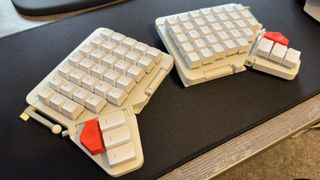
Switches:Cherry MX or Kailh (multiple options)Connectivity:wired (USB Type-C)Keys:72 in total, fully remappableSplit:fully separate halves, wired connectionTenting:continuously adjustableTilting:noneBacklighting:per-key RGBMedia controls:shortcuts via alternate key modePrice:$365
The one thing that I initially struggled with was the fact that these particular keys aren’t labelled. This is to allow them to be remapped to anything you like, even a custom macro, but it does make it tricky to figure out where everything is in those early weeks of use.
My first attempt at typing on it, without looking up what the thumb keys were for, was surprisingly successful and ZSA have obviously spent a good deal of time ensuring that the default layout is the most obvious one.
And speaking of things being obvious, the setup couldn’t be any easier: Just connect the two halves with the supplied 3.5mm cable (any will work, as long as it’s not too long) and then inset the provided USB Type-C cable to the left section. There’s no wireless option, though, so if you want a totally clutter free desk, then the Moonlander is not for you.
The simplistic nature of the setup continues with the software: You can use theOnyx page on ZSA’s websiteor its ownKeymapp program(Windows, Linux, MacOS) to view what each key does.
Where things started to get tricky was configuring the amount of tenting. Not everyone will want to have their keyboard angled but for me, it’s an absolute must: Long-term wrist injuries mean I get chronic pain if I use a flat arrangement for too long.
Image1of4(Image credit: Future)(Image credit: Future)(Image credit: Future)(Image credit: Future)
Image1of4(Image credit: Future)(Image credit: Future)(Image credit: Future)(Image credit: Future)
Image1of4
(Image credit: Future)(Image credit: Future)(Image credit: Future)(Image credit: Future)
(Image credit: Future)(Image credit: Future)(Image credit: Future)(Image credit: Future)
(Image credit: Future)
(Image credit: Future)
(Image credit: Future)
(Image credit: Future)
(Image credit: Future)

(Image credit: Future)
(Image credit: Future)
(Image credit: Future)
(Image credit: Future)
(Image credit: Future)
(Image credit: Future)
(Image credit: Future)
(Image credit: Future)
(Image credit: Future)
(Image credit: Future)
(Image credit: Future)
(Image credit: Future)
(Image credit: Future)
(Image credit: Future)
(Image credit: Future)
I found the standard tenting system rather fiddly to configure, though less annoying than the Glove80’s method. Personally, I’d prefer to see some kind of ratchet or notch in the leg/thumb island’s movement, to make it easier to set the same amount of tenting on each keyboard half.
Eventually I found the level I was happy with and once locked in place, I could get on the mighty task of getting to grips with the split, columnar, guess-what-I-do key arrangement.
Some people, I’m sure, will adapt to it very quickly but decades of touch typing isn’t something that can be swiftly adapted. Even after ten days of use, I was still well short of my normal typing speed, something that I didn’t experience with the likes ofKinesis Gaming Freestyle Edge.
But where I felt that I would need considerably more time to adapt to the Glove80’s layout, the Moonlander was beginning to make sense and if it was my own keyboard, I’d probably spend a good deal of time experimenting with different key layouts to find the perfect one for me.
Image1of2(Image credit: Future)(Image credit: Future)
Image1of2(Image credit: Future)(Image credit: Future)
Image1of2
(Image credit: Future)(Image credit: Future)
(Image credit: Future)(Image credit: Future)
(Image credit: Future)
(Image credit: Future)
(Image credit: Future)
(Image credit: Future)
(Image credit: Future)
(Image credit: Future)
(Image credit: Future)
(Image credit: Future)
(Image credit: Future)
(Image credit: Future)
Lots of older games are very twitchy when it comes to rebinding keys and this may well put you off somewhat. However, if you can get around that small issue, then you’ll find the Moonlander to be perfectly capable in gaming.
That’s despite the serious reduction in the number of keys, compared to a standard layout. With just 72 in total, lots of symbols and functions can only be accessed via the use a ‘layer’ key, which activates a new mapping when pressed or held.
Buy if…✅ You need ultra ergonomics:Everything about the Moonlander is for making your keyboard life as comfortable and stress-free as possible.
Buy if…
✅ You need ultra ergonomics:Everything about the Moonlander is for making your keyboard life as comfortable and stress-free as possible.
✅ You need ultra ergonomics:Everything about the Moonlander is for making your keyboard life as comfortable and stress-free as possible.
Don’t buy if…❌ You don’t want to spend weeks learning how to type again:The large, split, columnar arrangement is great for your body but it will mess with your mind for a good while until you’re used to it.
Don’t buy if…
❌ You don’t want to spend weeks learning how to type again:The large, split, columnar arrangement is great for your body but it will mess with your mind for a good while until you’re used to it.
❌ You don’t want to spend weeks learning how to type again:The large, split, columnar arrangement is great for your body but it will mess with your mind for a good while until you’re used to it.
Access to media and RGB controls lies within a second layer, and while I’m not a fan of such systems, it does work pretty well here. That said, the lack of discrete Function keys could be a problem for users who heavily rely on them, though once you get used to stabbing a Layer key to access them it stops being an issue.
Something else that works well is the whole key swapping process. You pull the keycaps off and the switches out of the keyboard with the supplied tool, and you can replace every single one of them with a set of Cherry MX or Kailh switches of your choice.
All of ZSA’s keyboards are built to order and you’re given a comprehensive list of switch choices before you confirm your purchase. My review sample sported Cherry MX Browns, which are very nice to use and pretty quiet (for mechanical keys). I’d certain choose these if I was placing an order myself, but I would like the option to order a Moonlander with a set of fully labelled keycaps.
Boutique keyboards, especially ones as expensive as this, aren’t designed to be the perfect match for everyone’s needs, though. The more a keyboard design tries to be all things to all people, the more compromises it will have. Not so here: the Moonlander is designed to be as ergonomic as possible, leaving everything else as a customisable feature that’s down to you to sort out.
I was, though, surprised to see no tilting ability. This is where the back or front of the whole keyboard can be raised, and while the split nature and tenting negates the need for the former, if you type at a standing desk, the lack of front tilting might be disappointing.
Image1of3(Image credit: ZSA)(Image credit: ZSA)(Image credit: ZSA)
Image1of3(Image credit: ZSA)(Image credit: ZSA)(Image credit: ZSA)
Image1of3
(Image credit: ZSA)(Image credit: ZSA)(Image credit: ZSA)
(Image credit: ZSA)(Image credit: ZSA)(Image credit: ZSA)
(Image credit: ZSA)
(Image credit: ZSA)
(Image credit: ZSA)
(Image credit: ZSA)
(Image credit: ZSA)
(Image credit: ZSA)
(Image credit: ZSA)
(Image credit: ZSA)
(Image credit: ZSA)
(Image credit: ZSA)
(Image credit: ZSA)
(Image credit: ZSA)
(Image credit: ZSA)
(Image credit: ZSA)
(Image credit: ZSA)
But if the Moonlander matches your needs (and wallet), then you’re in for a treat. At no point did I ever experience any discomfort when using it and despite the steep learning curve, I felt a lot more at home on this keyboard than the Glove80.
It’s not necessarily abetterkeyboard: Just one that suitedmyneeds and typing style more than the MoErgo model.
Where I feel ZSA also has the edge is in support: The Keymapp software is really easy to use and remapping the Moonlander was a breeze. The app can monitor your typing to produce a ‘heatmap’ of what keys you’re using the most frequently, allowing you to hone in on exactly what might be worth moving about.
There’s a really good training package on the website, letting you work on specific styles of writing, or just practice general typing. ZSA’s own engineers and developers handle all of the support requests, too, and there’s a genuine sense of them wanting you to get the very best out of the keyboard.
One could be cynical about this and say that it’s just to offset the high price, and it doesn’t really change the fact that the Moonlander is rather short of keys, doesn’t offer tilting, and is quite large in size.
But I’d say that this misses the whole point of such a keyboard. It’s not a gimmick or a toy; you’d be wasting your money if you wanted one of these just to look cool. This is a proper ergonomic keyboard and is absolutely not for everyone, or even most PC users for that matter.
It’s not perfect (well, not for me, at least) but the ZSA Moonlander is a seriously good keyboard. For the right person, it could be a total game-changer.
The Verdict89Read our review policyZSA MoonlanderSpace age ergonomic design offers supreme comfort and ease of use, but the cost for all of this is very high.
The Verdict
The Verdict
89Read our review policyZSA MoonlanderSpace age ergonomic design offers supreme comfort and ease of use, but the cost for all of this is very high.
89Read our review policy
89
ZSA MoonlanderSpace age ergonomic design offers supreme comfort and ease of use, but the cost for all of this is very high.
ZSA Moonlander
Space age ergonomic design offers supreme comfort and ease of use, but the cost for all of this is very high.
TOPICSHardware
TOPICS
LatestIt’s time for me to admit that AI-accelerated frame generation might actually be the way of the future and that’s a good thingElden Ring: Nightreign is getting a closed network test, and I’m totally not fuming because PC players aren’t invited to the party, or anythingHow to feed pegasus in Disney Dreamlight ValleySee more latest►
LatestIt’s time for me to admit that AI-accelerated frame generation might actually be the way of the future and that’s a good thingElden Ring: Nightreign is getting a closed network test, and I’m totally not fuming because PC players aren’t invited to the party, or anythingHow to feed pegasus in Disney Dreamlight ValleySee more latest►
LatestIt’s time for me to admit that AI-accelerated frame generation might actually be the way of the future and that’s a good thingElden Ring: Nightreign is getting a closed network test, and I’m totally not fuming because PC players aren’t invited to the party, or anythingHow to feed pegasus in Disney Dreamlight ValleySee more latest►
Latest
It’s time for me to admit that AI-accelerated frame generation might actually be the way of the future and that’s a good thingElden Ring: Nightreign is getting a closed network test, and I’m totally not fuming because PC players aren’t invited to the party, or anythingHow to feed pegasus in Disney Dreamlight Valley
It’s time for me to admit that AI-accelerated frame generation might actually be the way of the future and that’s a good thing
It’s time for me to admit that AI-accelerated frame generation might actually be the way of the future and that’s a good thing
Elden Ring: Nightreign is getting a closed network test, and I’m totally not fuming because PC players aren’t invited to the party, or anything
Elden Ring: Nightreign is getting a closed network test, and I’m totally not fuming because PC players aren’t invited to the party, or anything
How to feed pegasus in Disney Dreamlight Valley
How to feed pegasus in Disney Dreamlight Valley
See more latest►
Most PopularTurtle Beach Stealth Pivot reviewIkea Matchspel gaming chair reviewASRock DeskMini X600 reviewZotac Zbox Magnus EN374070C reviewMinisforum AtomMan G7 Ti reviewSamsung Galaxy Book4 Ultra reviewNoctua NH-D15 G2 reviewGulikit KK3 Max reviewBallionaire reviewMarvel Rivals reviewBe Quiet! Dark Rock 5 review
Most PopularTurtle Beach Stealth Pivot reviewIkea Matchspel gaming chair reviewASRock DeskMini X600 reviewZotac Zbox Magnus EN374070C reviewMinisforum AtomMan G7 Ti reviewSamsung Galaxy Book4 Ultra reviewNoctua NH-D15 G2 reviewGulikit KK3 Max reviewBallionaire reviewMarvel Rivals reviewBe Quiet! Dark Rock 5 review
Most PopularTurtle Beach Stealth Pivot reviewIkea Matchspel gaming chair reviewASRock DeskMini X600 reviewZotac Zbox Magnus EN374070C reviewMinisforum AtomMan G7 Ti reviewSamsung Galaxy Book4 Ultra reviewNoctua NH-D15 G2 reviewGulikit KK3 Max reviewBallionaire reviewMarvel Rivals reviewBe Quiet! Dark Rock 5 review
Most Popular
Turtle Beach Stealth Pivot review
Ikea Matchspel gaming chair review
ASRock DeskMini X600 review
Zotac Zbox Magnus EN374070C review
Minisforum AtomMan G7 Ti review
Samsung Galaxy Book4 Ultra review
Noctua NH-D15 G2 review
Gulikit KK3 Max review
Ballionaire review
Marvel Rivals review
Be Quiet! Dark Rock 5 review
HARDWARE BUYING GUIDESLATEST GAME REVIEWS1Best Steam Deck accessories in Australia for 2025: Our favorite docks, powerbanks and gamepads2Best graphics card for laptops: the mobile GPUs I’d want in my next gaming laptop3Best mini PCs in 2025: The compact computers I love the most4Best 14-inch gaming laptop: The top compact gaming laptops I’ve held in these hands5Best Mini-ITX motherboards in 2025: My pick from all the mini mobo marvels I’ve tested1Thank Goodness You’re Here! review: An anarchic treasure trove of jokes and skits2Shiren the Wanderer: The Mystery Dungeon of Serpentcoil Island review—like juggling chainsaws on horseback3WD Black SN850X 8 TB NVMe SSD review4Ikea Utespelare desk review5Asus ROG Harpe Ace Mini wireless mouse review
HARDWARE BUYING GUIDESLATEST GAME REVIEWS1Best Steam Deck accessories in Australia for 2025: Our favorite docks, powerbanks and gamepads2Best graphics card for laptops: the mobile GPUs I’d want in my next gaming laptop3Best mini PCs in 2025: The compact computers I love the most4Best 14-inch gaming laptop: The top compact gaming laptops I’ve held in these hands5Best Mini-ITX motherboards in 2025: My pick from all the mini mobo marvels I’ve tested1Thank Goodness You’re Here! review: An anarchic treasure trove of jokes and skits2Shiren the Wanderer: The Mystery Dungeon of Serpentcoil Island review—like juggling chainsaws on horseback3WD Black SN850X 8 TB NVMe SSD review4Ikea Utespelare desk review5Asus ROG Harpe Ace Mini wireless mouse review
HARDWARE BUYING GUIDESLATEST GAME REVIEWS1Best Steam Deck accessories in Australia for 2025: Our favorite docks, powerbanks and gamepads2Best graphics card for laptops: the mobile GPUs I’d want in my next gaming laptop3Best mini PCs in 2025: The compact computers I love the most4Best 14-inch gaming laptop: The top compact gaming laptops I’ve held in these hands5Best Mini-ITX motherboards in 2025: My pick from all the mini mobo marvels I’ve tested1Thank Goodness You’re Here! review: An anarchic treasure trove of jokes and skits2Shiren the Wanderer: The Mystery Dungeon of Serpentcoil Island review—like juggling chainsaws on horseback3WD Black SN850X 8 TB NVMe SSD review4Ikea Utespelare desk review5Asus ROG Harpe Ace Mini wireless mouse review
HARDWARE BUYING GUIDESLATEST GAME REVIEWS1Best Steam Deck accessories in Australia for 2025: Our favorite docks, powerbanks and gamepads2Best graphics card for laptops: the mobile GPUs I’d want in my next gaming laptop3Best mini PCs in 2025: The compact computers I love the most4Best 14-inch gaming laptop: The top compact gaming laptops I’ve held in these hands5Best Mini-ITX motherboards in 2025: My pick from all the mini mobo marvels I’ve tested1Thank Goodness You’re Here! review: An anarchic treasure trove of jokes and skits2Shiren the Wanderer: The Mystery Dungeon of Serpentcoil Island review—like juggling chainsaws on horseback3WD Black SN850X 8 TB NVMe SSD review4Ikea Utespelare desk review5Asus ROG Harpe Ace Mini wireless mouse review
HARDWARE BUYING GUIDESLATEST GAME REVIEWS
1Best Steam Deck accessories in Australia for 2025: Our favorite docks, powerbanks and gamepads
1Best Steam Deck accessories in Australia for 2025: Our favorite docks, powerbanks and gamepads
1
Best Steam Deck accessories in Australia for 2025: Our favorite docks, powerbanks and gamepads
2Best graphics card for laptops: the mobile GPUs I’d want in my next gaming laptop
2Best graphics card for laptops: the mobile GPUs I’d want in my next gaming laptop
2
Best graphics card for laptops: the mobile GPUs I’d want in my next gaming laptop
3Best mini PCs in 2025: The compact computers I love the most
3Best mini PCs in 2025: The compact computers I love the most
3
Best mini PCs in 2025: The compact computers I love the most
4Best 14-inch gaming laptop: The top compact gaming laptops I’ve held in these hands
4Best 14-inch gaming laptop: The top compact gaming laptops I’ve held in these hands
4
Best 14-inch gaming laptop: The top compact gaming laptops I’ve held in these hands
5Best Mini-ITX motherboards in 2025: My pick from all the mini mobo marvels I’ve tested
5Best Mini-ITX motherboards in 2025: My pick from all the mini mobo marvels I’ve tested
5
Best Mini-ITX motherboards in 2025: My pick from all the mini mobo marvels I’ve tested
1Thank Goodness You’re Here! review: An anarchic treasure trove of jokes and skits
1Thank Goodness You’re Here! review: An anarchic treasure trove of jokes and skits
1
Thank Goodness You’re Here! review: An anarchic treasure trove of jokes and skits
2Shiren the Wanderer: The Mystery Dungeon of Serpentcoil Island review—like juggling chainsaws on horseback
2Shiren the Wanderer: The Mystery Dungeon of Serpentcoil Island review—like juggling chainsaws on horseback
2
Shiren the Wanderer: The Mystery Dungeon of Serpentcoil Island review—like juggling chainsaws on horseback
3WD Black SN850X 8 TB NVMe SSD review
3WD Black SN850X 8 TB NVMe SSD review
3
WD Black SN850X 8 TB NVMe SSD review
4Ikea Utespelare desk review
4Ikea Utespelare desk review
4
Ikea Utespelare desk review
5Asus ROG Harpe Ace Mini wireless mouse review
5Asus ROG Harpe Ace Mini wireless mouse review
5
Asus ROG Harpe Ace Mini wireless mouse review
